
iTechGuides is reader-supported. When you buy through links on our site, we may earn an affiliate commission. As an Amazon Associate I earn from qualifying purchases. Learn more
There are two very different products marketed as a “smartwatch with camera.” A watch such as the VTech KidiZoom Smartwatch DX has its own camera for taking photos and videos. Samsung’s Galaxy Watch Camera Controller does not photograph from the watch; it operates the camera on a compatible, paired Galaxy phone. Choosing between them depends on whether you need a child-focused camera toy or a wrist-mounted remote viewfinder for your phone.
No comparable image-quality tests, sample galleries, megapixel figures, or owner-attributed benchmarks were established for these options. Treat “excellent camera” wording as a marketing promise rather than a proven performance rating, and verify exact model, software, phone, and regional compatibility before purchase.
What “camera smartwatch” actually means
Searches for “best smartwatch with camera” combine two use cases that should be evaluated separately. In the first, the camera is physical hardware inside the watch. The watch captures and stores the image itself. In the second, the watch is a control surface: it sends commands to a phone whose camera and storage do the actual work.
Free tools Windows power users keep installed
One-click scans. No signup required.
| Product class | Where the image is captured | Typical user | What to verify |
|---|---|---|---|
| Built-in-camera watch | The watch’s own camera module | Children wanting playful photo and video features | Camera functions, storage behavior, age suitability and availability |
| Phone-camera remote | A compatible smartphone paired to the watch | Adults using a phone on a stand or at arm’s length | Exact watch-phone pairing, software version, region and supported controls |
These categories are not interchangeable. A remote-control watch can help you frame a group picture while the phone is several feet away, but it is not an independent camera. Conversely, an onboard children’s watch can capture without a phone-camera connection, yet the available evidence does not show that it matches a modern phone for detail, dynamic range or low-light work.
#1 Best Overall

- Compared with the another 2.86" screen 4G smartwatch DM100, the 2.4" screen of this watch is relatively small but larger than other smart watches. Not only suitable for men, but also for women. Furthermore, this watch also adds a camera. This means that this new watch has 2 cameras with 2.0MP side camera and front camera. It is more convenient for you to record every beautiful moment of life.
- Both the smartwatch and the smartphone. When you insert a Nano SIM card, you can use it as a standalone smartphone to make and receive calls, reply to messages and download applications, etc.
- 4GB RAM 64GB ROM large memory and low power processor, ensures a smooth speed, allowing you to download more applications, music and movies you favorite, so you can listen to music, watch movies, play games, even get on online courses on your wrist. Equipped the 1500mAh large battery for long standby to avoid the trouble of frequent charging. With IP67 Water-resistance, it's a great companion throughout your adventures, perfect choice for outdoor activities. A truly practical watch.
- Support face unlock. We added a security protection function based on customers' demands --- face recognition function. lt can automatically generate your facial feature password by taking real-time pictures, and you can quickly unlock the watch by just raising your hand. Before the watch learns facial features, you need to set a pattern unlock password. lf face unlock becomes inconvenient, you could enter the pattern password. Two ways to protect your privacy, safer and more convenient.
- Smartwatch supported frequency bands: 2G : B3, B5, B8。3G : B1, B5, B8。4G: FDD/TDD: B2, B4, B5, B7, B8, B12, B17, B34, B38, B39, B40, B41。
Built-in camera: VTech KidiZoom Smartwatch DX
What it does
VTech describes the KidiZoom Smartwatch DX as a children’s watch with photo and video capture, plus playful effects. Its product information lists photo effects, frames and filters, and storage for pictures and videos. VTech’s own wording is: “Photo and Video camera allows kids to capture photo and videos anytime, anywhere.” That sentence is promotional copy, so it confirms the intended functions rather than proving image quality.
The important distinction is that the camera is part of the watch. A child can use the watch as the capture device instead of using a paired smartphone’s camera. The feature set is designed around experimentation—adding a frame or filter, recording a short clip and reviewing saved media—rather than replacing a dedicated camera for family events or serious photography.
Who should consider it
- Parents seeking a watch with an integrated camera for casual, supervised creative play.
- Children who value immediate photo effects, frames and filters more than advanced manual controls.
- Buyers who specifically need the watch itself to record, rather than a wrist remote for another device.
Do not compare this product directly with adult fitness or communication watches as though they served the same purpose. Its camera is an entertainment feature in a child-oriented device. The reviewed product information does not establish a professional sensor, high-resolution stills, optical stabilization, night mode or any other adult-camera specification.
Do these 3 things before closing this tab:
1Clear out junk files and repair common Windows errors2Fix the driver behind crashes, sound loss and screen glitches3Repair Windows errors before they cause bigger problemsLimits to keep in mind
VTech’s page confirms capture functions but does not provide a comparable laboratory test, standardized sample set or owner-attributed quality score. You therefore cannot use the available evidence to rank its sharpness against a phone camera. Storage capacity, transfer methods, battery endurance and regional retail contents should be checked on the current listing for the exact edition; they are not established by the cited product description.
Phone-camera remote: Samsung Galaxy Watch Camera Controller
What the feature does
Samsung support describes Camera Controller as a way for a Galaxy Watch to operate the camera on a compatible, connected Galaxy smartphone. The watch can show a preview, set a timer, take a photo, switch between photo and video modes, start or stop video recording and display a thumbnail of the latest photo. The phone remains the camera: its lens captures the scene and its software processes and stores the file.
This arrangement is useful when the phone is mounted on a tripod, balanced on a surface or held by another person. You can see framing from your wrist and trigger the shutter without walking back to the phone. It is also useful for self-portraits and group shots where touching the phone would introduce movement.
Compatibility is conditional
The Samsung support article, updated July 8, 2026, for Germany, lists supported Galaxy Watch and Galaxy phone families but warns that Camera Controller may be unavailable depending on the connected smartphone. Lists and feature availability can vary by region and software release. A watch that appears compatible in a general advertisement is not automatically compatible with every Galaxy phone.
Before buying, identify the exact watch model, phone model, operating-system versions and country in which the devices will be used. Check Samsung’s current support documentation for that combination. If any element is unsupported, the watch will not become a standalone camera simply because it has a camera-control app or icon.
Rank #2

- ⌚ 1.75 inch Smartwatch: High-definition and comfortable 1.75 inch full touch large screen with 466*466 resolution, sensitive touch smartwatch, smooth operation experience, smoothly play the apps you need. Bring a unique and innovative visual experience.
- ⌚ Rotatable Camera & GPS Positioning: The camera has a unique design with free rotation, support video call also support multi-direction photo. Smartwatch built-in GPS positioning navigation. Real-time reception of GPS/GLONASS satellite signals,precise trajectory, independent positioning and navigation.
- ⌚ lndependent SIM card: The Smart watch built-in SlM card slot, support full Netcom 4G network and WiFi wireless fast Internetaccess. Watch supports video call, text message, voice call and other functions, high-speed and stable network connection, easily handle important information on your wrist.
- ⌚ Watch Supported Frequency Bands: GSM: B2+B3+B5+B8, WCDMA: B1+B2+B5+B8, LTE-FDD: B1/B2/B3/B4(66)/B5/B7/B8/B12/B17/B20/B28F, LTE-TDD: B34/B38+B39+B40+B41(100M)
- ⌚ Android 8.1 OS Smartwatch: Equipped with the new Android 8.1 operating system, with an Quad cores SL8541E CPU and 2GB+16GB configuration, it runs at extreme speeds and long standby with 1520mAh polymer lithium battery, coupled with a deeply optimized energy-saving system, eliminating the trouble of frequent charging. Smart watches help people to control their phone time and avoid missing important information. So as to better enjoy one's time.
Typical setup sequence
Labels can change between software releases, but the process follows this pattern:
- Pair the Galaxy Watch with the intended Galaxy phone through Samsung’s supported wearable setup process.
- Install or update the Camera Controller component on the watch and phone if Samsung prompts you to do so.
- Open Camera Controller on the watch and allow the requested camera, connection and notification permissions.
- Keep the phone’s camera app ready, place the phone where it can see the scene and check that a live preview appears on the watch.
- Choose photo or video mode, set the timer if needed, then use the watch shutter or recording control.
- After capture, use the thumbnail on the watch for a quick check; the full-resolution file remains on the phone.
If the preview or shutter controls do not appear, stop and verify compatibility rather than assuming the watch camera is defective. Samsung’s documentation specifically makes availability dependent on the connected smartphone.
Side-by-side comparison
| Decision factor | VTech KidiZoom Smartwatch DX | Galaxy Watch Camera Controller |
|---|---|---|
| Camera location | Inside the watch | Inside the paired Galaxy phone |
| Primary audience | Children and playful, casual capture | Phone owners wanting wrist-based framing and shutter control |
| Photo/video operation | Watch captures photos and videos with effects, frames and filters | Watch previews and controls the phone’s photo or video camera |
| Phone required to capture | Not for the basic onboard-camera function | Yes; a compatible connected Galaxy phone is required |
| Evidence of image quality | No comparable benchmark or owner-attributed test in the reviewed material | No comparable benchmark or owner-attributed test in the reviewed material |
| Compatibility risk | Exact edition and availability should be confirmed | Watch, phone, software and region must all be supported |
How to choose the right type
Choose an onboard camera when the watch itself must take the picture
Select the built-in-camera category if the user is a child who wants to experiment with effects, capture short videos and save media on the watch. This is a feature decision, not a promise of phone-class image quality. Confirm the product’s age guidance, included storage and the way pictures can be moved or viewed before ordering.
What’s actually slowing this PC down?
Pick the symptom - the matching free tool is one click away.
Choose a phone remote when framing and convenience matter most
Select the phone-control category if you already own a compatible Galaxy phone and want a wrist preview, timer and shutter. The phone’s larger sensor, lens choices and image-processing pipeline remain responsible for the photograph, so the resulting quality depends primarily on that phone and the shooting conditions. The watch adds distance control; it does not upgrade the phone’s camera hardware.
Do not buy on the word “excellent” alone
The available official pages establish functions, not a head-to-head quality result. No named statistics or standardized camera benchmarks were supplied for either option. Claims about megapixels, superior detail, low-light performance or superiority to a phone would therefore be speculation. Look for independent samples taken under comparable conditions if image quality is your deciding factor, and treat any manufacturer description as a statement of intended use.
Compatibility and buying checklist
Use this checklist before placing an order or giving a watch to a child:
- Define the camera location: write down whether you need a self-contained watch camera or a remote for a phone.
- Record exact model names: “Galaxy Watch” and “Galaxy phone” describe families, not one guaranteed combination.
- Check the region: Samsung’s cited support information is for Germany, and feature availability may differ elsewhere.
- Check software: updates can change whether Camera Controller is available and which controls are exposed.
- Confirm the capture workflow: a remote watch stores the full image on the phone; an onboard watch follows its own storage and transfer process.
- Match the user: playful effects suit a child-oriented product, while a wrist remote makes sense for an adult already carrying a compatible phone.
- Verify current stock and edition: product pages and regional listings can change, and the reviewed evidence does not establish universal availability.
- Set quality expectations: require published samples or independent testing before paying extra for photographic performance that is not documented.
What each option is good for
Children’s creative play
The KidiZoom Smartwatch DX’s effects, frames and filters support quick experimentation. A child can make a picture, apply a playful treatment and save a clip without learning a phone-camera interface. Adults should still decide where and when the watch may be used, especially when other people appear in images.
Group photographs and self-portraits
Camera Controller addresses a different frustration: getting everyone into a phone picture without rushing back to the phone after setting a timer. The watch preview helps you check composition, while the timer and shutter controls reduce the need to touch the phone during the shot.
Rank #3

- 2.88 inch HD Large Screen: High-definition and comfortable 2.88 inch TFT full touch large screen with 480*640 resolution, sensitive touch, smooth operation experience, smoothly play the apps you need. Bring a unique and innovative visual experience.
- lndependent SIM card: The Smart watch built-in SlM card slot, support full Netcom 4G network and WiFi wireless fast Internetaccess. Support video call, text message, voice call and other functions, high-speed and stable network connection, easily handle important information on your wrist. (Note: The package does not include a SIM card.)
- Dual Camera & GPS: Using 13.0MP+5.0MP COMS high-sensitivity sensor, colorful and detailed, support for photography and video chat. Built-in GPS positioning navigation. Real-time reception of GPS/GLONASS satellite signals,precise trajectory, independent positioning and navigation.
- Android 9.0 OS: Equipped with the new Android 9.0 operating system,with an octa-core CPU and 4GB+64GB configuration,it runs at extreme speeds, allowing you to play mainstream mobile games without lag, helping you rule the battlefield.
- Long Standby: Equipped with 2300mAh polymer lithium battery, coupled with a deeply optimized energy-saving system, eliminating the trouble of frequent charging.
Remote video starts and stops
When supported, the Galaxy Watch control can start or stop video on the connected phone. This is convenient for a phone positioned out of reach, but it does not turn the watch into a second recording camera. The phone must stay connected and remain positioned so its lens covers the intended scene.
Troubleshooting a watch-camera setup
The watch cannot find the phone camera
- Confirm that the watch is paired with the phone you intend to use, not a previously connected handset.
- Check Samsung’s current compatibility list for both exact models and the user’s region.
- Install pending updates for the watch, phone and Camera Controller component.
- Reopen Camera Controller and review permission requests.
- Restart both devices and test again close to each other.
If the feature remains absent after these checks, the most likely explanation is unsupported hardware, software or regional availability—not a missing camera on the watch.
The preview appears but the picture is not what you expected
Inspect the phone’s camera position, lens selection and lighting. Camera Controller only exposes controls; the phone determines focus, exposure, processing and file storage. Move the phone or change the scene before judging the watch’s control feature.
Recommended Free Tools
An onboard watch runs out of room
Stop recording and review the watch’s own storage and transfer instructions for the exact edition. Delete or export older files according to the manufacturer’s procedure. Do not assume that a phone’s storage or cloud account automatically expands the capacity of a self-contained watch camera.
Privacy and responsible use
A camera on a child’s wrist can capture people who did not expect to be photographed. Establish household rules for asking permission, avoid recording in private spaces and explain that filters do not remove the responsibility to respect other people. For a phone remote, remember that the watch may display a live view of whatever the phone camera sees; place the phone deliberately and check the frame before pressing the shutter.
Review where each product stores media and how files are transferred before handing it to a child or using it at school, events or workplaces. The cited product descriptions confirm capture features but do not establish a universal privacy policy, retention period or parental-control configuration for every region and edition.
Adult smartwatch expectations
Many mainstream adult smartwatches are designed around notifications, health tracking and communication rather than an onboard camera. That context explains why a phone-control feature can be more practical than searching for a watch with a miniature imaging module. It is not an exhaustive rule: product lineups change, and a particular market may offer unusual models. Always read the exact specification page instead of assuming that a watch advertised with “camera control” contains a lens.
The Tool Desk
Outbyte Driver Updater FREEScan for outdated or missing drivers - takes under a minuteDriver Scan →Outbyte PC Repair FREERepair Windows errors before they cause bigger problemsFix Now →For an adult buyer, the Galaxy route also means evaluating the phone you already own. If replacing the phone is necessary to gain compatibility, the total purchase is no longer just the cost of a watch. Conversely, someone who already has a supported Galaxy phone may need only the compatible watch and the normal setup process. The watch cannot improve the phone’s sensor, lens or image processor, so upgrading the phone—not the remote—would be the relevant step for better image quality.
Rank #4

- 1.83" Touch Screen & 100+ Dials: Elevate your style with a smart watch that looks as good as it performs. The vibrant display, available up to 1.83 inches, delivers crisp visuals and smooth responsiveness, with excellent sunlight visibility and adjustable brightness for any setting. Our smart watch has hundreds of customizable watch faces, or upload your own photos to make it truly yours. The lightweight aluminum build and durable 2.5D glass strike the perfect balance between sleek design and everyday durability. Whether you’re in the office or at the gym, this is a smart watch that fits your style seamlessly
- 24/7 Health Monitoring & Smart Reminders: Designed exclusively for women’s daily health care, recording female menstrual periods for better lifestyle adjustments, our T7 smart watch is your wearable wellness guardian that stays by your side around the clock. This smartwatch is fitted with high-precision optical sensors and up to 10 days of battery life, delivering uninterrupted 24-hour monitoring of your heart rate, blood oxygen saturation, and stress levels. The smartwatch automatically tracks your sleep throughout the night, breaks down your sleep into deep, light, awake to help you say goodbye to restless nights and build consistent, healthy sleep routines
- Bluetooth Call & Smart Notification Center: Stay connected and in control with the T7 smart watch that delivers crystal-clear Bluetooth calling—meaning zero lag and crisp audio, even in noisy environments. Answer or make calls directly from your wrist using the high-definition speaker and microphone. The AI assistant is built right into the smart watch, so you can set reminders, check the weather, and control music hands-free. Real-time notifications for texts, emails, and apps like WhatsApp, Facebook, and Instagram go straight to your wrist, so you never miss what matters
- Fitness Tracker & IP67 Water Resistant: The smart watch track over multi-sport modes—from running to yoga and hiking, with accurate measurements of steps, distance, calories burned, and workout duration. High-precision sensors give you the data you need to analyze performance and dial in your training. Built with an IP67 waterproof rating, the smart watch is comfortable for sweat, rain, and handwashing (not for swimming or hot showers). Whether you’re an athlete or just staying active, this is the all-day companion that works as hard as you do
- Seamless Compatibility & Multi-Functionality: The T7 smart watch compatible with most iOS and Android smartphones, so whether you’re on an iPhone or Android, pairing is quick and reliable. Battery life goes the distance, up to 10 days of regular use on a single charge, with fast charging that gets you back up and running in around 2 hours. Beyond fitness and calls, this smart watch packs in the everyday tools you’ll actually use: stopwatch, timer, remote shutter, check the weather, find phone, calculator, and even track menstrual cycles. Sedentary reminders help you stay moving during long workdays. It’s the kind of smart convenience that simplifies your day, right from your wrist
Price, availability and what is not documented
No dependable current price, universal stock status or standard package contents are established for these products. Retail prices can vary by country, edition, seller and promotion, while older KidiZoom listings may remain visible after a newer version replaces them. Check the seller’s return policy, warranty, included charger and exact model number before paying.
Budget for the complete system. The KidiZoom option is a self-contained children’s product, but the Galaxy option requires both a compatible Galaxy Watch and a compatible Galaxy phone. A low watch price is not a bargain if the existing phone cannot run Camera Controller. Do not count on an accessory, cloud plan or replacement part to add camera capability; no such add-on is established for either option.
The official descriptions also do not establish megapixel counts, sensor dimensions, optical stabilization, night modes, maximum clip lengths, transfer speeds or battery figures that can be compared fairly. Those omissions are a reason to seek current manuals or independent testing, not a reason to fill in likely specifications from another model.
Outdated Drivers Are Slowing You Down
One free scan finds every outdated or missing driver and matches the right update for your exact hardware.Free scan · exact hardware matchPC Slower Than It Used to Be?
A free scan shows the junk files, broken settings and background clutter dragging Windows down - then fixes them in one click.Free scan · Windows 10 & 11A practical decision path
- State the goal: decide whether the watch must capture independently or merely trigger a phone.
- Name the user: child-focused creative play and adult group photography have different priorities.
- Inventory existing devices: write down the exact Galaxy Watch and Galaxy phone models, software versions and country of use.
- Confirm controls: verify that the required preview, timer, photo shutter, video mode and start/stop functions are supported.
- Check the file workflow: identify where full-resolution images are stored and how they can be reviewed or transferred.
- Evaluate evidence: look for comparable samples in daylight, indoor light and motion if quality matters.
- Buy from a verifiable listing: confirm edition, stock, warranty and return terms rather than relying on a generic family name.
This process avoids the most common mistake: buying a remote controller while expecting a standalone camera, or buying a child’s toy camera while expecting phone-class photographs.
Bottom line: which “camera smartwatch” is best?
There is no evidence-based single winner because these products solve different problems. The VTech KidiZoom Smartwatch DX is the relevant choice when a child needs a watch with its own photo and video functions, effects, frames and filters. Samsung’s Galaxy Watch Camera Controller is the relevant choice when an owner of a compatible Galaxy phone wants a wrist preview, timer, shutter and video controls; the phone takes and stores the photograph.
Choose by camera location and compatibility first, then investigate image quality with current independent samples if that matters. The official material reviewed here does not justify calling either option an “excellent” camera or ranking one against the other on megapixels or photographic performance.
Frequently Asked Questions
Does a Galaxy Watch have a built-in camera for taking photos?
Samsung’s Camera Controller uses the watch as a remote control and preview for a compatible connected Galaxy phone. The phone’s camera captures, processes and stores the image; the watch is not the photographing device in this setup.
Which smartwatch has its own camera?
The VTech KidiZoom Smartwatch DX is documented as having photo and video camera functions, effects, frames, filters and storage for pictures and videos. It is positioned as a child-oriented product, not a professional camera.
Best Value
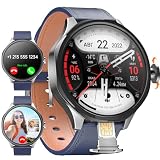
- 【Smart Watch & Phone in One】:Stay connected without carrying your phone everywhere. W & O smart watch with SIM card slot supports independent calling and texting, allowing you to make calls, receive messages, and handle emergencies directly from your wrist. Ideal for outdoor adventures, travel, work, and daily activities.
- 【180° Rotating Camera – Capture Every Moment】:Equipped with a high-definition rotating camera, this smart watch with camera lets you take photos and videos anytime, anywhere. The 180° adjustable design makes it easy to capture selfies, landscapes, workouts, and memorable moments from multiple angles.
- 【No App Required & No Network Restrictions】:Unlike traditional smartwatches, this Android smart watch works without downloading companion apps. No subscription fees required.
- 【Android System with Third-Party App Support】:Powered by Android OS with 3GB RAM and 32GB ROM, this smartwatch supports installation of popular third-party applications including social media, messaging, entertainment, productivity tools, learning apps, and games. Experience smartphone-level functionality directly on your wrist.
- 【Perfect Gift】:1.73" AMOLED HD display with 800mAh battery for all-day use. Supports step counting, calories, distance, workout tracking, heart rate, sleep, and blood oxygen monitoring with multiple sports modes.Perfect gift for men who love tech, fitness, or outdoor adventures—ideal for birthdays, Father's Day, Christmas, or special occasions.
Can I use Galaxy Watch Camera Controller with any Galaxy phone?
No. Samsung lists supported watch and phone families and warns that availability can depend on the connected smartphone. Check the exact watch model, phone model, software versions and region before buying.
Where are photos saved when I use Camera Controller?
The paired Galaxy phone takes and stores the full-resolution photo. The watch can show a preview and a thumbnail of the latest image, but it is not the primary photo-storage device in this workflow.
Can the Galaxy Watch start and stop phone video recording?
When the supported combination exposes the feature, Camera Controller can switch to video and start or stop recording on the connected phone. It does not create a second recording on the watch.
Quick wins for a faster PC:
Fix the driver behind crashes, sound loss and screen glitchesFind Drivers →Repair Windows errors before they cause bigger problemsFix Now →Are smartwatch cameras as good as phone cameras?
The documented product pages do not provide comparable samples, laboratory tests, megapixel figures or owner-attributed benchmarks. Do not assume phone-equivalent detail, dynamic range or low-light performance without independent testing.
What should I check before buying a camera smartwatch?
First identify whether you need an onboard camera or a phone remote. Then verify the exact model, region, software, capture controls, storage and transfer workflow, current stock, warranty and return terms.
Is there a current price that proves one option is better?
No universal price comparison is established. Retail prices and availability vary by country, edition, seller and promotion. For a Galaxy remote, include the cost of a compatible phone if you do not already own one.
The Bottom Line
Pick the VTech KidiZoom Smartwatch DX for child-focused, onboard photo and video play. Pick Samsung Galaxy Watch Camera Controller for wrist-based control of a compatible Galaxy phone. Verify the complete device combination and judge image quality from current independent samples, not the word “excellent” alone.
Quick Recap
Product prices and availability are accurate as of the date/time indicated and are subject to change. Any price and availability information displayed on Amazon at the time of purchase will apply.

