
PC Slower Than It Used to Be?
A free scan shows the junk files, broken settings and background clutter dragging Windows down - then fixes them in one click.Free scan · Windows 10 & 11Crashes, No Sound, or Screen Glitches?
Random freezes, missing sound and display glitches usually trace back to one bad driver. Find and replace yours safely.Free scan · under a minuteiTechGuides is reader-supported. When you buy through links on our site, we may earn an affiliate commission. As an Amazon Associate I earn from qualifying purchases. Learn more
Sometimes—but the number of smart-home devices connected is not, by itself, proof that they are slowing your Wi-Fi. A camera uploading video or a device downloading an update can compete for bandwidth; idle, low-traffic devices usually create a different load. Slowdowns can also come from weak coverage, radio congestion, an older router or client, or the internet service entering your home.
To find the cause, compare performance near the router with performance where the problem occurs, then check what devices are actively doing. That helps separate a Wi-Fi problem inside the home from a broadband or plan limitation.
How can smart-home gadgets affect Wi-Fi?
Two different kinds of shared capacity matter. Devices use the home’s internet connection when they send or receive data, and Wi-Fi devices share radio airtime to communicate with the router. Both can affect performance, but a device merely being connected does not show that it is using substantial bandwidth or airtime.
Active internet traffic
Streaming video, uploading camera footage, video-doorbell activity, and software updates can use more of a connection’s available capacity than an idle sensor. If several devices are busy at once, their combined activity can exceed what the broadband service or plan can provide. Google notes that home-network devices can exceed the bandwidth available from an ISP, slowing internet access. The actual impact depends on what is happening on the network; there is no established percentage by which a typical smart-home gadget slows Wi-Fi.
#1 Best Overall

- Powered by SmartThings: Connect, monitor, and automate your home through the SmartThings app. Build a reliable, unified smart home using Samsung's proven ecosystem
- Matter + Zigbee Smart Home Hub: Supports the newest Matter standard plus Zigbee for lighting, sensors, plugs, switches, thermostats, and more - thousands of compatible devices. PLEASE NOTE: Z-Wave not supported
- Easy Setup with Wi-Fi or Ethernet: Get started in minutes using Wi-Fi or a wired Ethernet connection for apartments, houses, and expanding smart home systems - Z-Wave not supported
- Automations That Work for You: Create custom routines for security, lighting, comfort, and energy savings. Many local automations continue working even if your internet goes offline
- Wide Device Compatibility: Connect compatible smart devices from Aeotec and many other brands to build a unified system for lighting, voice control, energy management, and climate settings
Shared Wi-Fi airtime
Wi-Fi devices use shared radio resources. Active traffic and nearby networks can contribute to contention or congestion, while interference can make communication less efficient. The Wireless Broadband Alliance (WBA) identifies device growth, interference, and congestion as home Wi-Fi performance challenges in its January 2019 home Wi-Fi guidelines. That document is foundational industry guidance, not a current count of devices or a measurement of how much an individual gadget slows a network.
Nearby Wi-Fi networks and other radio sources, including microwaves and baby monitors, can also interfere, according to Google’s Wi-Fi troubleshooting guidance. This does not mean an ordinary smart-home gadget necessarily emits harmful interference; local radio conditions and overlapping traffic are what matter.
Is the problem Wi-Fi or broadband?
Wi-Fi is the wireless link between a device and the router or access point. Broadband is the connection from the home to the internet provider. Either can be the bottleneck: a weak link in a distant room can slow one device even when the broadband service is fast, while a provider outage, line issue, or plan limit can affect internet use throughout the home.
Quick wins for a faster PC:
Fix the driver behind crashes, sound loss and screen glitchesFind Drivers →Repair Windows errors before they cause bigger problemsFix Now →Rank #2

- 2 MODES IN 1 GATEWAY: This Smart home hub support Bluetooth mesh (SIG) + Zigbee3.0 multi-protocol communication. Only one gateway is needed to connect devices of different protocols to the 2.4Ghz network.
- APP REMOTE CONTROL: Smart Bluetooth Zigbee hub works with smart life/Tuya App, Support Adding devices, device reset, third-party control and group control. You can manage and remotely control the device through the Smart Life App. You can manage and remotely control your lights, fingerbot and other smart devices via the app, even when you're not home.
- VOICE CONTROL: The smart hub Support voice control, Simply give a voice command to Alexa or Google home to control devices(such as turn on/off the smart plug, turn on/off the Finger Bot).
- SMART HOME AUTOMATION: Sub-devices of the gateway act as trigger conditions for Interacting with devices such as ZigBee, Bluetooth, Wi-Fi, for device linkage. Featured as one powerful network bridge for whole house linkage in a real sense for all smart home devices.
- SUPPORT 128 DEVICES: Support up to 128 Tuya smart home devices, such as ZigBee Motion Sensor, Leak Detector, BLE Finger Bot, Zigbee Door Sensor, BLE Thermometer, ZigBee Window Gate Sensor, etc. NOTE: Supports Tuya/SmartLife devices only.
Ofcom describes the router-to-device connection as a possible bottleneck in its broadband speed measurement work. Its page was published in 2020, updated March 17, 2023, and describes measurements from November 2019; it supports the distinction between links, not a current ranking of routers.
Clues that point to a Wi-Fi or coverage issue
- Performance is good near the router but poor in a particular room or on another floor.
- Moving the device closer improves the result.
- The problem is limited to devices in a weak-signal area or using a less capable connection.
Clues that point to broadband, plan capacity, or active traffic
- Several devices have trouble at the same time, including those close to the router.
- Performance worsens when people are streaming, uploading, or downloading updates.
- A provider outage or line issue is reported, or the service plan cannot meet the household’s simultaneous demand.
These are diagnostic clues, not proof on their own. Router and device capability also matter: Google notes that speed depends on both, that older devices may not support current Wi-Fi standards, and that a device on 2.4 GHz may not reach the speeds available to a device on 5 GHz.
How to find what is slowing the connection
- Work out the scope. Check whether one device or several are affected, and whether the problem follows you throughout the home or occurs only in one location.
- Compare two locations. Run a speed check close to the router, then repeat it where performance is poor. If the nearby result is also low, check your provider’s service status and plan before blaming a smart device. Google’s guidance distinguishes ISP speed from Wi-Fi factors.
- Look for active traffic. Review which devices are streaming, uploading, or updating. Temporarily pause nonessential, high-traffic activity and see whether performance changes. This test is more informative than counting connected gadgets; Google recommends reviewing network usage when its system identifies congestion or insufficient bandwidth.
- Check the wireless path. Consider distance, walls, floors, building materials, the device’s Wi-Fi capability, and the band it uses. Repeat the test closer to the router to see whether the location makes a difference.
- Check access-point placement. Place a router or mesh point in an open location with a suitable connection to the rest of the network. A point tucked behind obstructions or placed where its own link is weak may not improve coverage.
- Escalate the issue that the tests indicate. Consider another access point or mesh system when results point to a coverage gap. Contact the ISP when service speed, a line problem, or plan capacity appears responsible; new Wi-Fi hardware cannot fix an upstream service problem.
When does a mesh system or new router make sense?
A mesh Wi-Fi system is most relevant when the problem is coverage across the home, such as a consistently weak connection in rooms far from the router. An additional access point can help with that kind of gap, but placement and configuration matter; adding a second default access point is not automatically a working multi-point system. WBA treats multi-access-point configurations as a distinct deployment approach in its Wi-Fi 7 multi-AP field-trial report.
Rank #3

- 【2 Modes in 1 Gateway】Support MOES/Tuya Bluetooth mesh (SIG) + Zigbee3.0 multi-protocol communication. Only one gateway is needed to connect devices of different protocols to the 2.4Ghz network.
- 【Support 128 Devices】 Support up to 128 Tuya smart home devices, such as Bluetooth Door Lock, ZigBee Light Switch No Neutral, Bluetooth Finger, Zigbee Power Monitor Plug, Bluetooth Thermometer, ZigBee Window Gate Sensor, etc.
- 【Sound & Light Alarm】 Support sound and light alarm.Support Local Scenario / Support Local Automation / Support Security Function and be integrated into the Tuya Security Saas Platform.
- 【Voice & App Remote Control】 No matter where you are, you can control the connected smart devices through the MOES/Smart Life App on your mobile phone. Support voice control of Alexa, and Google Assistant.
- 【ESAY SET-UP】Designed for quick and easy set-up with absolutely no wiring or technical skills required.Quickly and easily add, reset, and group devices via the hub.
If you compare equipment, start with the diagnosed problem rather than the largest advertised speed. Consider coverage for your floor plan, options for wired backhaul and access-point placement, Wi-Fi generation and compatibility with your devices, management and security support, and cost. A router upgrade may help when router performance is the bottleneck, but it will not raise an ISP plan’s capacity or remove every source of radio interference.
Do these 3 things before closing this tab:
1Fix the driver behind crashes, sound loss and screen glitches2Clear out junk files and repair common Windows errors3Scan for outdated or missing drivers - takes under a minuteWhat the Wi-Fi 7 field trial does—and does not—show
In a February 10, 2025 announcement, WBA reported that 92% of U.S. internet households use Wi-Fi and that connected devices average 20 per home. The announcement does not provide independent survey methodology for those figures, and the average device count does not measure bandwidth impact.
The same announcement reports results from CableLabs and Intel testing in a 4,500-square-foot, two-story home: up to 3.7 Gbps downlink at close proximity using a 320 MHz channel, and more than 2 Gbps at typical residential distances on the same floor. These are field-trial results for that home and configuration, not guaranteed speeds for a household buying Wi-Fi 7 equipment. WBA president and CEO Tiago Rodrigues described the results as a “giant leap forward”; that is an industry executive’s promotional characterization, not an independent finding.
Rank #4
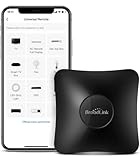
- 【HIGH COMPATIBILITY】: Support RF (433MHz) controlled devices such as curtain/shades motor, projector, light switch. Pls make sure your appliance does not use rolling code; Support 50,000+ IR (38KHz) controlled entertainment and life appliances, such as TV, Air Conditioner, Set top box, Streaming player, Amplifier, Sound Bar. Online updated IR library ensures the compatibility for new models. Manual learning is also available.
- 【TV / AC CONTROL】: Voice control your TV with On/Off, Volume control, Change channel by number/name, Switch input, Play, Fast forward, Rewind, Pause, Stop, Previous, Next…Voice control your aircon with On/Off, Temperature, Fan speed, mode. With free easy-to-use BroadLink App, you can remotely control your IR/RF devices no matter you are at home or away. Note: you can visit our website to confirm if your IR appliances is compatible with our devices: PARTNERSHIPS - APPLIANCE(IR).
- 【VOICE CONTROL AND IFTTT】: Works with Alexa or Google Assistant and IFTTT (“BroadLink” skill/service) . Simple setup with Amazon Echo or Google Nest to easily voice control your IR devices, and more home automation settings can be added by IFTTT. Siri voice control is also available on phone.
- 【FEATURES】: Create multiple timers and customized scenes as you need to control your Home Infrared/RF appliances. NOTE: IR signal can’t transmitted through obstacle; The Wi-Fi password should contain no more than 32 characters and no special characters
- 【QUALITY & TECH SUPPORT】: Require a secured 2.4GHz Wi-Fi networks. 5GHz Wi-Fi networks and mesh network are not supported; Pls confirm the compatible radio frequency range before purchasing: 433MHz (range: 430~440MHz), with fixed code, not rolling code. Some special curtain motor and ceiling fan may not supported, you can consult us before purchasing. RM4 pro requires a 5V 1A USB adapter(which is not included in the package) or an equivalent power source
Does a smart plug or camera use Wi-Fi when idle?
It depends on the device and what it is doing. A low-traffic sensor that is mostly idle is not equivalent to a camera actively uploading video, and connected status alone does not establish substantial use. Check current activity and pause nonessential transfers temporarily to see whether they correspond with the slowdown rather than assuming a particular gadget is responsible.
Keep the router secure while troubleshooting
Router security is important, but the sources cited here do not show that ordinary security measures generally slow Wi-Fi. Keep the router’s software supported and use secure configuration. NIST’s final IR 8425A, published September 10, 2024, sets out cybersecurity outcomes and requirements for consumer-grade router products and notes the router’s role in protecting network integrity and availability.
Quick Recap
Product prices and availability are accurate as of the date/time indicated and are subject to change. Any price and availability information displayed on Amazon at the time of purchase will apply.

