
PC Slower Than It Used to Be?
A free scan shows the junk files, broken settings and background clutter dragging Windows down - then fixes them in one click.Free scan · Windows 10 & 11Crashes, No Sound, or Screen Glitches?
Random freezes, missing sound and display glitches usually trace back to one bad driver. Find and replace yours safely.Free scan · under a minuteiTechGuides is reader-supported. When you buy through links on our site, we may earn an affiliate commission. As an Amazon Associate I earn from qualifying purchases. Learn more
For a normal Chrome extension, there is no documented, general-purpose API to inject code into Slack’s service worker and intercept its background push notifications. Overriding window.Notification can catch notifications created in a page’s JavaScript context, but it cannot reach a separate service worker. That makes interception through supported extension APIs impractical—not a universal claim that no privileged debugging technique could ever manipulate a browser.
Why can’t the extension reach the service worker?
A page and its service worker are separate JavaScript execution contexts. Page code can access window; a service worker does not have the page’s window object. As a result, replacing the page’s window.Notification does not replace notification code running in the worker.
M. Bilal Khan’s account of investigating this problem reports that Slack’s background notifications use a service-worker push path: the worker handles a push event and calls its registration’s showNotification(). In that path, a page-world override is not reached. This is the author’s report, not a verified statement about every Slack version, browser, operating system, or notification configuration. Read the account.
Can I override window.Notification?
Yes, for calls made in the page’s JavaScript environment. If a page script creates a notification with new Notification(...), an override in that same context may observe or affect that call. It does not provide coverage for notifications produced by a service worker using registration.showNotification(). The distinction is about where the notification-producing code runs, not merely which website displays it.
#1 Best Overall

- ACCESS HARD-TO-REACH FASTENERS WITH EASE thanks to our ergonomic and practical 3/8-inch extension bars, which are ideal for all cordless, electric, and pneumatic impact wrenches.
- PROTECT YOUR KNUCKLES ON THE JOB with our 3”, 6” and 8” long impact driver extension bars set, which will make your job easier and take all the fuss out of auto repair tasks.
- COMFORTABLE & ERGONOMIC DESIGN – the reliable spring-loaded detent ball will prevent dropping while the through-hole in the drive end will ensure that your extension bars are securely locked onto the drive tang.
- HEAVY-DUTY TOOLS FOR PROFESSIONALS! Made from Hardened Heat-Treated Chrome Vanadium alloy steel and coated with Manganese Phosphate, our impact socket bars will pass the test of time.
- RISK-FREE PURCHASE WITH A LIFETIME WARRANTY! Meet & Exceeds ANSI (The American National Standard Institute) and backed by our Lifetime Limited Warranty for your complete peace of mind.
Why don’t Chrome’s extension APIs solve this?
Push API: receives pushes for your extension
Chrome’s Push API lets an extension subscribe to a push provider and receive messages in its own service worker, including waking that worker when a push arrives. It does not subscribe the extension to Slack’s push stream or grant access to Slack’s service worker. Chrome’s real-time extension guide describes the extension’s own messaging path.
chrome.webRequest: network events are not worker injection
The webRequest API exposes specified request lifecycle events and, where permitted, can support actions such as blocking or changing requests and headers. It is not a general-purpose way to execute code inside a third-party service worker or rewrite that worker’s script response. In Manifest V3, webRequestBlocking is unavailable to most extensions. Chrome also documents that the API can observe a WebSocket handshake but not individual messages after the connection is established. See Chrome’s webRequest reference.
These are separate capabilities: seeing a request, changing a permitted request, altering a response body, and running code in a service worker are not interchangeable. A visible network request does not, by itself, reveal application messages or let an extension take over the worker’s notification call.
Rank #2
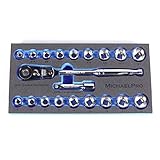
- 【Socket Set】This includes sockets in both SAE (1/4",5/16",3/8",7/16",1/2",9/16",5/8",11/16",3/4") & Metric (8,10,12,13,14,15,16,17,18mm), a standard 12-point socket and a 3” extension bar.
- 【Ratchet Wrench Handle】Flexible and Low-Profile 3/8” Reversible 80 Tooth Ratchet handle for access to almost any angle & tight spaces.
- 【Strong & Durable】Made from hardened treated Chrome Vanadium steel alloy (Cr-V) for strength and durability, that meets and even exceeds the strict ANSI standard.
- 【Easy Storage】This ratchet wrench set comes with an EVA tray that can be easily stored in the cabinet or tool box.
- 【MADE IN TAIWAN】TOur hand tools are Made in Taiwan where it is recognised for its dedication in producing premium quality tools. This ratchet wrench handle set is covered with lifelong warranty.
Debugger access: a different, disruptive route
Khan discusses debugger and Chrome DevTools Protocol manipulation as a technically possible avenue, but judges it unsuitable for a consumer extension because of the debugger warning and user experience. That is the author’s assessment, not a Chrome rule that CDP manipulation is impossible. It also does not create a supported, seamless interception hook for ordinary extension use.
Independent reader supportYour contribution helps us test, update, and keep practical guides available for everyone.What can you do instead?
React to events your extension owns
If your own service needs to notify your extension, use Chrome’s extension Push API and handle incoming messages in the extension’s service worker. For frequent two-way communication, a WebSocket may be appropriate while the extension is active; a connection alone does not provide an external wake-up event if the extension has been suspended. Choose this route when you control the producer or can arrange for it to send messages to your extension—not as a way to tap Slack’s browser notifications.
Build a separate, authorized Slack integration
If the actual goal is to respond to Slack workspace activity, build an app against Slack’s platform interfaces and obtain the required authorization. Slack’s Web API supports querying workspace information and taking actions; choose the relevant event or API mechanism and check its current scopes for your use case. This is a separate integration, not an API for intercepting notifications already generated by Slack in a browser. Slack Web API documentation.
Quick Recap
Choose the approach that matches the goal
| Approach | Where it runs | What it can do | Fit for intercepting Slack browser alerts |
|---|---|---|---|
Override window.Notification |
Page JavaScript | May observe notifications created directly by page code | Does not reach a separate service worker’s notification call |
| Chrome extension Push API | Your extension’s service worker | Receives pushes addressed to the extension | Does not subscribe to Slack’s push stream |
chrome.webRequest |
Extension network-request events | Observes specified requests and supports limited permitted actions | Does not provide arbitrary worker injection or general response-body rewriting |
| Slack app using platform APIs | Slack integration and its authorized backend | Works with workspace data and actions allowed by the chosen interfaces and scopes | A separate route to workspace events, not browser-notification interception |
Product prices and availability are accurate as of the date/time indicated and are subject to change. Any price and availability information displayed on Amazon at the time of purchase will apply.
The Tool Desk
Outbyte Driver Updater FREEFix the driver behind crashes, sound loss and screen glitchesFind Drivers →Outbyte PC Repair FREEClear out junk files and repair common Windows errorsFree Scan →
