
Recommended Free Tools
iTechGuides is reader-supported. When you buy through links on our site, we may earn an affiliate commission. As an Amazon Associate I earn from qualifying purchases. Learn more
SkillDuel is a learning app its creator says he built to help a friend test whether she understood Python concepts rather than simply recognizing familiar tutorial patterns. It presents one question at a time, responds to the learner’s answer, and adapts the next question. The project is designed to run with a language model on the user’s own computer, but its benefits and privacy claims have not been independently tested.
What SkillDuel does
In a project post published on October 5, 2026, developer dineshkottaKota describes SkillDuel as an adaptive, Socratic learning partner. Instead of leading with a lesson or a sequence of tutorial steps, it asks a question, evaluates the learner’s response, gives feedback and an explanation, then offers a deeper follow-up and adjusts the difficulty of the next question.

The post says the app was prompted by a friend who had studied Python for three months but was unsure whether she understood ideas or merely recognized familiar patterns. The author presents SkillDuel as adaptable to other subjects, including chess, cooking, mathematics, and language learning. XP and streak tracking are also described as app features.
The author reports that the friend said, “This is the first time I’ve actually had to think instead of just type.” That is one person’s reported reaction, not evidence that the app improves learning for users generally. The project post does not report a controlled study or measured learning outcomes.
How the local setup is described
The project post describes a browser-based interface connected to a local backend and model runtime. Its stated flow is browser UI → REST API at localhost:8000 → FastAPI and LangChain backend → Ollama at localhost:11434. The author says two prompts are used in each round: one to generate an adaptive Socratic question and another to evaluate the answer and form a follow-up.
- Interface: a single-file vanilla HTML, CSS, and JavaScript frontend.
- Backend: FastAPI, with LangChain Core for prompt orchestration and output parsing.
- Model runtime: Ollama, which serves a model locally.
This is the architecture the author describes; it is not an independent review of the app’s behavior or a privacy audit. The post’s “100% locally” framing refers to the described local inference path, not a verified guarantee about every possible data flow or deployment.
Rank #2

- 【AI Spoken English & Instant Translation】This AI translation speaker provides real-time speech recognition, correction, and translation. Like a personal tutor, it helps refine pronunciation and grammar while supporting 133 languages for immersive practice.
- 【Blue.tooth 5.4 & App Connectivity 】Pairs via stable Blue.tooth 5.4 with the VoiceAI app on phones or tablets. This AI translation speaker enables one-on-one scenario-based practice for travel, workplace, and everyday conversations.
- 【Clip-On Hands-Free Design】Lightweight at 37g with a convenient clip, this AI translation speaker frees your hands during study sessions. Simply speak into the device to trigger real-time bilingual dialogue without pressing any buttons.
- 【Ultra-High Sound Quality 】Equipped with a 4020B0X-L25/4 Ohm speaker, this AI translation speaker delivers clear, natural voice output. The 600mAh battery ensures extended use for lessons, meetings, or travel.
- 【Contextualized Learning & Feedback】AI-generated scenarios cover workplace meetings, shopping, and daily phrases. This AI translation speaker intelligently corrects errors and builds vocabulary lists for immediate, practical use.
What setup involves
The author’s instructions require more than opening a webpage: you install a local model runtime, download a model, install Python dependencies, start the backend, and then open the frontend file. The project post gives this sequence:
Do these 3 things before closing this tab:
1Fix the driver behind crashes, sound loss and screen glitches2Clear out junk files and repair common Windows errors3Scan for outdated or missing drivers - takes under a minute- Install Ollama and start the service.
- Download the default model with
ollama pull llama3.2. - Install the backend dependencies from
backend/requirements.txt. - Start the backend with
python main.py. - Open
frontend/index.htmlin a browser.
The post names Llama 3.2 as the default and mentions Mistral, Gemma, Phi, and CodeLlama as alternatives. It does not provide comparative results for those models or detailed troubleshooting instructions.
Rank #3

- Develop math, reading, writing, coding, problem-solving and creativity skills with more than 20 educator-approved learning apps that grow with kids
- Find hundreds more games, videos, music and eBooks (sold separately) by going to the LeapFrog App Center and expand the learning experience
- Includes a three-month trial of LeapFrog Academy; subscribe to send kids on learning adventures filled with more than 2,000 engaging games, activities, eBooks, videos, songs and more
- Learning tablet includes a stylus, tough bumper with kickstand and a 7" shatter-safe screen; set time limits, manage apps and explore kid-friendly web content with parent controls
- Intended for ages 3-8 years; rechargeable lithium-ion battery included
Model download size is not a hardware guarantee
Ollama’s official Llama 3.2 library entry lists llama3.2 as a 2.0 GB download and llama3.2:1b as a 1.3 GB download. The library describes the text-only family as 1B and 3B models and includes the command ollama run llama3.2. Download size alone does not tell you how much memory the model will require while running or how quickly it will respond. The SkillDuel post gives no minimum RAM, CPU, or GPU specification and no tested computer configuration.
What “free” and “local” mean in practice
The author’s no-cost claim applies to the described setup’s lack of an API bill. Running a model on your own computer still uses hardware and electricity, and setup takes time. The post does not establish that every model choice or future version will have no associated costs.
Rank #4
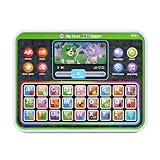
- Slide the play button to hear from Scout and Violet while watching them move
- Enjoy the bright backlit rainbow buttons and tap to practice letters, words and colors
- Venture out with Scout and Violet as they share details of trips to the farm, beach and more
- Hit all the right notes with the ABC song
- Intended for ages 12+ months; requires 3 AAA batteries; batteries included for demo purposes only; new batteries recommended for regular use
A local model can avoid sending prompts to a remote model service in the architecture described, but that alone does not establish what the complete app does with data. The author’s post is not an independent privacy assessment. Anyone considering use should inspect the code and its network behavior rather than treating “local” as a blanket privacy guarantee.
Who might find the approach useful
SkillDuel’s question-and-feedback loop may suit someone who wants to practice explaining concepts and responding to prompts rather than only following demonstrations. Its usefulness depends on the quality and relevance of the model’s questions and feedback for the chosen subject; the project post does not provide an independent evaluation of that quality.
It is also a hands-on setup for people comfortable installing software and running a local backend. The app’s stated architecture may appeal to those who prefer local inference, while people who want a ready-to-use hosted tutor may find the installation steps burdensome. The available project description does not compare SkillDuel with cloud tutors or other local learning apps.
What is established—and what is not
The project post supports a clear description of the intended design, stack, and setup. Ollama’s model page independently confirms the model names, listed download sizes, and run command. Neither source establishes that the app works reliably across machines, that it produces accurate instruction, or that using it leads to better learning. Treat SkillDuel as an author-described project and experiment, not a validated education product.
Quick Recap
Product prices and availability are accurate as of the date/time indicated and are subject to change. Any price and availability information displayed on Amazon at the time of purchase will apply.

