
Windows Errors? Fix Them Before They Spread
Repair common Windows errors and clear accumulated junk for a smoother, more stable PC - no reinstall needed.Free scan · no reinstallOutdated Drivers Are Slowing You Down
One free scan finds every outdated or missing driver and matches the right update for your exact hardware.Free scan · exact hardware matchiTechGuides is reader-supported. When you buy through links on our site, we may earn an affiliate commission. As an Amazon Associate I earn from qualifying purchases. Learn more
Shopping cart tools help customers select products, review quantities, calculate shipping and tax, pay, and receive an order confirmation—but they are not all complete ecommerce platforms. Choose a hosted platform for a full store, WooCommerce for WordPress control, Ecwid for an existing website, Stripe Checkout for a custom app, or a specialized tool for cart recovery.
The phrase “shopping cart tool” describes several different layers of ecommerce software. A hosted platform may provide the storefront, catalog, inventory, checkout, payments, shipping, order management, and marketing in one service. A payment component may handle only the checkout and payment authorization. An abandoned-cart tool may do neither: it improves recovery after a shopper leaves.
The right purchase depends on your existing website, product complexity, countries served, payment requirements, technical resources, fulfillment model, and total operating budget. The most expensive mistake is comparing products that solve different problems as though they were direct competitors.
Recommended Free Tools
Key takeaways
- Shopping cart tools fall into four broad groups: hosted ecommerce platforms, self-hosted systems, embedded carts and checkout components, and cart-conversion or recovery add-ons.
- Shopify and BigCommerce are managed full-store platforms; WooCommerce is a self-hosted commerce layer; Ecwid adds a store to an existing website; Stripe Checkout and PayPal Checkout primarily solve payment checkout.
- WooCommerce core is free, but WooCommerce estimates hosting at $25–$350 per month and extensions at approximately $29–$299 per year per extension.
- Baymard’s compilation of 50 studies reports a 70.22% average documented cart-abandonment rate, but that aggregate is not a universal benchmark for every store.
- A meaningful comparison must include payment processing, platform fees, apps, hosting, tax and shipping services, development, maintenance, refunds, and migration—not only the advertised monthly price.
What are shopping cart tools?
Shopping cart tools are software components that move a shopper from product selection to a completed order. The minimum workflow normally includes these stages:
#1 Best Overall

- END GROCERY TRIP CHAOS: Tired of juggling messy grocery totes and digging through plastic bags or bulky boxes? These 3 XL reusable bags with handles keep everything upright and organized by category; they feature an insulated bag and wine and egg pockets to protect fragile items and speed up checkout
- FITS XL CARTS & CLUB STORES, NOT YOUR FRUSTRATION: No more guessing or wasting money on reusable shopping bags foldable that don’t align; each grocery tote bag of the Club Cart set fits Costco, Sam’s Club, ALDI, Food4Less, and H-E-B carts; perfect for XL carts and bulk shopping trips
- BUILT FOR BUSY DAYS: From warehouse runs to big hauls, these shopping bags for groceries adapt fast; use them together or detach with Velcro; remove the rods to turn them into foldable grocery bags for errands, markets, or large-cart shopping
- NO MORE MELTED ICE CREAM: The XL turquoise insulated food bag is thermal-lined to protect frozen and chilled foods; no more stressing over softening frozen goods or lukewarm dairy by the time you’re home; these kitchen reusable grocery bags heavy duty help maintain freshness until you're ready to unload
- HEAVY-DUTY, MACHINE-WASHABLE: Each reusable shopping bag HOLDS OVER 60 LBS with reinforced seams and durable fabric; the wide openings of our reusable grocery totes make bulk shopping easy, and they’re machine washable for hassle-free cleaning
- Product selection: The shopper chooses a product, variant, quantity, or configuration.
- Add to cart: The system creates or updates a cart.
- Cart persistence: The cart remains available for a defined period, either in the browser, on a server, or in a customer account.
- Cart editing: The shopper changes quantities, variants, or products.
- Checkout calculation: The system calculates shipping, tax, discounts, and the order total.
- Payment: The payment provider authorizes or declines the selected payment method.
- Order creation: The store records the order, customer details, payment state, and fulfillment instructions.
- Inventory and fulfillment: Inventory is reserved or deducted, and the order reaches the warehouse, shipping, pickup, or delivery workflow.
- After-sales operations: The merchant handles confirmation, refunds, returns, cancellations, customer records, and reporting.
A payment link or checkout page may perform only the payment stage. Such a tool may not include a product catalog, inventory, shipping rules, tax calculation, customer accounts, returns, or abandoned-cart recovery. Conversely, a full ecommerce platform usually provides those surrounding systems, although the exact features and fees vary by plan, region, and installed integrations.
Which type of shopping cart tool do you need?
The best shopping cart tool depends first on the job you need done, not on a universal ranking of brands.
| Tool type | Storefront | Cart and checkout | Inventory | Infrastructure | Best fit |
|---|---|---|---|---|---|
| Hosted ecommerce platform | Included | Included | Usually included | Hosting included | New and growing stores that want a managed launch |
| Self-hosted ecommerce system | Included or theme-based | Included | Usually available | Merchant supplies hosting and maintenance | WordPress users and technical teams needing control |
| Embedded store | Uses an existing website | Usually available | Plan-dependent | Often managed by the vendor | Businesses adding commerce without rebuilding a site |
| Payment checkout component | No or limited | Payment checkout | Usually not included | Hosted or developer-integrated | Custom websites, apps, and headless commerce |
| Cart-conversion add-on | Uses an existing platform | Enhances the existing flow | No | Depends on the platform | Slide-out carts, upsells, free-shipping bars, and checkout improvements |
| Abandoned-cart tool | No | No | No | SaaS or plugin | Recovery emails, SMS, coupons, and cart analytics |
Hosted ecommerce platforms
Hosted platforms combine a storefront, catalog, cart, checkout, payments, inventory, orders, and often shipping, analytics, and marketing. Hosting, security updates, and much of the infrastructure are managed for you. The trade-off is a recurring subscription, possible app charges, payment-provider restrictions, and less control over the underlying system.
Hosted software is usually the strongest starting point when nobody on the team owns server administration, security, backups, updates, and performance. Shopify, BigCommerce, Square Online, and Ecwid all fit this broad category, although Ecwid is particularly oriented toward embedding commerce into an existing site.
Self-hosted ecommerce systems
Self-hosted systems give the merchant more control over code, hosting, content, data, and checkout behavior. The merchant must also arrange hosting and take responsibility for updates, backups, security, plugin compatibility, performance, and recovery when something fails.
WooCommerce’s pricing information says the core platform has no monthly subscription or revenue share. WooCommerce estimates hosting for most stores at $25–$350 per month and extensions at approximately $29–$299 per year per extension. Those figures are vendor estimates, not a guaranteed total cost. A store with several paid extensions, developer support, premium hosting, tax software, and maintenance can cost substantially more than the free core suggests.
Embedded carts
Embedded carts add products and checkout to an existing content, marketing, creator, or business website. This approach can avoid migrating the entire site, but you must verify how the cart handles product variants, subscriptions, digital products, taxes, inventory synchronization, customer accounts, analytics, SEO, and social or marketplace selling.
Quick wins for a faster PC:
Repair Windows errors before they cause bigger problemsFix Now →Fix the driver behind crashes, sound loss and screen glitchesFind Drivers →Clear out junk files and repair common Windows errorsFree Scan →Ecwid’s pricing page positions its Starter plan for adding a store to any website and lists support for up to 10 products on that plan. The same page displays a 16% saving for annual billing. Product limits and advanced features depend on the selected plan, so a small embedded store should be tested against its future catalog rather than only its launch catalog.
Payment checkout components
Payment checkout components are appropriate when a catalog, storefront, application, or order system already exists. Stripe Checkout and PayPal Checkout can provide payment options without requiring the merchant to build every payment interface from scratch, but neither should automatically be treated as a complete ecommerce operating system.
Stripe Checkout supports hosted or embedded checkout and accepts cards, wallets, and other payment methods. The displayed standard U.S. card rate is 2.9% plus $0.30 per successful card charge. Regional rates, payment methods, recurring billing, currency conversion, and other services can have different pricing.
Rank #2

- Universal Cart Clip Attachment: Engineered for compatibility with most supermarket carts, this secure clip system locks onto metal or plastic frames for a stable, elevated setup. Keep your groceries organized, visible, and within easy reach from aisle to checkout.
- Easy, Organized Shopping: Designed to attach directly to your grocery cart, these reusable bags keep items upright, visible, and neatly separated throughout your trip. Load as you shop, streamline checkout, and lift each bag straight into your trunk for a faster, more efficient grocery run.
- Interior Zipper Pouch for Secure Storage: Keep small essentials neatly contained with the built-in inner zipper pocket. Perfect for keys, coupons, receipts, phone, or loose items, this secure compartment prevents shifting and keeps valuables protected while you shop.
- Eco-Friendly & Reusable: A sustainable alternative to single-use plastic bags, designed to reduce waste and support environmentally conscious shopping. Built for long-term use, this reusable system helps you minimize your environmental footprint with every grocery trip.
- Heavy-Duty & Extra Spacious: Made from premium 210D polyester with reinforced double-stitched seams and handles for superior strength and long-lasting durability. Each bag is built to support up to 40 lbs, making it ideal for heavy grocery hauls, bulk shopping trips, and warehouse store runs.
PayPal Checkout supports PayPal, Venmo, Pay Later, cards, and alternative payment methods. The displayed U.S. information lists 3.49% plus $0.49 for PayPal and Venmo transactions, with separate card rates, and says fees can change. Payment-method availability and rates should be checked for the merchant’s country and account.
Free tools Windows power users keep installed
One-click scans. No signup required.
Cart-conversion and recovery tools
Conversion tools improve an existing store rather than replacing it. Common functions include slide-out carts, mini-cart previews, one-page checkout, quantity breaks, bundles, cross-sells, upsells, free-shipping progress bars, product recommendations, coupon recovery, analytics, and cart persistence.
Abandoned-cart recovery requires a more careful distinction. An anonymous browser cart, a server-side cart linked to an account, and an abandoned checkout where the shopper submitted an email address are different data situations. A recovery tool may not be able to contact every abandoned shopper, and email or SMS outreach may require consent under applicable law.
Which shopping cart tools fit common business situations?
| Business situation | Good starting options | Why | Important caution |
|---|---|---|---|
| Launching a complete store from zero | Shopify, BigCommerce, Square Online, Ecwid | Managed storefront, checkout, catalog, orders, and integrations | Compare plan limits, payment fees, and app costs |
| Already using WordPress | WooCommerce | Commerce integrates with the existing WordPress content system | Someone must own hosting, updates, security, backups, and plugin conflicts |
| Already have a marketing or content site | Ecwid or an embedded checkout | Commerce can be added without replacing the main site | Check design integration, analytics, accounts, inventory, and catalog limits |
| Physical retail, pickup, or local delivery | Square Online or Shopify with POS | Online orders can connect with payments and in-person operations | Verify location, fulfillment, hardware, and international support |
| Custom web application | Stripe Checkout, PayPal Checkout, or a headless commerce backend | Developers can connect checkout to existing catalog and workflows | Catalog, inventory, shipping, tax, returns, and order management may require separate systems |
| Large or complex catalog | BigCommerce, Shopify, WooCommerce, or enterprise commerce | These options can support broader merchandising and integrations | Test bundles, wholesale pricing, warehouses, currencies, languages, and market-specific catalogs |
| Only need better cart recovery | A recovery or conversion add-on for the existing platform | Preserves the current store while targeting a specific problem | Check consent, duplicate messages, coupon abuse, and completed-order suppression |
How do the leading shopping cart platforms compare?
Shopify: best for a managed, fast-launch store
Shopify is a strong default for merchants who want a polished hosted platform, a broad app ecosystem, built-in checkout, payments, inventory, shipping, analytics, and abandoned-checkout recovery with relatively little infrastructure work.
The Shopify pricing page displayed these U.S. plan prices in the August 18, 2026 research snapshot: Basic at $39 per month when billed monthly or $29 per month when paid yearly; Grow at $105 monthly or $79 yearly; Advanced at $399 monthly or $299 yearly; and Plus from $2,300 per month. Displayed Shopify Payments online card rates start at 2.9% plus $0.30 on Basic, while third-party transaction fees are displayed at 2% on Basic, 1% on Grow, and 0.6% on Advanced. POS Pro is listed as an additional $89 per month per location.
Shopify pricing and features vary by country, billing cycle, payment setup, and account eligibility. Treat the displayed figures as a dated buying signal, not a permanent quote. Shopify may be a poor fit when infrastructure control, avoidance of platform transaction fees, or unusual checkout workflows is more important than launch speed.
BigCommerce: best for native commerce depth and complex catalogs
BigCommerce deserves consideration when catalog structure, promotions, integrations, APIs, and multichannel commerce are more important than having the simplest possible feature set. A richer native feature set can reduce dependence on apps for some stores.
The BigCommerce pricing information displayed Core at $39 per month or $29 monthly when billed annually, Growth at $105 or $79 annually, Scale at $399 or $299 annually, and Performance from $1,499 per month billed annually. Revenue or GMV limits and payment-provider fees may apply depending on the plan and payment configuration.
BigCommerce can be more platform than a very small seller needs. Before choosing it, model projected revenue, plan thresholds, payment-provider fees, catalog complexity, international needs, and checkout customization.
WooCommerce: best for WordPress control
WooCommerce is a natural first candidate for an established WordPress site or a business that values control over content, code, hosting, and extensions. WooCommerce can support highly customized stores, but customization transfers operational responsibility to the merchant or implementation team.
Rank #3

- Universal Cart Clip Attachment: Engineered for compatibility with most supermarket carts, this secure clip system locks onto metal or plastic frames for a stable, elevated setup. Keep your groceries organized, visible, and within easy reach from aisle to checkout.
- Easy, Organized Shopping: Designed to attach directly to your grocery cart, these reusable bags keep items upright, visible, and neatly separated throughout your trip. Load as you shop, streamline checkout, and lift each bag straight into your trunk for a faster, more efficient grocery run.
- Interior Zipper Pouch for Secure Storage: Keep small essentials neatly contained with the built-in inner zipper pocket. Perfect for keys, coupons, receipts, phone, or loose items, this secure compartment prevents shifting and keeps valuables protected while you shop.
- Eco-Friendly & Reusable: A sustainable alternative to single-use plastic bags, designed to reduce waste and support environmentally conscious shopping. Built for long-term use, this reusable system helps you minimize your environmental footprint with every grocery trip.
- Heavy-Duty & Extra Spacious: Made from premium 210D polyester with reinforced double-stitched seams and handles for superior strength and long-lasting durability. Each bag is built to support up to 40 lbs, making it ideal for heavy grocery hauls, bulk shopping trips, and warehouse store runs.
WooCommerce is a poor fit when no one is responsible for updates, backups, security, plugin compatibility, and performance. A plugin or theme update can affect cart calculations, payment buttons, shipping rules, or checkout fields, so production changes should be tested in a staging environment.
Ecwid: best for adding commerce to an existing website
Ecwid is particularly relevant when the business already has a website and wants to add a small or moderate store rather than rebuild the entire web presence. The approach can suit creators, local businesses, and service businesses selling a limited product range.
Ecwid should be evaluated against future requirements. Complex B2B pricing, large catalogs, advanced fulfillment, subscriptions, customer-specific catalogs, or deeply customized checkout behavior may require a different platform or additional services.
Do these 3 things before closing this tab:
1Fix the driver behind crashes, sound loss and screen glitches2Repair Windows errors before they cause bigger problems3Scan for outdated or missing drivers - takes under a minuteSquare Online: best for Square-connected local commerce
Square Online is especially relevant to retailers, restaurants, and service businesses already using Square payments, point of sale, appointments, pickup, or local delivery.
Square’s current plan information says Square Free has no monthly subscription cost, while paid plans offer 30-day trials and payment-processing fees apply when payments are accepted. The displayed capabilities include pickup, local delivery, shipping-label functionality, free-shipping progress bars, and multiple payment methods. Square also says hardware is not required for all payment methods.
Square Online may be less suitable for complex international commerce, advanced catalog requirements, or enterprise-level storefront control. Its strongest advantage is usually the connection between online and local operations.
Stripe Checkout: best for custom applications
Stripe Checkout fits developers and businesses that already have a website, application, product catalog, or custom workflow. It can provide a hosted or embedded payment path while the business retains control of the surrounding application.
Stripe Checkout alone may leave the merchant responsible for catalog administration, inventory, shipping, tax, customer accounts, refunds, order management, and reporting. Use it when the existing technical architecture needs flexible payments—not when the business expects a complete store administration system without development work.
PayPal Checkout: best for PayPal, Venmo, and Pay Later access
PayPal Checkout can complement another ecommerce platform when customers expect PayPal, Venmo, Pay Later, or card payments. The displayed U.S. page lists no monthly or setup fees, but payment-method-specific rates, account reviews, holds, refunds, and disputes still belong in the risk assessment.
PayPal Checkout is not a substitute for a product catalog, inventory system, shipping engine, tax workflow, returns system, or complete order-management platform.
Rank #4
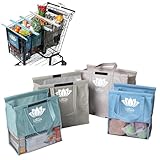
- END GROCERY TRIP CHAOS: Tired of juggling messy grocery totes and digging through plastic bags? These 4 reusable bags with handles keep everything upright and organized by category; they feature an insulated bag and wine and egg pockets to protect fragile items and speed up checkout
- FITS YOUR CART, NOT YOUR FRUSTRATION: No more guessing or wasting money on reusable shopping bags foldable that don’t align; each grocery tote bag of the Original set fits Target, Kroger, and standard U.S. carts (NOT SUITABLE FOR WAREHOUSE CLUB STORES); check out our Club Cart version for warehouse stores
- BUILT FOR BUSY DAYS: From Target runs to big hauls, these shopping bags for groceries adapt fast; use them together or detach with Velcro; remove the rods to turn them into foldable grocery bags for errands, markets, or weekly Instacart orders
- NO MORE MELTED ICE CREAM: The insulated food bag is thermal-lined to protect frozen and chilled foods; no more stressing over softening frozen goods or lukewarm dairy by the time you’re home; these kitchen reusable grocery bags heavy duty help maintain freshness until you're ready to unload
- TOUGH, CLEAN, AND MOLD-FREE: Each reusable shopping bag holds over 60 lbs with 120 GSM fabric and reinforced seams; machine wash the mesh-bottom bags to eliminate spills and smells; no more soggy reusable grocery totes or hidden messes
What cart and checkout features matter most?
A cart that can add an item is only the beginning. Evaluate the complete path from product page to fulfillment.
What’s actually slowing this PC down?
Pick the symptom - the matching free tool is one click away.
Checkout and mobile behavior
- Guest checkout should be available when account creation is not essential.
- Autofill, address validation, mobile keyboard behavior, and clear error messages should work on common phones.
- Shipping costs, tax, delivery estimates, and the final total should appear before payment authorization.
- Wallet buttons and express checkout should not bypass required product, shipping, tax, or personalization information.
- Back-button behavior, refresh behavior, and cart persistence should be tested.
- Checkout fields, controls, focus order, contrast, labels, and error messages should be reviewed for accessibility.
BigCommerce’s checkout feature guidance identifies guest checkout, payment-method coverage, abandoned-cart recovery, cart analytics, and real-time shipping estimates as important ecommerce capabilities. The same article says 19% of cart abandoners report leaving because they were forced to create an account; attribute that figure to BigCommerce’s cited research rather than treating it as a universal current statistic.
Payments and fraud
Verify credit and debit cards, digital wallets, PayPal or Venmo, buy now/pay later, local payment methods, recurring billing, partial payments, refunds, chargebacks, fraud screening, and 3-D Secure or equivalent authentication. Payment availability differs by country, currency, merchant category, provider, and account eligibility.
Do not compare payment rates without checking fixed fees, cross-border fees, currency conversion, platform transaction fees, chargeback fees, payout timing, reserve or hold policies, and whether a platform’s lowest rate requires its preferred processor.
Catalog and merchandising
Check variants, bundles, kits, configurable products, wholesale pricing, customer-specific pricing, subscriptions, digital products, preorders, backorders, multiple warehouses, multiple currencies, multiple languages, market-specific catalogs, and product personalization. A simple catalog does not justify enterprise functionality, while a complex catalog can make a low-subscription platform expensive after extensions and custom development.
The Tool Desk
Outbyte Driver Updater FREEScan for outdated or missing drivers - takes under a minuteDriver Scan →Outbyte PC Repair FREERepair Windows errors before they cause bigger problemsFix Now →Shipping, tax, and fulfillment
Test flat-rate shipping, free-shipping thresholds, real-time carrier rates, pickup, local delivery, delivery windows, multiple fulfillment locations, dropshipping or 3PL connections, shipping labels, partial fulfillment, split shipments, international duties, and return labels.
Tax automation is not the same as legal compliance. Sales-tax nexus, VAT, GST, tax-inclusive pricing, exempt customers, digital-goods rules, marketplace facilitator rules, registration, filing, remittance, privacy, cookies, PCI responsibilities, accessibility, refund rules, and consumer protections vary by jurisdiction and product. Obtain professional tax or legal advice for a nontrivial operation.
Integrations and data portability
Review accounting, ERP, CRM, email, SMS, reviews, search, product information management, inventory, shipping, returns, customer support, analytics, advertising, and marketplace integrations. For custom systems, inspect REST or GraphQL APIs, webhooks, bulk import and export, stable identifiers, sandbox mode, rate-limit documentation, versioned APIs, and role-based access.
Ask whether products, orders, customers, discounts, subscriptions, content, and historical analytics can be exported in a usable format. An easy launch can still create a costly exit if the merchant cannot migrate data or reconstruct order history.
How much do shopping cart tools really cost?
The real cost is the 12-month cost of operating the complete commerce stack, not the lowest advertised subscription.
Best Value

- Universal Cart Clip Attachment: Engineered for compatibility with most supermarket carts, this secure clip system locks onto metal or plastic frames for a stable, elevated setup. Keep your groceries organized, visible, and within easy reach from aisle to checkout.
- Easy, Organized Shopping: Designed to attach directly to your grocery cart, these reusable bags keep items upright, visible, and neatly separated throughout your trip. Load as you shop, streamline checkout, and lift each bag straight into your trunk for a faster, more efficient grocery run.
- Interior Zipper Pouch for Secure Storage: Keep small essentials neatly contained with the built-in inner zipper pocket. Perfect for keys, coupons, receipts, phone, or loose items, this secure compartment prevents shifting and keeps valuables protected while you shop.
- Eco-Friendly & Reusable: A sustainable alternative to single-use plastic bags, designed to reduce waste and support environmentally conscious shopping. Built for long-term use, this reusable system helps you minimize your environmental footprint with every grocery trip.
- Heavy-Duty & Extra Spacious: Made from premium 210D polyester with reinforced double-stitched seams and handles for superior strength and long-lasting durability. Each bag is built to support up to 40 lbs, making it ideal for heavy grocery hauls, bulk shopping trips, and warehouse store runs.
| Cost category | What to include | Often missed |
|---|---|---|
| Platform or hosting | Subscription, web hosting, database, storage, backups | Higher tiers triggered by revenue, traffic, products, or staff accounts |
| Payments | Percentage fee, fixed fee, recurring billing, currency conversion | Cross-border, chargeback, reserve, and payout costs |
| Platform fees | Third-party processor or marketplace transaction fees | Fees may depend on the platform’s preferred payment setup |
| Extensions | Apps, plugins, themes, tax, shipping, fraud, reviews | Several small recurring subscriptions can exceed the core plan |
| Operations | Developer work, support, maintenance, security, testing | Plugin conflicts, migrations, performance work, and emergency fixes |
| Sales operations | Email, SMS, shipping labels, fulfillment, returns | Message volume and per-label or per-return charges |
Use this worksheet for a 12-month estimate:
Annual total cost =
  platform subscription or hosting
  + payment processing
  + platform transaction fees
  + apps and extensions
  + domain
  + email and SMS
  + shipping software
  + tax software
  + developer or agency work
  + maintenance and support
A “free” cart can cost more than a hosted platform when the merchant needs premium hosting, paid extensions, developer support, security monitoring, and ongoing maintenance. Payment fees also scale with sales volume, so calculate at several realistic order volumes rather than assuming the launch month represents the business.
Independent reader supportYour contribution helps us test, update, and keep practical guides available for everyone.How should you test a shopping cart before launch?
Run real test orders in a staging environment where possible, then repeat the most important flows in production test mode. A feature checklist is not enough: the test should confirm that payment, inventory, order creation, fulfillment, notifications, analytics, and refunds stay synchronized.
- Define the commerce model: Record physical, digital, subscription, service, or mixed products; product and variant counts; average order value; expected order volume; countries and currencies; shipping model; returns complexity; existing CMS; integrations; and technical resources.
- Confirm the architecture: Decide whether the tool must include a storefront, add a store to an existing site, provide only checkout, or improve recovery on an existing platform.
- Place a mobile card order: Test autofill, validation, payment authorization, confirmation, inventory deduction, fulfillment export, and customer email.
- Place a desktop card order: Compare layout, speed, fields, totals, and error recovery with the mobile flow.
- Test wallet and alternative payments: Confirm that the payment method works in the target country and does not skip required shipping, tax, or custom fields.
- Test failure states: Use declined payments, interrupted connections, expired coupons, out-of-stock products, changed variants, and abandoned sessions.
- Test order changes: Process a full refund, partial refund, cancellation, return, partial fulfillment, and split shipment where applicable.
- Test rules: Verify taxable and nontaxable addresses, free-shipping thresholds, shipping zones, coupon exclusions, automatic promotions, subscriptions, and digital products.
- Test recovery: Confirm that abandoned-cart messages are recorded at the intended point, do not send after a completed purchase, respect consent, and do not allow improper coupon reuse.
- Test data: Confirm that orders reach accounting, fulfillment, analytics, and customer-support systems, and verify that products, orders, customers, and discounts can be exported.
What can go wrong with a shopping cart?
Failure recovery is a buying criterion, not an afterthought. Ask what happens in each of these cases:
- Payment succeeds but the order webhook fails.
- An order is created but payment confirmation arrives late.
- Webhook retries create duplicate orders.
- Inventory changes between cart and checkout, causing overselling.
- A product price changes after it was added to the cart.
- A coupon expires or conflicts with an automatic promotion.
- Shipping rates appear only at the final step or calculate incorrectly.
- The cart works on desktop but fails on mobile.
- A plugin or theme update breaks checkout fields or payment buttons.
- Express checkout bypasses required custom fields.
- A subscription product is incompatible with the selected payment method.
- A digital product accidentally triggers shipping.
- A customer loses connection immediately after payment and is unsure whether to retry.
- A payment processor places an account on hold.
- An API version is deprecated or an integration vendor shuts down.
- Caching incorrectly stores cart, account, or checkout pages.
- Recovery messages use email addresses, phone numbers, cookies, or device identifiers without an appropriate consent and privacy process.
Hosted systems reduce infrastructure work but do not eliminate configuration and integration risk. Self-hosted systems add control but make backups, staging, security, updates, and plugin compatibility the merchant’s responsibility.
Which alternatives may be better than a full shopping cart?
Payment links
Payment links can work for a few products, invoices, social selling, event registration, demand testing, donations, or one-off payments. Payment links are usually inadequate for large catalogs, product discovery, inventory synchronization, complex shipping, customer accounts, detailed merchandising, or sophisticated returns.
Website builders with commerce
Wix eCommerce and Squarespace Commerce can suit businesses that want a website builder and commerce system together, particularly when design and straightforward product sales matter more than highly complex operations. Review their current plans and regional payment, tax, shipping, and export capabilities before committing.
Enterprise and open-source platforms
Adobe Commerce, PrestaShop, and OpenCart may be relevant for technically capable or enterprise-oriented teams. Adobe Commerce is likely excessive for a small seller. PrestaShop and OpenCart can offer open-source control but still require hosting, security, updates, extensions, and implementation ownership.
What are the most common buying mistakes?
- Choosing by subscription price alone: Add processing, extensions, hosting, maintenance, tax, shipping, and implementation.
- Confusing cart and checkout: A payment page may not manage inventory, orders, shipping, tax, returns, or customers.
- Installing too many plugins: Each extension adds compatibility, security, performance, billing, and migration risk.
- Ignoring payment-method coverage: Confirm the methods customers use in every target country.
- Skipping refunds and returns: Test the complete post-purchase workflow before launch.
- Failing to test mobile: A desktop checkout can hide keyboard, autofill, wallet, and layout failures.
- Assuming recovery is automatic: Determine when a cart becomes identifiable, whether consent exists, and how duplicate messages are prevented.
- Accepting vendor conversion claims as independent evidence: Treat vendor claims as vendor claims unless an independent study supports them.
- Forgetting the exit cost: Confirm that products, customers, orders, discounts, subscriptions, content, and analytics can be exported.
- Repeating abandonment statistics without context: According to Baymard’s compilation, the 70.22% figure is an average across 50 studies. Industry, device mix, traffic intent, geography, and the definition of cart versus checkout abandonment affect the result.
Bottom-line decision tree
Use the following sequence to narrow the choice:
- Need a complete hosted store? Start with Shopify, BigCommerce, Square Online, or Ecwid, then compare catalog, payment, fulfillment, and plan limits.
- Already run WordPress? Evaluate WooCommerce if the team can own hosting, security, backups, updates, and extensions.
- Already have a custom site or application? Consider Stripe Checkout, PayPal Checkout, or a headless commerce backend, but budget for the surrounding commerce systems.
- Only need better cart conversion or recovery? Keep the existing platform and add a specialized tool after testing consent, analytics, coupons, and completed-order suppression.
- Need complex B2B, multi-store, or global operations? Evaluate enterprise-capable platforms and implementation partners against data, API, tax, inventory, pricing, fulfillment, and migration requirements.
Frequently Asked Questions
Is Shopify a shopping cart or an ecommerce platform?
Shopify is a hosted ecommerce platform that includes a shopping cart as part of a broader system. Shopify also provides storefront, catalog, checkout, payments, inventory, orders, shipping, analytics, and recovery features, with capabilities and fees varying by plan and region.
Is WooCommerce free?
WooCommerce core is free and has no monthly core subscription or stated revenue share, but running a WooCommerce store still costs money. WooCommerce estimates hosting at $25–$350 per month and extensions at approximately $29–$299 per year per extension; payment processing, maintenance, security, and development are additional costs.
Can I add a shopping cart to an existing website?
Yes. An embedded store such as Ecwid can add commerce to an existing website, while Stripe Checkout or PayPal Checkout can add payment checkout to a custom site or application. Confirm catalog, inventory, tax, shipping, customer accounts, analytics, design, and data-export capabilities before choosing.
Do payment processors replace an ecommerce platform?
Usually not. Stripe Checkout and PayPal Checkout can handle payment checkout, but the merchant may still need separate systems for products, inventory, shipping, tax, customers, order management, returns, and analytics.
Recommended Free Tools
What is the difference between cart abandonment and checkout abandonment?
Cart abandonment generally means a shopper added products but did not complete an order, while checkout abandonment refers more specifically to leaving after entering the checkout process. Reporting definitions vary, and an anonymous cart may not provide contact information for recovery.
The Bottom Line
The right shopping cart tool is the smallest complete system that meets your actual commerce model. Choose a hosted platform when launch speed and reduced maintenance matter most; WooCommerce when WordPress control and customization justify operational work; Ecwid when an existing site should remain in place; Stripe Checkout or PayPal Checkout when a developer is assembling a custom commerce stack; and a recovery add-on when the store already works but needs better cart conversion. Compare the full 12-month cost, test failed and successful orders, and verify data portability before committing.
Quick Recap
Product prices and availability are accurate as of the date/time indicated and are subject to change. Any price and availability information displayed on Amazon at the time of purchase will apply.

