
iTechGuides is reader-supported. When you buy through links on our site, we may earn an affiliate commission. As an Amazon Associate I earn from qualifying purchases. Learn more
RustDesk can be a better-value alternative to a TeamViewer subscription if you are willing to manage your own remote-access setup. Its open-source client and server let you self-host the ID and relay services, control more of the infrastructure, and use adjustable session settings without paying for the OSS software. But the server still takes infrastructure and upkeep, and TeamViewer remains free for personal, non-commercial use.
Is RustDesk really free?
RustDesk’s client and Server OSS are open-source software. The OSS server provides ID and rendezvous/signaling through hbbs and relay service through hbbr. You can run it on cloud or on-premises infrastructure that you manage. The software is free; any server, bandwidth, and time spent deploying and maintaining it may not be.
RustDesk also offers Server Pro for organizations that need centralized administration. Pro features are separate from the OSS feature set, and RustDesk describes the plans as self-hosted rather than a SaaS subscription. RustDesk’s self-hosting documentation and pricing page explain the available options.
Four RustDesk advantages that can make a subscription unnecessary
1. You can self-host the ID and relay server
RustDesk Server OSS gives technically capable users a route to operate their own ID/rendezvous and relay infrastructure instead of relying entirely on a managed service. The operator is responsible for deployment, networking, configuration, and upgrades. RustDesk recommends Docker as one installation path and says a basic cloud server may be sufficient for a minimum configuration, but actual network use depends on how the service is used. Consult the current deployment guide for configuration and port requirements before opening firewall rules.
#1 Best Overall
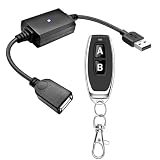
- 1.[Upgraded 3A Load & Plug-and-Play] Instantly add wireless control to your USB-powered devices. Built to handle a maximum load of 3A, this DC 5V inline switch securely powers your equipment. It features a straightforward plug-and-play USB design that requires no complicated wiring, soldering, or app installation. (Note: Designed for power supply only; does NOT support data transfer or sync)
- 2.[Pre-Paired Latching Relay System] Ready to use right out of the box with zero setup frustration. This RF power switch includes 1 receiver and 1 transmitter configured in a user-friendly latching mode: simply press button "A" to turn the relay ON, and press button "B" to turn it OFF. The intuitive one-click control is highly accessible for users of all ages, including children and the elderly
- 3.[164-Foot Range & Wall Penetrating Signal] Control your electronics from across the house without needing Wi-Fi or Bluetooth. Utilizing robust 433MHz radio frequency technology, the strong wireless signal easily penetrates walls, doors, and floors without line-of-sight limitations. It provides a stable, interference-free remote control range of up to 65-164 feet (20-50 meters) in open areas
- 4.[Smart Learning Code & Expandable Setup] Build and customize your own wireless home network. The receiver's built-in intelligent learning function supports pairing with additional remote controllers. Each receiver operates on an independent digital code, ensuring that multiple USB switches used in the same room or house will never cross-talk or interfere with one another
- 5.[Versatile Home & DIY Applications] The perfect remote power solution for a wide variety of 5V electronics. Safely and effortlessly control LED light strips, reading lamps, desk fans, small motors, routers, security cameras (power only), and custom DIY projects. Package includes: 1× USB receiver and 1× RF transmitter. (Please keep the remote out of reach of children under 14)
2. You have more control over deployment and data location
Self-hosting lets you choose and manage the systems that handle RustDesk’s ID and relay functions. That can matter when you want infrastructure under your own administrative control or need to decide where the deployment runs. It is a control and deployment choice, not proof that RustDesk is categorically more secure than TeamViewer: security still depends on how you configure, update, protect, and operate the environment.
3. Clients cover a broad range of platforms and connection options
RustDesk documents clients for Windows, macOS, Linux distributions, Android, iOS, and the web. Its overview describes peer-to-peer connections with end-to-end encryption based on NaCl, as well as software and hardware codec support. Platform capabilities are not identical: RustDesk’s client documentation says iOS devices cannot be controlled remotely. Check the client documentation for platform-specific behavior.
Rank #2

- 【Extend USB Up to 60m Over Ethernet】Transmit USB 2.0 signals over CAT5e/CAT6/CAT7 cable up to 60m (196ft), ideal for long-distance device connections in offices and AV setups.
- 【4-Port USB Hub for Multiple Devices】Connect up to four USB devices simultaneously, including webcams, keyboards, printers, storage drives, and more.
- 【Stable Power Supply for Reliable Performance】Includes a lockable 12V power adapter for the receiver, ensuring consistent performance for connected USB devices.
- 【High-Speed USB 2.0 (Up to 480Mbps)】Supports fast data transfer for USB peripherals such as flash drives, cameras, and other high-speed devices.
- 【Plug & Play – No Drivers Required】True hardware solution with no software installation—simply connect and start using instantly.
4. Windows sessions can start without installation or admin rights
RustDesk’s overview says its Windows client can be used without installation or administrative privileges; elevation can be provided locally or remotely when needed. This is useful for occasional support when you do not want to install an application on every Windows machine. Its client settings also let you adjust areas such as security permissions, server and network configuration, display, clipboard synchronization, audio, recording, and service control. The available options depend on platform and configuration.
What’s actually slowing this PC down?
Pick the symptom - the matching free tool is one click away.
What does TeamViewer offer for free?
TeamViewer is not subscription-only. Its free license is for personal, non-commercial use, so it is not a substitute for a commercial license when you provide business support. TeamViewer’s free feature overview lists a maximum of three managed devices and file transfer one file at a time. See TeamViewer’s free-license details for its current eligibility and limits.
Rank #3

- Notes: This remote switch button is specifically designed for use with AV Access iDock C20 (B0CP4PD3SM)and iDock D23(B0CRDQW4GT) models.
- Instant Device Switching at Your Fingertips: Switch between Input 1 and 2 with one button press. Smooth transitions keep your workflow seamless and stress-free.
- LED Indicators for Total Control: Know your active device instantly with clear LED status lights, ensuring easy, confident control.
- Compact Design, Big Convenience: This 40mm diameter button, just 9.5mm thick, fits any setup. Its 1.2m/3.94ft cable provides flexible, space-saving convenience.
- Seamless Compatibility with iDock Series: Designed to work flawlessly with the iDock C20 and D23 models, it enhances your docking experience by providing effortless control across your devices.
For paid use, TeamViewer’s plans differ by factors such as licensed users, channels or concurrent connections, managed-device allowances, and included features. Prices and availability can depend on country and plan. Its pricing FAQ describes annual subscriptions that automatically renew every 12 months unless terminated at least 28 days before the term ends; verify the current terms for your location and selected plan on TeamViewer’s pricing FAQ.
Which one should you choose?
| What matters most | RustDesk | TeamViewer |
|---|---|---|
| Personal, non-commercial remote access | Open-source client and Server OSS are available; self-hosting is optional. | Free license is available for personal, non-commercial use, with the limits TeamViewer specifies. |
| Commercial use | Server OSS offers a self-hosted route; organizations needing administrative controls may consider Server Pro. | Commercial plans are available; features and allowances vary by plan and country. |
| Who operates the service | You can manage your own server, but you take on deployment and maintenance. | TeamViewer provides a managed commercial service; paid Remote Access features depend on the selected plan. |
| Central administration | Server Pro documents a web console, API, OIDC/LDAP, 2FA, device management, access controls, logs, and multiple relays. | Paid plans offer plan-specific features and device allowances; check the current plan details. |
RustDesk is the stronger fit if you can handle server operations and value control over your ID and relay infrastructure. TeamViewer is more practical if you need a managed commercial service or plan-specific capabilities such as unattended access, Wake-on-LAN, black screen, or quick file transfer for assigned devices. TeamViewer lists these on its Remote Access page.
Rank #4

- This is a USB remote control power switch plug. Fast reaction speed and strong anti-interference capability. USB male input, USB female output
- Plug and play, responsive signal can penetrate walls Suitable for controlling a variety of USB-powered product power supplies
- Note: Only the power supply is controlled, not the data. Load recommendation: ≤5A, the product is switched off by default. How: The power supply is connected to a 5V power supply, the remote control is turned on, and the output is 5V. Working mode: Toggle / Self-locking mode: Press -> On; Press again -> Off
- Suitable for: optical modem, camera, set-top box, Night Light, monitor, router etc
- The receiver has a learning function, can be used to configure multiple sets of Universal and add a remote control.Shipped by default, each set is independently coded and does not control each other. Products will not interfere with each other.
Do you need to host your own RustDesk server?
No. Self-hosting is an option, not a prerequisite for using RustDesk. If you choose Server OSS, you need to provision and maintain suitable infrastructure, configure networking, and keep the deployment updated. RustDesk’s self-hosting documentation recommends checking the current port requirements for your use case; the common core ports it lists are TCP 21114–21119 and UDP 21116, but requirements can vary by deployment. Estimate bandwidth for your own usage rather than assuming a particular operating cost or performance level.
Quick wins for a faster PC:
Clear out junk files and repair common Windows errorsFree Scan →Fix the driver behind crashes, sound loss and screen glitchesFind Drivers →Quick Recap
Best Value

- Easy to Use:This is a receiver with USB male and female cable, which can be directly connected to the male connector of the power supply and the female connector of the device, eliminating the trouble of wiring
- Widely Applied: used in led light, Light strip, lamp beads, Light Fan, remote controller, wireless controller, fields, relay, light bulb, buzzer, circuit board et
- the RF remote control adopts RF technology, stable signal. Signal of the wireless RF switch can pass through walls, floors and doors, steadily control receiver from any place within a reliable distance, Max range is up to 20—30 meters with no obstacle
- the working mode : We send latched mode ( that is, Press the button "A" , the receiver relay is ON; Press the button "B", the receiver relay is OFF ). We have made transmitter and receiver working together and test it before ship it, when you get it don't need to do anything ,you can be used directly.
Product prices and availability are accurate as of the date/time indicated and are subject to change. Any price and availability information displayed on Amazon at the time of purchase will apply.

