
The Tool Desk
Outbyte PC Repair FREERepair Windows errors before they cause bigger problemsFix Now →Outbyte Driver Updater FREEFix the driver behind crashes, sound loss and screen glitchesFind Drivers →iTechGuides is reader-supported. When you buy through links on our site, we may earn an affiliate commission. As an Amazon Associate I earn from qualifying purchases. Learn more
RingCentral RingEX is a cloud business phone service that combines calling with tools such as messaging, meetings, fax, voicemail, and call routing. Its breadth can suit companies that want several communication tools under one account, but the right fit depends on plan-level features, user count, billing term, and any add-ons. RingCentral’s published product information describes the service; it does not establish independent call-quality testing or performance results.
What RingCentral RingEX includes
RingEX is a subscription-based business phone and communications service. RingCentral describes features including business calling, auto attendant, team messaging, online meetings, fax, conferencing, voicemail transcription, call recording, and integrations. Not every feature is included at every tier, and some capabilities are offered as add-ons. See RingCentral’s plans and pricing and its business phone app information for current packaging.
The RingCentral app can provide access to a business number on mobile devices, which may help employees make work calls without using a personal number. The app is free to download, but RingCentral says a plan is required to use its business phone service. Check supported devices and subscription terms before relying on a particular phone or workflow.
RingEX plans and U.S. pricing
The following U.S. per-user prices were listed on RingCentral’s plan comparison page captured October 7, 2026. Monthly billing and annual billing have different rates. These are vendor-listed prices, not a guaranteed quote; taxes, discounts, eligibility, feature packaging, and plan names may change. Confirm the current amount and terms with RingCentral before buying.
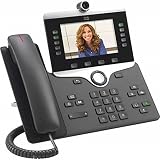
#1 Best Overall

- Item weight: 3.0 pounds
- Power source type: Corded Electric
| Plan | Monthly billing | Annual billing | Notable distinctions in the cited comparison |
|---|---|---|---|
| Essentials | $29.99 per user per month | $19.99 per user per month | Limited to 20 users; core calling, business SMS, voicemail-to-text, team messaging, and document sharing. |
| Standard | $34.99 per user per month | $24.99 per user per month | Unlimited users; adds broader international number availability, internet fax, audio conferencing, video meetings, quality-of-service reports, integrations, and 24/7 support. |
| Premium | $44.99 per user per month | $34.99 per user per month | Adds automatic call recording, single sign-on, multi-site administration, hot desking, advanced call handling, larger meetings, real-time analytics, CRM and industry integrations, and developer features. |
| Ultimate | $59.99 per user per month | $49.99 per user per month | Adds device status reporting and alerts and unlimited storage in the cited comparison. |
Prices and feature distinctions in this table are from RingCentral’s U.S. plan comparison captured October 7, 2026. Review the live comparison and any checkout or sales quote: the cost for your organization depends on user count, billing commitment, and whether you need separately priced add-ons.
How to choose a plan
- Start with the user count. Essentials is capped at 20 users in the cited comparison; Standard and higher are listed for unlimited users.
- List the communications features you actually need. Determine whether basic calling and messaging are enough, or whether the team needs video, fax, call recording, analytics, advanced call handling, or multi-site administration.
- Confirm which features are included. Higher-tier and add-on packaging can change. Verify the specific feature and any extra charge rather than assuming it is part of every RingEX subscription.
- Calculate the full commitment. Compare the intended user count and billing term, then account for add-ons and phone numbers in the quote.
- Check support and integrations. Confirm the applications your staff use are supported under the selected plan, and determine whether the listed support arrangement meets your needs.
- Decide how staff will connect. A team using desktop or mobile apps has different hardware needs from one that requires physical desk phones or a mix of endpoints.
Does RingEX work with desk phones and business apps?
Desk phones
RingCentral’s support hub includes desk phone setup and management resources, with manufacturer sections for Alcatel-Lucent, Avaya, Cisco, Mitel, Poly, Snom, Unify, and Yealink. This shows that desk-phone setup is covered in its documentation; it does not prove that every model from those manufacturers is compatible. Before purchasing hardware, check RingCentral’s current model-specific compatibility or provisioning instructions and confirm whether the phone is supported for your account and region.
Rank #2

- Yealink Optima HD voice technology
- Opus codec support, Dual USB ports, Dual-port Gigabit Ethernet & Dual firmware images
- The full keyboard and intelligent search support simplifies user input
- Support for multi-touch operations, offering unbelievable ease of use
Integrations
RingCentral promotes integrations with business applications and APIs, but its own pages report different totals: the plans page states more than 330 integrations across more than 200 companies, while the app page gives a different figure. Treat these as vendor descriptions rather than an independently verified catalog count. Identify the exact applications you need, then verify current availability, plan requirements, and any setup limitations in RingCentral’s integration catalog.
Crashes, No Sound, or Screen Glitches?
Random freezes, missing sound and display glitches usually trace back to one bad driver. Find and replace yours safely.Free scan · under a minuteWindows Errors? Fix Them Before They Spread
Repair common Windows errors and clear accumulated junk for a smoother, more stable PC - no reinstall needed.Free scan · no reinstallIs the free trial useful?
RingCentral’s plan page captured October 7, 2026, describes a 14-day free trial for eligible new subscribers, with up to 20 phone lines. It says the trial includes voice, auto attendant, online meetings, team messaging, fax, and conferencing; SMS is unavailable during trial use. The page also sets conditions for hardware used during a trial, including return timing after cancellation. These terms can change, so read the live offer and hardware terms before starting the trial.
Rank #3

- 3.5" TFT (320 x 240)
- 12 lines (programmable line keys)
- HD Voice up to 7KHz on all audio paths (Speaker, Handset, Headset)
- 2x Ethernet 10/100 or GigE
A trial can help a team check everyday call flows, meeting and messaging needs, and the administration experience before committing. It cannot establish how service will perform under every company’s network conditions or workload, and the SMS restriction means it will not test that workflow during the stated trial.
Independent reader supportYour contribution helps us test, update, and keep practical guides available for everyone.Who should consider RingCentral RingEX?
RingEX is worth evaluating if your business wants a cloud phone system alongside communications features such as messaging, meetings, fax, voicemail, or call routing, and you value having those functions managed through one provider. The breadth of the published feature set may also be relevant for organizations planning to add analytics, recording, integrations, or more advanced call handling at higher tiers.
Rank #4

- This Certified Refurbished product is tested and certified to look and work like new. The refurbishing process includes functionality testing, basic cleaning, inspection, and repackaging. The product ships with all relevant accessories, a minimum 90-day warranty, and may arrive in a generic box. Only select sellers who maintain a high performance bar may offer Certified Refurbished products on Amazon.com
It may be less straightforward for a small team that needs only basic calling, a business that requires a specific desk-phone model without verified compatibility, or an organization whose must-have integration or feature is available only on a higher plan or add-on. RingCentral’s marketing and support pages are not independent evidence of uptime, call quality, or user satisfaction; assess those needs against your own requirements and trial experience.
Quick Recap
What to verify before signing up
- Get current U.S. pricing for your user count. Confirm billing frequency, contract commitment, taxes, discounts, and any add-ons in the live checkout or a written quote.
- Map must-have features to the exact plan. Ask specifically about call recording, analytics, SSO, advanced routing, fax, meeting limits, and any add-on charges relevant to your workflow.
- Test the applications your team depends on. Verify the exact integration and required plan, rather than relying on a headline integration count.
- Check hardware model by model. Confirm phone compatibility and provisioning instructions before buying desk phones.
- Read the trial conditions. Check eligibility, the 20-line limit, unavailable SMS, and hardware return requirements on the live terms.
- Evaluate support expectations. RingCentral’s support hub provides documentation for areas including setup, billing, call handling, analytics, troubleshooting, text, fax, meetings, integrations, and device management. Confirm the support response and coverage terms that apply to your plan.
Product prices and availability are accurate as of the date/time indicated and are subject to change. Any price and availability information displayed on Amazon at the time of purchase will apply.

