
Do these 3 things before closing this tab:
1Fix the driver behind crashes, sound loss and screen glitches2Clear out junk files and repair common Windows errors3Scan for outdated or missing drivers - takes under a minuteiTechGuides is reader-supported. When you buy through links on our site, we may earn an affiliate commission. As an Amazon Associate I earn from qualifying purchases. Learn more
Short answer: Buy a certified Qi2 magnetic charger if you want broad phone and accessory compatibility. Buy Apple’s MagSafe Charger when you need Apple’s official magnetic behavior, a MagSafe-only accessory connection, or the highest speed available for a particular supported iPhone-and-adapter combination. Qi2 is not simply a rebranded MagSafe: it is an open Wireless Power Consortium (WPC) standard whose Magnetic Power Profile is based on MagSafe technology contributed by Apple.
What Qi2 and MagSafe actually are
Qi2 is an open, certified charging standard
Qi2 is the WPC’s magnetic wireless-charging standard. Qi version 2.0 launched in 2023 and added the Magnetic Power Profile (MPP), which uses magnets to align a phone and charger. Alignment keeps the charging coils centered, making attachment easier and reducing the positioning problem common with flat wireless charging pads.
The WPC also includes a non-magnetic Extended Power Profile in Qi2 v2.0. Therefore, “Qi2” does not automatically mean a magnetic phone connection; check whether a specific product uses the MPP and carries the appropriate certification mark.
The newer Qi2 25W specification is Qi v2.2.1, released in July 2025. It raises the capability above the original 15W Qi2 profile. A charger advertised as Qi2 25W should be certified for that version, and the phone must also support the higher profile before it can operate at that level.
#1 Best Overall

- 【Fast Charging 2-Pack for Phones & Earbuds】Supports 25W wireless fast charging with the magnetic compatibility standard. This 2-pack charger efficiently powers your smartphones and earbuds - perfect for home, office, or sharing with family
- 【Efficient Charging】Delivers 25W fast charging, charging up to 20 minutes faster than traditional 15W wireless chargers and reaching 50% in approximately 30 minutes on compatible phones. Magnetic Alignment ensures enhanced energy efficiency, reduced heat generation, and optimized power delivery for a safer, faster charge. For best performance, please use a compatible power adapter (30W+ recommended, not included)
- 【Wide Compatibility】Compatible with all magnetic enabled devices, including iPhone Duo/18/Air/17/16/15/14/13/12 series, AirPods models (wireless charging case required). No need to worry about compatibility, simply place your device on the pad for a secure connection. The maximum charging power is determined by your device
- 【Strong Magnetic Alignment】Built with N52 magnets for precise magnetic alignment and secure attachment. The auto snap-on design ensures perfect positioning every time, reducing energy loss and improving charging efficiency compared to standard wireless chargers. These ultra-strong magnets ensure your phone stays secure even during vibrations or sudden movements while providing fast charging capabilities without interruption
- 【Case Compatibility】This magnetic charging pad works best with bare devices or MagSafe-compatible cases (≤0.12 inch/3 mm thick). For optimal charging speed and alignment, please ensure your device is Mag-enabled or use a thin Mag-compatible case. Not compatible with metal cases, cases with metal plates or credit cards, or non-Mag cases
MagSafe is Apple’s magnetic ecosystem
MagSafe is Apple’s magnetic charging and accessory system for compatible iPhone models. Apple describes ordinary Qi as an open, universal WPC standard, while its own MagSafe system provides the magnetic alignment Apple specifies for faster, more efficient charging.
MagSafe is more than a power-transfer specification. The magnetic ring is built into supported phones and cases, and accessories can use that ring for stands, wallets, mounts and other attachments. Apple controls the charger designs and publishes model-specific performance conditions, including the required USB-C power adapter rating.
Is Qi2 the same as MagSafe?
No. The technologies overlap because Apple contributed MagSafe technology to the WPC, and Qi2’s MPP is based on that contribution. However, Qi2 products are certified under an open, multi-manufacturer standard, whereas MagSafe products belong to Apple’s branded ecosystem.
What’s actually slowing this PC down?
Pick the symptom - the matching free tool is one click away.
That distinction affects three practical questions:
- Certification: A genuine Qi2 mark means the product passed WPC testing for the claims covered by its certification. A magnetic ring or a “MagSafe-compatible” description alone is not proof of Qi2 certification.
- Phone support: A phone can support ordinary Qi without supporting magnets, Qi2 MPP or MagSafe. Confirm the exact model and case combination.
- Peak power: Qi2 and MagSafe have different revisions and device limits. A charger’s printed wattage is not a guarantee that every phone will draw that wattage.
For a compatible iPhone, a certified Qi2 magnetic charger and a MagSafe Charger can feel very similar: the phone snaps into alignment and remains centered. The choice comes down to verified speed, accessory requirements, adapter needs, price and how much cross-brand flexibility you want.
Rank #2

- Rapid 15W Wireless Charging: Unlock 15W high-speed charging with Qi2 certification and power your iPhone 16 Pro Max to 20% in just 19 minutes. For the best fast charging experience, we recommend using a 20W or higher output charger (not included).
- Total Peace of Mind: This Qi2 certified charger features our ActiveShield 2.0 safety system, offering unmatched protection by monitoring temperatures over 8 million times daily. Through intelligent temperature control detection and safety protection, it effectively improves charging efficiency and safeguards the health of your phone's battery.
- Extra-Long Cable: Enjoy the freedom of a 5 ft cable that provides extended reach for a more convenient and flexible charging experience. Perfect for using your phone comfortably at home or at work, whether you're browsing social media, checking emails, or on a video call, without any hassle from short cables.
- Compact and Portable: Take your charging anywhere with its ultra-compact design, complemented by a handy cable tie for organized storage.
- What You Get: Anker Zolo Wireless Charger (Magnetic, Pad) , welcome guide, 24-month warranty, and our friendly customer service.
Qi2 versus MagSafe speed and power
The figures below are capabilities published by the WPC or Apple, not a promise that every charging session will reach the maximum. Temperature, battery level, software, adapter capacity, case material and the phone’s own charging limits can reduce power.
| Configuration | Published capability | Conditions and qualification |
|---|---|---|
| Original Qi2 MPP | 15W | Original Qi2 profile launched with Qi v2.0 in 2023. |
| Qi2 25W (Qi v2.2.1) | Up to 25W | Released July 2025; both phone and charger must support Qi2 25W. The WPC says this is nearly 70% more power than original Qi2. |
| Qi2 25W charging claim | 0–50% in about 30 minutes | WPC capability statement for Qi2 25W, not an independently verified result for every phone or charger. |
| MagSafe on specified newer iPhones | Up to 25W | Requires the MagSafe Charger identified by Apple’s supported part numbers and a USB-C adapter rated at 30W or more. |
| MagSafe on iPhone 16 and iPhone 16 Pro | 22.5W peak | Apple’s stated peak for the specified charger-and-30W-or-greater-adapter configuration. |
| MagSafe on iPhone 15 and earlier supported models | Up to 15W | Uses the earlier MagSafe Charger part number with a USB-C adapter rated at 20W or more. |
| MagSafe on iPhone 13 mini and iPhone 12 mini | Up to 12W | Apple’s stated limit under its published conditions. |
| Ordinary Qi charging on compatible iPhones | Commonly up to 7.5W | Non-magnetic Qi charging; exact behavior varies by phone and charger. |
Apple’s 25W MagSafe figure applies only to the specified newer iPhone models, charger revision and adapter combination. Likewise, a Qi2 25W label does not make an older iPhone charge at 25W. If a phone, charger or software does not support Qi2 25W, the system negotiates a lower supported level.
Quick wins for a faster PC:
Scan for outdated or missing drivers - takes under a minuteDriver Scan →Clear out junk files and repair common Windows errorsFree Scan →Fix the driver behind crashes, sound loss and screen glitchesFind Drivers →Compatibility by phone type
iPhone 12, 13, 14, 15 and 16 families
These iPhone generations introduced or continue Apple’s magnetic charging ecosystem. A certified Qi2 magnetic charger will usually provide magnetic alignment and a wide choice of third-party accessories. It is the practical default when you want one charger style that is not tied to Apple’s accessory catalog.
Choose Apple’s MagSafe Charger instead if you require an Apple-designated charger, a MagSafe-only accessory arrangement, or the current model-specific peak speed described in Apple’s support specifications. Check the charger revision and adapter requirement before ordering; different MagSafe generations do not all have the same ceiling.
iPhone 8 through iPhone 11 and other non-magnetic Qi phones
These phones can use compatible Qi charging, but they do not automatically gain magnetic attachment by being placed on a Qi2 or MagSafe puck. A magnetic case or ring may add physical alignment, yet it does not change the phone’s internal charging protocol or guarantee MagSafe-speed charging.
Rank #3
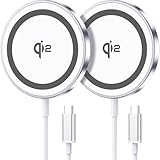
- 💎【𝐐𝐈𝟐 𝐂𝐄𝐑𝐓𝐈𝐅𝐈𝐄𝐃 𝟏𝟓𝐖 𝐅𝐀𝐒𝐓 𝐂𝐇𝐀𝐑𝐆𝐈𝐍𝐆】The Qi2 certified magnetic charger for iphone delivers up to 15W fast charging—2x faster than standard 7.5W chargers. It charges to 22% in just 20 minutes and fully charges in 2 hours, so your phone stays powered and ready for use. ⚠️Note: Please use a 20W or higher USB-C power adapter for optimal performance (⚠️adapter not included).
- 💎【𝐒𝐓𝐑𝐎𝐍𝐆 𝐌𝐀𝐆𝐍𝐄𝐓𝐈𝐂 𝐀𝐋𝐈𝐆𝐍𝐌𝐄𝐍𝐓】This Qi2 for mag safe. charger utilizes powerful magnetic technology to automatically align and secure your phone in the optimal charging position—at night, simply place your phone down for effortless charging. The for iphone charger fast charging provides strong magnetic force that keeps your device securely aligned, ensuring stable charging without shifting—even during calls, texts, or vibrations.
- 💎【𝐖𝐈𝐃𝐄 𝐂𝐎𝐌𝐏𝐀𝐓𝐈𝐁𝐈𝐋𝐈𝐓𝐘】The magnetic phone charger is compatible with iPhone 17/17 Pro/17 Pro Max/Air, 16/16 Plus/16 Pro/16 Pro Max, 15/15 Plus/15 Pro/15 Pro Max, 14/14 Plus/14 Pro/14 Pro Max, 13/13 Mini/13 Pro/13 Pro Max, and 12/12 Mini/12 Pro/12 Pro Max, for AirPods 4 3 2 Pro, for Pixel 10/10 Pro/ 10 Pro XL(charges up to 41% in 37 min). ⚠️Note: For best results, use a case that is compatible with mag safe.
- 💎【𝟓𝐅𝐓 𝐄𝐗𝐓𝐑𝐀-𝐋𝐎𝐍𝐆 𝐂𝐀𝐁𝐋𝐄】This for iphone wireless charger fast charging with cable includes a 5-foot (1.5-meter) cord that combines flexibility with durability. The for iphone charging pad extended cable lets you charge freely at your desk, bedside or sofa.
- 💎【𝟐 𝐏𝐀𝐂𝐊 𝐕𝐀𝐋𝐔𝐄 & 𝐏𝐎𝐑𝐓𝐀𝐁𝐋𝐄 𝐃𝐄𝐒𝐈𝐆𝐍】The wireless phone charger comes as a 2-pack for diverse charging needs. Keep one at home, one at the office—no more moving qi2 for mag safe charger around. Makes a great gift for family and friends too. The compatible with iphone magnetic charger features a slim, lightweight design that fits easily in pockets or bags, perfect for travel and daily use. Charge your devices anytime, anywhere.
For these devices, verify the phone maker’s wireless-charging specification and treat magnetic claims as a case-and-accessory feature rather than proof of Qi2 support. A MagSafe Charger can charge a non-MagSafe Qi-compatible iPhone, but Apple says power and charge time differ from the supported MagSafe configurations.
Qi2 Android phones
Qi2 support for Android is expanding rather than universal. The WPC reported that Qi2 Android phones began appearing in late 2024 and described “Qi2 Ready” phone-and-case combinations intended to provide the complete magnetic experience. Before buying, check the exact regional model number and whether the manufacturer lists Qi2 MPP, Qi2 25W or only ordinary Qi.
A Qi2 Ready designation can mean that the phone requires a particular certified case to provide the magnetic ring. Without that case, the phone may still charge but lack reliable magnetic attachment. Do not infer support from a circular magnet pattern in a case or from a retailer’s generic “wireless charging” label.
Which charger should you buy?
Choose a certified Qi2 magnetic wireless charger when:
- You want one open standard that can work across compatible iPhone and Android devices.
- You value magnetic alignment but do not need Apple’s branded accessory ecosystem.
- You want to choose among chargers with different stands, cable lengths, mounting designs or multi-device layouts.
- Your phone supports original Qi2 at 15W, or you have confirmed that both phone and charger support Qi2 25W.
- You are replacing chargers as your household’s phones change brands.
Look for the official Qi2 certification mark, not just “magnetic wireless charger” wording. WPC says certified products undergo independent laboratory testing for safety and interoperability. Certification does not guarantee a particular cable, adapter, thermal design or stand angle, so inspect those details separately.
Choose Apple’s MagSafe Charger when:
- You need Apple’s official magnetic charging behavior or an accessory explicitly designed for MagSafe.
- Your specific iPhone is eligible for Apple’s highest published MagSafe speed and you are willing to use the required charger revision and USB-C adapter.
- You want Apple’s documented compatibility path rather than comparing several third-party implementations.
- You already own accessories that depend on the MagSafe designation.
Apple’s faster configurations may require a separate 20W-or-greater or 30W-or-greater USB-C power adapter, depending on the iPhone and charger part number. Confirm what is included in the box; the adapter is not automatically bundled with every charger.
PC Slower Than It Used to Be?
A free scan shows the junk files, broken settings and background clutter dragging Windows down - then fixes them in one click.Free scan · Windows 10 & 11Crashes, No Sound, or Screen Glitches?
Random freezes, missing sound and display glitches usually trace back to one bad driver. Find and replace yours safely.Free scan · under a minuteRank #4

- 15W Fast Charge for the Morning Rush: Save up to 45 minutes with the INIU Wireless Charger. Powered by AirFuel tech, it’s ideal for commuters needing a rapid power boost before leaving, eliminating the frustration of slow charging.
- Sleep-Friendly for Nightstands: The self-adaptive LED dims in the dark and brightens by day. Perfect for light sleepers, it keeps you informed of your charging status without harsh glare disturbing your rest.
- Dual Coils for Desk & Entertainment: A wider charging area means no more finding the "sweet spot." A must-have office desk setup, letting you FaceTime in portrait or watch videos in landscape without losing power.
- NTC Temp°Guard for Battery Health: Smart, real-time temperature control prevents overheating. Heavy users can safely leave phones charging overnight, solving the pain of heat-induced battery damage.
- Perfect for Every Household: Auto-adapts up to 15W for compatible iOS and Android phones, making it the ideal shared wireless charger for families and guests.
When neither label answers the question
If a listing says “15W,” “25W,” or “MagSafe compatible” without identifying certification, phone support and adapter conditions, treat the claim as incomplete. The useful comparison is the entire configuration: phone model, case, charger revision, USB-C adapter, cable and software—not the largest number printed on the package.
What to check before ordering
- Identify the exact phone model. Include the regional or carrier variant when the manufacturer lists different specifications.
- Check the phone’s charging profile. Confirm ordinary Qi, Qi2 MPP, Qi2 25W or MagSafe support; these are not interchangeable labels.
- Verify certification. Look for the WPC Qi2 or Qi2 25W certification mark, or Apple’s MagSafe designation for an Apple charger.
- Read the adapter requirement. For Apple’s published MagSafe tiers, this may be a 20W-or-greater or 30W-or-greater USB-C adapter. A lower-rated adapter can limit charging.
- Check the case. Thick, metal or poorly aligned cases can slow or stop charging. A case must have the correct magnetic profile for dependable attachment.
- Check what the package contains. Compare adapter inclusion, cable length, stand hardware, mounting parts and warranty.
- Consider heat management. A compact puck, vertical stand and multi-device pad can behave differently under sustained load. Look for the maker’s operating guidance rather than assuming two chargers with the same wattage run identically.
How to set up a Qi2 or MagSafe charger
Qi2 setup
- Connect the charger to the manufacturer-recommended USB-C power adapter. If it is a Qi2 25W model, use an adapter and cable capable of supplying the charger’s stated input.
- Place the charger on a hard, stable surface with its cable free of sharp bends.
- Attach the phone or Qi2-compatible case so the magnetic rings meet. You should feel the phone center itself rather than balancing it by hand.
- Check the phone’s charging indicator and leave the display on briefly to confirm that charging begins.
- If the phone does not attach, remove the case and test again. This separates a case problem from a phone or charger problem.
MagSafe setup
- Confirm that the charger’s part number matches the speed tier Apple lists for your iPhone.
- Connect it to the required USB-C adapter—20W or more for the earlier 15W configuration, or 30W or more for the specified newer 25W configuration.
- Place the phone or MagSafe case against the magnetic face. The animation or charging indicator should appear when alignment is correct.
- Keep cards, passports, badges and key fobs away from the space between the phone and charger.
- If charging is slower than expected, check the adapter rating, case thickness and phone temperature before replacing the charger.
Cases, cards and accessories
A case is part of the charging system. A thin, non-metal case may permit wireless charging but weaken magnetic hold. A Qi2 Ready or MagSafe case adds the alignment ring, but the case’s label does not upgrade a phone that lacks the corresponding charging protocol.
Metal plates, kickstand inserts and wallets can interfere with the charging field. Apple specifically warns against placing cards, passports, badges or key fobs between the phone and charger. Remove them before charging, especially when diagnosing intermittent connections.
Qi2 magnetic accessories are an emerging category. A Qi2 car charger, for example, still depends on the phone’s magnetic support, the case, the mount’s retention strength and the vehicle’s power connection. Verify each component rather than assuming that any magnetic mount is Qi2-certified.
Safety, heat and charging behavior
Wireless charging power is negotiated continuously. The phone may reduce power as the battery fills or when temperatures rise. That behavior is normal and means a 25W-rated charger will not draw 25W throughout an entire charge.
Best Value

- 15W MagSafe-Compatible Charging: Experience fast charging with a 15W wireless output that matches the performance of MagSafe technology.
- Hands-Free Charging: The built-in stand ensures you can watch, work, or play while your device charges, all hands-free.
- 360° Rotation with Adjustable Charging Surface: The wireless charger features a patented 360° rotating mechanism for seamless orientation changes and an adjustable tilt for the perfect viewing angle.
- Reliable Charging Safety: ActiveShield 2.0 tracks temperature up to 3,000,000 times per day, while built-in protections help guard against voltage spikes, overcurrent, and overheating.
- What You Get: Anker MagGo Wireless Charger (Stand), welcome guide, 24-month warranty, and our friendly customer service.
Keep the charging surfaces clean and unobstructed. Do not place loose metal objects between the phone and pad, and follow the charger maker’s ventilation instructions. If the phone becomes unusually hot, charging repeatedly stops, or the cable or adapter is damaged, disconnect the system and troubleshoot the power source before using it again.
There is no independent head-to-head study establishing that Qi2 is always cheaper, cooler or better for battery longevity than MagSafe. Those outcomes depend on the specific phone, charger design, adapter, ambient temperature and charging pattern.
Troubleshooting
The phone charges but does not stay attached
- Confirm that the phone itself has a magnetic profile or that the case provides one.
- Remove a thick, metal or multi-layer case and test again.
- Check that the charger is a magnetic Qi2 or MagSafe model rather than a flat Qi pad.
The phone attaches but charging is slow
- Check whether the phone supports the charger’s advertised profile.
- Verify the USB-C adapter rating and cable.
- Remove cards, metal accessories and the case.
- Let a hot phone cool and retry; thermal management can lower power.
There is no charging indicator
- Try a known-good wall outlet and the charger’s original cable, if supplied.
- Inspect the USB-C connectors for debris or damage.
- Restart the phone and install any available system update.
- Test the charger without the case and with another compatible phone, if available.
- If only one phone fails, consult that phone maker’s wireless-charging specifications; if every device fails, suspect the adapter, cable or charger.
Bottom line for common buying decisions
For most owners of a compatible iPhone or a Qi2 Android phone, a certified Qi2 magnetic wireless charger is the balanced choice: it provides magnetic alignment, follows an open standard and leaves room to change phone brands. Select a Qi2 25W model only after confirming 25W support on both sides of the connection.
The Tool Desk
Outbyte PC Repair FREEClear out junk files and repair common Windows errorsFree Scan →Outbyte Driver Updater FREEFix the driver behind crashes, sound loss and screen glitchesFind Drivers →Choose Apple’s MagSafe Charger when official Apple integration, MagSafe-specific accessories or the highest model-specific MagSafe speed matters more than cross-brand flexibility. Match the charger part number and USB-C adapter rating to the exact iPhone; otherwise, the headline wattage will not describe your real charging result.
Quick Recap
Product prices and availability are accurate as of the date/time indicated and are subject to change. Any price and availability information displayed on Amazon at the time of purchase will apply.

