
The Tool Desk
Outbyte PC Repair FREERepair Windows errors before they cause bigger problemsFix Now →Outbyte Driver Updater FREEFix the driver behind crashes, sound loss and screen glitchesFind Drivers →iTechGuides is reader-supported. When you buy through links on our site, we may earn an affiliate commission. As an Amazon Associate I earn from qualifying purchases. Learn more
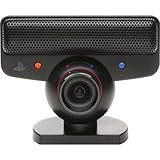
The red and blue marks on a PlayStation Eye camera indicate two lens-angle settings: red is standard view and blue is wide-angle view. They are not colored filters or separate lenses. Turn the lens-angle selector until its marker lines up with the setting you want.
What do the red and blue marks mean?
Sony’s PlayStation Eye Instruction Manual identifies the marks as indicators for the camera’s lens-angle selector. Align the marker with red for “standard view,” or with blue for “wide angle view.” The color tells you which framing position is selected; it does not mean the camera has switched to a colored filter or infrared mode.
| # | Preview | Product | Price | |
|---|---|---|---|---|
| 1 |

|
Sony PlayStation 3 PS3 Eye Camera (Renewed) | $33.99 | Buy on Amazon |
| 2 |
|
PlayStation Eye | $29.99 | Buy on Amazon |
| 3 |

|
Sony PlayStation Eye Camera (Bulk Packaging) | $71.66 | Buy on Amazon |
| 4 |
|
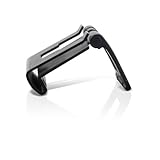
OSTENT Adjustable TV Clip Mount Holder Dock Stand for Sony PS3 Move Eye Camera | $8.99 | Buy on Amazon |
| 5 |

|
Playstation Eye Camera | $107.05 | Buy on Amazon |
The manual gives no numerical field-of-view measurements for these positions. Sony’s 2007 product description characterizes the lens as fixed-focus with normal and wide settings, but does not provide an angle measurement either. It is safest to describe the choices using Sony’s terms—standard and wide-angle—rather than assign them a specific number of degrees.
Quick wins for a faster PC:
Clear out junk files and repair common Windows errorsFree Scan →Scan for outdated or missing drivers - takes under a minuteDriver Scan →Repair Windows errors before they cause bigger problemsFix Now →How to change the PlayStation Eye’s view
- Locate the lens-angle selector and its marker.
- For standard framing, turn the selector left until the marker lines up with the red indicator.
- For wider framing, turn the selector right until the marker lines up with the blue indicator.
Choose standard view when the narrower framing suits the shot; choose wide-angle when you need more of the play area in view. This is a practical choice based on the two settings, not a claim that either position improves image quality.
#1 Best Overall
- This Certified Refurbished product is tested and certified to look and work like new. The refurbishing process includes functionality testing, basic cleaning, inspection, and repackaging. The product ships with all relevant accessories, a minimum 90-day warranty, and may arrive in a generic box. Only select sellers who maintain a high performance bar may offer Certified Refurbished products on Amazon.com
- For Ps3
Why does Sony recommend blue for PlayStation Move?
Sony’s PlayStation Move: The Ultimate FAQ tells users setting up Move to select wide-angle mode by turning the lens to the blue dot. That makes blue the recommended camera view for that setup—not a special tracking mode. The PlayStation Eye is required to use the Move controller on PS3, and the camera detects the controller’s illuminated sphere to determine its position, as Sony explains in its PlayStation Move announcement.
What the PlayStation Eye camera was designed to do
Sony introduced the PlayStation Eye as a USB camera for PS3 video and voice chat and camera-enabled interactive entertainment. In its 2007 product explanation, Sony described low-light operation, a fixed-focus lens with normal and wide settings, and a four-microphone array for online audiovisual and in-game voice chat. Sony also listed video modes of 640 × 480 at 60 frames per second and 320 × 240 at 120 frames per second; these are manufacturer-stated capabilities, not independent performance measurements. Sony later used the camera with PlayStation Move for controller-position tracking.
Rank #2
- Free EyeCreate download editing software, which allows users to save, edit and add cool visual effects to photos, video and audio clips
- Camera and audio reception making it an integral part of the PlayStation Move motion control system
- A sophisticated microphone with the ability to reduce background noise and focus on spoken word for smoother, more accurate speech recognition
- Two fast frame rates for improved tracking, responsiveness and smoothness
- Two position zoom lens for close-up and full body options and 4 channel audio input - 16-bits/channel, 48kHz, SNR 90db
Are the red and blue marks related to infrared modifications?
No. The factory marks identify the standard and wide-angle positions. Infrared use is a separate hobbyist or research modification that can involve changing the camera’s optical filtering. For example, Dynamicland’s 2016 infrared-camera project email discusses an 850 nm band-pass filter, while a university-hosted academic document describes camera modification for infrared input. These examples do not make infrared a factory function of the red or blue setting, and modifications are not manufacturer-approved. Internal construction may also vary by camera revision.
Quick Recap
Best Value
Rank #4
- Clip holds your PS3 eye camera securely in place on flat-screen TVs.
- Wide range of adjustable settings adjustable to fit variance among monitor profiles.
- It is also adjustable to fit variance among monitor profiles.
- Material: Plastic+Metal
- Compatible with: Sony PS3 MOVE
Rank #3
- PlayStation Eye PS3 USB Camera - Black
How to clean the camera safely
- Disconnect the camera before cleaning.
- Wipe its housing with a soft, dry cloth.
- Use air pressure to remove dust from the lens.
- Do not disassemble or modify the camera; Sony’s manual cautions against it.
Product prices and availability are accurate as of the date/time indicated and are subject to change. Any price and availability information displayed on Amazon at the time of purchase will apply.

