
SVGSketch
SVGSketch: A focused SVG editor with animation, code generation, plugins, and CLI support. Ranked #16 of 51 in Vector Graphics Software by our editors (6.9/10); pricing: Free plan · 14-day trial; best for SVG animation and developer workflows.
At a glance
- Editor score6.9 / 10
- PricingFree plan · 14-day trial
- Best forSVG animation and developer workflows
- Free planYes
- Paid from$9/mo
- SVG exportYes
- Facts checked20 Sep 2026
Where it wins
- Advanced SVG path editing and Boolean operations
- Timeline animation with keyframes, motion paths, and morphing
- React, Vue, D3.js, CSS, SDK, and CLI workflows
Where it doesn't
- Browser-only, with no desktop app
- Free plan includes limited cloud storage
- Advanced exports and code generation require Pro
Our verdict on SVGSketch
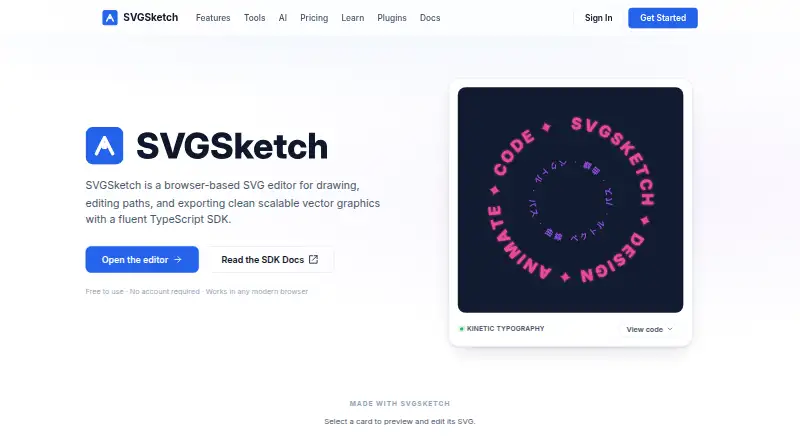
SVGSketch is a browser-based vector graphics editor for people who create, edit, animate, and export scalable graphics. Its core toolkit covers SVG path editing, node and handle controls, Boolean operations, typography, reusable components, grids, image-to-SVG vectorization, and multi-format export. It suits designers working directly with SVG as well as developers who need generated code or programmatic document workflows.
The pricing structure keeps core editing accessible. The Free plan costs $0 forever and includes the core SVG editor, SVG and PNG export, Boolean operations, path editing, and limited cloud storage. Pro costs $9 per month and includes a 14-day free trial. The paid tier adds AI vector generation, animation export, PDF, GIF, video, and batch ZIP export, along with code generation, plugins, expanded cloud storage, and real-time collaboration. This makes the free plan appropriate for basic SVG creation, while Pro is the practical choice for animation, broader exports, and developer-oriented workflows.
SVGSketch’s standout strength is its SVG-specific depth. Timeline-based animation includes keyframes, motion paths, and morphing, while plugins support charts, maps, math, barcodes, and other workflows. React, Vue, D3.js, and CSS code generation connect vector work to front-end projects, and the TypeScript SDK and CLI support programmatic creation and rendering. The trade-off is its browser-only delivery and lack of a desktop app. Choose SVGSketch for SVG animation, web-oriented design, and code-connected production; choose another tool if a desktop application is essential.
Your product? Our editors can test SVGSketch in depth and publish a review, labelled as paid · from $99/mo →
SVGSketch pricing
All 2 SVGSketch plans and prices →
SVGSketch fact sheet
| Free plan | Yes |
|---|---|
| Paid from | $9/mo |
| SVG export | Yes |
| Browser app | Yes |
| Desktop app | No |
| Real-time collaboration | Yes |
| PDF export | Yes |
| Animation tools | Yes |
| Maximum artboards | Not verified |
| Free trial | 14 days |
| Deployment | Cloud |
| Platforms | Web |
| Integrations | 4 integrations: Google, GitHub, Microsoft, Discord |
| Pricing | Free plan · 14-day trial (source) |
| Website | svgsketch.com |
| Facts checked | 20 Sep 2026 |
SVGSketch integrations
SVGSketch lists 4 integrations on its own site.
- GitHub
- Microsoft
- Discord
Alternatives to SVGSketch
- Adobe IllustratorA deep vector design suite for teams that need advanced artwork and typography tools.9.4
- AffinityA broad free desktop suite for designers who need vector, pixel and layout tools together.9.2
- InkscapeA capable no-cost SVG editor for designers who want desktop flexibility.9.0



See all SVGSketch alternatives →
Used SVGSketch? Be the first to review it
The editor score above is our own research. What this page doesn't have yet is a reader's view — what you used SVGSketch for, what worked and what didn't. No stars are seeded and no review is paid for; an editor reads every one before it appears.
Write a reviewTwo minutes · verified accounts only · read by an editor before it appears
Featured on iTechGuides

SVGSketch is listed in our Vector Graphics Software directory. Add the badge to your site — it links back to this page.
<a href="https://www.itechguides.com/products/svgsketch/"><img src="https://www.itechguides.com/best/badge/svgsketch.svg" alt="Featured on iTechGuides" width="230" height="46"></a>
Guides on vector graphics software
- Top 5 Best Vector Graphics Software in 2022: A Use-Case-Based GuideAug 2026
- Top 6 Vector Graphics Software in 2026Aug 2026
Reviewed by iTechGuides Editors · Editorial team · Updated Oct 2026
Advertiser disclosure: iTechGuides is reader-supported. Vendors can pay for top positions in our rankings and for a place on other products' pages, and we may earn a commission when you click some links. How we rank.
Last updated · How we research and update