
What’s actually slowing this PC down?
Pick the symptom - the matching free tool is one click away.
iTechGuides is reader-supported. When you buy through links on our site, we may earn an affiliate commission. As an Amazon Associate I earn from qualifying purchases. Learn more
For a local workflow that converts both PDF and DOCX files to Markdown without requiring an LLM, start with Docling. Its documented command-line interface accepts both formats, can process a directory in batch, and exports Markdown; its format guide lists table support for both PDF and Word documents. Scanned PDFs need OCR, and converted tables still need checking against the originals.
Use Docling for a single PDF-and-DOCX workflow
Docling is the clearest documented starting point when one local tool needs to handle both input formats. Its v2 command-line interface writes Markdown by default for a single file:

docling myfile.pdfFor batch conversion of PDFs and Word documents, the documentation gives this example:
Do these 3 things before closing this tab:
1Fix the driver behind crashes, sound loss and screen glitches2Clear out junk files and repair common Windows errors3Scan for outdated or missing drivers - takes under a minutedocling ./input/dir --from pdf --from docx --to md --to json --output ./scratchThe command asks Docling to read PDF and DOCX files from the input directory and write Markdown and JSON outputs to the specified output directory. The v2 documentation also describes a structured DoclingDocument API, including reading-order iteration and export_to_markdown(), for Python workflows that need more control than the CLI offers. See the Docling v2 documentation.
#1 Best Overall

- AUDIO ALL-ROUNDER – convert your audio or video files into almost any audio format - edit, trim, merge, adjust sample and bit rate, extract audio from videos
- Supported input formats - MP3, MP2, AAC, AC3, WAV, WMA, M4A, RM, RAM, OGG, AU, AIF, AIFF, PG, MPEG, MPEG 2, MP4, M4V, MJPG, MJPEG, HD TS, HD MTS, HD M2TS, HD MPG, HD MPEG, HD MP4, HD WMV, QuickTime HD MOV and others
- Supported output formats - AAC, AC3, AIFF, AMR, AU, FLAC, M4A, MKA, MP2, MP3, OGG, WAV, WMA
- EASY TO INSTALL AND USE - user-friendly and intuitive interface, free tech support whenever you need assistance
- compatible with Windows 10, 8 and 7 (32 and 64-bit versions) - single user license
What to expect from tables and reading order
Docling’s supported-formats guide describes PDF handling as including layout, reading order, and table understanding. For DOCX, it lists headings, lists, and tables. These capabilities make it a reasonable first choice for documents containing structured content, but they do not guarantee that every table will convert perfectly. The format guide says it was checked against Docling v2.129.0 on 2026-09-22; consult the current documentation for changes after that date. See Docling’s supported-formats guide.
Choose a PDF-focused alternative when you do not need DOCX
PyMuPDF4LLM is a documented option for converting PDFs to Markdown with detected tables integrated among the surrounding text. Its README shows this Python example:
Rank #2
![Roxio Easy VHS to DVD 3 Plus | VHS, Hi8, V8 Video to DVD or Digital Converter | Amazon Exclusive 2 Bonus DVDs [Windows Disc]](https://m.media-amazon.com/images/I/51UBEF6uzZL._SL160_.jpg)
- Convert your VHS tapes to DVD or digital to enhance and preserve your home movies
- Capture analog video directly from your camcorder or VCR and burn to DVD or convert to popular digital formats to share freely across devices
- Trim video, make quick edits, enhance color, add transitions, reduce noise and stabilize old footage to breathe new life into your old videos
- Complete your video experience by selecting from creative, customizable DVD menu templates, or creating personalized disc labels
- Get 2 DVDs for your first projects: An Amazon exclusive extra
import pymupdf4llm

md_text = pymupdf4llm.to_markdown("report.pdf")
PyMuPDF also documents finding and extracting PDF tables, with options to export them as Markdown or through pandas. These are useful paths when PDF conversion is the main requirement, but the reviewed documentation does not establish an equivalent no-license DOCX workflow. Its README’s DOCX Markdown example imports pymupdf.pro and unlocks it with a license key, so it should not be treated as evidence of a free, no-license route for Word files. See the PyMuPDF README and PyMuPDF page documentation.
Quick wins for a faster PC:
Clear out junk files and repair common Windows errorsFree Scan →Fix the driver behind crashes, sound loss and screen glitchesFind Drivers →Check whether a PDF needs OCR
A PDF with selectable text can usually be processed as text; an image-only scan needs OCR before its text can appear in Markdown. PyMuPDF’s README notes that ordinary text extraction on scanned pages returns nothing without OCR, and that OCR can also help with troublesome character mappings. Docling lists OCR as optional for PDFs and advises full-page OCR for scans; its DOCX format entry does not list OCR. Check a PDF by trying to select or copy a line of text: if the page behaves like a picture, use an OCR-capable PDF workflow and inspect the resulting text for recognition errors.
Validate the output on representative documents
Markdown can represent table content, but the conversion may not preserve every visual detail or relationship in the original. Before relying on a workflow, convert a small set of your own documents and compare the output with the source.
- Check that table headers remain attached to the right columns and that rows have not shifted or merged.
- Inspect multi-column pages, headings, lists, and reading order to confirm the Markdown follows the intended sequence.
- For scanned PDFs, check OCR output for missed words, incorrect characters, and number or punctuation errors.
- Confirm that the output format and destination are suitable for the next step in your process.
The official documentation reviewed here does not provide a shared-corpus accuracy or speed benchmark for Docling and PyMuPDF4LLM, and it does not establish perfect fidelity for either. Which tool works best depends on your files and the checks your workflow requires.
Rank #4
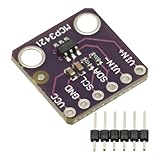
- MCP3421 I2C SOT23-6 18-Bit Analog-to-Digital Converter A/D Converter ADC Evaluation Module Board For PICkit Serial Analyzer Module
- The MCP3421 is a single channel low-noise, high accuracy A/D converter with differential inputs and up to 18 bits of resolution in a small SOT-23-6 package
- The on-board precision 2.048V reference voltage enables an input range of ±2.048V differentially
- The device uses a two-wire I2C compatible serial interface and operates from a single 2.7V to 5.5V power supply.
What “without an LLM” means here
The documented commands and APIs produce Markdown without requiring you to send a document to an LLM as part of the conversion workflow. That does not establish that every internal component is model-free: Docling’s technical report describes specialized models for layout analysis and table structure recognition, but does not establish that the conversion path calls a large language model. If avoiding any model-based component is a requirement, check the selected tool’s current implementation and configuration rather than equating “no LLM” with “no models.” See the Docling technical report.
Windows Errors? Fix Them Before They Spread
Repair common Windows errors and clear accumulated junk for a smoother, more stable PC - no reinstall needed.Free scan · no reinstallCrashes, No Sound, or Screen Glitches?
Random freezes, missing sound and display glitches usually trace back to one bad driver. Find and replace yours safely.Free scan · under a minuteQuick Recap
Product prices and availability are accurate as of the date/time indicated and are subject to change. Any price and availability information displayed on Amazon at the time of purchase will apply.

