
iTechGuides is reader-supported. When you buy through links on our site, we may earn an affiliate commission. As an Amazon Associate I earn from qualifying purchases. Learn more
OwlLayer AI is an open-source TypeScript SDK that lets an AI agent request actions an application explicitly makes available, rather than giving the agent unrestricted control of the page. The application supplies the relevant interface context and runs each action through its own handler, keeping its components and business rules in charge.
What OwlLayer AI is—and what it is not
OwlLayer AI calls its developer integration an “Agentic UI SDK” and its execution layer the “OwlLayer AI Runtime.” Its premise is to connect an agent to selected parts of an existing application. Instead of relying on a chat window that cannot act, or generating a replacement interface, a developer can expose named capabilities tied to the product’s own UI and workflows. Those are project descriptions of its approach, not proof that every other agent system works the same way.
The central unit is a capability declared by the application. For example, a shopping interface might expose an action to add the currently displayed product to a cart. The declaration can include a typed input schema and a risk level, while an application-owned handler performs the operation. The agent requests the named action; it does not improvise arbitrary clicks or perform the side effect itself.
The Tool Desk
Outbyte PC Repair FREERepair Windows errors before they cause bigger problemsFix Now →Outbyte Driver Updater FREEScan for outdated or missing drivers - takes under a minuteDriver Scan →Capabilities follow the lifecycle of the UI that declares them. A capability can be available while its component is mounted and removed when the component disappears. That design is meant to keep the agent’s action choices aligned with the current screen, but developers still need to verify lifecycle behavior in their integration.
#1 Best Overall

- AI Voice Typing & Translation: No keyboard needed, just speak, and your words are instantly transcribed. The BM4195 allows you to perform various operations through simple voice commands. Work smarter and faster with hands-free control and improved productivity(PS: The AI function can only be activated after downloading the software)
- Software Support - You can customize mouse commands and assign different functions to keys to achieve operational freedom. Press and hold the scroll wheel for 6 seconds to download the software
- Multi-Mode Connectivity - Simply press the mode-switch button on the bottom of the mouse to effortlessly toggle between 2.4G, BT1, and BT2—allowing instant switching across 3 devices. Whether switching from a desktop to a tablet, the experience remains seamless and uninterrupted
- Adjustable DPI & Stable Wireless Performance - Supports 5-level DPI adjustment for precise control in different applications. With a 250Hz polling rate and a long wireless transmission distance, you’ll enjoy smooth, lag-free performance across multiple operating systems
- Type-C Fast Charging & Long Battery Life - Equipped with a high-capacity 500mAh built-in battery and a Type-C charging port, for quick and convenient power-up. The low-power design ensures ultra-long standby time and reliable performance, keeping you powered throughout your workday
How an agent acts through the SDK
OwlLayer AI uses “Neural-DOM Binding” for the governed connection between the active interface and an agent’s reasoning model. Its “Shadow Context” is a compact, allow-listed representation of relevant UI state. AITP—Agent-to-Interface Transfer Protocol—is described as the typed JSON protocol for synchronizing context, capabilities, messages, tool calls, approvals, and results across the runtime boundary.
- The application declares context and capabilities. Developers choose which UI state to expose and which named actions are available.
- The user sends a request. Input may be text or voice.
- The agent receives the current context and action contracts. It can choose among declared capabilities, rather than being given general authority over the interface.
- The runtime evaluates the requested action. Its policy can allow the action to proceed or require human approval, according to the project’s documented design.
- The application handler executes the operation. Application code remains responsible for side effects and domain logic.
- The result returns to the agent. The application can then reflect the outcome in its UI and conversation.
In the project’s README, OwlLayer AI summarizes the idea this way: “The UI stays the source of truth; OwlLayer AI gives the agent a safe language for acting on it.” This is project-authored wording, not an independently verified security finding. OwlLayer AI’s repository describes the architecture and its stated safeguards.
Rank #2

- 【6-in-1 Smart AI Mouse】: The Virtusx Jethro brings wireless mouse control, voice typing and dictation, AI meeting recording, real-time translation, AI chat, and Smart Toolbar together in one everyday device. The Virtusx desktop app for Windows and macOS connects the mouse to its complete suite of online AI tools, letting you speak, record, translate, summarize, and create directly from your mouse.
- 【Voice Typing, Dictation & Speech to Text】: Use the built-in microphone on the Jethro AI Mouse for fast voice typing, dictation, speech to text, and voice to text across emails, documents, messages, search boxes, and everyday work apps. Speak naturally instead of typing, then refine, rewrite, format, or continue your words for faster writing, communication, and productivity.
- 【Real-Time Voice Translation in 100+ Languages】: Communicate across languages with real-time translation, voice translation, and multilingual voice typing. The Virtusx AI Mouse helps translate spoken conversations or selected text, transcribe speech, and turn voice to text for international meetings, travel, study, customer communication, and global teamwork.
- 【AI Notetaker & Voice Recorder】: Capture meetings, lectures, interviews, conversations, and voice notes with the built-in microphone. Use Jethro as an AI voice recorder and audio recorder while Virtusx generates meeting transcription and speaker-labeled notes, then turns every recording into structured summaries, key takeaways, action items, and follow-up tasks.
- 【One AI Chat, Multiple Leading Models】: Access ChatGPT, Gemini, Claude, Grok, and other currently supported AI models through Virtusx. Switch between models in one AI chat for research, writing, summarization, analysis, brainstorming, and everyday questions while keeping your work together in one place.
What the application still has to secure
The project documents schema validation, scoped context, risk-aware policy, human approval for certain high-risk actions, application-owned handlers, and runtime observability for sessions, calls, approvals, and results. It also advises developers to consult its HITL security guide before exposing destructive or high-impact operations and not to put provider credentials in browser bundles. These are design and documentation claims; they do not establish that the implementation prevents every misuse.
The most important boundary is the handler. A declared capability and a valid input schema do not replace authorization checks, transaction safeguards, or domain rules. The application handler should check whether the current user is permitted to perform the requested operation and validate relevant state before changing anything. An approval prompt is an additional control, not a substitute for those checks.
Rank #3

- [2026 UPGRADED AI MOUSE] Revolutionize your mobile office with a 2-in-1 work design. In Desktop Mode, use it as a mouse with touchpad support. Switch to Air Mode to transform it into a handheld presentation remote. Perfect for professionals who transition between desk work, meetings, and boardroom presentations without carrying multiple devices.
- [YOUR AI MEETING SECRETARY: RECORD, TRANSCRIBE, SUMMARIZE] Never miss a detail again. With a single click, start meeting recording and let the software transcribe speech to text and automatically generate concise Meeting Summaries and Key Points. Export PDFs on your computer, or scan the QR code on screen to share content to your phone. Files are stored in the location you set, helping protect your privacy while your smart mouse handles the meeting workflow—ideal for professionals, journalists, and students.
- [PROFESSIONAL PRESENTATION MASTER WITH SPOTLIGHT] Command the room confidently. In Air Mode, use intuitive touch gestures to control slides, scroll pages, and manage volume from across the room. Features laser and Digital Spotlight/Magnifier presentation functions (Driver required), and you can double-click the laser button to switch between Air Mouse, Spotlight, and Digital Light Mode. It also supports Professional PPT Mode through the driver, helping highlight key details more clearly on LED/LCD displays.
- [INTEGRATED CHATGPT VOICE ASSISTANT] Experience the power of AI at your fingertips. The dedicated AI button can wake or hide the GPT dialog box for ChatGPT voice Q&A, GPT conversation mode, and GPT mode. Ask questions, draft emails, translate languages, or rewrite documents using voice commands. It supports 12 language options, and GPT mode does not require a subscription, but internet access is required for AI features.
- [LONG-LASTING POWER & BLUETOOTH 5.0 CONNECTION] Engineered for the long haul. A single charge provides more than 25 days of use. Connects via Bluetooth 5.0, supports Windows, macOS, and Linux systems. The compact hard-shell body weighs only 70g (±3g) and measures 60 × 41 × 16 mm, making it suitable for portable office and mobile work scenarios.
- Which UI context is sent to the agent, and could it contain sensitive or unnecessary data?
- How is each capability classified by risk, and which actions require approval?
- What exactly does the approval screen tell the user before they accept?
- Does the handler enforce the application’s permissions and business rules independently?
- Which events and results are logged, and who can access those logs?
- What happens to an available capability when its component unmounts, or when a request fails partway through?
These questions need answers in the actual product and deployment; the SDK’s documented design alone cannot answer them for an application.
Frameworks, voice integrations, and project maturity
The repository lists integration guides for React, Vue, Svelte, Angular, and browser-based applications. It lists a cross-platform mobile runtime and native Android and iOS surfaces as roadmap items, so they should not be treated as established current support. The README describes the project as under active development, preparing its first public npm release, and warns that APIs may change before a stable release. It recommends using exact versions for production evaluation. These release details can change; check the repository for the current package and API status before adopting it.
Rank #4

- AI Voice Typing : AI Wireless Mouse for Laptops with Real-Time Voice-to-Text. Dictate notes on the fly in desktop mode and watch your speech convert into text instantly. It even uses AI to generate smart summaries. One powerful AI mouse handles all your work needs
- Bluetooth 5.0 & 600-Hour Battery: The AI Wireless Mouse features dual-mode connectivity via Bluetooth 5.0 or USB 2.4G receiver. It can pair with up to 3 devices simultaneously, allowing you to switch seamlessly between them. Once paired, it reconnects automatically for effortless control. Portable AI Mouse battery powered, Stays for 26 days on standby. It with Type-C fast charging (1.5h full charge) and LED power display for business travel and all-day meetings
- 200+ Language AI Translator: The Work Mouse enables real-time voice and text translation with near-zero latency. Speak and instantly see translations appear on screen in multiple languages. Built-in USB receiver storage. This PC mouse supports multilingual meetings, studying, and work
- Ultra-Thin & Silent Design: Engineered for quiet, comfortable use. Silent wireless mouse features less than 25dB silent clicks for libraries or offices and a lightweight
- Wide Compatibility with Local-Processing Privacy: Wireless Mouse Bluetooth works with Windows 7/8/10/11, MacOS 10/11, Plug-and-play setup for desktop PC, laptop and tablet. All AI voice and translation data is processed locally on your device, not in the cloud, ensuring your conversations and data remain completely private and secure
OwlLayer AI separates LLM tool calling, native realtime models, speech-to-text, text-to-speech, and voice runtime into integration categories. A developer article by the project’s author discusses OpenAI Realtime, Gemini Live, and LiveKit in connection with voice; that is the author’s account, not independent interoperability testing. Do not assume every provider or voice path is equally mature or available just because it appears in a category or roadmap.
What’s actually slowing this PC down?
Pick the symptom - the matching free tool is one click away.
When this approach may fit
OwlLayer AI is worth evaluating when a team wants an agent to act within an existing application while the application explicitly defines the available actions and executes them through its own code. The design offers a clear control boundary to assess: declared capabilities and selected context on one side, application handlers and permissions on the other.
Best Value
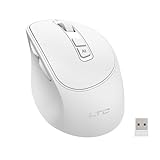
- AI-Powered Voice Typing & Translation - Experience the future of productivity with our AI Voice Typing & Translate Mouse, allowing you to type up to 300 words per minute with 98% accuracy. Effortlessly translate over 100 languages, making it the perfect tool for all language enthusiasts and professionals.
- Versatile Connectivity - Supports both BT and 2.4GHz wireless connections for a flexible and reliable experience with your MacBook, PC, laptop, or desktop, catering to all your multi-device needs.
- Ergonomic Design for Comfort - The Ergo Mouse is designed with user comfort in mind, featuring a lightweight and ergonomic shape to reduce hand strain during extended use, making it ideal for professionals and gamers alike who spend hours on their PCs.
- Long-lasting Rechargeable Battery - Equipped with a 500mAh rechargeable battery and Type-C fast charging port. Enjoy long-lasting power and quick recharging. Activate the 5-minute smart sleep mode with a single click to save energy and minimize interruptions, keeping you focused on what matters most. Perfect for a productive workspace!
- Pro software support - Customize each key with distinct functions and enjoy five levels of adjustable DPI settings, tailored to meet your control needs across different scenarios. Elevate your user experience and take full command of your workflow! Easily access the software download page by simply holding the scroll wheel for six seconds.
Before choosing it, compare the concrete implementation—not just the project’s framing—across these areas:
- Control boundary: named, application-declared actions versus browser automation or another interaction model.
- Context exposure: what information the agent receives and how it is scoped.
- Permission enforcement: whether handlers check the application’s real authorization rules.
- Human approval: which actions pause for approval and what users are asked to approve.
- Framework and provider coverage: the integrations confirmed in the current version, rather than roadmap entries.
- Observability and maturity: what the runtime records and whether the evolving API suits the product’s release requirements.
Those criteria make the SDK’s proposed architecture easier to assess, but the available project documentation does not establish that it is safer or more reliable in practice than alternatives.
Quick Recap
Product prices and availability are accurate as of the date/time indicated and are subject to change. Any price and availability information displayed on Amazon at the time of purchase will apply.
Quick wins for a faster PC:
Scan for outdated or missing drivers - takes under a minuteDriver Scan →Clear out junk files and repair common Windows errorsFree Scan →Fix the driver behind crashes, sound loss and screen glitchesFind Drivers →
