
iTechGuides is reader-supported. When you buy through links on our site, we may earn an affiliate commission. As an Amazon Associate I earn from qualifying purchases. Learn more
Outlook file extensions identify different kinds of data: a PST or OLM can hold a collection of items, an OST is a synchronized offline copy, and EML or MSG is usually one email. OFT is a reusable message template; ICS and VCF carry calendar and contact data. The format tells you what a file is for, but Outlook support depends on the app version and account.
Outlook file types at a glance
| Extension | What it contains | Typical use |
|---|---|---|
.pst |
Outlook items such as email, contacts, appointments, tasks, notes and journal entries | Local storage, archive, export or backup. Support and steps vary between classic and new Outlook. Microsoft explains Outlook Data Files and PST import and export. |
.ost |
An offline synchronized copy of mailbox data for supported account configurations | Lets Outlook work with synchronized data offline; it is tied to the account, not a portable archive. Microsoft describes PST and OST files. |
.olm |
Outlook for Mac archive items, including email, contacts, calendar items, tasks and notes | Archive format used in Outlook for Mac. Microsoft also documents importing a Windows PST into Outlook for Mac. See Microsoft’s Mac import guidance. |
.eml |
One saved email message | A message file that Outlook and other email applications can open, subject to app version support. Microsoft’s new Outlook instructions cover EML. |
.msg |
One Outlook message | Useful for saving or sharing an individual message. Microsoft’s new Outlook opening instructions require a qualifying Microsoft 365 subscription. Check the current requirements. |
.oft |
An Outlook message template | A reusable starting point for a message, not an email archive. New Outlook opening requires a qualifying Microsoft 365 subscription according to Microsoft’s instructions. See new Outlook file support. |
.ics |
Calendar event or calendar data | Import events from a file or subscribe to an online calendar. An import is a snapshot; a subscription can receive later changes from its source. Microsoft explains calendar import and subscription. |
.vcf |
Contact details in vCard format | Share a contact or add a received contact to Outlook. See Microsoft’s contact instructions. |
.csv |
Tabular data, often contact fields | Used in Outlook contact import and export workflows; it is not a full mailbox archive. Microsoft documents CSV contact import. |
How PST, OST and OLM differ
PST: an Outlook archive or data file
A PST can contain many kinds of Outlook items. It is commonly used to store local data, keep an archive, or export information for backup. The exact workflow depends on whether you use classic Outlook or new Outlook: Microsoft documents PST support in new Outlook with requirements, including a Microsoft 365 subscription for the account and an ARM limitation. Use Microsoft’s current PST guidance for your version.



OST: an account-linked offline copy
An OST keeps synchronized mailbox data available offline for supported Exchange, IMAP and Outlook.com account configurations. It represents a local working copy associated with the account and its server data, rather than a self-contained archive intended to move between computers. Microsoft says an OST can be recreated when the account is set up again. Read Microsoft’s PST and OST overview.
Quick wins for a faster PC:
Clear out junk files and repair common Windows errorsFree Scan →Scan for outdated or missing drivers - takes under a minuteDriver Scan →Repair Windows errors before they cause bigger problemsFix Now →OLM: Outlook for Mac archive
OLM is Outlook for Mac’s archive format for messages and other Outlook items. It is not simply the Mac spelling of PST: they belong to different platform workflows. Microsoft documents importing a Windows Outlook PST archive into Outlook for Mac, so a file can move between workflows through an import rather than by changing its extension. The cited Microsoft page says support for legacy Outlook for Mac will end in October 2026; that date applies to legacy Outlook for Mac, so consult Microsoft’s latest Mac guidance for instructions after that date. Microsoft’s Mac import documentation.
#1 Best Overall
Which files are individual messages or templates?
EML and MSG are saved messages
EML and MSG usually represent one email, not a mailbox full of messages. EML is a broadly supported saved-message format; MSG is Outlook’s message-file format. New Outlook can open EML under Microsoft’s documented instructions, while opening MSG there requires a qualifying Microsoft 365 subscription. Support and eligibility can change, so check the current instructions for the exact Outlook edition you use. Microsoft’s guidance for EML, MSG and OFT.
OFT is a reusable message template
An OFT stores a template for composing a message, rather than a received email collection or mailbox archive. In new Outlook, Microsoft lists a qualifying Microsoft 365 subscription as a requirement to open OFT files. Check Microsoft’s current file-opening requirements.
Rank #2

- Large 24 Pockets File Folders: TriMigic file box will give you plenty of room to grow and add more things as needed, because this accordian file organizer has 24 individual pockets that fit A4 & letter size, and each pocket can expand across the bottom and top, the accordion file organizer can hold up to about 3500 sheets
- Colorful Expanding File Folder: the multi-color plastic label reveals both the document and the label tab, making all your files simple to retrieve. Include Pre-printed labels with alphabetical ABC and the months, and also can be custom labeled
- Desk Organization to Save Your Space: the document organizer could stand well independently, save on getting an extra file box, help you to stay more organized instead of having documents everywhere, very easy to use and suitable for daily filing and storing of documents
- Easy to Move with Portable Notches: a neat way for important file document storage as filing box, perfect for teacher supplies, budget planner, classroom organization, bill organizer, receipt organizer, acordian file keeper, paper storage organizer, teacher supplies for classroom, receipt holder
- Double Times Service Life Document Organizer: the expandable binder organizer made from top-end 700D Polyester and PP, 4 metal protect reinforced buckle and side border overlock design, our sturdier structure will ensure longer service life, while the others would start to fall apart after being constantly used
Calendar and contact files
ICS: calendar events or a subscription
An ICS file carries calendar event data. Importing it brings in a snapshot of the events in that file; it does not itself create an ongoing connection to the source calendar. If you need later changes to flow through, subscribe to the source calendar online where your Outlook edition supports that option. Feature availability varies by edition. Microsoft’s calendar guidance.
VCF and CSV: contact transfer
A VCF is a vCard contact file, commonly used to share an individual contact’s details. CSV is a table of values often used to move contact lists between applications. Both are narrower than PST: they transfer contact information rather than a complete set of Outlook mailbox items. Microsoft’s VCF/contact guidance and CSV contact import guidance.
How to identify and open an Outlook file
- Check the full filename. On Windows, File Explorer may hide known extensions; enable file name extensions in View settings to see whether the file ends in .pst, .ost, .olm, .eml, .msg, .oft, .ics, .vcf or .csv.
- Match the extension to its purpose. Use the table above to distinguish archives, account-linked offline copies, individual messages, templates, calendar data and contacts.
- Check your Outlook edition and account. New Outlook, classic Outlook and Outlook for Mac do not support every format in the same way. Confirm the exact file type on Microsoft’s current support page before following import or open steps.
- Use an import or open workflow, not a rename. Renaming
file.psttofile.ostdoes not convert it; changing an extension only changes the label, not the file’s contents. Microsoft’s Windows instructions for showing extensions and file renaming guidance.
Choosing the right format for a move or backup
- To keep a collection of Outlook items: a PST is the relevant Windows Outlook archive/export format; confirm version support and export/import requirements first.
- To access mailbox data offline: OST serves synchronization for supported accounts. Do not treat it as the file to copy to another computer to move a mailbox.
- To archive from Outlook for Mac: OLM is the Mac archive format. For Windows-to-Mac transfer, follow Microsoft’s documented PST import workflow rather than renaming files.
- To share one item: use a message format such as EML or MSG for an email, ICS for calendar data, or VCF for contact details; OFT is for reusing a message layout.
For a backup, keep an exported PST in a separate storage location and verify it is available before relying on it. Microsoft documents PST export and storage workflows; an external drive is one possible destination, not a requirement. See Microsoft’s PST export guidance.
Quick Recap
Best Value
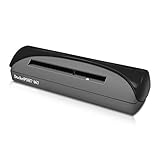
- ULTRA COMPACT FOOTPRINT: At about the size of a stapler, the DocketPORT 667 takes up far less space than flatbed scanners.
- USB-POWERED CONVENIENCE: Because it's powered by your computer's USB port, you'll never search for an outlet or carry a bulky AC adapter again.
- IMPORT CONTACTS DIRECTLY TO OUTLOOK: The included single PC software license is compatible with Microsoft Outlook, making importing and exporting contacts easy and hassle-free.
- EXPORT TO CSV: Using optical character recognition (OCR) technology, this software can export contacts to a CSV file for storing your data. From here, CSV files can be uploaded to third party CRMs, such as Salesforce and Google Contacts.
- EASY PROFILE MANAGEMENT: Once that data is in your computer, you’re in complete control of creating and customizing your scanning profiles. Choose between a variety of output types, including PDF, TIFF, JPG, Searchable PDF, Word or Excel.
Product prices and availability are accurate as of the date/time indicated and are subject to change. Any price and availability information displayed on Amazon at the time of purchase will apply.

