
iTechGuides is reader-supported. When you buy through links on our site, we may earn an affiliate commission. As an Amazon Associate I earn from qualifying purchases. Learn more
Optical zoom changes the lens’s focal length before the picture is captured. Digital zoom creates a tighter view from captured sensor data by cropping, enlarging, or otherwise processing it. Optical zoom therefore uses more of the camera’s imaging area for the subject, while a digital extension can reduce available pixel detail or output resolution. The visible difference depends on the camera, zoom mode, file format, resolution setting, scene and how large you view or print the result.
The practical rule is simple: compare a camera’s optical focal-length range separately from any digital extension. If a specification combines them, check the fine print for output-size limits and image-size conditions.
What optical zoom changes
An optical zoom is a variable-focal-length lens. Its internal elements move as you operate the zoom control, changing the lens’s focal length and angle of view. Sony’s support explanation puts it plainly: “With optical zoom, the zoom lens is moved forward or backward to adjust focal length.” The camera then projects that narrower or wider view onto the sensor before recording the image.
Do these 3 things before closing this tab:
1Fix the driver behind crashes, sound loss and screen glitches2Repair Windows errors before they cause bigger problems3Scan for outdated or missing drivers - takes under a minuteAt the wide end, more of the scene fits in the frame. At the telephoto end, the field of view is narrower, so a distant subject occupies more of the frame without throwing away pixels after capture. Sony says image quality is not affected by zooming within the optical range in the context of its support guidance. That statement describes the operation of the optical range; it is not a promise that every lens has identical sharpness, distortion control or low-light performance at every focal length.
#1 Best Overall

- 16MP Sensor: Captures detailed photos with a CMOS sensor for everyday shooting
- Optical Zoom: 5x optical zoom with a 28mm wide angle lens for flexible framing indoors or outdoors
- Full HD Video: Records 1080p video for travel clips, family moments, or simple vlogging
- Memory Support: Works with Class 10 SD, SDHC, or SDXC cards up to 512GB
- Rechargeable Battery: Included LB-012 lithium-ion battery charges in the camera over USB with the supplied adapter in about 2 hours; charge it for at least 4 hours before first use to maximize battery life
Focal length is more useful than the “×” number
A label such as “10× zoom” only describes the ratio between a lens’s longest and shortest focal lengths. It does not tell you where that range starts. A 24–240mm-equivalent lens and a 100–1000mm-equivalent lens are both 10×, but they serve very different framing needs. For a compact camera, read the 35mm-equivalent focal lengths as well as the optical ratio.
Why telephoto framing is harder to hold
A narrow telephoto view magnifies the apparent effect of camera movement. Stabilization, shutter speed, support and technique are separate considerations from whether the zoom is optical or digital. A digital crop can make shake look just as obvious because the subject occupies more of the displayed frame, even though the lens has not gained additional focal length.
What digital zoom changes
Digital zoom starts with sensor data that has already been captured. The camera selects a smaller region, enlarges it, and sometimes applies image-processing algorithms to that result. Sony describes its Clear Image Zoom and Digital Zoom features as zooming “by applying image processing.” A straightforward crop uses fewer original pixels for the subject, so there is less fine detail to work with and the camera may offer a smaller output size.
Recommended Free Tools
Processing can make a digital extension look better than a simple, unprocessed crop at the same displayed size. It cannot create the same optical information as a lens that projects a genuinely tighter image onto the full sensor. The result also depends on the subject’s texture, lighting, camera sharpening and noise reduction, the selected JPEG or HEIF size, and whether you inspect the image on a phone, monitor or large print.
Digital zoom is not one universal feature
Manufacturers use different names and limits. Sony distinguishes Smart Zoom, Clear Image Zoom and Digital Zoom in its support material. Smart Zoom is a crop-based option with smaller still-image sizes on the described system. Clear Image Zoom is described as extending up to 2× with minimal quality loss in its supported range. Sony describes ordinary Digital Zoom as image processing that causes some quality loss. Those names and claims apply to the models and settings covered by Sony’s guide, not automatically to every compact camera.
Canon’s help documentation similarly separates an optical range from a Digital ZoomPlus range and a further range in which the image will appear grainy. Canon cautions that the visible graininess and available maximum depend on the selected resolution and zoom factor. Consequently, “digital zoom always destroys the image” is too absolute. A more accurate expectation is that cropping can reduce pixel detail, while processing may keep the loss unobtrusive for certain ranges and viewing sizes.
Rank #2

- 16MP Sensor: Captures detailed photos with a CMOS sensor for everyday shooting
- Optical Zoom: 4x optical zoom with a 27mm wide angle lens for flexible framing indoors or outdoors
- Full HD Video: Records 1080p video for travel clips, family moments, or simple vlogging
- Memory Support: Works with Class 10 SD, SDHC, or SDXC cards up to 512GB
- LCD Screen and Battery: 2.7in LCD screen with 2 AA alkaline batteries for convenient on-the-go use
Optical and digital zoom compared
| Aspect | Optical zoom | Digital zoom or digital extension |
|---|---|---|
| What changes | The lens’s focal length and angle of view | A crop, enlargement and/or image processing applied to sensor data |
| When it happens | Before capture, as the lens projects the framing onto the sensor | During capture processing or after the image is captured |
| Sensor area used for the subject | The subject can occupy more of the sensor’s image area | Often fewer source pixels are used for the subject |
| Typical trade-off | Changes framing without the specific resolution penalty of a crop | Potentially less fine detail, lower output size or visible processing artifacts |
| File and mode limits | Usually available across the camera’s normal still-image settings | May require JPEG or HEIF, a smaller image size, or a particular movie mode; RAW support is model-dependent |
| How to judge it | Check the optical focal-length range and lens performance | Check the named mode, maximum factor, resolution restrictions and the manufacturer’s stated quality behavior |
This table describes the mechanisms, not a laboratory ranking. The cited manufacturer material does not provide a cross-camera statistic for how much quality is lost at a given digital factor.
How manufacturers combine the numbers
A camera may advertise a maximum focal-length equivalent or a total zoom ratio that includes a digital step. Treat that number as a description of the final framing, not as the optical capability of the lens.
Canon PowerShot ZOOM example
Canon’s U.S. specification page describes the PowerShot ZOOM as a monocular telephoto compact digital camera. Its lens switches between approximately 100mm and 400mm in 35mm-equivalent optical steps, then adds approximately 2× digital zoom to reach approximately 800mm equivalent. Canon lists a 12.1-megapixel sensor and notes that the center portion of a 1/2.3-inch-type CMOS sensor is used.
The useful comparison is therefore “100mm/400mm optical, with an approximately 2× digital extension,” not simply “800mm zoom.” The 800mm figure tells you the tightest advertised framing; it does not mean the lens optically reaches 800mm.
Nikon COOLPIX P950 example
In its 7 January 2020 announcement, Nikon specified an 83× optical zoom covering 24–2000mm equivalent for the COOLPIX P950. Nikon said Dynamic Fine Zoom can extend the view to approximately 4000mm equivalent and up to 166×, while also stating that the maximum zoom ratio varies by image size. Nikon defines the 166× figure as a combination of optical and digital zoom and lists a 16.0-megapixel effective pixel count.
These are Nikon-published specifications for one model, not an industry standard or an independent image-quality test. The image-size qualification is essential: changing resolution can change the maximum available digital factor.
Rank #3
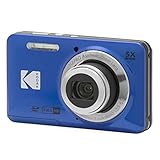
- 16MP Sensor: Captures detailed photos with a CMOS sensor for everyday shooting
- Optical Zoom: 5x optical zoom with a 28mm wide angle lens for flexible framing indoors or outdoors
- Full HD Video: Records 1080p video for travel clips, family moments, or simple vlogging
- Memory Support: Works with Class 10 SD, SDHC, or SDXC cards up to 512GB
- Rechargeable Battery: Included LB-012 lithium-ion battery charges in the camera over USB with the supplied adapter in about 2 hours; charge it for at least 4 hours before first use to maximize battery life
Sony’s zoom modes show why the fine print matters
Sony’s support guide separates four concepts:
- Optical Zoom: the lens moves to change focal length.
- Smart Zoom: a crop-based extension that, in the described still-image system, requires JPEG with an M or S image size. The guide says it is unavailable for movies in that system.
- Clear Image Zoom: image processing intended to retain clarity, described by Sony as available up to 2× with minimal loss on supported models.
- Digital Zoom: image processing that Sony says causes some image-quality loss.
Do not transfer these names or restrictions to another camera. Sony expressly notes that supported functions and limitations vary by model. Look up the exact manual for the camera and recording mode you plan to use.
What you will see in a digital crop
Reduced fine detail
When a crop uses a smaller portion of the sensor’s image, distant feathers, hair, leaves and fine text have fewer source pixels. Enlarging those pixels can make edges look soft or blocky, especially in a large print or when you zoom in on a monitor.
Noise and grain become more obvious
Small sensors and dim light already produce noise. A digital crop enlarges the subject and the noise together. Canon’s guidance identifies a range in which images appear grainy and ties that behavior to resolution and zoom factor, so the point at which you notice it is camera- and setting-specific.
The Tool Desk
Outbyte PC Repair FREEClear out junk files and repair common Windows errorsFree Scan →Outbyte Driver Updater FREEFix the driver behind crashes, sound loss and screen glitchesFind Drivers →Processing artifacts can replace softness
Sharpening, noise reduction and reconstruction may preserve an impression of clarity while producing halos, smeared texture or an artificial look. These effects vary with the manufacturer’s algorithm and the subject. A processed digital mode can be a reasonable compromise for casual viewing, but it should not be treated as equivalent to adding optical focal length.
How to use zoom without giving away more detail than necessary
- Start with the optical range. Use the lens zoom control until the camera reaches its optical telephoto limit. The on-screen indicator may show a boundary, a color change or a separate section of the bar.
- Read the indicator before going farther. If the display enters Smart Zoom, Clear Image Zoom, Digital Zoom, ZoomPlus or Dynamic Fine Zoom, you are using a digital extension. The exact label depends on the model.
- Choose the largest suitable output size. Check whether the digital mode disappears at the largest JPEG or HEIF size, or whether it requires M or S. Canon and Sony both document resolution-dependent behavior on their supported systems.
- Check file format. A digital mode may be unavailable for RAW or may record only a processed JPEG or HEIF. Confirm this in the manual rather than assuming that every zoom mode is available for every format.
- Stabilize the camera. Use the camera’s optical or electronic stabilization if appropriate, brace the camera, and select a shutter speed that can freeze subject movement. A tighter field of view magnifies framing errors.
- Make a test at the intended output size. Photograph a detailed, distant subject in the light you expect to use. Inspect the file at the size where it will actually be viewed; a crop that looks acceptable on a phone may not hold up in a large print.
- Consider cropping later. If the camera’s digital mode imposes an unwanted resolution or format restriction, record at the largest practical optical setting and crop on a computer or phone. You retain control over the crop, although you cannot recover pixels that were never captured.
When digital zoom is a sensible choice
Use optical zoom first for detail-critical work
Wildlife identification, sports, surveillance-style documentation, large prints and any image that may be heavily edited benefit from capturing the subject with as many sensor pixels as the camera and lens allow. For these uses, prioritize optical focal-length coverage and evaluate stabilization and handling separately.
A digital extension can be practical for casual viewing
If the final image will be shared at a modest size, a manufacturer’s processed mode may provide a tighter composition without requiring you to crop later. Digital zoom can also help you frame a subject that would otherwise be too small to identify on the camera screen. Treat this as a convenience trade-off, not a universal promise of optical-level quality.
Rank #4

- 16MP Sensor: Captures detailed photos with a CMOS sensor for everyday shooting
- Optical Zoom: 5x optical zoom with a 28mm wide angle lens for flexible framing indoors or outdoors
- Full HD Video: Records 1080p video for travel clips, family moments, or simple vlogging
- Memory Support: Works with Class 10 SD, SDHC, or SDXC cards up to 512GB
- Rechargeable Battery: Included LB-012 lithium-ion battery charges in the camera over USB with the supplied adapter in about 2 hours; charge it for at least 4 hours before first use to maximize battery life
Do not choose by the biggest advertised number
A 166× combined figure can sound more meaningful than an 83× optical figure, but the extra reach may depend on a reduced image size and digital processing. Compare the optical range, the digital mode’s conditions, and the output you need.
What’s actually slowing this PC down?
Pick the symptom - the matching free tool is one click away.
A buying checklist for compact cameras
- Record the optical focal-length equivalents, not just the headline zoom ratio.
- Identify whether the advertised maximum includes Smart, Clear Image, Digital ZoomPlus, Dynamic Fine Zoom or another processed mode.
- Check the maximum image size and file format available at each digital step.
- Read the manual for RAW, JPEG, HEIF and movie-mode restrictions.
- Look for the manufacturer’s own description of processing, graininess or quality loss, and distinguish it from independent testing.
- Consider stabilization, grip, viewfinder visibility and shutter response for the telephoto end.
- Verify the exact model and firmware documentation: feature names and limits are not universal, and older support pages may describe a different generation.
Common mistakes and how to avoid them
Mistake: treating every “×” as optical
Separate the optical ratio from any combined ratio. Nikon’s P950 specification is a clear example of a total figure that includes digital zoom.
Mistake: assuming digital zoom always looks identical
Results differ by crop method, processing, resolution, lighting and viewing size. Sony and Canon document different modes with different quality descriptions and limits.
Mistake: ignoring the output-size condition
A mode that is available at M or S JPEG size may not be available at the camera’s largest setting or in RAW. Check the recording menu and manual before relying on it.
Mistake: confusing tighter framing with more optical reach
Digital processing can make the subject larger on screen, but it does not add optical focal length. Use the optical specification when comparing cameras for distant-subject detail.
The bottom line for choosing a zoom mode
Optical zoom is a lens change; digital zoom is a crop and/or processing step. Capture with the optical range whenever preserving maximum source detail matters. Enable a digital extension when its framing convenience outweighs the possible loss in detail, and only after checking the camera’s resolution, file-format and model-specific limits. Manufacturer examples such as Canon’s 100/400mm optical steps with an approximately 2× digital extension, Nikon’s 24–2000mm optical range with up to 166× combined zoom, and Sony’s separate Smart, Clear Image and Digital modes show why the exact specification—not the largest number on the box—determines what you will get.
Quick Recap
Product prices and availability are accurate as of the date/time indicated and are subject to change. Any price and availability information displayed on Amazon at the time of purchase will apply.

