
Windows Errors? Fix Them Before They Spread
Repair common Windows errors and clear accumulated junk for a smoother, more stable PC - no reinstall needed.Free scan · no reinstallCrashes, No Sound, or Screen Glitches?
Random freezes, missing sound and display glitches usually trace back to one bad driver. Find and replace yours safely.Free scan · under a minuteiTechGuides is reader-supported. When you buy through links on our site, we may earn an affiliate commission. As an Amazon Associate I earn from qualifying purchases. Learn more
Short answer: there is no single open-source drop-in replacement for Amazon Bedrock AgentCore Code Interpreter. For a local, policy-controlled sandbox, start with Strands Box; for OS-level restrictions around local processes, examine Anthropic’s sandbox-runtime. E2B and OpenSandbox are execution-oriented options for teams willing to validate current self-hosting and licensing details. Firecracker, gVisor and Kata Containers are lower-level isolation components, not ready-made agent workspaces.
The right choice depends on what “sandbox” means in your design: managed code execution, a local process jail, a container or microVM layer, or a complete runtime for hosting the agent itself.


First, define the AWS service you are replacing
Amazon Bedrock AgentCore Code Interpreter is a managed execution service for agents. AWS describes it as a way to run Python, JavaScript and TypeScript in isolated environments with configurable network access, CPU and memory limits, persistent session state, file operations, cleanup and integrations with AWS services. Those capabilities form a useful comparison baseline, but AWS’s product description is not independent proof of security effectiveness.
Quick wins for a faster PC:
Clear out junk files and repair common Windows errorsFree Scan →Fix the driver behind crashes, sound loss and screen glitchesFind Drivers →AgentCore Runtime is a different service. It hosts agents and tools; it is not the same thing as the Code Interpreter execution environment. If your requirement is “let an agent run code safely,” compare Code Interpreter with an execution sandbox. If your requirement is “run my agent service,” compare Runtime with an agent-hosting platform. Mixing the two produces misleading feature and cost comparisons.
| Requirement | Relevant AWS component | What an alternative must provide |
|---|---|---|
| Run generated code | AgentCore Code Interpreter | An execution environment with language support, isolation, resource limits and lifecycle controls |
| Host the agent and its tools | AgentCore Runtime | A service or platform for deploying the agent process, networking and operations |
| Control files and outbound requests | Code Interpreter controls and integrations | Explicit filesystem and network policy enforcement, not merely a container label |
Best open-source candidates at a glance
| Project | Best fit | What is established | Important qualification |
|---|---|---|---|
| Strands Box | Local agent sandbox with action policies | OS isolation, Dogwood rules, shell and Python interpreters, and an egress gateway are described by AWS | The announcement says the project starts with macOS; broader OS support and deployed-agent packaging are future work |
| Anthropic sandbox-runtime | Restricting local processes | Its repository describes OS-level filesystem and network restrictions without requiring a container | It is not documented as a managed, persistent code-interpreter service |
| E2B | Agent execution environments | A community directory lists an agent runtime and a self-hostable option | Confirm current license, deployment process, maintenance and hosted-service terms in the project’s primary documentation |
| OpenSandbox | Self-hosted container or cluster execution | A community directory lists a Docker/Kubernetes runtime | Verify supported workloads, current documentation, maintenance and security model before adoption |
| Firecracker, gVisor and Kata Containers | Teams assembling their own isolation layer | The directory identifies them as runtime building blocks | They are infrastructure components, not drop-in AgentCore replacements |
Strands Box: the closest policy-oriented local option
How it is designed
AWS presents Strands Box as a local sandbox that combines operating-system isolation with Dogwood rules for governing agent actions. Shell and Python operations flow through interpreters, while outbound requests are mediated by an egress gateway. This makes it conceptually closer to a policy-enforced agent workspace than to an unconfigured container.
The project’s stated credential pattern is also significant: the gateway can attach configured credentials while keeping the real secrets outside the agent environment. That arrangement reduces the need to place long-lived credentials directly in generated code or the agent process, although the security outcome still depends on the policies, gateway configuration and host protection you choose.
What runs inside the sandbox
Strands Box embeds two interpreters. Fernando Dingler, a Principal Engineer at AWS and member of the Strands team, wrote in the AWS Open Source Blog announcement: “This is why we chose to embed two code interpreters into Strands Box: Strands Shell (https://github.com/strands-agents/shell) and Monty for Python (https://github.com/pydantic/monty).” The interpreter model gives policy enforcement a defined place to inspect shell and Python actions rather than treating arbitrary host execution as trusted.
Rank #2

- AGX Orin 64GB Development Kit makes it easy to get started with AGX Orin. Its compact size, rich interfaces, and AI performance of up to 275 TOPS make it ideal for building advanced AI robots and other autonomous machine prototypes.
- The development kit includes AGX Orin 64GB module and can emulate all Orin modules. It utilizes the Ampere GPU architecture, next-generation deep learning and vision accelerators, high-speed I/O, and fast memory bandwidth. You can leverage the largest and most complex AI models to develop solutions for problems such as natural language understanding, 3D perception, and multi-sensor fusion.
- Jetson runs AI software and provides application frameworks for specific use cases, such as Isaac for robotics, DeepStream for visual AI, and Riva for conversational AI. Using Omniverse Replicator for Synthetic Data Generation (SDG) can save you significant time; while fine-tuning pre-trained AI models from the NGC catalog using the TAO toolkit can further enhance your results.
- Yahboom offers four kits for users to choose from. The AIlarge model voice module utilizes examples of AI large models and multimodal models; it provides 1TB/2TB SSDs with pre-flashed driver image files; and an 8MP USB industrial camera for image processing.
- It offers various online and offline mainstream AI large model development materials. The system is pre-configured with AI vision examples, ROS case studies, and AI large models. It supports offline/online deployment of large models for voice interaction, real-time video analysis, and visual positioning, helping you quickly get started with localized AI agent development.
Platform and maturity limits
The announcement describes Strands Box as starting with macOS. Support for additional operating systems and packaging for deployed agents are identified as future work, so do not present those roadmap items as current capabilities. A team standardizing on Linux servers, Windows workstations or a production fleet must verify availability for that exact platform before selecting it.
When to choose it
- Choose it when the primary need is local experimentation with explicit action policies.
- Choose it when filesystem decisions, outbound traffic and credential attachment need a policy layer instead of simple process execution.
- Do not choose it as an assumed cloud-hosted replacement until the project’s deployment model and target operating-system support match your environment.
Anthropic sandbox-runtime: process restrictions without a container
What it addresses
Anthropic’s sandbox-runtime repository describes a tool for applying filesystem and network restrictions to local processes at the operating-system level, without requiring a container. That is useful when an agent needs to invoke a local command or application but must be prevented from reading selected paths or contacting arbitrary destinations.
Why it is a different service shape
A process restriction layer is not the same as a managed code interpreter. The repository description does not establish managed sessions, persistent workspaces, automatic cleanup, file-transfer APIs, language runtimes or cloud integrations comparable to the features AWS lists for Code Interpreter. Treat it as a local control mechanism around a process, not as feature-for-feature parity.
When to choose it
- Use it when your agent already runs on a workstation or server and you need OS-level filesystem and network controls.
- Use it when avoiding a container is operationally important.
- Do not assume that process restrictions alone supply the lifecycle, resource accounting or multi-tenant isolation of a managed execution service.
E2B: an execution-platform lead that needs verification
E2B appears in the available category directory as an agent execution environment, and the same directory identifies a self-hostable runtime. That makes it a plausible candidate for teams that want an execution service they can operate themselves rather than sending code to a fully managed provider.
The Tool Desk
Outbyte Driver Updater FREEFix the driver behind crashes, sound loss and screen glitchesFind Drivers →Outbyte PC Repair FREEClear out junk files and repair common Windows errorsFree Scan →Because those details come from a secondary directory, verify the current project documentation before committing. Check the published license, supported deployment path, maintenance activity, hosted-versus-self-hosted differences, session behavior, file transfer, network policy and supported languages. The directory listing is useful for discovery; it is not sufficient evidence for a production security or operational decision.
Questions to answer before adoption
- Can the current release be deployed in your chosen environment without an undisclosed hosted dependency?
- Which isolation boundary is used for each workload, and what is configurable by the operator?
- How are sessions timed out, cleaned up and recovered after a worker failure?
- Where do credentials live, and can outbound requests be forced through a controlled gateway?
- Does the current API fit your agent framework and the languages your generated code requires?
OpenSandbox: Docker and Kubernetes-oriented self-hosting
The category directory describes OpenSandbox as a Docker/Kubernetes runtime. That points toward teams that already operate container infrastructure and want to assemble an execution service inside their own cluster.
Do not infer more than the listing establishes. Before recommending OpenSandbox for a workload, read the current project documentation for supported languages, image lifecycle, network controls, filesystem mounts, tenancy model, cleanup behavior and cluster requirements. Confirm the project’s current license and maintenance status from primary sources as well.
When the model fits
- Your organization already has Docker or Kubernetes operations, image scanning and cluster access controls.
- You need self-hosted placement for data-residency or connectivity reasons.
- You can own the additional work of patching images, isolating tenants, collecting logs and responding to runtime failures.
Firecracker, gVisor and Kata Containers: useful building blocks, not replacements
Firecracker, gVisor and Kata Containers are listed as lower-level runtime components for teams building an isolation layer. They can be relevant when you want to control the worker architecture yourself, but selecting one does not automatically give you an agent API, policy language, session store, file-transfer mechanism, credential broker or cleanup controller.
What’s actually slowing this PC down?
Pick the symptom - the matching free tool is one click away.
A team assembling a platform from these components must design the control plane around them. That includes admission rules, image or filesystem provisioning, CPU and memory quotas, network egress, secret handling, audit logs, timeout enforcement and recovery after a crashed or abandoned session. The engineering burden is therefore materially different from adopting a service that already exposes those functions.
Best Value
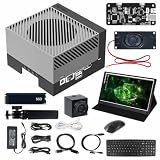
- AGX Orin 64GB Development Kit makes it easy to get started with AGX Orin. Its compact size, rich interfaces, and AI performance of up to 275 TOPS make it ideal for building advanced AI robots and other autonomous machine prototypes.
- The development kit includes AGX Orin 64GB module and can emulate all Orin modules. It utilizes the Ampere GPU architecture, next-generation deep learning and vision accelerators, high-speed I/O, and fast memory bandwidth. You can leverage the largest and most complex AI models to develop solutions for problems such as natural language understanding, 3D perception, and multi-sensor fusion.
- Jetson runs AI software and provides application frameworks for specific use cases, such as Isaac for robotics, DeepStream for visual AI, and Riva for conversational AI. Using Omniverse Replicator for Synthetic Data Generation (SDG) can save you significant time; while fine-tuning pre-trained AI models from the NGC catalog using the TAO toolkit can further enhance your results.
- Yahboom offers four kits for users to choose from. The AIlarge model voice module utilizes examples of AI large models and multimodal models; it provides 1TB/2TB SSDs with pre-flashed driver image files; and an 8MP USB industrial camera for image processing.
- It offers various online and offline mainstream AI large model development materials. The system is pre-configured with AI vision examples, ROS case studies, and AI large models. It supports offline/online deployment of large models for voice interaction, real-time video analysis, and visual positioning, helping you quickly get started with localized AI agent development.
Compare alternatives on the dimensions that affect safety
| Decision axis | Questions to ask | Why it changes the choice |
|---|---|---|
| Deployment model | Does the workload run on a developer workstation, your own servers, a Kubernetes cluster or a managed cloud? | It determines who patches the sandbox, controls the host and pays the operational cost. |
| Isolation boundary | Is the boundary an OS-restricted process, a container, a microVM or a combination? | Labels do not provide a universal security ranking; the threat model and configuration matter. |
| Filesystem policy | Which paths can the agent read, write, delete or mount? | Most agent data-leak and destructive-action risks begin with excessive file access. |
| Network policy | Can every destination be denied by default, allow-listed or inspected through an egress gateway? | Outbound control limits data exfiltration and unintended tool calls. |
| Credential handling | Do secrets enter the process, come from the host environment or arrive through a broker? | Keeping real credentials outside the agent process reduces accidental exposure. |
| Sessions and cleanup | Is state persistent, how are files transferred, and what happens at timeout? | Persistent state is useful for multi-step work but requires explicit deletion and tenancy rules. |
| Workload fit | Do you need Python, JavaScript, TypeScript, shell, browser or GUI access, or only agent hosting? | A code interpreter, local process wrapper and agent runtime solve different problems. |
| Operational maturity | Are your operating system, deployment target and maintenance process supported today? | Roadmap statements and directory listings are not substitutes for current release documentation. |
Choose an option with this step-by-step process
- Write the workload down. Record whether the agent executes generated code, runs shell commands, manipulates files, accesses a browser or GUI, or simply serves requests as a hosted agent.
- Set the deployment boundary. Decide whether code may leave a workstation, whether self-hosting is mandatory, and which operating systems and orchestration platforms are approved.
- Define the threat model. List the assets an untrusted prompt or generated program must not reach: source repositories, personal files, cloud credentials, internal endpoints and other tenants.
- Choose the control layer. For local policy enforcement, evaluate Strands Box and sandbox-runtime. For an execution service, investigate E2B and OpenSandbox. For a custom platform, evaluate the lower-level runtime components.
- Specify policy defaults. Start with no filesystem access beyond a temporary workspace and no outbound network access except explicitly approved destinations. Add capabilities only when a workload demonstrates the need.
- Plan secrets separately. Prefer a broker or gateway pattern that supplies narrowly scoped credentials without placing reusable secrets in generated code or inherited environment variables.
- Define lifecycle behavior. Set maximum session duration, idle timeout, file retention, cleanup on failure and procedures for recovering a worker that stops responding.
- Validate the exact release. Confirm current licenses, supported platforms, deployment instructions, maintenance activity and integration APIs from each project’s primary documentation.
- Test failure paths before production. Exercise denied file reads, blocked network destinations, oversized workloads, expired sessions, crashed workers and revoked credentials. Record the observed result rather than relying on a project label.
Designing a safer local sandbox
Filesystem controls
Give the agent a dedicated temporary workspace and make sensitive host paths unavailable by default. Decide whether the workspace survives between turns. If sessions are persistent, define ownership and deletion rules so one agent or user cannot inherit another’s files.
Network controls
Use an explicit allow-list for destinations where possible. A gateway-based design makes policy decisions and credential attachment visible outside the agent process. If a project only restricts local processes but does not provide a gateway, you may need to supply that network layer separately.
Resource limits
Apply CPU, memory, storage and execution-time limits appropriate to the workload. AgentCore Code Interpreter documents these controls as part of its managed feature set; open-source deployments must expose and enforce equivalent limits themselves or through their underlying runtime.
Audit and recovery
Log policy decisions, denied operations, outbound destinations, session start and end times, cleanup results and credential-broker events. Keep enough context to investigate an incident without recording secret values. Define what happens when cleanup fails: quarantine the worker, revoke its credentials and prevent reuse until the filesystem and process state are verified.
Common selection mistakes
- Comparing unlike products: a hosting runtime, a process wrapper and a code interpreter are not interchangeable.
- Treating “open source” as a security guarantee: inspect the actual boundary, default policy and patch process.
- Assuming a container equals isolation: container deployment is an implementation detail; filesystem mounts, privileges and network access determine exposure.
- Ignoring platform status: Strands Box’s announcement starts with macOS, while other project support must be checked against current documentation.
- Trusting a directory entry as a specification: E2B and OpenSandbox details surfaced through a community directory require primary-source verification.
- Forgetting cleanup: persistent sessions and transferred files can outlive the agent action unless deletion is explicit.
- Embedding credentials in the agent: use a narrow broker or gateway pattern whenever the architecture supports it.
What is and is not established
No original, dated statistics about adoption, security incidents, performance or market size were established for these projects, and no hands-on comparative testing was conducted. Consequently, there is no defensible claim here that one candidate is universally faster or safer than another. The practical recommendation is based on documented service shape and deployment intent: match the workload and threat model first, then verify the current implementation.
Decision summary
For a local sandbox centered on agent action policies, Strands Box is the most directly aligned option described here, provided macOS and its current maturity fit your environment. For restricting arbitrary local processes without a container, sandbox-runtime addresses a narrower but useful problem. E2B and OpenSandbox deserve evaluation when you need execution infrastructure you can potentially self-host, but their current particulars must be confirmed from official documentation. Firecracker, gVisor and Kata Containers make sense only when you are prepared to build and operate the surrounding control plane.
Quick Recap
Product prices and availability are accurate as of the date/time indicated and are subject to change. Any price and availability information displayed on Amazon at the time of purchase will apply.
Free tools Windows power users keep installed
One-click scans. No signup required.

