
iTechGuides is reader-supported. When you buy through links on our site, we may earn an affiliate commission. As an Amazon Associate I earn from qualifying purchases. Learn more
If your Nintendo Switch 2 dock is not showing a picture on the TV, first confirm the console works in handheld mode, then check dock-compatible power, the HDMI connection, TV input, and console seating. Work through these ten checks in order; they help distinguish a setup problem from a dock or console that needs service.
1. Confirm the console works in handheld mode
Turn off the TV. Disconnect the dock’s cables, then unplug the power adapter from the wall and from the dock or console for 30 seconds. Connect the Switch 2 adapter directly to the undocked console and a wall outlet. Press POWER if needed and check whether the screen works. If it does, install the latest system update before testing TV output again. Nintendo’s blank-screen troubleshooting guide starts with this kind of power reset and handheld check.
2. Use power that supports Switch 2 TV mode
Check the adapter model before blaming the dock. Nintendo recommends the Switch 2 AC adapter, model NGN-01. The original Switch adapter, HAC-002, can power a Switch 2 when connected directly to the console, but it does not provide enough power for docked TV mode. If using a third-party adapter with the dock, Nintendo specifies at least 54 W. See Nintendo’s no-video-output guidance and Switch 2 TV mode instructions.
Crashes, No Sound, or Screen Glitches?
Random freezes, missing sound and display glitches usually trace back to one bad driver. Find and replace yours safely.Free scan · under a minuteWindows Errors? Fix Them Before They Spread
Repair common Windows errors and clear accumulated junk for a smoother, more stable PC - no reinstall needed.Free scan · no reinstall3. Inspect the dock, adapter, and cables
Look for frayed or split wires, bent or loose connectors, damaged ports, kinks, or other visible damage on the adapter, HDMI cable, and dock. Do not keep using damaged accessories; Nintendo advises replacing damaged accessories.
#1 Best Overall

- Type: HDMI to HDMI
- Cable Length: 5 ft
- Color: Black
- Compatible Model: Universal
- Feature: OEM Nintendo Branded Cable
4. Connect the dock directly to power and TV
For diagnosis, remove extra devices from the signal path. Connect the compatible power adapter to the dock and directly to a wall outlet. Connect HDMI from the dock directly to a TV HDMI port. Temporarily bypass a sound bar, home-theater receiver, splitter, or video adapter. These devices can add another link to troubleshoot.
5. Select the right TV input and try another port
Turn on the TV and choose the HDMI input where the dock is connected. If there is still no picture, move the HDMI cable to a different TV HDMI port and select that input. This checks whether the issue is limited to one port or an incorrect input selection.
Rank #2

- Real 8K HDMI certified cable: The HDMI cables pass HDMI 2.1 Certified. The HDMI Cable delivers 10K 8K@60Hz and 4K@240Hz higher resolution, 4 times higher than 4K@60Hz. The advanced technology makes a remarkable improvement in image clarity and sharpness
- 48Gbps ultra high speed: The HDMI 2.1 Cable with 48Gbps bandwidth delivers uncompressed 8K(7680 x 4320) video and high-speed transmission without signal loss. Make it faster 2.6X than HDMI 2.0(18Gbps). The 4K@240Hz HDMI cord also supports variable refresh rates and QFT to decrease “display latency”. Auto low latency mode and quick media switching for movies and video use the HDMI VRR mechanism to eliminate the blackout period when an HDMI Source device switches its video mode
- Dynamic HDR & eARC: This HDMI Cable features Dynamic HDR to let you capture more details with 12-bit color accuracy and get breathtakingly realistic pictures. The function of eARC (Enhanced Audio Return Channel) directly delivers full-resolution audio, like Dolby Atmos, DTS:X from TV to soundbar/AV receiver. Also Support HDCP 2.3/2.2, Ethernet, 3D
- Enhanced durability: Built with a robust aluminum alloy case, nickel-plated connectors, and a durable nylon braided jacket, HDMI cables can withstand more frequent bending tests and decrease rupture without reducing cable flexibility, ensuring enhanced signal transmission performance and a longer lifespan
- Wide compatibility: Compatible with Apple TV/PS5/PS4 Pro/Roku Stick, Xbox Series X/S/Xbox 360, Nintendo Switch/Switch 2, Wii U, Mac mini M4/M4 Pro, Laptop, PC, Blu-ray player, AV Receiver, TV stick, TV Box, DVD player, LG 8K UHD TV, Samsung G8/G9 QLED TV, Soundbar, Projector, Monitor and more
6. Seat the console correctly in the dock
Place the console in the dock with its screen facing the front of the dock. Remove any protective case while testing so it cannot prevent a proper fit. With the dock connected to power and the TV, a correctly docked console’s built-in display should go black. If the screen stays on despite correct placement and connections, Nintendo says the dock needs service.
Quick wins for a faster PC:
Repair Windows errors before they cause bigger problemsFix Now →Fix the driver behind crashes, sound loss and screen glitchesFind Drivers →Clear out junk files and repair common Windows errorsFree Scan →7. Test with an Ultra High Speed HDMI cable
Nintendo specifies an Ultra High Speed HDMI cable for Switch 2 TV output. If you are unsure what cable you have, or the direct connection still produces no image, test with a known-good cable carrying that designation. Borrowing one is useful before buying: a cable swap is a diagnostic check, not proof that every blank screen needs a replacement.
Rank #3
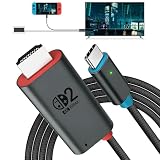
- 🎮 [for Switch 2 Compatibility Verified] A compact HDMI cable that combines the functionality of an "HDMI cable + Switch dock" into a single unit. Verified to work with Switch 2 (system version 22.1.0), compatible with a wide range of gaming consoles including Switch 2 / Switch / Switch OLED. Enjoy the same stable TV connection experience, now with the freedom to connect easily anywhere. Whether it's a party game in the living room or an immersive solo session, simply plug it in and instantly enjoy big-screen gameplay. (*Note: ① Be sure to connect a PD charger before connecting your Switch to the TV. ② Not compatible with Switch Lite.)
- 🔥 [4K@60Hz Ultra-High Quality & Heat Dissipation Design] While many similar products use plastic casings, this Switch 2 dock features a premium aluminum alloy build. With excellent heat dissipation, it thoroughly prevents "video lag" and "frame drops" caused by thermal throttling. It stabilizes your Switch 2 HDMI connection, transmitting ultra-high-definition video at up to 4K@60Hz with zero latency. The cable outer jacket is made of durable nylon braided material, resistant to breakage and tangling.
- It faithfully reproduces the fine details and vibrant colors of your games on the big screen, maximizing the full potential of your Switch 2. (*Note: ① Switch 1 supports up to 1080P only. ② For video output on PCs, tablets, and smartphones, the device's USB-C port must support Alt Mode. ③ When outputting to TV, connect to the USB-C port on the bottom of the Switch 2 console, not the top.)
- ⚡ [PD 100W Fast Charging & Play While Charging] Supports USB PD 3.0 with up to 100W fast power delivery. Designed with safety optimized for power consumption when used as a Switch 2 dock (approx. 18W), eliminating concerns over overcharging or overheating. This USB-C to HDMI adapter cable features a charging port (Type-C female), allowing you to connect a separate PD charger and charge your device at full speed while playing your Switch 2. Say goodbye to waiting for charging to finish. This perfectly delivers the "play while charging" experience you expect from a Switch 2 dock. (*Note: Requires a 60W or higher PD charger when used as a Switch dock.)
- 🎨 [Expressing the Switch Worldview] This product features the iconic "Red & Blue" two-tone color scheme that symbolizes the Switch. It matches seamlessly with the Switch 2 console and official controllers. While many competing products opt for simple solid-color designs, this product features a playful design that appeals to gamers' hearts—and looks great on social media. Perfect for users who care about aesthetics while staying true to the Switch 2 universe.
8. Check for heat and blocked vents
If the console or dock feels hot, turn the system off and let it cool. Make sure vents are uncovered, clear dust or debris, and place the dock in an open, ventilated area rather than somewhere heat can build up. Nintendo includes overheating and airflow checks in its TV-mode no-video guidance.
9. Reset the adapter and review TV settings
Nintendo’s no-video procedure says to unplug the adapter from both the dock and wall outlet for 20 seconds, then reconnect it as directed. If the picture is still absent, check the TV’s HDMI and picture settings. Nintendo also suggests testing with Variable Refresh Rate (VRR) turned off.
Rank #4

- Superior Display, Swift Connectivity: Elevate your viewing experience to unparalleled clarity with 8K@60Hz, and enjoy smoother visuals and reduced lag with support for 4K@120Hz and 4K@60Hz.
- Quick and Seamless Video Transfer: With the latest HDMI technology, stream or transfer videos without interruptions, and witness the power of up to 48 Gbps in bandwidth, ensuring consistently clear content.
- Lasts Longer, Performs Stronger: This cable is designed to withstand up to 1,000 bends throughout its lifespan, meaning fewer replacements and continuous peace of mind.
- One Cable, Many Solutions: Whether you're connecting tablets, laptops, HDMI devices, projectors, or desktop screens, this cable effortlessly connects them all.
- What You Get: HDMI Cable (6 ft, 8K), welcome guide, 18-month warranty, and our friendly customer service.
10. Cross-test with another TV or dock
If available, connect the Switch 2 setup to a different TV, and test the console with another Switch 2 dock. A different TV checks whether the original display or its settings are involved. If another dock works, Nintendo says the original dock needs service. If output still fails after these checks, Nintendo says the console and dock may need service. Start with Nintendo Support’s troubleshooting page for the applicable regional service route.
Recommended Free Tools
How to interpret the result
- Handheld mode also has no picture: focus first on console power, display operation, and system update rather than assuming the TV connection is the only issue.
- The console works handheld, but the docked screen stays on: recheck seating and connections; if it remains on when correctly docked, Nintendo identifies the dock as needing service.
- A second dock restores TV output: the original dock is the likely service issue.
- No TV works and no dock restores output: Nintendo’s guidance is to seek service for the console and dock.
Do not buy a new adapter, cable, or dock solely because the TV is blank. Check compatibility and, where practical, cross-test with known-good equipment before replacing anything.
Quick Recap
Best Value
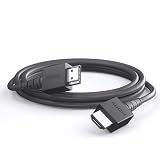
- 4K@120Hz & 4K@60Hz Support: Delivers stunning ultra HD visuals at up to 4K@120Hz for smooth, crystal-clear picture quality.
- WIDE COMPATIBILITY: Works seamlessly with Nintendo Switch 2, Nintendo Switch OLED, PlayStation 5, Xbox, and many other devices.
- 5FT CONVENIENT LENGTH: The 5-foot cord provides flexible reach for connecting your console to your TV or monitor without clutter.
- Reliable Connection: Built to deliver a stable, high-speed signal for an uninterrupted gaming and streaming experience.
- Type: HDMI to HDMI
Product prices and availability are accurate as of the date/time indicated and are subject to change. Any price and availability information displayed on Amazon at the time of purchase will apply.

