
iTechGuides is reader-supported. When you buy through links on our site, we may earn an affiliate commission. As an Amazon Associate I earn from qualifying purchases. Learn more
The best Nintendo gift depends on the fan’s console model, favorite series and way of playing. For a safe practical choice, buy a carrying case matched to the exact Switch, Switch OLED, Switch Lite or Switch 2. For multiplayer, choose an additional controller or Joy-Con; for a collector, consider amiibo or an official Nintendo Store exclusive; for someone who already owns the hardware, Nintendo Switch Online can add online play and classic games. Always check for the Official Nintendo Licensed Product Seal and confirm model compatibility before paying.
Start with the recipient, not the product listing
A Switch fan may want protection for a commute, extra controls for family sessions, a replacement charger, character merchandise or a service that expands an existing library. The same item can be an excellent gift for one owner and useless for another. Identify four things before shopping:
- Console: Nintendo Switch, Nintendo Switch OLED model, Nintendo Switch Lite or Nintendo Switch 2.
- Play style: handheld travel, television play, local multiplayer, online play, collecting or decorating.
- Fandom: Super Mario, The Legend of Zelda, Animal Crossing, Pikmin, Metroid or another Nintendo series.
- Buying preference: an official Nintendo Store item, a broadly available licensed product or a digital/service gift.
If you cannot ask directly, look at the console’s shape and controls in a photo. A standard Switch and Switch OLED use detachable Joy-Con controllers and a television dock; a Switch Lite has integrated controls and is handheld-focused. Switch 2 accessories should be treated as a separate compatibility category unless the product listing explicitly names Switch 2.
Best gifts by use case
| Recipient need | Strong gift direction | What to verify |
|---|---|---|
| Protecting a console in a bag | Model-specific carrying case | Exact console model, room for the owner’s accessories, licensed status |
| More players or a traditional control layout | Compatible controller or Joy-Con pair | Switch family supported, wireless or wired requirements, number of players needed |
| A second television or desk setup | Compatible dock, cable or charger | Model support, power specifications and whether the recipient already owns the required cable |
| Collecting and game-linked extras | amiibo | Whether the recipient collects the character and whether their games support the figure |
| Character fandom without hardware risk | Apparel, plush, home or office item | Size, material, intended age and return policy |
| Someone who already has the console and accessories | Nintendo Switch Online membership | Account region, desired membership term and the games or features included at purchase |
Practical hardware gifts
Carrying cases: the safest general-purpose choice
A carrying case solves a problem most handheld owners recognize: transporting the console, game cards and small accessories without putting the screen and controls directly against other objects in a bag. Nintendo’s hardware catalog treats cases as a dedicated accessory category, which makes them easy to search by system.
#1 Best Overall
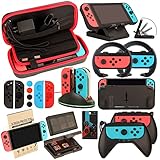
- Super Pack Content: 1x Carrying Case, 2x Tempered Glass Screen Protector, 2x Switch Racing Wheels, 2x Joy-Con Grip, 1x Joy-Con Charging Dock (4 in 1), 1x Compact Playstand, 1x Game Card Holder, 1x TPU Cover Case, 8x Joystick Caps, 4x Joy-Con Sillicone Case.
- Switch Steering Wheel and Joy-Con Grip make your game experience more enjoyable. Ergonomic design provides superior Joy-Con grip and enhances comfort.
- Protective Carrying Case and Tempered Glass Screen Protector offer full protection around switch from everyday bumps, scratches, dust and fingerprints.
- Compact Adjustable Stand: Stand for gameplay provides three viewing angles and better gaming experience. Unique design with charging cable entry, foldable and convenient to carry.
- PREMIUM NINTENDO SWITCH ACCESSORIES: The pack also includes fantastic accessories that will help enhance your gaming experience with the Nintendo Switch. (Console, joycon & games are for illustration only and not included.)
Choose the case for the recipient’s exact model. A standard Switch case may not fit a Switch Lite correctly, and a case made for one console should not be assumed to fit Switch 2. OLED owners should look for an explicit OLED designation rather than relying on a generic “Switch” label. If the owner travels with a charger, dock or extra Joy-Con, check the internal compartments and dimensions; a slim travel shell and a larger organizer serve different needs.
For safety, prefer a product carrying Nintendo’s Official Nintendo Licensed Product Seal where available. Licensing does not tell you whether the case has the preferred layout or padding, so still inspect the photos and description for storage capacity, closure type and protection around the screen.
Controllers and Joy-Con
An additional controller is useful for local multiplayer, replacing a drifting or damaged unit, or giving a player a traditional gamepad shape. Nintendo separates Joy-Con and controller categories in its hardware store, so begin with the control style the recipient already uses.
What’s actually slowing this PC down?
Pick the symptom - the matching free tool is one click away.
- Joy-Con: appropriate when the owner wants detachable left and right controllers, a replacement pair or more players in games that support individual Joy-Con play.
- Traditional controller: better for someone who prefers a single full-size gamepad for television sessions or longer play.
- Switch Lite owner: external controllers can add multiplayer or a different control feel, but the Lite itself remains a handheld system; do not buy a dock on the assumption that it will turn the Lite into a television console.
Check whether the listing supports the recipient’s console family, how many controllers are included and whether charging hardware is included. A single controller may be ideal for a solo player, while a family gift may require two compatible controllers rather than one premium unit.
Docks, cables and chargers
A second dock or charging setup makes sense when the owner plays in two rooms, keeps one setup at work or has misplaced a cable. It is also a high-risk category for compatibility mistakes. Verify the exact console generation and the manufacturer’s supported power requirements before ordering.
Rank #2

- Lightweight, ergonomic design for comfortable gameplay anywhere
- Double-injected rubber grips for added comfort
- Easy slide-in design secures each Joy-Con
- Visible player indicator lights
Do not assume that a cable with the right connector guarantees the correct charging or video behavior. Read the compatibility list, confirm what is included in the box and determine whether the recipient needs charging only or television output as well. For Switch Lite, a television-output dock is not a suitable gift simply because it works with another Switch model. For Switch 2, select accessories that name Switch 2 support rather than treating older Switch hardware as interchangeable.
amiibo and other system accessories
amiibo occupy a useful middle ground between a collectible and a game accessory. Choose a character connected to the recipient’s favorite series, then check whether the games they play support the figure’s functions. A fan may value an amiibo as a display piece even when they do not use its in-game features, but avoid presenting an amiibo as universally useful across every title.
Recommended Free Tools
Other system accessories can include screen protection, grips, stands and storage organizers. Match each item to the console model and to the owner’s habits: a tabletop stand helps someone who plays with detachable controllers, while a grip is more relevant to handheld sessions. For any accessory that touches the console, confirm dimensions and model support before purchase.
Fandom-led Nintendo gifts
Nintendo’s merchandise catalog is organized around major series and product types. Its listed collections include Super Mario, The Legend of Zelda, Animal Crossing, Pikmin and Metroid, alongside apparel and accessories, home and office products, plush, toys and games, LEGO and Crocs categories. These groupings let you shop from the fan’s identity instead of guessing which hardware they already own.
Super Mario
Mario gifts work for a broad age range because the series appears across clothing, plush, toys, games and household items. For a player who already owns the essentials, choose a useful everyday item such as apparel or a desk accessory. For a younger recipient, check the stated age range and avoid assuming that a display plush is intended as a toy for all ages.
Rank #3
![daydayup [3 Pack] Tempered Glass Screen Protector Compatible with Nintendo switch - Transparent HD Clear Anti-Scratch Screen Protector Skin Set for Nintendo Switch](https://m.media-amazon.com/images/I/51xpB0YDutL._SL160_.jpg)
- Daydayup Specifically designed for Nintendo Switch 2017
- Ultra thin-0.3mm thickness is reliable and resilient, and promises full compatibility with touchscreen sensitivity
- Ultra-clear High Definition with 99.9% transparency to allow an optimal, natural viewing experience
- Highly durable, and scratch resistant Skin Set - surface hardness 9H and topped with oleophobic coating to reduce fingerprints.
- Includes: 3x GLASS Screen Protector, Micro-Fiber Cleaning Cloth,Wet Wipes, Easy Installation Use Guide
The Legend of Zelda
Zelda fans often respond well to gifts that signal the series without requiring a particular console model: apparel, accessories, home décor, plush or a collectible. If you choose a Zelda item tied to a specific game, verify that the recipient recognizes that title rather than selecting only by the green-and-gold visual style.
Do these 3 things before closing this tab:
1Clear out junk files and repair common Windows errors2Fix the driver behind crashes, sound loss and screen glitches3Repair Windows errors before they cause bigger problemsAnimal Crossing
Animal Crossing gifts suit fans who enjoy cozy, decorative themes. Plush, home items, stationery-style accessories and apparel can work even when the recipient is not seeking another game. For clothing, confirm size and care instructions; for décor, check dimensions so a small desk item is not mistaken for a large room decoration.
Pikmin and Metroid
Pikmin merchandise is a natural fit for fans who like character plush and playful display items. Metroid merchandise is more specialized and can be a better choice when you know the recipient follows the series. In both cases, use the character or game as the anchor and select the product category—plush, apparel, accessory or home item—that matches how the person will use it.
Apparel, home and office products
Apparel is useful when you know the recipient’s size and preferred style; it is risky when you do not. Home and office items avoid sizing problems but still require practical checks such as dimensions, material and whether the piece is intended for display or daily use. Plush and toys should be matched to the recipient’s age and whether they collect, decorate or actively play with them.
Official exclusives versus widely available licensed merchandise
Nintendo maintains an exclusives catalog with Nintendo Store exclusive merchandise, including themed apparel such as a Zelda Rupee T-shirt. An exclusive can feel more distinctive because it is less likely to be the same item the recipient has seen in every retailer, but availability and stock can change. Broader licensed merchandise is often easier to find in a required size or character and may be simpler to exchange.
Rank #4

- HD Rumble 2
- Motion controls
- Built-in amiibo functionality*
- Capture Button
- C Button for GameChat**
| Choice | Advantages | Trade-offs |
|---|---|---|
| Nintendo Store exclusive | Distinctive design and direct connection to Nintendo’s catalog | Stock, sizing and availability may be limited or change quickly |
| Widely available licensed product | More places to compare fit, format and return options | Designs may be less uncommon; verify the licensing mark |
Do not confuse “Nintendo-themed” wording with authorization. The Official Nintendo Licensed Product Seal is Nintendo’s identifier for licensed gaming accessories and merchandise. If a listing is vague about its maker or licensing, treat that as a reason to investigate rather than as proof of authenticity.
Digital and service gifts
Nintendo Switch Online
Nintendo Switch Online is a practical gift for an owner who already has the console and games. Nintendo’s getting-started information describes it as enabling online play and access to classic games from NES, SNES, Game Boy, Game Boy Advance, Nintendo 64 and SEGA Genesis. The exact catalog and included features depend on the membership option and can change, so check the current regional offer before buying.
Confirm which Nintendo Account will use the membership and whether the recipient already subscribes. A membership code or account-linked purchase may not be interchangeable between regions. If several people use the same console, determine whether an individual or family arrangement fits their account setup instead of assuming one format covers everyone.
eShop gifting and regional rules
Nintendo publishes a dedicated support page titled “Can I Send a Gift Through Nintendo eShop?” Use that current guidance before promising a digital game or downloadable content as a present. Whether direct gifting is available, and how codes or balances work, can depend on the account’s country or region and the retailer issuing the code.
The safest approach is to confirm the recipient’s account region, select a code or purchase method explicitly supported there and avoid buying a code from another market. Do not describe a digital purchase as a guaranteed direct gift when Nintendo’s regional rules may require the recipient to redeem a code or make the purchase themselves.
Best Value
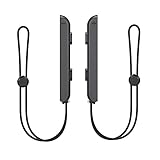
- 🎮 ELEVATE YOUR GAME - The Strap attaches to your Joy Con for additional security when playing motion-based games; It also improves the SL and SR buttons, making them much easier to press
- 🎮 ADVANCED ENGINEERING - Precision engineered to completely fits flush on all side, perfectly fit for your Joy-Con Joycon Controller; By attaching the Joy-Con strap to your wrist when you play, you can hold the Joy-Con more easily and control games more comfortably
- 🎮 UPGRADED PREMIUM QUALITY - Feedback based design with high end compact material, wear-resistant and not easy to break
How to avoid fake or incompatible accessories
Check the seal and the compatibility statement
Nintendo states that all licensed gaming accessories and peripherals display the “Official Nintendo Licensed Product Seal” worldwide. The seal is a useful authenticity check, but it does not replace reading the model list. Look for the exact wording “Nintendo Switch,” “Nintendo Switch OLED model,” “Nintendo Switch Lite” or “Nintendo Switch 2,” as applicable.
Understand the risk of unlicensed products
Nintendo also warns that unlicensed products do not undergo its testing and evaluation process. They may not work with a game system at all and may have compatibility problems with particular games or accessories. That warning matters most for electrical items, docks, chargers and controllers, where a mismatch can be more disruptive than an ill-fitting case.
Use a pre-purchase checklist
- Ask for the console model or confirm it from a clear photo.
- Read the manufacturer’s compatibility list, not only the marketplace title.
- Look for the Official Nintendo Licensed Product Seal on gaming accessories and peripherals.
- Check what the package contains: one controller, a pair, a cable, a power adapter or no accessories.
- Review dimensions, storage capacity, age guidance and return terms.
- For digital gifts, verify the recipient’s Nintendo Account region and redemption method.
Gift planning by budget and certainty
When you know little about the recipient, choose a low-assumption item: a model-confirmed case, a character-neutral Nintendo accessory or merchandise with an easy size exchange. When you know the console but not the fandom, a controller, charging accessory or organizer is more reliable than a character-specific shirt. When you know both the series and play style, combine them—for example, a Zelda apparel item for a collector, an Animal Crossing home item for a decorator or a multiplayer controller for a family that plays together.
Free tools Windows power users keep installed
One-click scans. No signup required.
For a larger gift, pair one practical item with one fandom item only after checking compatibility. A case plus a plush can cover travel and personality; a controller plus Nintendo Switch Online can cover local and online play. Avoid bundling multiple electrical accessories unless you have confirmed that each one supports the same console generation.
Quick Recap
Last-minute checks before you buy
- Confirm the exact hardware model, especially OLED, Lite and Switch 2.
- Check current stock, sizes, prices and return terms because catalog details change.
- For accessories, look for the Official Nintendo Licensed Product Seal and an explicit compatibility list.
- For apparel, verify size availability and care instructions.
- For plush, toys and collectibles, check age guidance and intended use.
- For Nintendo Switch Online, confirm the membership type, account arrangement and region.
- For eShop-related gifts, follow Nintendo’s current regional support guidance instead of assuming direct gifting.
A simple decision path
- Start with hardware: If the recipient’s model is unknown, ask before buying anything that fits, plugs in or docks.
- Choose the use case: Travel points to a case; multiplayer to Joy-Con or a controller; a second room to a compatible dock or charging setup; collecting to amiibo.
- Add fandom: Use Mario, Zelda, Animal Crossing, Pikmin, Metroid or another known favorite for apparel, plush, toys, home and office goods.
- Choose the source: Select a Nintendo Store exclusive for distinctiveness or a licensed product with wider availability when fit and returns matter more.
- Validate before checkout: Recheck model, seal, contents, region and current availability.
Product prices and availability are accurate as of the date/time indicated and are subject to change. Any price and availability information displayed on Amazon at the time of purchase will apply.

