
What’s actually slowing this PC down?
Pick the symptom - the matching free tool is one click away.
iTechGuides is reader-supported. When you buy through links on our site, we may earn an affiliate commission. As an Amazon Associate I earn from qualifying purchases. Learn more
A decade-old Windows installation can remain responsive when you consistently manage updates, free storage, drive maintenance, malware scans, and backups. Those habits preserve performance and make failures recoverable; they do not make unsupported software secure or aging hardware immortal.
An old Windows installation does not automatically become slow because of its age. Performance usually depends on a small maintenance loop: install updates while Microsoft still supports the release, keep room available on the system drive, let Windows optimize the correct type of storage, scan for malware, and maintain a backup before making major changes.
1. Keep Windows and drivers current while support lasts
Windows Update includes bug fixes and performance improvements. Microsoft’s performance guidance also recommends checking optional driver updates, since a graphics, storage, network or chipset driver can affect responsiveness and stability.
Open Settings > Windows Update, install available updates, restart when prompted, then open Advanced options > Optional updates and review driver updates. Install only drivers that match your hardware; do not force an unrelated package simply because it is listed.
#1 Best Overall

- ALL-IN-ONE SOLUTION: This 11-piece computer tool kit provides you with everything you’ll need to repair and maintain today’s computers.
- SECURE DESIGN: Designed to be used in offices or by computer services people, the computer tool set features a high quality vinyl case and is zippered to keep everything in one place.
- VERSATILE FUNCTIONALITY: This PC repair tool kit is perfect for computer technicians, off-site technicians and hobbyists looking for a basic tool kit to perform PC repairs and maintenance from home.
- MAXIMUM PORTABILITY: This PC tool kit is perfect for technicians who need a kit of common repair tools in a small, portable package.
Windows 10’s lifecycle boundary
Microsoft says support for Windows 10 ended on October 14, 2025. A computer can continue to boot and run after that date, but normal security updates and fixes have stopped. “Still works” and “still receives security maintenance” are different conditions. Eligible Extended Security Updates are a separate lifecycle option, not a restoration of ordinary support.
2. Keep free space on the system drive
Microsoft states that low disk space can reduce system performance and can prevent Windows from receiving upgrades. Windows needs working room for temporary files, update packages, caches and virtual-memory activity, so a nearly full system drive can make an otherwise healthy installation feel sluggish.
A safe monthly cleanup
- Open Settings > System > Storage and review the categories using space.
- Run Storage Sense or open Cleanup recommendations to review temporary files, large or unused files and rarely used apps.
- Use Disk Cleanup when you need to inspect additional system-generated files.
- Read each category before removing it, then restart if Windows has just completed a large cleanup or update.
Storage Sense targets the system drive and can remove temporary files and Recycle Bin contents according to its settings. Downloads and cloud content are not removed by default unless you configure those locations, but you should still verify the options before running an automatic cleanup. Never delete personal files from Downloads merely because they are old; move them to an external USB drive or another deliberate archive location first.
Rank #2

- The original electronics toolkit: Designed for computer, smartphone, tablet, and gaming repair, backed by thousands of free instructions.
- Intentional selection: All the tools you need. A 64 precision bit driver set, tweezers, flex extension, opening tools, and anti-static wristband.
- Secure design: Magnetic case and foam insert ensure secure storage and transportation. Additionally, the inside of the lid serves as a sorting/organization tray.
- Lifetime Warranty: We'll replace anything that breaks, as long as you own it.
3. Let Windows optimize the drive it actually has
Windows normally optimizes drives automatically, usually once a week. The operation differs by storage type:
| Storage type | Windows operation | What you should do |
|---|---|---|
| Hard disk drive (HDD) | Defragmentation reorganizes file fragments to improve sequential access. | Leave scheduled optimization enabled; inspect it if the disk feels unusually slow or a scheduled run was skipped. |
| Solid-state drive (SSD) | Optimization uses TRIM-style maintenance rather than traditional defragmentation. | Use the same Windows panel and keep automatic scheduling enabled; do not apply third-party “defrag everything” routines. |
Where to check
Search for Defragment and Optimize Drives, select a drive, and choose Analyze or Optimize as appropriate. Windows identifies the media type and applies the corresponding operation. Manual intervention is mainly useful for troubleshooting; routine scheduling is safer than repeatedly forcing optimization.
4. Scan when performance changes suddenly
Malware can consume CPU and disk resources, reducing system performance. If a computer becomes slow unexpectedly, check for updates and free space, then run a built-in security scan before purchasing a cleanup utility.
Rank #3
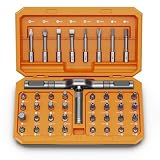
- [Ergonomic Design] - The mini screwdriver set features an ergonomic handle, providing a comfortable grip for users. The detachable extension rod design allows for adjustable working distances, making it more labor - saving. The handle doubles also as a mini wrench, more than just a screwdriver.
- [40 Professional Bits] - 42 in 1 magnetic screwdriver set equipped with 8 pcs 45mm long screwdriver heads, 32 pcs 25mm short screwdrivers (PH, SL, PZ, U-shaped, etc.), one handle, and a magnetic slot. Our experienced technical team has redesigned the kit, including all the tools needed to repair furniture, including Phillips, Pentalobe, Torx, Hex, JS, Slotted, Triangle, Square, and more.
- [Multi-Scenario Applicability] - Our ratchet screwdriver set are perfect for both home and office appliance repairs. Ideal for delicate tasks such as repairing mobile phones, glasses, watches, and laptops. No matter if it's a minor fix at home or a quick repair in the office, this set has you covered.
- [Smooth Ratcheting Mechanism] - The ratcheting screwdriver set features a 58-tooth gear system for one-handed operation. The 6.2° swing angle maximizes efficiency, reducing wrist strain, save 80% of your energy.
- [Excellent Quality] - The bits of this 42 in 1 magnetic ratchet screwdriver set are made of sturdy and rust - resistant metal materials, ensuring long - lasting use. Magnetic tips & holder design securely holds screws verticallyand prevents loss, even one-handed operation, there is no dropped screws, improving efficiency.
- Open Windows Security > Virus & threat protection.
- Choose Quick scan and allow it to finish.
- If symptoms persist or the scan finds a serious threat, open Scan options and select Microsoft Defender Offline scan. Save work first because the PC restarts.
Keep automatic security intelligence and Windows updates enabled. A scan is a response to a change, not a substitute for current security support.
5. Back up before cleanup, upgrades or hardware moves
Maintenance is only useful if a mistake or failing drive does not destroy your files. Before a reset, upgrade, storage replacement or major cleanup, verify a current backup and confirm that important files can be opened.
Cloud-assisted migration
Microsoft recommends OneDrive with Windows Backup for files, settings and apps when moving to a new device or upgrading. Check what is included and wait for synchronization to complete; a folder selected for backup is not proof that every file is already available on another device.
Rank #4
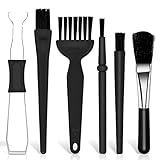
- Keyboard Brush Kit – This keyboard cleaning brush set includes 5 anti static brushes of different styles (ideal for cleaning tight spaces) and a 2-in-1 keycap puller & switch puller. It’s incredibly easy to store—compact and lightweight, perfect for on-the-go carry. Whether you’re at home, in the office, or traveling, this practical keyboard cleaner brush toolkit lets you easily clean keyboards and other electronic devices with the help of these keyboard brushes
- Anti Static Brushes – All 5 keyboard brushes are made with PP handles & nylon bristles. PP gives a sturdy yet gentle grip, nylon bristles have a special anti-static design to stop electrostatic discharge from damaging sensitive electronics. Soft bristles avoid scratching surfaces, making this set of keyboard cleaning brushes ideal for cleaning computer keyboards, circuit boards, camera sensors & other precision devices. They offer great safety and cleaning efficiency
- Avoid Costly Device Repairs – This keyboard brush cleaner kit is designed for hard-to-reach tight spaces. The included anti static brushes and keyboard key remover tool deliver deep cleaning—effectively removing debris stuck in keyboard gaps and dust buildup inside computers. Keeping your devices clean consistently not only ensures optimal performance but also prevents damage from excessive dust, ultimately saving you from expensive repair costs
- Deep Cleaning - The two-in-one keyboard keycap removal tool facilitates deep cleaning. The keycap puller on one end has a trapezoidal design and fits most sizes of mechanical keyboard keycaps, making it easy to remove keycaps for thorough deep cleaning. Please note: The switch puller on the other end only removes switches from mechanical keyboards with replaceable switches
- Versatile Uses - This keyboard brush cleaner kit features anti static brushes, perfect for cleaning computer keyboards, appliance crevices, circuit boards, phones, and headphones, keeping all your electronic devices dust-free and performing at peak performance. A variety of bristle sizes make it suitable for cleaning car vents, cameras, small fans, razors, door and window tracks, and more. One kit meets all your home and office needs, easily removing dust and debris for practical and safe
Local control and offloading
An external USB storage drive provides a physical destination for files you want to keep but rarely use. Copy the files, open several of them from the backup, and keep the drive disconnected when it is not needed so a malware incident cannot immediately encrypt both copies.
Independent reader supportYour contribution helps us test, update, and keep practical guides available for everyone.A maintenance rhythm that avoids risky “clean everything” advice
| When | Action | Reason |
|---|---|---|
| Monthly or when Windows reports low space | Review Storage, run Storage Sense or Cleanup recommendations, and inspect unusually large temporary files. | Preserves working room without deleting personal data blindly. |
| On Windows’ normal schedule | Allow Optimize Drives to run; inspect the panel if an HDD slows down or an optimization was skipped. | Applies defragmentation to HDDs and TRIM-style maintenance to SSDs. |
| When performance changes suddenly | Install available updates, run a Windows Security scan, and check free space. | Addresses common software causes before buying utilities. |
| Before an upgrade, reset or hardware move | Verify OneDrive/Windows Backup or an external USB backup and test important files. | Provides recovery if cleanup, migration or hardware fails. |
What these habits can—and cannot—do
They can prevent avoidable slowdowns caused by a full system drive, stale drivers, missed drive maintenance or malware, while making upgrades and replacements less stressful. They cannot add memory, repair a mechanically failing HDD, reverse worn-out SSD flash or provide security patches after a Windows release leaves support. If Windows 10 remains in service after October 14, 2025, treat its lifecycle status as a security decision separate from the fact that the installation still feels fast.
Free tools Windows power users keep installed
One-click scans. No signup required.
Quick Recap
Product prices and availability are accurate as of the date/time indicated and are subject to change. Any price and availability information displayed on Amazon at the time of purchase will apply.

