
Do these 3 things before closing this tab:
1Clear out junk files and repair common Windows errors2Scan for outdated or missing drivers - takes under a minute3Repair Windows errors before they cause bigger problemsiTechGuides is reader-supported. When you buy through links on our site, we may earn an affiliate commission. As an Amazon Associate I earn from qualifying purchases. Learn more
You can get more from Milwaukee tools you already own by matching the tool to the job and choosing a compatible attachment. These five ideas range from community-reported uses to cautious extensions of stated tool capabilities; they are not all manufacturer-approved applications or tested recommendations.
1. Scrub shower tile with a drill brush
A Milwaukee Tool community participant described using a drill with a scrub-brush attachment to clean shower tile. That is an anecdotal example, not Milwaukee guidance. Before trying it, confirm the brush fits your drill and is appropriate for the surface. Start at low speed on a small, inconspicuous area, and avoid pressing hard: grout, coatings, and delicate finishes can be damaged by aggressive scrubbing.

Keep the drill and battery away from water and follow the moisture limitations in the manual for your exact model. A drill is not a wet-area cleaning appliance. The community discussion describing the use supports the anecdote, not its suitability for every tile, grout, brush, or drill.
Free tools Windows power users keep installed
One-click scans. No signup required.
2. Cut cardboard with an oscillating multi-tool
Users in a Milwaukee community thread report cutting cardboard with a knife blade fitted to an oscillating multi-tool. This may be useful for trimming bulky packaging or making a controlled cut where a utility knife is awkward, but the report does not establish that every blade or tool is suitable. Choose a blade intended for the material, secure the cardboard so it cannot shift, and follow the instructions for both tool and blade. Keep hands clear of the cutting path.
#1 Best Overall
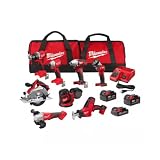
- COMPLETE KIT: Includes hammer drill, impact driver, circular saw, angle grinder, reciprocating saw, multi-tool, work light, and 3 batteries with charger in 2 tool bags
- POWER SYSTEM: Features M18 18-volt lithium-ion battery platform, providing consistent performance and extended runtime across all tools
- BATTERY PACKAGE: Comes with two high-capacity batteries and one compact battery, plus a rapid charger for minimal downtime
- STORAGE SOLUTION: Two heavy-duty contractor bags included for organized storage and easy transport of all tools and accessories
- VERSATILE APPLICATIONS: Perfect for drilling, driving, cutting, grinding, and demolition tasks in construction, remodeling, and maintenance work
The community thread is the source for this user-reported example.
3. Scrape residue with a multi-tool scraper blade
The same thread includes user reports of using scraper blades to remove caulk, adhesive, grease, and stickers. Treat those as possible task ideas, not a guarantee that one scraper will work safely on all residues or surfaces. Match the scraper to the material, test an inconspicuous spot, and use controlled pressure to avoid gouging paint, wood, or other finished surfaces. Secure the work and follow the blade and tool instructions.
Rank #2

- RECESSED FORWARD - BACKWARD SWITCH on the back of the head prevents you from accidental actuations in the middle of an important job
- LOW PROFILE HEAD DESIGN allows you to work in an engine bay without issue
- ONBOARD FUEL GAUGE: Lights on the side of the unit will let you know how much power you have left
- LED LIGHTING on the front of the unit allows you to see your job in dimly lit conditions
- REDLINK INTELLIGENCE: A smart chip in this unit allows it to communicate with the M12 battery plugged into it. This prevents it from receiving too much power and overheating, saving it from unnecessary damage
Milwaukee describes its M18 Cordless Multi-Tool, model 2626-20, as a versatile tool for jobsite applications, with remodelers, flooring contractors, maintenance repair technicians, and electricians among its intended users. That broad positioning supports versatility, but does not specifically endorse these community-reported cutting or scraping tasks.
4. Use an impact driver for careful, low-output fastening
An impact driver can be useful for controlled fastening when you select an appropriate drive-control mode and manage the trigger carefully. Milwaukee describes four drive-control modes and trigger control on its M18 FUEL 1/4-inch Hex Impact Driver with ONE-KEY, model 2957-20, as features intended to help prevent stripped screws or damage to materials. They reduce neither the need for judgment nor the possibility of damage.
Rank #3

- INCLUDES: • (1) 3404-20 M12 FUEL™ Hammer Drill Driver Bare Tool • (1) 3
For the material and fastener at hand, start with a suitable lower-output setting, use a correctly fitting bit, and practice on a spare piece or fastener if possible. The available modes vary by model, so check the controls and instructions for your exact driver.
5. Use a multi-tool for small, awkward remodeling details
For a short, precise cut or a localized removal task during a repair, an oscillating multi-tool may be more manageable than bringing a larger saw or scraper into a tight area. This is a practical extension of the tool’s general versatility—not a claim that every material or cut is suitable. Milwaukee positions the M18 2626-20 for work including remodeling, flooring, maintenance repair, and electrical tasks; the specific blade, material, and operation still determine whether a job is appropriate.
Before cutting or driving screws, check for concealed pipes and wires. Milwaukee’s impact-driver manual also warns against excessive impacting and recommends practicing on fasteners and checking tightness with a hand-torque wrench. Those instructions concern impact-driver work; for any other tool, use the manual for that exact model and task. Read the Milwaukee impact-driver manual.
Recommended Free Tools
Choose the attachment before the unusual use
A Milwaukee name on the tool does not establish that a particular accessory fits or suits the job. Before buying or using an attachment, check these points:
Quick Recap
- Compatibility: Confirm the accessory interface matches your exact tool model.
- Material and task: Use a brush, blade, or scraper intended for the surface and operation.
- Control: Check whether the tool can be operated at a speed or output appropriate for delicate work.
- Replacement: Consider how easily consumable brushes and blades can be changed when worn or contaminated.
Product prices and availability are accurate as of the date/time indicated and are subject to change. Any price and availability information displayed on Amazon at the time of purchase will apply.

