

Quick wins for a faster PC:
Repair Windows errors before they cause bigger problemsFix Now →Scan for outdated or missing drivers - takes under a minuteDriver Scan →iTechGuides is reader-supported. When you buy through links on our site, we may earn an affiliate commission. As an Amazon Associate I earn from qualifying purchases. Learn more
Lenovo Y740: At First Glance
When I set my eyes on Lenovo Y740, I wondered why anyone would want such a gaming laptop considering its simple design. That incited my curiosity to know what the laptop is made up of.
However, the laptop’s sharp design and the attractive RGB lighting that illuminates its keyboard were some of the things that cut deep into my heart. ‘’This is what every gamer will like on their laptop’’ – I said to myself.
Compared to the more affordable Lenovo Y720 that most of us are already familiar with, the Lenovo Y740 comes with more powerful hardware components. Of course, we should expect that from an upgraded version.
Talking about affordability, when I published this article in October 2021, the Lenovo Y740 had a starting price of $1,799.00. The big question here should be: “is the Lenovo Y740 worth its huge price tag?”
#1 Best Overall

- Compatible With Lenovo Legion Y540-15IRH Y540-17IRH Y540-17IRH-PG0 Y720-15IKB Y740-15ICHg Y545-PG0 Y730 Y900 Y910 Y920 Y7000 Y7000P Y9000K R720 Series, Lenovo Legion 7-15IMH05 7-15IMHg05. Lenovo Legion C7 15IMH05, Legion S7 15ACH6, Legion S7 15ARH5, Legion S7 15IMH5. Thinkpad P73 P72 P71 P70. Lenovo ThinkPad P53s P53 P52s P52 P51 P50 P50s, ThinkPad W540 W541 W550S W550
- Compatible with Lenovo ThinkPad P340 (30DE 30DF 30DG 30DR 30DS), P70 P71 P72 P73 P50 P51 P53 P40 Y910 Workstation Dock 230W, 700-15 Y50-70 P51S Y40-70
- With the intelligent chip inside,Featuring overcharging, overheating, overvoltage and short circuit protection, laptop Charger keeps you and your devices safe
- Package Includes: 1x 230W Laptop Charger 1x Ac Power Supply Cord
Read on to find out.
Lenovo Y740: Design, Dimension and Weight
In contrast with most gaming laptops, the design of the Lenovo Y740 is one that everyone will call simple and cool. The laptop looks so simple that it could be mistaken for an office laptop.
Lenovo Y740 chassis is built with high-quality aluminum material. This laptop’s aluminum body comes with some subtle black branding elements and very little bling that gives the laptop a durable and cool look.
Still on the exterior design, the only design hint that shows this laptop is a gaming laptop is the RGB light on its lid. To be precise, this RGB light glows attractively on the “Y” inscription that sits on top of the “O” in the LEGION logo.
What’s actually slowing this PC down?
Pick the symptom - the matching free tool is one click away.
To open the lid, you will definitely notice the dual hinges that hold the lid firmly to the keyboard chassis. These firm hinges allow the lid to be opened with one hand.
They also have enough range of motion to enable the screen to sit flat. This also means that the lid can go all the way to 180 degrees flat.
With the lid opened, the laptop’s beautiful screen comes into full view. Asides from the chunky bottom bezel, you will find the screen’s top and side bezels to be moderately thin.
For the most part, the top and side bezels complement the display enough to give the laptop a more modern gaming laptop look. This is an added advantage because it makes the viewing experience on this laptop a more immersive one.
However, there’s something that came as a shock to me. Unlike most laptops, the Lenovo Y740 has its webcam situated at the bottom bezel.
For me, this is a design flaw that I wasn’t expecting because the design has been nearly flawless until this point. Consequently, this webcam location causes anyone watching your stream to see you directly up to your nose.
By the way, If you’re just using the webcam once in a while for streaming with family and friends and not on games, it will get the job done. However, anyone taking game streaming seriously will want to invest in a webcam that allows views from a different angle.
One other feature a serious gamer will likely consider is the display of the laptop. Don’t worry, if you are a serious gamer, I’ve got you covered.
Luckily, Lenovo Y740 delivered in terms of the display feature. The laptop has a 17.3-inch IPS screen with a 920 x 1080 display resolution.
This LCD has a 144Hz refresh rate. With the 144Hz refresh rate, the laptop is capable of reproducing even the quickest of movements.
This is perfect not only for gaming but for keeping up with action-packed movies. Furthermore, the Lenovo Y740’s brightness can be increased to a maximum brightness of 300 nits.
Moving on to one of the most controversial parts of this laptop – the keyboard – I was a bit displeased by the arrangement. Nonetheless, the keyboard’s beautiful RGB lighting feature somehow made me develop a liking for it.
Do these 3 things before closing this tab:
1Repair Windows errors before they cause bigger problems2Scan for outdated or missing drivers - takes under a minute3Clear out junk files and repair common Windows errorsDuring usage, the laptop’s keyboard was comfortable to use. It has a slightly rubberized feel for a good grip and a 1 ms response time, for quick and accurate typing.
The other most interesting part of the Lenovo Y740 keyboard is the addition of dedicated macro keys. These keys come in the form of an additional column on the left side of the keyboard.
In case you don’t know, these keys could be programmed to perform a set of functions. For example, you can use them to perform operations like the customization of the keyboard backlighting effects.
Are you eager to know the dimension and the weight of this laptop? Let’s quickly check that out in the next paragraph.
Lenovo Y740 comes with a dimension of 412 x 305 x 21.95 – 25.45 mm. It is slimmer compared to the Lenovo Y720 of the same line.
The Lenovo Y720 measures 380 x 277 x 29 mm.
In addition, the Lenovo Y740 is also lighter despite its more powerful hardware components. Lenovo Y740 weighs 2900g, while the Lenovo Y720 weighs 3200g.
As for the port selection, this laptop comes with 1 USB 3.1, 2 USB 3.1 Gen 1, and 1 USB 3.1 Type-C port. The Lenovo Y740 also comes with a 1 x HDMI 2.0 port, 1 RJ-45 Ethernet port, and lastly 1 Thunderbolt 3 (Display, Data transfer) port.
Rank #2
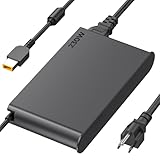
- 【Technical Specifications】230W Laptop Charger Input: 100-240V/50-60Hz Output: 20V, 11.5A, 230W (Compatible with 20V, 11.5A, 230W/20V, 8.5A, 170W/20V, 6.75A, 135W, incompatible with 300W and 330W) Maximum Output Power: 230W. Plug Specification: Square Yellow Plug
- 【Compatible Lenovo Model】 Lenovo Legion Charger compatible with Legion 5-15ACH6 5-15ACH6A 5-15ACH6H 5-15ARH05H 5-15IMH05H 5-15IMH6 5-15ITH6 5-15ITH6H 5-17ACH6 5-17ACH6H, 5-17ARH05H, 5-17IMH05H, 5-17ITH6, 5-17ITH6H, Legion 5Pro-16ACH6, 5Pro-16ACH6H, 5Pro-16ITH6, 5Pro-16ITH6H, 5P-15ARH05H 5P-15IMH05H
- 【Compatible Lenovo Model】Lenovo 230W Charger Compatible With Lenovo Legion Y540-15IRH, Y540-17IRH, Y540-17IRH-PG0, Y720-15IKB, Y740-15ICHg, Y545-PG0, Y520, Y730, Y740, Y900, Y910, Y920, Y7000, Y7000P, Y9000K, R720 series, 7-15IMH05, 7-15IMHg05, C7 15IMH05, S7 15ACH6, S7 15ARH5, S7 15IMH5, Compatible With Lenovo ThinkPad P1 P15 P16 P73 P72 P71 P70 P53s P53 P52s P52 P51s P51 P50 P50s W540 W541 W550S W550
- 【Compatible with P/N】ADL230SDC3A ADL230NLC3A ADL230SCC3A ADL230NDC3A ADL230SLC3A ADL230SCC2A 4X20E75113 4X20E75124 4X20E75117 4X20E75122 4 X20E75114 4X20E75120 4X20E75125 4X20E75112 4X20E75119 4X20E75111 4X20E75123 4X20E75116 4X20E75115 4X 20E75118 4X20E75121 4X20S56717 4X20S56713 4X20S56726 4X20Z83991 4X20E7511 GX20Z46307 GX20L29347 SA10R168 90 SA10E75804 SA10M42756 SA10E75805 SA10H28356 00HM626 00HM627 01FR046 01FR044 02DL144 02DL143 02DL142 00PC782
- 【Safety and Service】The Lenovo Legion 5 charger undergoes rigorous quality testing to ensure outstanding performance. It complies with safety standards and features multiple protections, including overvoltage, overload, overheating, and short-circuit protection. Lenovo laptop chargers come with a 12-month worry-free refund or replacement guarantee
Thinking about multimedia? No worries, Lenovo has got you covered. The Lenovo Y740 has a 3.5 mm Headphone/Microphone Combo Jack for audio.
You also get a 720p HD Camera that comes with a microphone.
In conclusion, the Lenovo Y740’s design is mouth-watering compared to its price tag. However, its webcam and keyboard arrangement can be improved.
Therefore, I will rate the Lenovo Y740 a nine in this design review.
Lenovo Y740: Processor (CPU) Performance
Lenovo Y740 comes with a 6-core Intel Core i7-9750H processor. This Core i7-9750H processor has a base frequency of 2.60 GHz and 4.50 GHz as the maximum frequency.
Free tools Windows power users keep installed
One-click scans. No signup required.
The Intel Core i7-9750H processor is an upgraded version of the eight-generation Intel Core i7-8750H. Intel Core i7-9750H processor belongs to the coffee Lakes Refresh (CL-R) generation.
CL-R generation processors are high-end processors that usually come with six cores.
With this type of processor on this laptop, it is more than capable of handling any productive task you throw at it. For instance, when I opened 25 browser tabs on the laptop while playing games, this laptop never gave me a reason to doubt its capabilities.
I went ahead to determine the laptop’s performance by subjecting it to Cinebench R20. I was not surprised when this laptop outshone the Asus ROG Zephyrus.
The Tool Desk
Outbyte PC Repair FREEClear out junk files and repair common Windows errorsFree Scan →Outbyte Driver Updater FREEFix the driver behind crashes, sound loss and screen glitchesFind Drivers →Cinebench is a test tool that analyses the real-world performance of a computer processor’s capabilities.
Based on this benchmark test, the Lenovo Y740 scored 2738 while the Asus Zephyrus scored 2357. When I performed the Cinebench R20 test on the Dell Alienware M17 R2, it scored better, achieving 4136.
For clarity, it is important to note that the higher the value of the Cinebench tests the better the performance.
Based on this test result, Lenovo Y740 has proven to be a powerful laptop. Hence, I will give it an eight out of ten in this review.
Crashes, No Sound, or Screen Glitches?
Random freezes, missing sound and display glitches usually trace back to one bad driver. Find and replace yours safely.Free scan · under a minuteWindows Errors? Fix Them Before They Spread
Repair common Windows errors and clear accumulated junk for a smoother, more stable PC - no reinstall needed.Free scan · no reinstallLenovo Y740: Memory (RAM) Performance
Lenovo Y740 comes with 32 GB RAM. This 32 GB RAM is evenly distributed among two RAM slots.
This means that each slot houses 16 GB of RAM.
A 32 GB dual-channel DDR4 RAM is enough for gaming and other memory-intensive applications that you may want to run. To test its performance, I decided to open 20 browser tabs.
Two of these tabs were streaming youtube videos while I played games. With these simultaneous operations, the Lenovo Y740 still ran smoothly.
Still on the test, I moved further to perform a benchmark test using PCMark 10. The Lenovo Y740 finished the test with a score of 5922 in the overall benchmark test.
Recommended Free Tools
By the way, PCMark 10 benchmark is a test that measures complete system performance for modern office needs using tests based on real-world applications and activities.
I also carried out the same PC Mark 10 benchmark test on the Alienware M17 R2 P4IE gaming laptop. The Alienware M17 R2 P4IE lagged behind the Lenovo Y740’s 5922 scores.
Alienware M17 R2 P4IE finished the test with a score of 5502 points.
Furthermore, when comparing Lenovo Y740 with ASUS ROG Zephyrus on PC Mark 10 benchmark test. The ASUS ROG Zephyrus led the table with an overall score of 6049.
Quick wins for a faster PC:
Fix the driver behind crashes, sound loss and screen glitchesFind Drivers →Clear out junk files and repair common Windows errorsFree Scan →Scan for outdated or missing drivers - takes under a minuteDriver Scan →However, this does not make Lenovo Y740 a less-performing laptop. Instead, it implies that it performs in its own space.
Rank #3

- Product parameters:Input:100-240v 50-60Hz ; Output: 20V 11.5A 230W.Connector size:USB Square Yellow Tip.(Please reconfirm the connector type before purchase.)
- Excellent Compatibility: Compatible with ALL 230W/170W laptops with square tip power connector.- It will not work properly If your device requires over 230W
- Compatible with Lenovo Legion 5 7 5P C7 S7 Y540 Y545 Y740 Y730 Y900 Y910 Y920 Y7000,Thinkpad P51 P52 P53 P15 P17 P71 P72 P73 P340 T15g Gen 1,W550s,X1 Carbon(2nd Gen),X1 Carbon(3rd Gen),X1 Carbon(4th Gen),X1 Yoga(1st Gen),X240,X250,X260,E440,E450,E455,E460,E465,E470,E475,E540,E550,E550c,E555,E560,E560p,E565,E570,E570p,E575,S1 Yoga 12, S3 Yoga 14,S5 Yoga 15,Yoga 14,L440,L450,L460,L540,L560,L570.
- Compatible with Lenovo P/N:GX20Z46307 GX20L29347 4X20S56713 4X20E75111 4X20Z83991 00HM626 00HM627 5A10H28356 ADL170NLC2A ADL230NDC3A ADL230NLC3A PA-1231-12LA SA10E75805 5A10H28357 SA10E75804 00HM626
- What You Will Get:Package:1*AC adapter and 1* power cord.Warr-anty:free ex-change and re-fund within 30 days.If you have any questions with our products,please do not hesitate to tell us.
Conclusively, Lenovo Y740 is a laptop with good memory performance capabilities. This is one of those aspects that make it a good gaming laptop.
With the Lenovo Y740’s performance in this section, it scores an eight in this memory performance review.
Lenovo Y740: Storage Option and Performance
This laptop comes with dual storage drives. It has 512 GB SSD storage with a 1TB HDD storage that runs at 7200RPM.
Do these 3 things before closing this tab:
1Clear out junk files and repair common Windows errors2Fix the driver behind crashes, sound loss and screen glitches3Repair Windows errors before they cause bigger problemsFortunately, having this large dual storage on the laptop is the juice for any space-hungry game. This permits you to throw anything at the laptop and still have your cake back.
Regardless, it is important to know how this storage performs and one of the best ways to do that was to use the Crystaldiskmark benchmark test.
A Crystaldiskmark benchmark test is a tool that analyses the read and write speed of a storage drive of a laptop. The read and write speed test score shows how fast or slow files can be copied or opened on the drive.
At the end of the test, Lenovo legion Y740 had a read speed of 1010MBps and a write speed of 362.2MBps.
Comparatively, Lenovo Y740 leads the table when compared with the Dell G7 17 that has a read and write speed of 924.7 MBps and 234.4MBps respectively.
Furthermore, I compared the Lenovo Y740 with the HP Pavilion 17. Here, the HP Pavilion 17’s read and write speed was 1617MBps /1337MBps which is a bit higher than the Lenovo’s.
On a file transfer test, the Lenovo Legion Y740 copied 4.97 GB of data in 9 seconds, at a rate of 566 MBps. The laptop surpasses the category average transfer rate of 393 MBps.
Based on the performance of Lenovo Y740 in this storage section, it scores an eight in this storage performance review.
Free tools Windows power users keep installed
One-click scans. No signup required.
Lenovo Y740: Graphics Card Performance
The Lenovo Y740 graphics card performance is one of those features that will definitely make you smile. Let’s take a quick look at these graphics card configurations options.
Lenovo Y740 comes with three graphics card configuration options that you can choose from.
Firstly, it comes with the NVIDIA GeForce RTX 2060 that has a dedicated VRAM of 6 GB GDDR6. This graphics card has a base GPU frequency of 1365 MHz and boosts GPU frequency of 1680 MHz.
Secondly, Lenovo Y740 comes with the NVIDIA GeForce RTX 2070 Max-Q that has a dedicated VRAM of 8 GB GDDR6. It has a base GPU frequency of 885 MHz and boosts GPU frequency of 1185 MHz.
Thirdly, there’s the NVIDIA GeForce RTX 2080 Max-Q which has 8 GB GDDR6 as its VRAM. Furthermore, this GPU comes with 735 MHz and 1095 MHz as its base GPU frequency and boost GPU frequency respectively.
Dedicated VRAM is advantageous in any gaming laptop. This implies that the laptop has a separate VRAM (video memory) that handles the graphics and image tasks of this laptop – not sharing the system memory with the CPU.
Our review unit is equipped with an NVIDIA GeForce RTX 2080 Max-Q. To determine its GPU performance I went straight to perform a 3D Mark benchmark Test.
Briefly, the 3DMark benchmark is a tool that helps you estimate the hardware performance of your laptop, tablet, and smartphone.
Based on the 3DMark benchmark test result, Lenovo topped the table with a score of 18520 points. The Dell G7 17 was the next on the table with a score of 17466 points.
Outstanding you said? Yes, that is an outstanding performance.
Furthermore, I proceeded to the real-world gaming performance of the laptop. I tested this Lenovo Y740 with The Witcher 3 which played at ultra graphics settings.
Rank #4

- Safety - Certified and Listed by UL, the US recognized safety standards, passed UL's stringent tests to ensure you and your devices' safety.
- Compatible with Lenovo laptops with 230W Slim tip power connector, model e.g. Legion 5 5i 5-15 5-16 5-17 5P 5P-15 5P-16 7 7i C7 S7 Y540 Y545 Y740 Y730 Y900 Y910 Y920 Y7000, ThinkPad X1 Extreme P71 P72 P73 P53 P15 P16 P17 P1, LOQ 15 16 laptops and more. (Only for amperage equal or less than 11.5A).
- One-year manufacturer warranty
- Output max - 20V 11.5A 230W, compatible with 20V 8.5A 170W input volt range - 100-240V
- Package - 1 * power adapter, 1 * AC power cord
The Lenovo Y740 played at 73.1fps. Meanwhile, the Dell G7 17 inch laptop followed closely with 64.7fps.
I also played Far Cry 5 on the laptop. This game played at 78fps on ultra settings. In addition, Shadow of the tomb raider played at 87 fps.
Overall, the Lenovo Y740 nailed it in this Graphics card performance section. Therefore, it deserves a nine in this review.
Lenovo Y740: Battery Life & Performance
The Lenovo Y740 comes with a 4 Cell 76Wh Li-Polymer battery. According to Lenovo, the battery delivers up to 6 hours of battery life under standard operations.
This laptop battery life is nothing to boast about. In fact, it is a great disadvantage to its status as a powerful gaming laptop.
The Tool Desk
Outbyte PC Repair FREERepair Windows errors before they cause bigger problemsFix Now →Outbyte Driver Updater FREEScan for outdated or missing drivers - takes under a minuteDriver Scan →To ascertain the 6-hour claim Lenovo made, I decided to put the battery performance to test. I ensured that the laptop’s battery was fully charged at 100% before I began the test.
I turned on Wi-Fi and set the display brightness to 70%. For this test, I opened several tabs on the laptop and I continued to surf the internet.
The battery lasted for 4 hours 16minutes with this test.
I proceeded in my quest to know how long it will last while watching videos on the laptop. I played a short movie with the volume set at 100%.
Recommended Free Tools
The laptop’s battery got drained after it had played videos for 4 hours and 16 mins.
Comparatively, the Lenovo Y740’s battery runtime trails behind that of the Dell G7 17 gaming laptop with 6 cell 97Wh. The Dell G7 17 lasted 12hours 50minutes.
Based on the battery life performance of Lenovo Y740, I will give it five in this battery performance review section.
Frequently Asked Question
Lenovo Y740 does not come with a 4K display option. If you are looking for 4k then you can go for another laptop like HP ENVY 17t-cg100 that offers a 4K display option.
What’s actually slowing this PC down?
Pick the symptom - the matching free tool is one click away.
The Lenovo Y740’s price is on the high side. As of the time of writing this article in October 2021, you can get the Lenovo Y740 on www.itechguides.com through one of our affiliates at the price of $,1,799.00.
The Lenovo Y740 was released in 2019.
Yes, Lenovo Y740 has a 720p HD camera.
Yes, Lenovo Legion Y740 is a good gaming laptop. With the dedicated NVIDIA GeForce RTX 2080, the Max-Q graphics card on this laptop is a gaming monster.
Conclusion
Lenovo legion Y740 comes with some adorable features. The design, graphics card, and 32GB memory make it a laptop that satisfies the average gamer’s needs.
However, the Lenovo Y740 is also a victim of the poor battery life that inflicts most gaming laptops. Nevertheless, the hardware features are nothing any gamer will scoff at.
Outdated Drivers Are Slowing You Down
One free scan finds every outdated or missing driver and matches the right update for your exact hardware.Free scan · exact hardware matchWindows Errors? Fix Them Before They Spread
Repair common Windows errors and clear accumulated junk for a smoother, more stable PC - no reinstall needed.Free scan · no reinstallIn conclusion, considering the pros and cons of this laptop, I recommend the Lenovo Y740 as a gaming laptop for real gamers out there like myself.
I hope you found this Lenovo Y740 review helpful. If you found the review helpful, kindly click Yes to “Was this page Helpful?” below.
You could also share your thoughts with the “Leave a Comment” form found at the end of this page.
Finally, for more laptop reviews, visit our Laptop Reviews page. You may also find our Laptop Specs page very helpful.
Quick Recap
Product prices and availability are accurate as of the date/time indicated and are subject to change. Any price and availability information displayed on Amazon at the time of purchase will apply.


