
iTechGuides is reader-supported. When you buy through links on our site, we may earn an affiliate commission. As an Amazon Associate I earn from qualifying purchases. Learn more
No. A display with a native resolution of 1280 × 800 is WXGA, not 1080p. The confusion comes from comparing width with height: 1280 is the horizontal pixel count, while “1080p” refers to 1080 vertical lines in a progressive image. In common Full HD usage, that image is 1920 × 1080.
What does 1280 × 800 mean?
The figures describe the display’s pixel grid: 1280 pixels across and 800 pixels high. Dell classifies 1280 × 800 as WXGA and lists its total as 1,024,000 pixels. It is a 16:10 format, taller in shape than a 16:9 screen of the same width.
By comparison, Dell classifies 1920 × 1080 as FHD, with 2,073,600 pixels. Samsung describes 1920 × 1080 as 1080p or Full HD. Dell’s resolution reference and Samsung’s display-resolution guide distinguish the formats.
What’s actually slowing this PC down?
Pick the symptom - the matching free tool is one click away.
| Format | Pixel dimensions | Aspect ratio | Total pixels |
|---|---|---|---|
| WXGA | 1280 × 800 | 16:10 | 1,024,000 |
| FHD / 1080p | 1920 × 1080 | 16:9 | 2,073,600 |
The pixel counts are specification figures listed by Dell Support on a page last modified February 16, 2024. A 1920 × 1080 grid has just over twice as many pixels as a 1280 × 800 grid.
#1 Best Overall
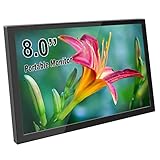
- Mini & Portable: Compact 8-inch mini monitor with a sleek aluminum alloy shell. The simple and durable design makes it easy to carry and perfect for limited spaces. Overall size is only 7.7 × 4.7 inches, ideal for portable setups or space-saving desktop use
- High-Definition IPS Screen: The small monitor features a 1280x800 HD resolution with an IPS panel for vivid color and sharp image quality. Enjoy consistent colors and clear visuals from wide viewing angles, great for gaming, programming, or monitoring tasks
- Wide Compatibility & Easy Connection: Equipped with mini HD port for signal input and micro USB for power supply, plug and play setup with no driver needed. Compatible with Raspberry Pi, Jetson Nano, PCs, laptops, game consoles, and other HDMI-compatible devices
- Built-in Speakers & Adjustable Settings: The small computer monitor has integrated stereo speakers to enhance your audiovisual experience. Easily adjust volume and brightness to suit your environment, whether for work, entertainment, or DIY projects
- USB Powered & VESA Mount Supported: Power via USB from a PC, power bank, or wall plug — no bulky adapter required. It comes with 4 VESA mounting holes (75x75mm) on the back, allowing flexible installation on walls, stands, or monitor arms
Why is 1280 × 800 not called 1080p?
The “p” in 1080p means progressive scan, as opposed to interlaced formats marked “i.” The number 1080 identifies the image’s vertical line count; it is not a shorthand for any resolution with a width above 1080 pixels. A 1280 × 800 grid has only 800 vertical pixels, so it is not 1080p.
Can a 1280 × 800 display accept a 1080p signal?
Possibly, but native resolution and input compatibility are separate specifications. Native resolution is the physical panel’s pixel grid. A display or projector may accept a 1920 × 1080 input and scale it to its 1280 × 800 grid, but that does not make the panel native 1080p. Do not assume a device accepts that input based only on its native resolution; check the specifications or manual for the exact model.
Rank #2

- iPitBit 10.1 inch mini monitor offers a resolution of 1280x800. Its IPS panel provides a wide 178° viewing angle, and flicker-free technology effectively reduces eye fatigue.
- iPitBit 10.1 inch raspberry pi monitor is suitable for various versions of Raspberry Pi and multiple devices such as Octo Pi, Banana Pi, Retro Pi, game consoles, computers, and TV boxes. It supports multiple systems including Retro Pi, NOOBS, Debian, Ubuntu, Kodi, and Windows 7/8/10/11.
- The high-sensitivity 5-point capacitive portable monitor is plug-and-play, requiring no additional drivers. Simply connect the device via the HDMI interface and power it via the USB interface to enable the touch function, with a response time of only 3-5 ms.
- This small HDMI monitor features built-in speakers and a stylish ultra-thin design. It comes with a foldable PU case that protects the screen, it is lightweight and portable for work and travel. Equipped with mounting holes on the back, it can easily install VESA bracket.
- You will get 10.1inch Monitor x 1, HDMI to HDMI Cable x 1, VGA Cable x 1, USB-C Cable x 2, HDMI Adapter x 1, Mini Portable Stand x 1, Power Adapter x 1. Feel free to contact us if you encounter any problems during this period.
Windows uses a display’s reported native resolution when selecting a default display mode, as described in Microsoft’s guidance on changing screen resolution and layout.
Recommended Free Tools
What happens when 16:9 video appears on a 16:10 screen?
The 16:9 video and 16:10 display have different shapes. Depending on the device and its settings, the image may be scaled with bars, cropped, or otherwise adjusted to fit. The precise behavior varies by model and configuration, so consult the display’s settings or documentation if the result matters.
Rank #3
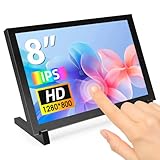
- 8 Inch Monitor: With support for 1280x800 HD resolution, the 8 inch IPS display offers crystal clear visuals and vivid colors for high-quality visuals experience. The backlight of the monitor can be adjusted by button
- Touchscreen Monitor: 8 inch touch screen supports smooth and accurate navigation. When connected to PC (Win7/8/10/11), supports 5-point touch; when work with Raspberry Pi screen (Raspbian, Kali Linux, Ubuntu, Kodi, Win10 IOT), single point touch
- Wide Applications: The small monitor has HD and two USB ports, compatible with Raspberry Pi, Jetson Nano, laptops, gaming consoles, and more HDMI-compatible devices; the second USB port can used for additional power supply, ensuring stable and reliable performance
- Versatile Mounting Options: The LCD monitor comes with a stand and mounting holes on the back, making it easy to install small computers SBC, and mount it on the wall
- Protective Acrylic Case: The mini monitor comes with a durable and stylish acrylic case that protects the screen from scratches, fingerprints, and other damage, while also enhancing its visual appeal
Does 1080p always look sharper?
More pixels provide more image detail when the content, display, and viewing conditions make that detail visible, but resolution alone does not determine perceived sharpness. Physical screen size and viewing distance also matter; screen size and pixel resolution are distinct measurements, as Samsung explains in its resolution guide.
Quick Recap
Product prices and availability are accurate as of the date/time indicated and are subject to change. Any price and availability information displayed on Amazon at the time of purchase will apply.

