
PC Slower Than It Used to Be?
A free scan shows the junk files, broken settings and background clutter dragging Windows down - then fixes them in one click.Free scan · Windows 10 & 11Crashes, No Sound, or Screen Glitches?
Random freezes, missing sound and display glitches usually trace back to one bad driver. Find and replace yours safely.Free scan · under a minuteiTechGuides is reader-supported. When you buy through links on our site, we may earn an affiliate commission. As an Amazon Associate I earn from qualifying purchases. Learn more
HP Omen: At First Glance
HP’s Omen range of gaming laptops has been providing a “one-of-a-kind” gaming experience for gamers since 2016. Part of its range of products is the HP Omen 15T – EN0029NR and HP Omen 17T-CB100 laptops.
The 17-inch model was released in 2019, followed by the 15-inch model in 2020. Even with their flaws, both models are good definitions of premium, rugged, and daring.
| # | Preview | Product | Price | |
|---|---|---|---|---|
| 1 |

|
HP Omen Max 16" 240Hz Ryzen AI 9 HX 375 & 5080 Gaming Laptop, 32GB + 1TB | $2,936.02 | Buy on Amazon |
| 2 |
|
HP HyperX OMEN 16 OLED 2.5K AMD Ryzen 9 9955HX RTX 5070 Gaming Laptop | $2,399.00 | Buy on Amazon |
In terms of price, HP Omen comes at a fair price – similar to other premium gaming laptops like the MSI G series.
At the time of publishing this review in August 2021, the HP Omen 15-inch model had a starting price of $1,098.43. On the other hand, the price of the HP Omen 17-inch model starts at $1,031.51.
#1 Best Overall
- 【AI‑Boosted Business‑Grade Computing】Powered by AMD Ryzen AI 9 HX 375 (55 TOPS built‑in NPU) and NVIDIA RTX 5080 16GB GDDR7 GPU. It runs local‑AI tasks, enterprise data analysis and design projects smoothly, supports Rufus deployment to satisfy business‑oriented high‑load workflows.
- 【High‑Caliber Display for Daily Business Usage】This 16‑inch WQXGA IPS panel delivers a 240Hz refresh rate, 3ms response time, 500‑nits brightness and 100% sRGB gamut. Anti‑glare and low‑blue‑light features ease eye strain during long‑time document reviewing and color‑sensitive designing.
- 【OMEN Cooling System for Hardware Reliability】OMEN Tempest Cooling Pro suppresses thermal throttling under continuous heavy loads. It maintains steady CPU‑GPU performance for long‑hour business rendering and intensive tasks, lessens hardware aging to ensure dependable long‑term operation.
- 【Fast Memory & Storage】 With 32GB DDR5 RAM, enjoy smooth multitasking, instant app switching, and seamless handling of large files. The 1TB SSD provides lightning-fast boot times, rapid game and software loading, and ample space for your games, media, and projects, keeping your workflow efficient and lag-free.
- 【Ports】 Featuring 2 USB-A 10Gbps ports for lag-free gaming peripherals, dual USB-C ports for ultra-low input latency, HDMI 2.1 for smooth, tear-free visuals on external monitors, RJ-45 Ethernet for ultra-stable online gaming, and a headphone/mic combo for crystal-clear voice and precise positional audio. The AC smart pin ensures full power delivery to both the CPU and RTX 5080, so the system runs at peak performance without throttling.
Want to know if this laptop is worth your money? Then read on as I unravel all that these HP Omen models have to offer!
HP Omen: Design, Dimensions & Weight
As I previously stated, this review focuses on two models of the HP Omen. As expected, since they are from the same brand, they share some similar features such as design.
However, the models also differ in some other features like weight.
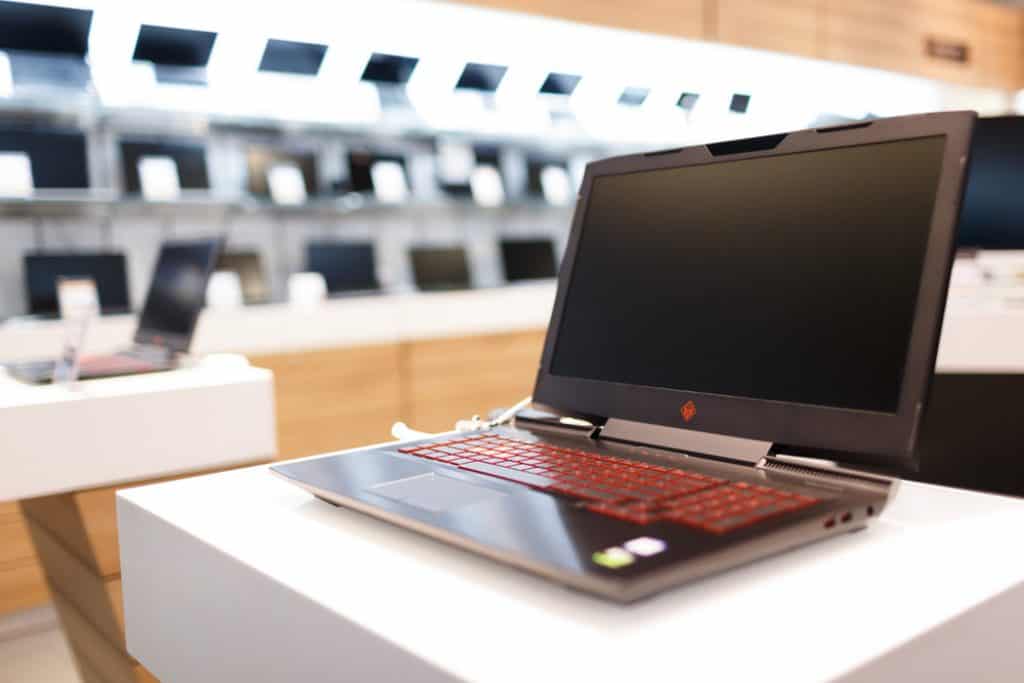
To start with, the HP Omen is made of solid plastic chassis and an aluminum deck for comfortable palm rest. The faux brushed finish on this laptop gives it a premium, metal-like look that will make you doubt its plastic chassis.
Speaking of chassis, the 15-inch model has a more subtle look than the 17-inch model. Unlike most gaming laptops, the HP Omen 15T – EN0029NR does not scream “I’m a gaming laptop!”
In fact, it looks more like an HP Notebook than a typical gaming laptop. This design will be appreciated by those who prefer a less evident look to their gaming laptop.
On the other hand, the HP Omen 17T-CB100 is the complete opposite of the 15-inch model. Just at a glance, you can tell that the 17-inch model aims to dominate and make a statement.
What’s actually slowing this PC down?
Pick the symptom - the matching free tool is one click away.
For color variants, the HP Omen 15-inch model offers mica silver or shadow black color variants. The 17-inch model, on the other hand, comes in only one color – black.
The most noticeable design feature of the 17-inch model is the hinges. The hinges are centrally positioned like the Dell Alienware M15 R1.
As expected, the position of the hinges causes some screen flex which is probably not something to worry about.
Interestingly, the HP Omen does not have the typical “hp” logo on any part of the laptop. Instead, what you see is the “omen” text logo and a slanted square logo above it.
Quick wins for a faster PC:
Fix the driver behind crashes, sound loss and screen glitchesFind Drivers →Clear out junk files and repair common Windows errorsFree Scan →In terms of size and weight, the HP Omen 15-inch has a dimension of 357.8 x 239.7 x 22.6 mm and weighs 2458.4 g.
On the other hand, the HP Omen 17 has a dimension of 404.8 x 284.9 x 29.9 mm and weighs 3229.5 g.
The 15-inch model is not the slimmest of gaming laptops but it is portable like the Lenovo Legion 7i. While the HP Omen 17-inch model is a lot heavier.
Moving on to display, HP offers these laptops with the very best in viewing pleasure. Asides from the obvious 15-inch and 17-inch difference, they have some similarities.
More precisely, both models feature an IPS display panel with a 144 Hz refresh rate. Just in case you’re wondering, the panel refresh rate counts the number of times a display fully refreshes every second it is on.
A refresh rate of 144 Hz is a very good figure, especially for fast-paced games. Asides from the refresh rate, both models also serve well in terms of the color accuracy of a display.
The 15-inch model has 325 nits of brightness and 96% sRGB. Slightly higher, is the 17-inch model with 368 nits of brightness and 104% sRGB.
To be more precise, both sRGB and brightness of nits are responsible for color accuracy. This makes it easy to spot every detail in an image.
With such a display, this device is ideal for content creators, photo and video editors, and graphic artists.
Furthermore, the matte, anti-glare display feature of the HP Omen makes it friendly for both indoor and outdoor use. This means that the reflection of sunlight does not affect how the display looks when working outdoors.
Moving on to the deck of the laptop, the keyboard on the HP Omen has a nice key spacing. Just below the keyboard is the smooth and very responsive touchpad.
The key travel on this laptop is 1.5mm. This is the distance a key moves into the chassis of the laptop before bouncing back on a single press.
Do these 3 things before closing this tab:
1Fix the driver behind crashes, sound loss and screen glitches2Repair Windows errors before they cause bigger problems3Scan for outdated or missing drivers - takes under a minuteSpeaking of the keys, HP offers an interesting feature on the laptop’s keyboard. HP Omen features a customizable RGB per-key backlit which gives you more color options on the keys.
The sRGB backlit keyboards are becoming a trend for gaming laptops. Laptops like the Razer Blade 15 and ASUS ROG Strix G17 also have this feature.
However, this is an optional feature that will cost you a little more. So if you’ll prefer the subtle regular backlit keys, you won’t have to spend more.
For the port and slots of the HP Omen, the 17-inch model offers a little more than the 15-inch.
On the left side of the HP Omen 15, there’s the power-in port, an RJ-45 ethernet, a USB Type-A port, an HDMI port, an audio jack, and a full SD card reader.
Moving on to the right, you’ll see a USB Type-C port, two USB Type-A ports, and a DisplayPort out. There is no thunderbolt port since it’s an AMD Ryzen processor laptop.
Just in case you’re wondering why that is, thunderbolts are only meant for Intel processor laptops. This means that it’s really rare to find an AMD Ryzen processor laptop with a thunderbolt port and if you do – it will be super expensive.
Back to the ports, on the right side of the HP Omen 17, there’s a full SD card reader and 1 USB Type-A port.
Recommended Free Tools
While on the left side, there’s the power-in port, one USB 3.2 Type C port, an HDMI port, a DisplayPort, two USB Type-A ports, one thunderbolt Type-C, and a headphone jack.
In brief, HP provides really pleasing features to the display and design of the Omen laptop. So, this gaming laptop deserves a nine out of ten.
HP Omen: Processor (CPU) Performance
Both models of the HP Omen come with different processors. The HP Omen 17T-CB100 is powered by an Intel Core processor while the HP Omen 15T-EN0029NR has an AMD Ryzen processor.
In detail, the 15-inch HP Omen features an 8-core AMD Ryzen 7 4800H processor with an 8 MB cache. In terms of CPU speed, it has a base frequency of 2.90 GHz and a boost frequency of 4.20 GHz.
Free tools Windows power users keep installed
One-click scans. No signup required.
The 17-inch model features an 8-core Intel Core i9-10885H processor with a 16 MB cache. It also has a base frequency of 2.40 GHz and a boost frequency of 5.30 GHz.
However, to be sure that the laptop’s performance is up to scratch, I ran a benchmark test to analyze how both processors perform. To be more exact, I used the Cinebench R15 which is a real-world test suite that evaluates your computer’s hardware capabilities.
From the result of this test, the HP Omen 15-inch scored 1909 points. On the other hand, the 17-inch model was behind with a score of 1450 points.
Apparently, the AMD Ryzen 7 4800H processor is a higher performer than the Intel Core i9-10885H processor.
The Tool Desk
Outbyte PC Repair FREERepair Windows errors before they cause bigger problemsFix Now →Outbyte Driver Updater FREEScan for outdated or missing drivers - takes under a minuteDriver Scan →To support these test results, I compared them with other similar gaming laptops. Among these laptops is the Dell G5 15 with the same AMD Ryzen 7 4800H processor which had a score of 1834
In the same light, the 17-inch MSI GE75 9SG with an Intel Core processor had a score of 1721. This is not so surprising since AMD Ryzen processors have been taking the lead recently in high performance.
This can be seen in most gaming laptops invented in 2020 like the ASUS TUF A15 and the Dell G5 15.
Regardless of the test results being in favor of the 15-inch model, it does not make the 17-inch any less capable. Apparently, the HP Omen 15-inch model is a performance upgrade of its 17-inch model.
Recommended Free Tools
Altogether, the HP Omen provides improved CPU performance. I will be rating it nine.
HP Omen: Memory (RAM) Performance
When it comes to memory, the HP Omen does not disappoint. Both models feature almost the same memory specifications.
The HP Omen 15T-EN0029NR and HP Omen 17T-CB100 both come with a standard memory size of 8 GB RAM.
In addition to that, there are two memory slots on the HP Omen for expanding the memory. This means that one slot has the 8 GB RAM which comes with the laptop while the second slot is empty for additional RAM.
Quick wins for a faster PC:
Clear out junk files and repair common Windows errorsFree Scan →Fix the driver behind crashes, sound loss and screen glitchesFind Drivers →However, the maximum memory capacity differs for both laptops. The HP Omen 17-inch model supports twice the memory size of the 15-inch model.
To be exact, the 15-inch supports a maximum memory of 16 GB RAM while the 17-inch supports a maximum of 32 GB RAM. Despite not having 32 GB of RAM memory capacity on the 15-inch model, 16 GB RAM will perform well on this gaming laptop.
Rank #2
- 【Processor & Operating System】Powered by Powered by the latest next-gen AMD Ryzen 9 9955HX processor built on Zen 5 architecture, featuring 16 Cores & 32 Threads, Max. Boost Clock Up to 5.4 GHz, paired with 16 MB L2 Cache and 64 MB L3 Cache to deliver blistering speed for heavy gaming, content creation and multi-tasking workloads..Windows 11 home: Optimized for gaming and multitasking, making it ideal for work, school, and play.
- 【Creative Graphics】The gaming laptop comes with the GeForce RTX 5070 8GB GDDR7 GPU, providing a quantum leap in performance and enabling unparalleled game experiences through improved ray tracing, AI-enhanced DLSS 5 in modern AAA titles. It also accelerates creative workflows such as video editing, 3D rendering, and graphic design.
- 【Smooth Visual Performance】16 inch IPS-level anti-glare WQXGA (2560 x 1600) OLED 2.5K display with a 165Hz refresh rate is ideal for fast-paced gameplay.
- 【Lag-Free Connectivity: Stay Ahead of the Competition】3 x Superspeed USB Type-A, 1 x Superspeed USB Type-C, 1 x HDMI, 1 x RJ-45, 1 x Audio Port; Backlit Keyboard(Fn+F9); Numeric Keypad; Webcam; Wi-Fi 7 & Bluetooth.
- 【Advanced Cooling System】Equipped with OMEN Tempest Cooling architecture and self-cleaning technology to boost airflow and heat dissipation. Prevent thermal throttling, maintain consistent high performance for extended gaming & creative workloads, and reduce long-term maintenance to protect your hardware.
Speaking of performance, I conducted a memory performance test on both models of the HP Omen using the PC Mark 10. The PC Mark 10 is a benchmark test that measures complete system performance for modern office needs based on real-world applications and activities.
Earlier, I mentioned that HP offers a maximum of 16 GB memory for the 15″ model while the 17″ model supports a maximum of 32 GB memory. It’s worth noting that our 15-inch and 17-inch review units have 8 GB of memory each.
At the end of this test, the HP Omen 15-inch scored 5767 points while the 17-inch model scored higher with 6220 points. Compared with other gaming laptops, HP Omen 15 and 17 scored higher than the 15 and 17-inch models of the Acer Predator.
More precisely the Acer Predator Helios 700 (17-inch) had 6043 while its 15-inch model – the Acer Predator Helio 300 had a score of 5840 points in the same test.
All in all, the above test results show that the HP Omen will perform tasks without hitches. I will be rating it an eight based on its performance and specifications.
HP Omen: Storage Option & Performance
Similar to its memory and CPU specifications, the HP Omen offers slightly different storage options to chose from. In addition to that, they both differ in maximum storage capacity.
What’s actually slowing this PC down?
Pick the symptom - the matching free tool is one click away.
In terms of storage type, the 17-inch has both the SSD & HDD storage slot while the 15-inch has only one SSD slot.
To be precise, both models feature 256 GB SSD storage. However, the maximum storage of the 15-inch model is 512 GB while that of the 17-inch model is 1 TB.
In addition to the 1 TB SSD storage capacity, the 17-inch model also supports another 1 TB HDD storage capacity. This means that you can have 2 TB storage on both slots of the HP Omen 17.
Interestingly, even with the SSD & HDD storage options made available, HP also included a full SD card option for more storage.
The Tool Desk
Outbyte Driver Updater FREEFix the driver behind crashes, sound loss and screen glitchesFind Drivers →Outbyte PC Repair FREERepair Windows errors before they cause bigger problemsFix Now →Apparently, HP had the intention of providing more than enough storage for its users for seamless gaming performance. This brings us to the aspect of storage performance.
To analyze how well the HP Omen storage performs, I carried out a CrystalDiskMark test. This is a benchmark test that measures the performance of storage types by reading and writing through storage files.
From the result of the test, the HP Omen 15 had a read speed of 2869 MB/s and a write speed of 2706 MB/s. The HP Omen 17 scored higher with a read speed of 3102 MB/s and a write speed of 2967 MB/s.
In comparison, the HP Omen performed similarly to the MSI Titan which had a read and write speed of 3199 MB/s and 2439 MB/s respectively.
Asides from having good storage options, the HP Omen is also a performer. For that reason, I will be rating it a nine in this storage review.
Independent reader supportYour contribution helps us test, update, and keep practical guides available for everyone.HP Omen: Graphics Card Performance
The HP Omen provides impressive graphics for a gaming laptop. This laptop also comes with graphics options to choose from.
You can go for the NVIDIA GeForce RTX- 2080 SUPER, AMD Radeon Graphics, or NVIDIA GeForce GTX – 660 graphics option.
The NVIDIA GeForce RTX 2080 has 8 GB of dedicated VRAM. In terms of speed, it has a base frequency of 1650 MHz and a boost frequency of 1815 MHz.
Next is the AMD Radeon Graphics which is an integrated graphics card with a base frequency of 1440 MHz and – a boost frequency of 1600 MHz.
The NVIDIA GeForce GTX 660 has 6 GB of dedicated VRAM. In addition to that, 1500 MHz is the base frequency while 1770 MHz is the boost frequency.
At this point, it’s important to highlight the key difference between these graphic cards. Both NVIDIA GeForce RTX 2080 and GTX 660 are dedicated graphics cards while the AMD Radeon is an integrated graphics card.
That is to say that dedicated graphics perform independently because they have their own memory. The integrated graphics card, on the other hand, shares the memory of the CPU to perform its task.
Free tools Windows power users keep installed
One-click scans. No signup required.
In simple terms, a dedicated graphics card performs better than an integrated one. If you will be involved in high graphics tasks on this laptop, either of the NVIDIA GeForce will serve you well.
Meanwhile, you need to know the performance level of these graphics cards. To find out, I used the 3D Mark which is a benchmark test used to measure a laptop’s gaming performance.
Before proceeding, it is important to note that the review model has the NVIDIA GeForce graphics card.
At the end of this test, the 15-inch with the NVIDIA GeForce GTX 1660 scored 20535 points. On the contrary, the 17-inch model with NVIDIA GeForce RTX 2080 scored 31826 points.
PC Slower Than It Used to Be?
A free scan shows the junk files, broken settings and background clutter dragging Windows down - then fixes them in one click.Free scan · Windows 10 & 11Crashes, No Sound, or Screen Glitches?
Random freezes, missing sound and display glitches usually trace back to one bad driver. Find and replace yours safely.Free scan · under a minuteComparatively, the 15-inch Lenovo Legion 5 with the same graphics card as the HP Omen 15, scored 21542. While the MSI GE75 with the same graphics card as HP Omen 17, scored 34050 in the same test.
Since this is a gaming laptop, I decided to play some games and see just how well it performs.
To start with, I played Far Cry 5 which was playable at 95 fps on medium settings of 1080p. On the same settings, Rise of the Tomb Raider played at 111 fps
Above all, the HP Omen is a good gaming laptop that also provides graphics options to choose from based on your needs. For that reason, I will be rating it a nine.
Do these 3 things before closing this tab:
1Fix the driver behind crashes, sound loss and screen glitches2Clear out junk files and repair common Windows errors3Scan for outdated or missing drivers - takes under a minuteHP Omen: Battery Life & Performance
Both the 15 and 17-inch models of the HP Omen are powered by a 70 Wh Li-ion polymer battery. HP advertised the laptops to have a battery life of 7 hours 30 minutes.
To test HP’s claim, I ran a battery test. Without adjusting any battery-saving settings on the laptop, it lasted for 3 hours 40 minutes on gaming.
In addition to that, I wanted to know how it performs for less demanding tasks, so I ran another battery test. On this test, Wi-Fi was turned on with 7 web tabs open and brightness was set at 50%.
The HP Omen lasted for 6 hours 42 minutes on this test. When compared with other laptops, it did not exactly match up.
For the Dell G5 15, it lasted 7 hours 12 minutes while the ASUS ROG Zephyrus lasted 11 hours 25 minutes on the same test.
Regardless, if you’ll always have this laptop plugged in, this battery life may not be such a big deal.
Generally, gaming laptops are not always the best with battery life but I expected better from the HP Omen. For this reason, I will be rating it a six.
Frequently Asked Questions
Both models provide great gaming performance and are very similar in specifications. However, the HP Omen 15 is an upgrade to the HP Omen 17. Either way, both function well depending on your needs.
Yes. HP offers an optional 4K display screen for the Omen 17
Yes. In terms of memory and storage, you can upgrade the HP Omen 17. HP Omen 17″ supports up to 32 GB. In terms of a storage upgrade, the laptop supports both SSD and HDD.
Yes. The HP Omen has an optional customized RGB keyboard. However, if you want this optional feature, it will cost you a bit more.
Yes. It comes with an IPS display panel with a 144Hz refresh rate
Conclusion
The HP Omen can be regarded as a near-perfect gaming laptop with its impressive features. It also has a good price-to-performance ratio which makes it just the right price for the right performance.
Both models of this laptop have the right combination of hardware, making it a good performer for gaming and other high graphics needs.
Also, I would recommend the HP Omen not just for gamers but also for graphic artists, photo and video editors.
I hope you found this HP Omen review helpful. If you found the review helpful, kindly click Yes to “Was this page Helpful?” below.
Quick wins for a faster PC:
Repair Windows errors before they cause bigger problemsFix Now →Fix the driver behind crashes, sound loss and screen glitchesFind Drivers →You could also share your thoughts with the “Leave a Comment” form found at the end of this page.
Finally, for more laptop reviews, visit our Laptop Reviews page. You may also find our Laptop Specs page very helpful.
Quick Recap
Product prices and availability are accurate as of the date/time indicated and are subject to change. Any price and availability information displayed on Amazon at the time of purchase will apply.


I own an Omen Laptop and have mixed feelings about it. Performance is good, but not as good as an Apple, which might cause controversy, but yes. If I had the budget, I would go back to Apple, but due to that, they are so overpriced and not as reliable as they were a couple of years ago I stick to my Omen.
Long story short I am quite happy, but not over the top, and have a major compliment. The computer is so tall on the keyboard area that it is causing me wrist problems. It is not ergonomic, at all! 🙁 one needs to acquire this under wrists mats in order to prevent this problem, but then again more things to carry around.