
iTechGuides is reader-supported. When you buy through links on our site, we may earn an affiliate commission. As an Amazon Associate I earn from qualifying purchases. Learn more
The Amazon Alexa Tablet 11 can serve as a voice-and-touch control surface for compatible smart-home devices because Alexa+ is built in. Say Alexa or tap the Ask Alexa button, then ask it to operate connected lights, plugs, switches, thermostats or cameras. It is not documented as a dedicated smart-home hub, however: Amazon has not confirmed a Tablet 11 dashboard workflow or built-in Zigbee, Thread, Matter or other radio hardware. Use the tablet as an Alexa endpoint, and verify each device’s supported connection method before you buy or install it.
What the Alexa Tablet 11 can—and cannot—do
Amazon’s 2026 announcement describes Alexa+ as built into the Alexa Tablet 11 and says it can control the smart home in a tablet-specific experience. You can issue commands by voice or use the Ask Alexa button. That makes the tablet useful at a kitchen counter, desk or sofa as a portable control screen.
The distinction between a control surface and a hub matters. Amazon’s announcement does not call the Tablet 11 a dedicated smart-home hub, and the cited documentation does not establish that it contains radios for direct Zigbee, Thread, Matter or another home-automation protocol. A compatible device may instead communicate over Wi-Fi, Bluetooth, an Alexa skill, the Alexa app or a separate hub. Alexa on the tablet sends the command through the account and connection path that the device supports.
- Confirmed: Alexa+ is built in; Alexa can be invoked by saying Alexa or tapping Ask Alexa; Amazon says Alexa can control the smart home.
- Not confirmed for this model: a Tablet 11-specific Device Dashboard setup path, Show Mode support, or an integrated multi-protocol radio hub.
- Practical result: treat the Tablet 11 as a general-purpose tablet with Alexa control, not as a guaranteed replacement for a permanently mounted smart-home controller.
Tablet 11 specifications that affect control-panel use
Amazon announced the following specifications for the Alexa Tablet 11. They are manufacturer figures, not independent test results.
#1 Best Overall
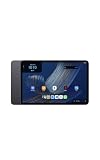
- Fast performance, all-day battery: Up to 15 hours of video playback. Quick performance with 8-core chip and 8GB RAM for smooth streaming, reading, and more. Wi-Fi 6, 8MP rear and front cameras.
- Stunning 2.5K resolution display: Watch, read, and create in sharp detail and vivid color. Smooth scrolling with 90Hz. Dual speakers powered by Dolby Atmos.
- Feels as good as it looks: Thin, light, and durable aluminum unibody design.
- Over a million apps on Google Play: From social media and streaming to fitness, finance, and gaming, find the apps you already love and discover new ones.
- Seamless and personalized: Amazon apps—Prime Video, Kindle, Audible, Amazon Music, Amazon Luna—are built-in and sync across devices with single sign-on and personalized content.
| Specification | Amazon’s announced detail | Why it matters for smart-home control |
|---|---|---|
| Display | 11 inches, 2.5K resolution, 276 pixels per inch | Large, sharp enough for device cards, camera views and thermostat controls at arm’s length. |
| Refresh rate | 90Hz | Scrolling device lists and touch interactions should look smoother than on a conventional 60Hz panel, although no independent performance test is supplied. |
| Processor and memory | 8-core processor and 8GB RAM | Provides the hardware basis for Alexa, dashboards and ordinary tablet apps; Amazon has not published a smart-home response-time benchmark. |
| Audio | Dual Dolby Atmos speakers | Useful for hearing Alexa responses, timers and alerts without wearing headphones. |
| Battery claim | Up to 15 hours of video playback | This is a video-playback rating, not a guaranteed runtime when the screen is continuously awake for home control. |
| Storage and U.S. starting price | 64GB configuration starting at $329.99 | The announced entry configuration leaves room for apps and media, but the price is a U.S. starting price from Amazon’s announcement, not a live inventory quote. |
Amazon announced shipping from October 14, 2026, in the United States, Mexico and Canada, and from October 19, 2026, in the United Kingdom, Germany, France, Italy and Spain. Those are announcement dates and regional availability statements; check the retailer listing for current stock, delivery and local pricing.
What you need before connecting devices
Prepare the account and network first. Alexa controls devices associated with your Amazon account, while the device itself may still require a manufacturer account or app.
- Sign in to the Tablet 11 with the Amazon account that will own the smart-home devices.
- Connect the tablet to the same reliable home network used by Wi-Fi devices. A device that is offline, isolated on a guest network or out of range cannot respond just because Alexa is available on the tablet.
- Keep the installation instructions for each light, plug, switch, thermostat or camera. Compatibility and pairing steps vary by product.
- Confirm that the product advertises Alexa compatibility or provides an Alexa skill. Do not infer compatibility from a product’s Wi-Fi or Bluetooth label alone.
- Decide on names and rooms before discovery. Names such as hallway light or bedroom thermostat are easier to say and reduce accidental commands to similarly named devices.
Connect a compatible device to Alexa
Amazon documents three broad connection routes. The exact labels can differ by product and app version, so follow the device maker’s instructions when they override the generic sequence.
Free tools Windows power users keep installed
One-click scans. No signup required.
Route 1: Add an Alexa smart-home skill
- Install and set up the device in its manufacturer app, if the instructions require that step.
- In the Alexa app, open the skills area and search for the device maker’s official Alexa skill.
- Enable the skill and sign in with the account used for the device.
- Allow Alexa to discover devices when prompted. If discovery is not offered automatically, start a device discovery from the Alexa app.
- Assign each discovered device to the correct room and give it a short, unambiguous name.
This route is common for products that keep their own cloud service. The skill may expose only some features; a camera, for example, might support viewing or announcements but not every setting available in its maker app.
Rank #2
- Fast performance, all-day battery: Up to 15 hours of video playback. Quick performance with 8-core chip and 8GB RAM for smooth streaming, reading, and more. Wi-Fi 6, 8MP rear and front cameras.
- Stunning 2.5K resolution display: Watch, read, and create in sharp detail and vivid color. Smooth scrolling with 90Hz. Dual speakers powered by Dolby Atmos.
- Feels as good as it looks: Thin, light, and durable aluminum unibody design.
- Over a million apps on Google Play: From social media and streaming to fitness, finance, and gaming, find the apps you already love and discover new ones.
- Seamless and personalized: Amazon apps—Prime Video, Kindle, Audible, Amazon Music, Amazon Luna—are built-in and sync across devices with single sign-on and personalized content.
Route 2: Use direct connection when the product supports it
Some devices can be connected directly through Alexa without a separate skill account. Open the Alexa app’s device-adding flow and select the product category or the manufacturer shown by the setup wizard. Put the device in pairing or discovery mode exactly as its instructions specify, then complete the prompts. Amazon’s general Alexa guidance does not state that every product offers this route, so use it only when the product’s documentation identifies direct Alexa setup.
Route 3: Finish setup in the Alexa app
Other products expose an Alexa option during their own app setup. Complete the manufacturer’s network and account steps, choose the Alexa integration when offered, and approve account linking. Return to Alexa and run discovery if the device does not appear. Some devices connect automatically; others remain invisible until discovery or a required skill is enabled.
Check the result before relying on it
- Open the Alexa app’s device list and confirm that the device has the expected name and room.
- Test a low-risk command, such as turning a lamp on and off. For a thermostat, read the current temperature before changing a set point.
- For a camera, confirm that the correct camera name opens the intended view and that privacy shutters or recording settings behave as expected.
- Rename or regroup devices immediately if Alexa reports that several devices have similar names.
Operate the home from the Tablet 11
Once a device is linked, the tablet is an Alexa endpoint. Say Alexa, turn on the hallway light, or tap Ask Alexa and speak the request. Use the room name when several devices share a type, for example, Alexa, set the bedroom thermostat to 20 degrees. Alexa’s available actions depend on the device and its integration.
Voice commands
- Lights, plugs and switches: turn them on or off, or set a supported brightness or scene.
- Thermostats: ask for the current temperature or change a supported target setting.
- Cameras: request a view when the camera integration and Alexa experience support video.
- Groups and routines: address a room or a routine name after you have created those groupings in Alexa.
Use the confirmation shown or spoken by Alexa as a status check, not as proof that a physical device completed an action. If a lamp is unplugged or a thermostat has lost network access, Alexa may report the underlying connection problem instead of changing the device.
Rank #3
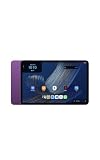
- Fast performance, all-day battery: Up to 15 hours of video playback. Quick performance with 8-core chip and 8GB RAM for smooth streaming, reading, and more. Wi-Fi 6, 8MP rear and front cameras.
- Stunning 2.5K resolution display: Watch, read, and create in sharp detail and vivid color. Smooth scrolling with 90Hz. Dual speakers powered by Dolby Atmos.
- Feels as good as it looks: Thin, light, and durable aluminum unibody design.
- Over a million apps on Google Play: From social media and streaming to fitness, finance, and gaming, find the apps you already love and discover new ones.
- Seamless and personalized: Amazon apps—Prime Video, Kindle, Audible, Amazon Music, Amazon Luna—are built-in and sync across devices with single sign-on and personalized content.
Touch interaction
Tap Ask Alexa whenever speaking is inconvenient, then use the response or any controls presented by the tablet-specific Alexa experience. The cited announcement confirms the button and tablet experience but does not publish a fixed screen layout, so labels and card positions may change with software updates.
Device Dashboard, favorites and routines: what is documented
Amazon’s Fire tablet support page describes a Device Dashboard where users can favorite devices and routines in the Alexa app and open the dashboard from Quick Settings by swiping down from the top of the screen. That page lists lights, plugs, switches, thermostats and cameras.
Those instructions are Fire tablet guidance, not Tablet 11-specific confirmation. Do not assume that swiping down will expose the same dashboard on the Alexa Tablet 11. After setup, check Quick Settings for a Device Dashboard control and follow any Tablet 11 instructions that appear. If no such control is present, use Alexa voice commands and the Alexa app’s device and routine screens instead of forcing a Fire tablet procedure that the model does not document.
The Tool Desk
Outbyte Driver Updater FREEFix the driver behind crashes, sound loss and screen glitchesFind Drivers →Outbyte PC Repair FREERepair Windows errors before they cause bigger problemsFix Now →Organize devices in the Alexa app
- Use one clear name per device and avoid near-duplicates such as desk lamp and desk light unless you need both.
- Place devices in rooms so commands such as
turn off the kitchencan target the intended group when supported. - Favorite the controls you use most often if the app offers that option.
- Create routines for repeated sequences, such as turning off selected lights at bedtime. Review every action before saving because a routine can affect several devices at once.
Do not assume Show Mode support
Amazon’s Show Mode support page covers named older Fire HD generations and explicitly excludes several models, including Fire Max 11 (13th Generation) and Fire HD 10 (13th Generation). It does not establish Show Mode support for the Alexa Tablet 11. Do not follow an older Fire tablet Show Mode guide expecting the Tablet 11 to become an Echo Show-style display. Use the Alexa Tablet 11’s own settings and software documentation for any ambient or hands-free display mode.
Rank #4
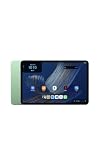
- Fast performance, all-day battery: Up to 15 hours of video playback. Quick performance with 8-core chip and 8GB RAM for smooth streaming, reading, and more. Wi-Fi 6, 8MP rear and front cameras.
- Stunning 2.5K resolution display: Watch, read, and create in sharp detail and vivid color. Smooth scrolling with 90Hz. Dual speakers powered by Dolby Atmos.
- Feels as good as it looks: Thin, light, and durable aluminum unibody design.
- Over a million apps on Google Play: From social media and streaming to fitness, finance, and gaming, find the apps you already love and discover new ones.
- Seamless and personalized: Amazon apps—Prime Video, Kindle, Audible, Amazon Music, Amazon Luna—are built-in and sync across devices with single sign-on and personalized content.
Screen-aware Alexa features and privacy settings
Amazon says On-Screen Intelligence is off by default and requires opt-in. If you enable screen-aware Alexa features, review what the feature can read or act on before using it near personal messages, financial information, security-camera feeds or other sensitive content. Amazon says the feature can be disabled in Settings; the exact menu wording may change with software updates.
Connecting household devices also creates account data. Amazon’s Alexa FAQ says it may receive device type, name, features, status and usage history, and documents controls for reviewing and deleting certain third-party smart-home history. Treat that as Amazon’s stated handling and control options, not a complete description of every data type collected by every device maker. Check the manufacturer’s privacy policy separately, especially for cameras and doorbells.
Placement, power and everyday reliability
Choose a useful location
Place the tablet where the screen is visible and the microphone can hear you without requiring a shout. A counter or shelf can work for temporary use; a wall or permanent stand may be preferable for a fixed control point, but the cited Tablet 11 announcement does not establish a model-specific mount or dashboard accessory. Confirm exact folio or stand fit before purchasing an accessory.
Do these 3 things before closing this tab:
1Scan for outdated or missing drivers - takes under a minute2Repair Windows errors before they cause bigger problems3Fix the driver behind crashes, sound loss and screen glitchesBalance battery life with availability
The up-to-15-hour figure is for video playback. A control panel that stays awake, uses Wi-Fi continuously and streams camera video can consume power faster. Keep a charger near the chosen location if you expect the tablet to be available all day, and avoid placing it where a cable creates a trip hazard or blocks ventilation.
Best Value
- Fast performance, all-day battery: Up to 15 hours of video playback. Quick performance with 8-core chip and 8GB RAM for smooth streaming, reading, and more. Wi-Fi 6, 8MP rear and front cameras.
- Stunning 2.5K resolution display: Watch, read, and create in sharp detail and vivid color. Smooth scrolling with 90Hz. Dual speakers powered by Dolby Atmos.
- Feels as good as it looks: Thin, light, and durable aluminum unibody design.
- Over a million apps on Google Play: From social media and streaming to fitness, finance, and gaming, find the apps you already love and discover new ones.
- Seamless and personalized: Amazon apps—Prime Video, Kindle, Audible, Amazon Music, Amazon Luna—are built-in and sync across devices with single sign-on and personalized content.
Use sensible security
- Protect the Amazon account with a strong, unique password and available multifactor authentication.
- Use device names that do not disclose unnecessary personal information on a shared screen.
- Review who can speak to Alexa in rooms where visitors or children may issue commands.
- For locks, alarms or other safety-critical equipment, confirm whether the integration requires a PIN or additional confirmation before enabling voice control.
Troubleshoot common control failures
Alexa says it cannot find the device
- Confirm the device is powered, online and registered in its manufacturer app.
- Check that the correct Alexa skill is enabled or that the direct-connection setup completed.
- Run discovery again in the Alexa app.
- Check for duplicate names and assign a room.
- If the device requires a separate hub, verify that the hub—not the Tablet 11—is online.
The device appears but commands fail
Test the device in its own app first. If the manufacturer app also fails, the problem is likely power, network or the device service rather than the tablet. If the manufacturer app works, disable and re-enable the Alexa skill or account link, then rediscover the device. Keep commands simple while testing; advanced features may not be exposed through Alexa.
Alexa hears the wrong room or device
Rename similar devices, place them in accurate rooms and speak the full name. Avoid assigning the same spoken name to a device and a routine. A short pause after saying Alexa can also help the tablet recognize the complete request.
The screen does not show a dashboard
That behavior is not evidence that the tablet is malfunctioning. The Fire tablet Device Dashboard page is not confirmation of a Tablet 11 interface. Use the Alexa app’s device list and voice control unless a Tablet 11 software update or support page provides a dashboard option.
Quick wins for a faster PC:
Clear out junk files and repair common Windows errorsFree Scan →Fix the driver behind crashes, sound loss and screen glitchesFind Drivers →Repair Windows errors before they cause bigger problemsFix Now →A camera feed or other rich control is missing
Alexa support varies by device integration. Check which features the skill or direct connection exposes, verify account permissions and update the device app. The Tablet 11 cannot add controls that the integration does not provide.
Tablet 11 versus Echo Hub
Choose between them based on whether you want a general-purpose tablet or a purpose-built control panel. Amazon describes Echo Hub as a separate dedicated smart-home control panel with an 8-inch touch display, a customizable dashboard and built-in Zigbee, Sidewalk, Thread, Bluetooth and Matter support. Amazon says a stand is sold separately and that wall mounting is an option.
| Decision factor | Alexa Tablet 11 | Echo Hub |
|---|---|---|
| Primary role | General-purpose 11-inch tablet with Alexa+ and smart-home control | Dedicated smart-home control panel |
| Display | 11 inches, 2.5K, 276 ppi, 90Hz | 8 inches |
| Built-in smart-home radios | Not established by the cited Tablet 11 announcement | Amazon lists Zigbee, Sidewalk, Thread, Bluetooth and Matter support |
| Dashboard | Tablet 11-specific dashboard path not confirmed | Customizable dashboard described by Amazon |
| Placement | Portable tablet placement; model-specific mount details not established | Wall mounting is described; stand sold separately |
| Announced price evidence | Starts at $329.99 in the United States for 64GB, according to Amazon’s 2026 announcement | Not stated in the cited material |
The Tablet 11 is the better fit if you also want a large screen for ordinary tablet tasks, media and apps, and you are comfortable controlling devices through Alexa integrations. Echo Hub is the more direct fit if a permanent screen and documented built-in protocol support are your priorities.
A practical setup checklist
- Choose the location and provide dependable power and Wi-Fi.
- Sign in to the intended Amazon account.
- List each device and confirm Alexa compatibility and any required manufacturer app or hub.
- Connect devices by skill, direct connection or Alexa-app setup, following the product’s instructions.
- Run discovery and assign names and rooms.
- Test one simple command per device.
- Create only the routines you can explain and undo, then test them while you are present.
- Look for a Device Dashboard in Quick Settings only if the Tablet 11 software presents one; otherwise use the Alexa app.
- Review On-Screen Intelligence, account security and third-party smart-home history settings before placing the tablet in a shared space.
Bottom line for choosing the Tablet 11
The Alexa Tablet 11 is a capable Alexa-enabled smart-home control surface, not a confirmed dedicated hub. Its 11-inch high-resolution display, built-in Alexa+ and portable form make it useful for voice commands and occasional touch control. If your devices already support Alexa through a skill, direct connection or the Alexa app, setup is straightforward. If you need a permanent dashboard with documented multi-protocol radio connectivity, compare its limitations with a dedicated product such as Echo Hub before choosing the tablet.
PC Slower Than It Used to Be?
A free scan shows the junk files, broken settings and background clutter dragging Windows down - then fixes them in one click.Free scan · Windows 10 & 11Crashes, No Sound, or Screen Glitches?
Random freezes, missing sound and display glitches usually trace back to one bad driver. Find and replace yours safely.Free scan · under a minuteQuick Recap
Product prices and availability are accurate as of the date/time indicated and are subject to change. Any price and availability information displayed on Amazon at the time of purchase will apply.

