
iTechGuides is reader-supported. When you buy through links on our site, we may earn an affiliate commission. As an Amazon Associate I earn from qualifying purchases. Learn more
The fastest free fix is Android’s built-in One-handed mode. Open Settings, search for “One-handed mode,” and turn on Use One-handed mode. On supported phones, the feature pulls the top half of the display downward so notifications and app controls sit within thumb reach. The exact gesture and menu depend on your Android version, phone maker, and navigation setting.
If software reachability is not enough, use your manufacturer’s enhancement, switch to an accessibility input method, or add a grip ring for a more secure hold. These options solve different problems: software reduces stretching, while a grip accessory helps prevent drops.
Start with Android’s built-in One-handed mode
Android’s system feature is the most transferable solution because it does not require an accessory or a separate app. Google describes it this way: “When one-handed mode is on, you can use one hand to pull down the top half of your screen and easily reach notifications, app content, and more.” The mode changes the usable touch area; it does not physically shrink the display or alter how apps are laid out permanently.
What’s actually slowing this PC down?
Pick the symptom - the matching free tool is one click away.
Turn it on
- Open Settings.
- Tap the search field or magnifying-glass icon.
- Type One-handed mode.
- Open the matching result and enable Use One-handed mode.
Google’s current help guidance notes that some steps require Android 12 or later. If the search returns no result, your phone may be running an older release, the manufacturer may have removed the option, or the model may not support it.
#1 Best Overall

- Transparent Phone Ring Design: The cell phone ring holder is made of transparent Acrylic, the phone grip kickstand perfect fit for any cell phone with or without case cover. Phone ring keeps your phone original feature design without affecting the exterior.
- Free Rotation Phone Ring Holder: Black, sliver, rose gold round transparent phone ring for you to choose. Size: round diameter 1.4 inch. 360°Rotation and 180°Flip fold to help you adjust your phone, different viewing angles to reading, watch videos.
- Strong Adhesive: Environment-friendly material and strong adhesive sticky to make the phone ring holder finger kickstand can be glued to the back of your tablets/phones or their cases firmly, which reduces the risk of theft.
- Wide Compatibility of Phone Case Holder: Our cell phone ring holder stand is compatible with almost all phones and phone cases. Phone ring holders conveniently take photos, text or talk. Nice package perfect for your family, friends, co-workers, Thanksgiving day, Christmas gift choice.
- High Viscosity: Strong sticky adhesive makes sure the phone ring be attached tightly to the back of your phone/tablet. Nice package perfect for your family and friends gift choice.
Use the reduced screen
After activation, use the gesture shown on your phone’s One-handed mode page. Android’s standard behavior pulls the screen downward, making the upper portion reachable with your thumb. Tap an item in the lowered area as usual. To restore the full display, use the exit gesture shown in Settings or tap outside the reduced window if your phone presents a floating window.
Add it to Quick Settings
On phones that expose a Quick Settings tile, add One-handed mode to the panel. Swipe down twice from the top of the screen, tap the edit pencil, then drag the tile into the active area. This gives you a one-touch switch without opening Settings. Tile names and edit controls vary by Android build, so use Settings search if you cannot find it.
Why a large display becomes difficult to reach
Android Developers’ large-screen design guidance says the upper 25% of a large screen can be hard to reach without changing grip. That is a design guideline published in 2022, not a measurement that applies identically to every phone, hand, or case. A taller phone, thick protective case, short thumb, or a slippery back can make the practical reach zone smaller.
The Tool Desk
Outbyte Driver Updater FREEFix the driver behind crashes, sound loss and screen glitchesFind Drivers →Outbyte PC Repair FREEClear out junk files and repair common Windows errorsFree Scan →One-handed mode addresses the vertical reach problem by moving controls toward you. It does not make every part of the phone equally comfortable: a wide screen can still require thumb stretching at the far edge, and reaching a bottom corner may force you to loosen your hold. Use the smallest thumb movement that completes a task, and change hands rather than repeatedly forcing an extreme stretch.
Samsung Galaxy: use its One-handed mode and edge controls
Samsung Galaxy phones provide a dedicated control in addition to Android’s general feature. On supported Galaxy models, open Settings > Advanced features > One-handed mode. Samsung’s menus can change between One UI releases; if that path is absent, search Settings for “One-handed mode.”
Rank #2

- 【4.4lbs One-Sided Magnetic Force】Attention Please: This ring holder is one-side magnetic, it can not stick to the metal surface directly. Lamicall lightweight (1.12 ounce) & slim (4.2mm) mag safe ring holder can snap securely onto your bare iphone 12 13 14 15 16 17 18 series with up to 4.4lbs of magnetic force. Pro Tip: Apply the included metal ring for a stronger hold – up to 9.9lbs! (Please press the metal ring firmly for 2 minutes before use)
- 【Upgraded 360° Rotational Damping】Our upgraded internal damping ring gives you steady rotation and multi-angle positioning. You will feel nice resistance when spinning the inner ring. Flip, tilt, and hold your phone comfortably with one hand – no wobble, no disassembly needed. Perfect grip accessories for browsing, selfies.
- 【Universal Fit】This magnetic phone grip holder fits perfectly on iPhone 18 Pro, 18 Pro Max, iPhone 17, 17 Pro, 17 Pro Max, iPhone Air, iPhone 16, 16 Pro, 16 Pro Max, 16 Plus, iPhone 15 14 13 12 Series or mag safe magnetic phone. (Magnet will stronger if use the metal ring). For non-magnetic devices, you must apply the included metal ring on hard, flat surfaces (not for Soft Silicone/TPU/PP/TPE) to enhance magnetic power.
- 【Multi Function】Lamicall iphone magnetic ring can be used as a magnetic finger grip holder and a desktop kickstand. Easy to operate the phone with one hand, hold the phone firmly and reduce the risk of accidentally dropping down. Moreover, it can also hold strongly on your magnetic car mount while driving and no need to take the ring off. (Note: If using the metal ring, gently twist and lift the grip from the side to remove it easily.)
- 【Easy to Pull Ring Out】The unique arc-shaped groove makes pulling the ring out effortless when you need to use the phone grip – no more struggling! Also, it enhanced stability, preventing wobbling when your phone is placed horizontally or vertically.
Resize and reposition the window
Samsung’s implementation reduces the display to a smaller window that you can move. Drag the window’s handle or border to place it on the side used by your thumb, and adjust its size until controls are reachable without squeezing the phone. A smaller window maximizes reach but shows less content at once; a larger window reduces the amount of scrolling or context switching.
To leave the mode, tap outside the minimized window. If your version shows an on-screen handle, use the exit control displayed there rather than repeatedly swiping at the edge.
Use One Hand Operation+ when edge swipes suit you
Samsung also offers the separate One Hand Operation+ app, which assigns actions to short swipes from the left or right screen edge. You can map an edge swipe to actions such as Back, Home, Recent apps, or other system commands. This can reduce the need to reach the navigation bar or top controls, but it adds a Samsung-specific app and another set of gestures to remember.
The app exposes a handle area whose position and size can be adjusted. Samsung says you can tune the handle for hand size, thumb thickness, and case shape. A bulky case may require a wider or lower handle; a slim case may work with a narrower one. The Samsung support page describing these controls was updated on 3 June 2024, and labels may differ on later software.
Motorola: check Gestures and navigation requirements
On supported Motorola phones, the path is Settings > Gestures > One-handed mode. Motorola documents two behaviors: pulling the screen down into thumb reach, or using the gesture to show notifications and Quick Settings.
Rank #3

- [High quality phone ring holder] Features ultra-slim design (0.014inch thickness). made of high-quality zinc alloy and metal plate, Syncwire phone ring holder boasts unrivalled durability to stay intact even in dropping accidents. Vacuum Ion plating technology makes the phone holder surface 5 times more resistant to color fading than traditional water electroplating ones. The edges of the ring grip are carefully polished for your fingers.
- [Strong adhesiveness finger ring grip] With an ultra-strong 3M VHB adhesive pad, This phone finger ring grip can attach to your smartphone tightly (withstands 5kg gravity test) for accidental drops and slips. The 3M pad can be applied to most smooth surfaces including plastic, metal and TPU. Note: The 3M pad does not work with silicone case, leather, fabric case.
- [360°Rotatable & 180°adjustable] Syncwire phone holder is 360° rotatable and 180° foldable so that you can position your phone at your best viewing angle anytime. This ring grip is tested to withstand 6000 times of folding without getting loose. The metal plate is a perfect match for a magnetic car mount.
- [Multi-functional phone ring] This versatile phone holder can set your hands free while you are riding in crowded buses or subways. You can also place It on your office desk, kitchen counter or table to watch movies, listen to music, put on makeup, make video calls and play games.
Check gesture navigation first
Motorola states that its One-handed mode requires Gesture navigation and is not available on every model. If the setting is missing or the gesture does nothing, open Settings and search for System navigation or Navigation mode, then select Gesture navigation if your phone offers it. Changing navigation mode also changes how you go Home, switch apps, and go Back, so practice those gestures before relying on the one-handed shortcut.
Recommended Free Tools
Choose the behavior that matches your routine
If you frequently read or tap controls near the top, choose the screen-down option. If your main problem is opening notifications or Quick Settings, choose the notification-focused behavior instead. Motorola’s labels and available choices differ by model and software version; the One-handed mode screen is the authoritative description for your device.
When software reachability is not enough: accessibility options
Accessibility features can reduce the amount of precise thumb movement needed. Google lists Button navigation and Voice Access among options relevant to limited reach, manipulation, or strength. Availability and names can differ by device and market.
Try Button navigation
Button navigation places Back, Home, and Recent-apps controls in a persistent navigation bar. It can be easier to activate with a thumb than a gesture that starts from a screen edge, especially when a case interferes with edge swipes. Look under Settings > System > Navigation mode, Settings > Display > Navigation bar, or search Settings for Navigation. The exact location is manufacturer-specific.
Button navigation does not lower the top of an app, so pair it with One-handed mode if upper controls remain difficult. Its benefit is predictable navigation without reaching for an edge, not a smaller display.
Rank #4

- 【Super Strong Magnetic】The Syncwire MagSafe phone ring holder is made with N55 NdFeB magnets, providing exceptional magnetic force. You can securely attach your phone to the MagSafe magnetic phone ring holder with just one finger, experiencing a strong hold that resists shaking or movement. The magnetic force can be enhanced by 5 times when used with the provided metal ring.
- 【Double-Sided Magnetic】Features a unique two-sided magnetic design, so it work with MagSafe car mounts without the need to remove the ring. It can be attached to any magnetic metal surface, such as fitness equipment, fridges, bread machines, etc. The side attaches to the phone can hold up to 2.6-3 lbs(1.2-1.4KG), the magnetic force is enhanced to 10 lbs(5KG) used with the provided metal ring. Meanwhile, the back of the holder can hold weights of up to 2.2 lbs (1KG). (Tested by Syncwire Labs)
- 【360° Rotation & 90° Flip】Multi-angle adjustment provide flexible & comfortable hand grab and excellent viewing angle. This ring holder is tested to withstand over 6000 times of folding without getting loose, greatly improving durability.
- 【Unique Decompression Design】A patented structure that combines gears with spring plates for positioning, ensuring enhanced stability. By rotating the ring, it produces a satisfying clicking sound, providing an effective method of stress relief. The innovative design ensures a unique experience, enabling users to alleviate tension and find relaxation in a simple yet enjoyable manner.
- 【User-Centered Design】The ring incorporates a flat bottom design that forms a long fulcrum, providing enhanced stability and preventing any wobbling when your phone is placed horizontally or vertically. Additionally, the inner groove shape design of the ring allows for effortless pulling, no more struggling to pull the ring out.
Use Voice Access for hands-busy moments
Voice Access lets you control supported interface elements with spoken commands. It can help when you cannot safely stretch your thumb, for example while carrying something. Open Settings and search for Voice Access to check whether it is installed and supported, then follow Android’s setup prompts for microphone and accessibility permissions.
Voice control depends on language support, a working microphone, and a suitable environment. It is an input alternative rather than a replacement for secure phone handling; keep the phone stable and review permissions before enabling an accessibility service.
Software versus a grip ring: choose the fix for the actual problem
| Option | What it changes | Activation or dependency | Best fit | Limitations |
|---|---|---|---|---|
| Android One-handed mode | Moves the usable display area downward | Supported Android version and model; usually enabled in Settings | Reaching notifications and upper app controls | Does not improve physical grip or eliminate all side-to-side stretching |
| Samsung One-handed mode | Creates a movable, resizable reduced window | Supported Galaxy model and One UI version | Users who want to choose window size and side | Menus and behavior vary by software release |
| Samsung One Hand Operation+ | Triggers navigation and other actions from edge swipes | Samsung app, configured handles, and case-compatible edge touch | Reducing trips to navigation controls | Adds gestures; a thick case can block or alter the handle |
| Motorola One-handed mode | Pulls the screen down or exposes notifications/Quick Settings | Supported Motorola model; Motorola requires Gesture navigation | Motorola users who already prefer gesture navigation | Not available on all models |
| Button navigation | Places core navigation actions in a persistent bar | Supported navigation mode | People who find edge gestures difficult | Does not lower app content |
| Voice Access | Uses spoken commands for supported controls | Supported device, language, microphone, and accessibility setup | Moments when touching the screen is difficult | Recognition and availability vary; privacy and permissions matter |
| Grip ring | Adds a finger hold point on the phone or case | Adhesive or case-compatible attachment | A slippery phone or fear of dropping it | Does not move controls; fit and comfort vary |
Use a phone grip ring carefully
A grip ring can give one finger a fixed hold point, allowing the thumb to move with less fear of dropping the phone. Treat it as an optional physical aid after trying the free settings. The MobileHCI 2018 paper commonly cited for this category examined grip-ring effects during stationary text entry. That context does not establish that every ring improves comfort, reduces strain, or works with every case during walking, commuting, or extended use.
Check compatibility before attaching one
- Confirm that the adhesive or mounting surface is compatible with your case material. Textured, silicone, dusty, or heavily curved surfaces may not hold reliably.
- Place the ring where your middle or ring finger can support the phone while your thumb remains near the center of the screen. A position that works in the right hand may feel wrong in the left.
- Keep wireless-charging coils, camera bumps, buttons, and foldable hinges clear where applicable.
- Allow adhesive to cure according to the accessory’s instructions before putting the phone under load.
A ring changes how you hold the device; it does not make a top-corner button reachable. Pair it with One-handed mode if you need both reach and security. Stop using it if it causes localized pain, numbness, or persistent discomfort, and do not treat it as a medical ergonomic device.
Quick wins for a faster PC:
Fix the driver behind crashes, sound loss and screen glitchesFind Drivers →Repair Windows errors before they cause bigger problemsFix Now →Scan for outdated or missing drivers - takes under a minuteDriver Scan →A practical setup sequence for any Android phone
- Search first. In Settings, search for “One-handed mode.” This avoids memorizing brand-specific menu paths.
- Enable the system feature. Turn on Use One-handed mode and perform the displayed gesture once while seated.
- Put the shortcut where you can reach it. Add the feature to Quick Settings if your phone supplies a tile.
- Test your normal tasks. Open a messaging app, notification shade, browser, and keyboard. Note which controls are still outside comfortable reach.
- Apply the manufacturer option. Galaxy users can try the resizable window or One Hand Operation+; supported Motorola users can check Gestures > One-handed mode.
- Resolve navigation friction. If edge gestures are unreliable, test Button navigation. If touching is impractical, investigate Voice Access.
- Improve security separately. Add a compatible grip ring only if the phone remains slippery or unstable in your chosen hand.
- Re-test with your case installed. Cases change edge sensitivity, reach, weight, and the position of any ring or handle.
Troubleshoot common failures
“One-handed mode” does not appear in Settings
Check the Android version and install available system updates. Google notes that some instructions require Android 12 or later. If the feature is still absent, the model or manufacturer software may not support it. Search for the maker’s terms—such as “one-handed,” “reachability,” or “gestures”—rather than assuming every Android phone has the same switch.
Best Value
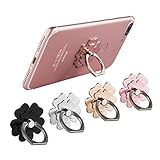
- Mobile Phone Ring Holder - 360°rotation and 180°angle adjustable, with lovely flower design, it's absolutely the best decision to your love cell phone
- Hands Free - Cell phone stand holder can used as a kckstand, set your hands free when watching movies, listening to music or facetime chatting
- Sturdy Adhesive - Metal finger ring grip with advanced and sticky sensitive adhesive which tightly hold your phone and prevent possibility of dropping phone on many occasion
- Compatibility - Phone ring holder is compatible with most smartphones which has flat back cover
- Packing - There are 4 pieces of phone ring holders in different colors
The gesture is hard to trigger
Read the instructions on the One-handed mode page, because the trigger differs by navigation mode and manufacturer. On Motorola, verify that Gesture navigation is active. On Samsung, try the on-screen handle or the dedicated One Hand Operation+ edge action instead of repeating a swipe that your case blocks.
The reduced window is on the wrong side or too small
Use the window’s move control to place it under your thumb and resize it. Change hands for tasks that require the opposite edge rather than twisting your wrist. A larger reduced window may be more comfortable if constant scrolling through a tiny view is causing extra work.
Edge controls stop responding after adding a case
Increase the Samsung handle’s size or move it inward if those controls are available. Thick or raised cases can interfere with edge detection on any phone. If edge gestures remain unreliable, use Button navigation or the standard One-handed mode shortcut.
Windows Errors? Fix Them Before They Spread
Repair common Windows errors and clear accumulated junk for a smoother, more stable PC - no reinstall needed.Free scan · no reinstallCrashes, No Sound, or Screen Glitches?
Random freezes, missing sound and display glitches usually trace back to one bad driver. Find and replace yours safely.Free scan · under a minuteThe phone still feels unsafe to hold
That is a grip problem, not a reachability problem. Reposition your hold, use both hands for demanding or high-risk tasks, or consider a case-compatible grip accessory. Do not rely on a reduced display to prevent a drop.
Habits that make one-handed use more comfortable
- Keep the phone close to the middle of your palm instead of balancing it on the fingertips.
- Use One-handed mode for short interactions—checking a notification, selecting a control, or replying briefly—and use two hands for long typing or precision work.
- Alternate hands during extended sessions. A setting that improves reach does not remove fatigue from holding a large device.
- Reduce repeated top-edge trips by placing frequently used apps or controls in reachable locations when the app allows it.
- When walking, climbing stairs, or handling liquids, prioritize a secure hold and situational awareness over one-handed convenience.
The most reliable setup is usually layered: Android’s One-handed mode for upper-screen reach, an OEM control when it offers better gestures, an accessibility input method when touch is the barrier, and a grip aid only when physical security is the issue.
Quick Recap
Product prices and availability are accurate as of the date/time indicated and are subject to change. Any price and availability information displayed on Amazon at the time of purchase will apply.

