
Quick wins for a faster PC:
Repair Windows errors before they cause bigger problemsFix Now →Scan for outdated or missing drivers - takes under a minuteDriver Scan →Clear out junk files and repair common Windows errorsFree Scan →iTechGuides is reader-supported. When you buy through links on our site, we may earn an affiliate commission. As an Amazon Associate I earn from qualifying purchases. Learn more
You can enlarge low-resolution footage to a 4K output with video-enhancement software, but the result is an upscaled file—not a guarantee of detail identical to footage originally recorded in 4K. For 1080p footage, Topaz recommends starting with Artemis High Quality and trying Proteus Fine Tune if the preview needs adjustment. The key is to preview representative scenes before rendering the entire clip.
What 4K upscaling can—and cannot—do
Upscaling increases a video’s output resolution. Enhancement models can also adjust the image to make it appear clearer, but enlarging a source cannot guarantee recovery of the exact fine detail a camera would have captured at native 4K. The vendor materials reviewed describe enhancement capabilities; they do not establish that an upscaled result is equivalent to native 4K footage.
Topaz’s tutorial illustrates the basic scale change with a 322×240 source enlarged 2× to 644×480. Those figures are an example in the tutorial, not a general quality promise. See Topaz’s video-upscaling basics.
Windows Errors? Fix Them Before They Spread
Repair common Windows errors and clear accumulated junk for a smoother, more stable PC - no reinstall needed.Free scan · no reinstallCrashes, No Sound, or Screen Glitches?
Random freezes, missing sound and display glitches usually trace back to one bad driver. Find and replace yours safely.Free scan · under a minuteChoose a workflow that fits the clip
| Option | What the vendor documents | Questions to check |
|---|---|---|
| Topaz Video desktop software | For 1080p footage targeting 4K, Topaz recommends Artemis High Quality, with Proteus Fine Tune as an alternative if the result needs adjustment. Topaz guide | Does the preview improve this source? Does your computer meet current requirements, and how long will the render take? |
| Topaz plugin for DaVinci Resolve Studio | Resolve Studio is required. Topaz warns that upscaling 3–4× can reduce performance and interface responsiveness. Topaz plugin documentation | Is Resolve Studio already part of your workflow? Check compatibility with your installed version. |
| Adobe Firefly web upscaler | Adobe describes enhancement powered by Topaz Astra and output up to 4K. The listed upload requirements are MP4, under 200 MB, and 5–20 seconds. Adobe Firefly video upscaling | Does the clip fit the listed size and duration limits? Is an online workflow suitable for your footage and privacy needs? |
These are documented capabilities, not a controlled comparison of quality or speed. Choose based on source compatibility, preview results, processing time, software requirements, and whether desktop or web processing fits your project. Check current system requirements before installing desktop software; Topaz directs users to verify them in its Video quick-start guide.
#1 Best Overall

- ENHANCED IMAGE QUALITY: The mClassic's graphics processor enhances every pixel with zero lag on both widescreen and 4:3 aspect ratio games, upscaling supported gaming resolutions up to 1440p/60hz on supported monitors and TVs with our proprietary anti-aliasing algorithm
- OPTIMIZED WIDESCREEN GAMING: Enhancement On (Mode 2) provides sharper images and reduced visual artifacts on your docked Nintendo Switch or other widescreen gaming consoles, with up to 1440p/60hz on supported 4K TVs, HDTVs, or gaming monitors; The toggle switch light will be green
- RETRO GAMING ON MODERN DISPLAYS: Retro Mode (Mode 3) improves graphics in real-time on retro consoles like NES, SNES, Sega Genesis, Playstation 2, N64, and more. Upscale from 480p up to 1440p/60hz on supported monitors while preserving the classic 4:3 aspect ratio; Toggle switch will be blue
- YOU'RE IN CONTROL: Mode 1 (Enhancement Off) will simply pass the original audio and video through, so you don't need to remove mClassic if you choose not to use it; The toggle switch will have no light on
- SIMPLE PLUG-AND-PLAY SETUP: The mClassic plugs in between your game console, or your console's HDMI adapter, and the HDMI input on your TV or monitor. Power is provided by included micro-USB cable, plugged into an available USB port or AC power adapter (AC power adapter and HDMI adapters not included)
Upscale 1080p footage to 4K with a desktop workflow
- Check the source. Note its resolution and aspect ratio, then inspect for blur, noise, compression artifacts, or interlacing. These conditions affect what an enhancement model has to work with.
- Set the output resolution. For a 1920×1080 source targeting 4K, choose 4K in the output settings. Topaz recommends starting with Artemis High Quality for this specific 1080p-to-4K case.
- Generate a preview. If Artemis does not give you an acceptable result, try Proteus Fine Tune and preview again rather than assuming another setting will suit every clip.
- Inspect representative scenes. Check more than one moment, including faces, fine textures, motion, and darker areas. Look for halos, flickering detail, unnatural changes to faces, invented-looking texture, or noise that has become more noticeable. These are practical quality-control checks, not reported test findings.
- Compare at the intended viewing size. Judge the processed preview alongside the original on the display where the finished video will be watched. Consider whether the apparent clarity improvement is worth any artifacts and the time a full render may require.
- Render the full clip. Once the preview is acceptable, export the finished file at the chosen output resolution.
Topaz’s recommended model and workflow are vendor guidance, not an independent quality ranking. Your source footage and the preview should determine whether the result is useful.
When the browser-based option may work
Adobe Firefly is a possible route for a short clip that meets its listed upload constraints: MP4, under 200 MB, and 5–20 seconds, with output up to 4K. Adobe says its upscaler is powered by Topaz Astra. Because online product limits can change, confirm them on the live Firefly page before preparing a project around them. The documented limits do not establish support for longer or larger videos.
Rank #2
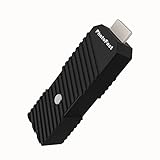
- 💬【Notes Before Purchase】4K Gamer Pro is only compatible with 1080p input and HDMI 2.0a or higher version cable (the original HDMI 1.4 cable that comes in the Nintendo Switch package doesn't work with 4KGP). **Please contact us if you see a black screen when turning the dongle on because it's an issue of preference or the HDMI cable.
- 🎮【Upscale Your Video Game From 1080p To 4K】 4K Gamer Pro photofast enhances the resolution while also making the image delicate, clear, and three-dimensional. It accomplishes this by using image processing technology for image sharpening, color processing, and depth of field without any lag or drop in FPS.
- 📺【3 Levels Of 4K Optimization】With 3 different levels of visual optimization, you can find the perfect quality to suit your TV, game, and needs. Find the right enhancement level so you can get the most comfortable visual experience for your favorite games.
- 👍【No Lag Or Drop In FPS】Enjoy high-resolution video quality without sacrificing FPS or suffering any lag.
- 🕹【Video Game Accessory】You can push your Nintendo Switch / Nintendo Switch OLED / Wii U / PS4 / PS3(1080p) / Xbox One / Xbox 360(1080p) / mClassic / RetroTink 5x for retro game console & more beyond 1080p and experience your favorite games in 4K
Use the Resolve plugin with the right expectations
If you want to work inside DaVinci Resolve, Topaz says its plugin requires Resolve Studio. The vendor also cautions that processing at 3–4× scaling can affect performance and interface responsiveness. Check the plugin’s current compatibility information before installing it: Topaz Video plugin guidance.
Quick Recap
Best Value

- Upgrade Your Video Games from 1080p to 4K@60fps: The 4K Upscaler enhances resolution while also delivering crisp, clear, and three-dimensional images. It achieves this through image sharpening, color processing, and depth of field using advanced image processing technology, all without any lag or decrease in FPS.
- Compatible Gaming Devices: Suitable for Nintendo Switch, mClassic, Original Xbox, PlayStation, GameCube, PS2, Wii, DreamCast, PS3, Xbox 360, Wii U, mClassics, RetroTink 5x, and more.
- Black Screen Issue: Please make sure your game console has 1080p output. If you encounter any issues with a tight or black screen, please contact us. We will guide you on how to identify a 4K@60Hz display or HDMI 2.0 cable, as HDMI 1.4 cables are not supported by this product.
- Usage Instructions: Please insert the HDMI end labeled "UHD" into your Nintendo Switch dock, and use the provided cable to connect the other end to your 4K@60Hz display.Note: It does not support 4K@30fps and 1440P monitors. If you use this device on a 4K@30fps or 1440P monitor, a black screen will appear.
- No Latency or FPS Drop: Experience high-resolution video quality without sacrificing FPS or enduring any delays.
Rank #4

- Compact but Powerful Design: ZowieBox is smaller than a phone, featuring a tally light and LCD screen for streaming status. Capture console gameplay in up to 4K with zero-lag HDMI passthrough, while the built-in video encoder converts video for IP streaming. The IP stream can also be decoded back to a 4K HDMI signal.
- Standalone Game Streaming: Just plug and play—ZowieBox enables PC-free live gaming without affecting gameplay. As an RTMP hardware encoder and HDMI streamer, it delivers stable streaming directly from your source, making it ideal for gaming, live events, and professional broadcasting.
- NDI|HX3 Converter Technology: ZowieBox converts HDMI signals to NDI|HX3/HX2/HX, functioning as an NDI video encoder, or NDI Video Decoder for flexible IP workflows. Certified NDI technology enables low-latency gameplay streaming through OBS/vMix. Note: Encoder and decoder modes cannot run simultaneously; full NDI signals are not supported.
- UVC to HDMI Conversion: Supporting up to 4K@30fps and 1080p@60fps decoding, ZowieBox enables flexible conversion for webcam and video workflows. As a video decoder and HDMI to IP converter, it expands connectivity options for professional video devices. Note: USB capture card functionality is not currently supported.
- All-around Configuration Options: Control ZowieBox through its web UI on a PC, phone, or tablet. Manage connected PTZ cameras, tally light, video/audio, OSD, work mode, streams, network, and system settings. Support for VISCA over IP encoder workflows enables flexible PTZ control, while the dashboard provides video preview and system status.
Rank #3

- AV To HDMI Converter 3.0 - Convert & Upscale RCA / S-Video / Analog Video Input to HDMI (TV or Monitor) at 1080P or 720P - Plug and Play Adapter with No Computer or Drivers Required
- Upscaler Compatible with VCR, VHS, Camcorders, Hi8, Gaming Systems, Set-Top Boxes, DVD Players, & More. RCA/AV/Composite and S-Video Input. HDMI Output. Works with PAL and NTSC. (Important Note: Does NOT Downscale HDMI to RCA/AV/S-Video)
- NEW! Remote Control Included - Fine Tune Your Video's Image Quality By Adjusting Brightness, Contrast, Saturation, Hue, Resolution (1080P or 720P), Aspect Ratio (Preserve Original 4:3 Look with Black Bars or Stretch To 16:9 HD Widescreen To Fill Your TV Screen)
- NEW! S-Video Input - Allows S-Video Input From Camcorder, VCR, DVD Player, & More - Providing The Highest Possible Video Quality From These Sources (S-Video Cable Not Included - RCA/AV Cable Required For Audio Signal)
- Includes 2-Year Warranty & Tech Support from ClearClick, a USA-Based Small Business (Extendable to 3 Years for Free - See User's Manual)
Common reasons an upscale disappoints
- The source is already soft or damaged. Upscaling does not guarantee recovery of detail lost to blur, heavy compression, or noise.
- Enhancement artifacts are distracting. Added-looking texture, halos, flicker, or unnatural faces can make a larger image look less convincing. Revisit the model choice and compare previews with the original.
- The clip is being judged only by its resolution label. A 4K export describes the output dimensions, not proof that the footage contains the detail of a native-4K recording.
- The processing route does not fit the job. A web tool with strict duration and file-size limits will not suit every source; a desktop workflow requires compatible software and hardware.
Product prices and availability are accurate as of the date/time indicated and are subject to change. Any price and availability information displayed on Amazon at the time of purchase will apply.

