
Free tools Windows power users keep installed
One-click scans. No signup required.
iTechGuides is reader-supported. When you buy through links on our site, we may earn an affiliate commission. As an Amazon Associate I earn from qualifying purchases. Learn more
Grounding DINO finds objects in an image from words or phrases you provide: upload an image, describe what to locate, then review the predicted boxes and labels. Hautechai’s Replicate page offers a hosted H100 build; the official Grounding DINO repository is the route for local setup and implementation detail. The hosted listing and official code are related, but they are not interchangeable sources for the hosted model’s exact API behavior.
What Grounding DINO does
Grounding DINO is an open-set object detector. A conventional detector is generally trained to recognize a fixed set of categories; Grounding DINO uses language to specify what to find, including category names and more descriptive referring expressions. The authors describe it as combining the Transformer-based DINO detector with grounded pre-training. Its architecture includes a feature enhancer, language-guided query selection, and a cross-modality decoder. You do not need to understand those components to try a prompt: provide an image and text, then assess the resulting boxes and labels. The Grounding DINO paper and official implementation explain the approach.
“Open-set” and “zero-shot” describe the model’s ability to use language to request concepts beyond a fixed label list; they do not mean every phrase will be recognized correctly. Performance depends on the image, the wording, and the evaluation setting.
Recommended Free Tools
What Hautechai’s Replicate listing offers
Hautechai’s Replicate model page describes its offering as “Grounding DINO: zero-shot text-prompted object detection (SwinT-OGC). H100 build.” The page also says the model is open source and can run on a computer with Docker, but currently states that it has no README. The linked official repository provides background and a local workflow; it does not establish the exact input fields or output format of this particular hosted build.
#1 Best Overall
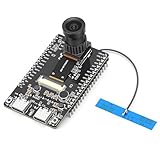
- 【Main Functions】BW21-CBV-Kit is a local AI vision recognition development board capable of independently running object recognition models
- 【Camera Specifications】Equipped with a 1920 x 1080 resolution, 2MP, 30fps wide-angle camera, a condenser microphone, and support for 2TB memory card storage
- 【Strong Communication Capabilities】Based on the RTL8735B chip, it supports dual-band 2.4GHz/5GHz WiFi and Bluetooth 5.1, providing high-performance wireless transmission capabilities for smoother image transmission
- 【Development Method】Utilizes the Arduino development approach, allowing you to easily implement your ideas, such as face recognition, gesture recognition, object recognition, component defect detection, people counting, pet recognition, etc
- 【Rich Interfaces】Two sets of 18-pin headers provide 30 programmable I/Os, facilitating project expansion. Combined with AI recognition, it unlocks limitless possibilities
As displayed on October 7, 2026, Replicate listed an approximate cost of $0.058 per run (about 17 runs per US dollar) and a typical prediction time of 38 seconds. Replicate says cost and prediction time vary significantly with inputs, so these are provider estimates, not stable prices, guaranteed runtimes, or independent measurements. Check the live listing before relying on them.
How to write a useful text prompt
At the task level, give the detector an image and words describing the objects or phrases you want located. The official implementation says it predicts boxes and phrase labels from the image-and-text pair. For a list of category names, its README recommends separating the names with periods, for example:
Rank #2

- COMPACT, VERSATILE, WEATHERPROOF: The Tapo C121 is a compact camera suitable for indoor and outdoor use, featuring an IP66 rating for withstanding rain, dust, and rugged conditions.
- MAGNETIC BASE FOR FLEXIBLE MOUNTING: Easily attach the C121 camera to any metal surface with its magnetic base. Versatile mounting on railings, frames, or even the refrigerator.
- 2K QHD 4MP RESOLUTION: Crystal-clear detail in every shot. Capture every moment with stunning 2K quality that ensures even the finest details are never missed. Connects via 2.4GHz Wi-Fi Band
- StARLIGHT COLOR NIGHT VISION: The built-in Starlight sensor delivers bright, colorful video at night, with two spotlights for extra illumination in darker conditions.
- INVISIBLE IR MODE: Get night vision up to 30ft with IR light. If the red light is distracting, switch to invisible mode for discreet monitoring.
chair . person . dog .
A referring expression can be more specific than a category name when you want to describe an object by appearance or context. Start with wording that distinguishes the target from other things in the image. If the result misses an object or labels the wrong region, try a clearer or more specific phrase and inspect the boxes rather than assuming the model understood the prompt as intended.
Quick wins for a faster PC:
Clear out junk files and repair common Windows errorsFree Scan →Scan for outdated or missing drivers - takes under a minuteDriver Scan →Repair Windows errors before they cause bigger problemsFix Now →What thresholds do
The official code describes two filtering controls. box_threshold filters candidate boxes according to their highest similarity; text_threshold filters words used as predicted labels. In practical terms, raising a threshold makes selection more restrictive and may omit weaker detections. The official README’s example uses 0.35 for the box threshold and 0.25 for the text threshold, but those are example values, not universal settings for every image or prompt.
Rank #3
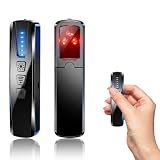
- AI-Powered Smart Signal Analysis – This camera detector, built in intelligent AI chip processes RF signals in real time, reducing background interference and false alarms for more reliable detection of hidden wireless cameras, audio bugs, and GPS trackers. The adjustable sensitivity dial lets you fine-tune scanning levels to match different environments – from busy hotels to quiet homes – so you get precise alerts without constant beeping.
- 4-in-1 Detection with 5-Level Sensitivity – As a reliable hidden camera detectors, it scans for wireless cameras, hidden pinhole lenses, GPS trackers, and magnetic field devices, giving you complete coverage against various surveillance threats. The 5-level adjustable sensitivity lets you dial in the right detection range for any setting – turn it up for weak signals in large spaces, or lower it in crowded areas to reduce interference. Works great at home, in hotel rooms, and while traveling, so you always know your privacy is protected.
- Easy Operation with 4 Modes – With a built-in GPS tracker detector, switch between wireless signal scanning, hidden camera finder, magnetic field detection, and flashlight – all in one compact device. Select between sound or vibration alerts for quiet, discreet scanning in any environment.
- Long Battery Life & Portable Design – Built-in 800mAh rechargeable battery provides up to 25 hours of continuous use. Fully charges in just 1.5 hours via USB. Small enough to carry anywhere – weighs next to nothing, so you can take it on every trip.
Hautechai’s current page does not provide a README, and its API documentation was not available for confirming the hosted schema. Do not assume that it uses the official implementation’s field names, threshold defaults, or output structure. A different Replicate deployment, Adirik’s Grounding DINO listing, has its own documented fields; that documentation describes Adirik’s deployment only.
Independent reader supportYour contribution helps us test, update, and keep practical guides available for everyone.Hosted inference or local installation?
| Choice | What it involves | Useful when |
|---|---|---|
| Hautechai on Replicate | A hosted H100 build accessed through Replicate. The listing’s price and typical runtime are variable estimates, not guarantees. | You want to try hosted inference without setting up the official project locally. |
| Official implementation | Clone the project, install dependencies, download the SwinT-OGC pretrained weights, and run an image inference demo. The repository includes a CPU-only mode. | You want direct access to the implementation and more control over a local workflow. |
The trade-off is not simply GPU versus no GPU. Hosted use has a per-run service cost and depends on the provider’s interface; local use requires environment setup and uses your own machine and operating resources. The repository’s CPU-only option means a GPU is not mandatory to run the code, but the available sources do not establish a universal hardware requirement for practical speed. Review the repository’s Apache-2.0 license and the applicable terms for pretrained weights and other assets before using them in a product.
How to interpret published results
The Grounding DINO authors report 52.5 AP on the COCO zero-shot transfer benchmark without training data from COCO, and a mean 26.1 AP on the ODinW zero-shot benchmark. These are results from defined research evaluations reported in the paper, which was submitted in 2023 and revised in 2024. They are not predictions of accuracy on a particular image, a guarantee across domains, or independent tests of Hautechai’s hosted execution.
Quick Recap
Product prices and availability are accurate as of the date/time indicated and are subject to change. Any price and availability information displayed on Amazon at the time of purchase will apply.

