
iTechGuides is reader-supported. When you buy through links on our site, we may earn an affiliate commission. As an Amazon Associate I earn from qualifying purchases. Learn more
To check whether your power supply can handle a new graphics card, look up the exact card’s recommended system wattage and power connectors, then compare them with your PSU’s rated output, available cables, and the rest of your PC. Wattage alone is not enough: connector fit, exact PSU cable compatibility, and room to install the cable safely matter too.
What to check before buying or installing the card
- Identify the exact graphics card. Use the full model name, including the add-in-board partner model where possible. Cards based on the same GPU can differ in connector layout and power requirements.
- Find its manufacturer’s requirements. Check the model’s product page or manual for recommended system PSU wattage, connector type and quantity, and any instructions for using an adapter. Do not substitute a recommendation for a different card or rely on a generic wattage calculator.
- Identify your PSU precisely. Read the label or model documentation for its exact model and rated wattage. Then verify which GPU connectors and cables it supports.
- Check the full system, not just the GPU. The CPU and other components affect the PSU recommendation. Compare your CPU tier and build against manufacturer or board-partner guidance, treating those tables as cross-checks rather than a definitive answer for every system.
- Confirm the cable and physical fit. Verify that the required connectors are available and that any modular cable is approved for your exact PSU model. Check the card maker’s instructions for adapter use, connector seating, and cable clearance.
If you cannot verify a required wattage or connector condition, do not assume the combination is compatible. Gather the exact GPU, CPU, and PSU model numbers and check their manufacturer documentation.
How to interpret PSU wattage recommendations
A recommended system PSU wattage is guidance for a whole PC configuration, not a measurement of the graphics card alone. Manufacturers can give different recommendations because they account for different CPU tiers and system headroom. ASUS’s guidance, for example, varies its PSU recommendation by both GPU and CPU tier; its table pairs an RTX 5080 with 750 W for Intel Core i5 or AMD Ryzen 5 systems, and 1,000 W for Intel Core Ultra 9/HEDT or AMD Threadripper systems. The table’s date is not stated, so use the current recommendation for your exact card and system when available.
The Tool Desk
Outbyte Driver Updater FREEScan for outdated or missing drivers - takes under a minuteDriver Scan →Outbyte PC Repair FREERepair Windows errors before they cause bigger problemsFix Now →ASRock likewise describes its figures as general guidance that includes headroom for other components, not a complete calculation for every build. A broad table can help you spot a mismatch, but the graphics card manufacturer’s exact model guidance and your PSU’s verified specifications should anchor the decision.
#1 Best Overall
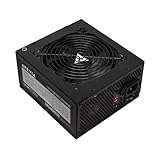
- Apevia 700W Spirit ATX Gaming Power Supply with black sandblasted casing
- Supports Dual/Quad/Multi-core CPUs. Supports single 12V output for higher power usage.
- Connectors: 1 x 20/24pin Main Power, 1 x 4+4pin 12V, 2 x PCI 6+2pin, 4 x SATA, 4 x Peripheral
- Auto-thermally controlled 120mm black fan. Output: +3.3V@16A, +5V@20A, +12V@53A, -12V@0.5A, +5VSB@2.5A
- Heavy-duty protections: Short-Circuit/Over-Current/Over-Voltage/Over-Power/Under-Voltage/Over-Temperature Protections
Check connectors and cables separately from wattage
A PSU can meet a wattage recommendation and still lack the connector arrangement the card requires. Match both connector type and quantity to the exact GPU instructions. If the card includes an adapter, follow that model’s directions about which PSU connectors to use; do not assume that any adapter or cable is suitable.
Modular PSU cables are not automatically interchangeable. Use only a cable that the PSU manufacturer lists as compatible with your exact PSU model. Seasonic’s cable guidance says connectors must be inserted, locked, and seated properly, and advises against bending or forcing a cable at the connector after installation. Its cited 12VHPWR/12V-2×6 cable is rated for a maximum of 600 W; that cable specification does not mean a particular graphics card requires 600 W.
Rank #2

- 80 PLUS GOLD CERTIFIED
- 10-year limited warranty, guaranteeing long term reliable operation
- Fully modular design
- ATX 3.1 & PCIE 5.1
Does a newer GPU connector mean you need a new PSU?
Not necessarily. The answer depends on the exact graphics card and whether your current PSU meets its wattage and connector requirements. For RTX 40 Series cards, NVIDIA says a new PSU is not required if the existing unit meets the recommended wattage; those cards include adapters for existing PSU 8-pin connectors. That is RTX 40 Series guidance, not a rule for every newer or different card.
Quick wins for a faster PC:
Scan for outdated or missing drivers - takes under a minuteDriver Scan →Repair Windows errors before they cause bigger problemsFix Now →Fix the driver behind crashes, sound loss and screen glitchesFind Drivers →MSI notes that an ATX 3.1 PSU with a native 12V-2×6 cable can simplify installation for compatible cards, but it is not required for every card. Check the particular GPU’s instructions before replacing a PSU solely because the card uses a newer connector.
Rank #3

- 80 PLUS GOLD CERTIFIED
- 10-year limited warranty, guaranteeing long term reliable operation
- Fully modular design
- ATX 3.1 & PCIE 5.1
Fit and seat the power cable carefully
After confirming electrical compatibility, make sure the card and its power cable can fit in the case without putting strain on the connector. For its RTX 40 Series adapter, NVIDIA specifies at least 36 mm of planned clearance above the card for cable bend and airflow. Treat that measurement as specific to NVIDIA’s stated RTX 40 Series guidance, not a universal clearance rule for all cards or cables.
Follow the card and cable manufacturers’ installation instructions. Seat and lock each connector fully, and avoid forcing or sharply bending a cable at the connector. A cable that fits electrically but cannot be routed as instructed is not a satisfactory installation.
Rank #4

- Function: Use the computer's SATA interface to power the graphics card.
- This product is one 8-pin PCI-E connector to 15-pin SATA (male) connectors, two of the pins can be detached to convert it into a 6 pin connector.
- Connecting a SATA power extension cable reduces the damage to the interface caused by continuous unplugging and also reduces the stress on the connector of the SATA drive or computer motherboard.
- SATA 15-pin male to 8-pin female adapter power supply for your graphics card. There is no need to upgrade your existing SATA power supply to use PCI Express graphics cards.
- The Sata 15-pin to 8-pin adapter is a perfect solution foshortness of PCIe power connectors on your motherboard. Connect your graphics card with the PCIe 6-pin power connector to the SATA 15-pin power supply in your computer host.
When to replace the PSU
Choose a properly compatible replacement if your current PSU does not meet the exact system wattage recommendation, lacks a required connector, or cannot use an approved cable for the card. If the PSU meets the requirements and the correct cable or included adapter can be installed according to the manufacturer’s directions, a new unit may not be necessary.
Do these 3 things before closing this tab:
1Fix the driver behind crashes, sound loss and screen glitches2Repair Windows errors before they cause bigger problems3Scan for outdated or missing drivers - takes under a minuteWhen comparing replacement units, first check adequate wattage for your GPU and CPU combination, connector type and quantity, exact cable compatibility, and installation clearance. Efficiency, modularity, noise, protection, and warranty are separate PSU selection considerations; an efficiency rating does not establish that a PSU has the needed power or connectors.
Best Value

- Adapts a single 8-pin PCIe power connection to dual 8-pin (6+2) slots, compatible with GPUs requiring multiple connectors
- Durable, high-performance design provides additional power to GPUs with a single 8-pin PSU connection
- Ideal for custom PC builds, offering a sleek look that keeps your setup clean and organized
- Efficiently splits one 8-pin connection into two 8-pin (6+2) connectors, ensuring stable power for high-demand GPUs
- Includes two adapters, offering flexibility for multi-connector GPUs or future upgrades, making it a cost-effective choice
Examples from manufacturer guidance
NVIDIA’s 2022 RTX 40 Series support guidance lists a 450 W TGP and an 850 W minimum recommended PSU for the RTX 4090, and a 320 W TGP and 750 W minimum recommended PSU for the RTX 4080 16GB. These figures apply to the named models in that guidance and illustrate why GPU power and recommended system PSU wattage are different numbers. Check current documentation for the exact card you plan to install.
Quick Recap
Product prices and availability are accurate as of the date/time indicated and are subject to change. Any price and availability information displayed on Amazon at the time of purchase will apply.

