
Quick wins for a faster PC:
Repair Windows errors before they cause bigger problemsFix Now →Fix the driver behind crashes, sound loss and screen glitchesFind Drivers →Clear out junk files and repair common Windows errorsFree Scan →iTechGuides is reader-supported. When you buy through links on our site, we may earn an affiliate commission. As an Amazon Associate I earn from qualifying purchases. Learn more
Make computer work safer by fitting the workstation to your body and tasks: sit comfortably, keep the keyboard and mouse within easy reach, position the screen to limit neck strain and glare, and break up long stretches of computer use. Start with the quick checks below, then adjust one part at a time. OSHA emphasizes that no single posture or workstation arrangement suits everyone.
How can I make working at a computer safer?
- Comfort: Can you sit without reaching, hunching, or holding your shoulders tense?
- Reach: Are the keyboard and mouse close enough to use with elbows near your sides?
- Screen: Is the monitor directly in front of you, at a comfortable distance and height?
- Glare: Does light from a window or lamp reflect on the display?
- Variety: Can you change tasks or pause briefly instead of staying in the same position for hours?
Change the setup to suit your body, work, and available equipment—not the other way around. OSHA’s computer workstation guidance states that there is no single “correct” posture or arrangement that fits everyone. Use its measurements as practical starting points, then make adjustments that feel comfortable and allow you to work without unnecessary reaching or twisting.
How should I set up the chair, desk, keyboard, and mouse?
These parts work as a system. Adjust the chair and work surface together so you can reach the keyboard without raising your shoulders or bending your wrists. OSHA’s keyboard guidance recommends placing the keyboard directly in front of you, keeping shoulders relaxed and elbows close to the body, and keeping wrists straight and in line with the forearms.
Recommended Free Tools
- Set your working position. Sit where you can face the work area comfortably. Adjust the chair and desk or work surface so you can approach the keyboard without leaning forward or reaching up.
- Center the keyboard. Put it directly in front of you, aligned with your body. Keep your shoulders relaxed, elbows close, and wrists in line with your forearms while typing.
- Place the mouse nearby. Keep it close to the keyboard so you can use it without stretching your arm out to the side. If using it makes you reach or twist, reposition it.
- Recheck the whole setup. After changing chair or desk height, check keyboard and mouse reach again. A change that helps one component can affect the others.
There is no need to force yourself into one rigid posture. Aim for a comfortable, relaxed position and adjust when the work or your comfort changes.
#1 Best Overall

- Create Instant Active Standing - VIVO’s desk riser provides on-demand standing throughout the day for the freedom to get out of your chair and relieve muscle tension, reduce stress, and increase productivity. --Patented--
- Space Efficient 31.5" Surface - The top surface measures 31.5” x 15.7”, which maximizes space while still providing room for dual monitors. The 31.3" x 11.8" (10.5" in center) keyboard tray raises in sync with the top surface to create a comfortable workstation.
- Strong 33 lbs Lift Assist - Go from sitting to standing in one smooth motion using the innovative simple touch height locking mechanism (Adjustment Range: 4.5" to 20"). Lift design elevates straight upwards.
- Very Minimal Assembly - This riser is almost ready to go right out of the box! Place on your existing desk, attach the keyboard tray, and start organizing your workstation.
- We've Got You Covered - Sturdy, high-grade steel design is backed with a 3-Year Manufacturer Warranty and friendly tech support to help with any questions or concerns.
Where should the monitor go?
OSHA’s monitor quick tips recommend putting the screen directly in front of you and at least 20 inches away, with its top line at or below eye level. OSHA also advises positioning the monitor perpendicular to a window to reduce glare.
- Center the monitor in front of your body rather than placing it off to one side.
- Use the 20-inch distance as OSHA’s starting point; adjust for a clear, comfortable view.
- Set the top line of the screen at or below eye level.
- Turn the display perpendicular to a window if window light creates glare.
If you find yourself leaning toward the screen to read, first consider whether its distance, height, or viewing angle needs adjustment.
Rank #2
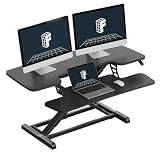
- Quick Setup – Ready to Use in Minutes: Designed for convenience, this sit stand desk riser comes almost fully assembled. Simply attach the keyboard tray to your desktop workstation is ready to go—no complicated tools or installation required. Perfect for busy professionals and home office setups.
- Patented Spring Lift System: Featuring a patented mechanical spring system, delivers smooth and stable height adjustment. Built with high-quality steel spring wire for long-lasting performance, it avoids common gas spring issues like air leakage or performance drop over time—ensuring reliable daily use for your sit stand workstation.
- Ergonomic for Healthy Work: Upgrade your workspace with this desk riser designed for ergonomic comfort. Easily switch between sitting and standing to reduce fatigue from long hours of work. The keyboard tray keeps your arms at a natural angle, helping relieve neck and shoulder strain—ideal for home office, remote work, and daily computer use.
- Heavy-Duty Structure with Enhanced Stability: Built with a reinforced steel frame and thickened square tubes, this converter offers superior stability at any height. The top surface supports up to 33 lbs, while the keyboard tray holds 4.4 lbs, making it ideal for monitors, laptops, and office accessories without wobbling.
- 40 Inch Large Workspace for Multi-Device Setup: Enjoy a spacious work surface with this 40" desk riser, ideal for dual monitors, laptops, and office accessories. A great choice for users who need more room for multitasking and productivity.
How often should I take breaks from computer work?
Vary computer work with other tasks when possible and take short pauses rather than maintaining the same activity and position continuously. OSHA’s keyboard page gives this example: “Every hour, take a five-minute break from computer tasks.” Treat that as a suggested micro-break practice, not a guarantee of injury prevention or a universal medical rule. OSHA also discusses changing tasks and short pauses in its work process and recognition guidance.
Crashes, No Sound, or Screen Glitches?
Random freezes, missing sound and display glitches usually trace back to one bad driver. Find and replace yours safely.Free scan · under a minutePC Slower Than It Used to Be?
A free scan shows the junk files, broken settings and background clutter dragging Windows down - then fixes them in one click.Free scan · Windows 10 & 11What symptoms should prompt attention?
OSHA identifies symptoms that can be associated with workstation risks, including hand numbness or burning, reduced grip strength, joint stiffness, pain in the arms, neck, or back, and sore or blurred vision. These symptoms do not establish a diagnosis. Pay attention to new, persistent, or worsening symptoms and report work-related concerns through the appropriate workplace process or seek a suitable professional assessment.
Rank #3

- Versatile & Spacious Desktop: The spacious desktop adapts easily to study, work, gaming, or light exercise, making it ideal for creators, remote workers, programmers, and hobbyists. The smooth, water-resistant surface feels comfortable to the touch, while rounded corners add safety.
- Smooth & Quiet Adjustment: The electric lifting system adjusts smoothly from 28.9" to 46.5" with a single touch, fitting users of different heights. Ultra-quiet operation helps you switch between sitting and standing without disrupting work or calls.
- Strong & Stable Structure: Built with a reinforced steel frame, the desk supports up to 154 lbs, easily holding multiple monitors, laptops, and office equipment. The industrial-grade steel frame further reinforces its strength.
- Smart & Safe Controls: The intelligent control panel features 4 memory buttons, allowing each family member to save their ideal height for ergonomic study or work with one-touch adjustment. Anti-collision technology automatically reverses when obstacles are detected, adding extra safety for daily use.
- Easy & Hassle-Free Setup: Clear instructions make assembly simple and straightforward, even for first-time users. Setup takes around 30 minutes, with responsive customer service available whenever you need help.
Do I need to buy an ergonomic accessory?
Adjust existing furniture and equipment first. OSHA says an adjustable keyboard tray may be needed when the work surface or chair cannot be adjusted appropriately. If you are considering one, assess whether it:
- Adjusts in height and tilt to support a comfortable keyboard position.
- Has enough room for both the keyboard and pointing device.
- Leaves adequate clearance for your legs and feet.
- Fits the desk and can be installed without creating a new reach or clearance problem.
Other components, such as a chair, desk, document holder, monitor, or pointing device, are worth considering only when a specific fit problem remains. OSHA’s component guidance is practical information, not an endorsement of a product.
Rank #4
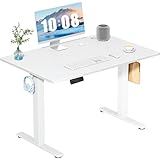
- Spacious Desktop for Productivity: Maximize your workflow with our 40" x 24" dual-panel desktop. This electric standing desk offers an expansive, sturdy surface for multiple monitors, laptops, and accessories, supporting an organized and efficient workspace for professionals and gamers seeking an ergonomic upgrade to enhance focus and output
- Quiet Electric Height Adjustment: Effortlessly transition between sitting and standing with our near-silent motor (under 55 dB). This standing desk adjusts smoothly from 28.7" to 46.5", ensuring seamless, disruption-free movement ideal for focused work, shared home offices, and important video calls, promoting comfort without noise distractions
- Programmable Memory Presets: Customize your ergonomic comfort with 3 smart memory presets. The intuitive LED controller allows you to save and recall your preferred heights instantly, eliminating repetitive adjustments. This key feature for the electric standing desk encourages consistent posture changes, aligning with behaviors that drive long-term user satisfaction
- Sturdy & Durable Construction: Experience rock-solid stability with a reinforced steel frame and wide T-leg base. This electric desk reliably supports up to 176 lbs, ensuring your dual-monitor setup or gaming gear remains secure even at maximum height. Rigorously tested for 50,000+ cycles, it delivers the trusted durability that influences purchase decisions
- Quick, Tool-Free Assembly: Get your standing desk ready in under 30 minutes with our hassle-free, tool-free assembly system. Pre-labeled parts and clear, step-by-step instructions mean you can start enjoying the health benefits of an electric standing desk immediately, removing a common barrier to purchase and enhancing customer satisfaction
Separate consideration: digital security
Physical workstation comfort is different from cybersecurity. For work devices, follow your employer’s security policies. CISA’s 2023 counter-phishing recommendations for non-federal organizations discuss organizational measures such as endpoint hardening, software updates, and multifactor authentication; this brief note is not a complete security policy for individual workers.
What’s actually slowing this PC down?
Pick the symptom - the matching free tool is one click away.
Quick Recap
Best Value

- Smooth Electric Lift Function: The electric standing desk features a powerful and quiet electric motor (<45dB). It lifts at 25mm/s, with a height adjustment range of 28.3" - 46.5", accommodating different heights for various needs. The adjustable desk comes with an easy-to-use control panel and memory function, allowing you to preset up to 3 frequently used heights for enhanced efficiency and comfort at work
- Sturdy Frame for Superb Load-bearing Capacity: The overall frame of the electric desk is constructed with a 1.2mm heavy-duty steel frame structure, combined with a thickened desktop, ensuring the long-term stability and durability of the standing desk electric. It has a load-bearing capacity of up to 180 LBS and has passed 60,000 lift tests after years of use
- Ergonomic Design: This standing desk is in line with ergonomic principles, effectively reducing the back pain caused by prolonged sitting and helping to improve poor sitting posture. The desktop provides ample space for placing various office equipment such as dual-screen monitor computers, keyboards, and files. The corners are rounded for safety and comfort, preventing bumps
- Easy to Assemble: The height adjustable desk can be effortlessly assembled within a few straightforward steps, without the requirement for intricate tools or specialized skills, thereby saving both time and effort. It can serve as an office desk, computer desk, study table, work desk for home, raising desk, and crafting table
- Organize the workstation: Farewell to the jumbled wires. The electric standing desk is equipped with a concealed cable management tray below, which can easily organize various power cords, data cables, etc. Avoid messy cables and improve the cleanliness and aesthetics of the work area
Product prices and availability are accurate as of the date/time indicated and are subject to change. Any price and availability information displayed on Amazon at the time of purchase will apply.

