
What’s actually slowing this PC down?
Pick the symptom - the matching free tool is one click away.
iTechGuides is reader-supported. When you buy through links on our site, we may earn an affiliate commission. As an Amazon Associate I earn from qualifying purchases. Learn more
To record your first run on the COROS PACE 4 Pro, install the COROS app, pair the watch by scanning its QR code, complete the guided setup, wait for GPS and heart-rate readings, then start, finish, save and sync the activity. The whole process is handled from the watch and the COROS app; the box includes the charging adapter needed to prepare the watch.
This model-specific sequence follows COROS’s current setup and activity instructions. Keep the PACE 4 Pro setup guide available if a screen label differs after a software update.
What you need before starting
Have the PACE 4 Pro, a compatible iPhone or Android phone, internet access for downloading the app and signing in, and the watch’s charging accessory. The package contents listed by COROS are:
Quick wins for a faster PC:
Clear out junk files and repair common Windows errorsFree Scan →Scan for outdated or missing drivers - takes under a minuteDriver Scan →- COROS PACE 4 Pro GPS Watch
- COROS A2 Charging Adapter
The A2 adapter is designed to be used with a standard USB-C cable. A separate sensor is not established as necessary for recording the first run.
#1 Best Overall
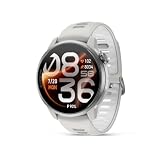
- PREMIER TITANIUM BUILD — A premium titanium sport watch designed for athletes who demand uncompromising performance, combining durable materials with a sleek, modern finish.
- ULTRALIGHT AND ULTRA-THIN — At just 43 grams and 11.8 mm thin, PACE 4 Pro is built to disappear on your wrist so you can focus on performance.
- OUR BIGGEST DISPLAY EVER — A massive 1.47-inch edge-to-edge AMOLED touchscreen with sapphire glass and 3,500 nits peak brightness for sharp, bright visibility in any light.
- BOLD BATTERY LIFE — Up to 60 hours of GPS battery life keeps you training, racing, and exploring for days without constantly stopping to recharge.
- BRING THE WORLD INTO FOCUS — Dual-frequency GPS and fast global mapping deliver precise positioning and reliable navigation across cities, trails, and remote terrain.
1. Charge or power on the watch
If the display is off, hold the lower-right Back/Lap button for 2–3 seconds. Release it when the COROS logo appears. The watch then asks you to choose a language and displays a QR code for pairing.
If the battery needs charging first, remove the A2 adapter from its silicone case. Fit its metal pins to the charging contacts on the back of the watch until the adapter snaps into place, then connect a standard USB-C cable to the adapter and a power source. COROS states that charging during a recorded workout will not interfere with, stop or restart that workout, although charging before you leave avoids having to manage a cable while running.
2. Install the COROS app and pair the PACE 4 Pro
- Install the COROS app from the iOS App Store or Google Play.
- Open the app and sign in, or create a COROS account.
- On the watch, choose a language if prompted and leave the QR-code screen visible.
- In the app, open Profile, the fourth tab.
- Choose Add New Device.
- Scan the QR code shown on the watch and follow the guided setup.
The guided setup includes choices such as which hand you wear the watch on and whether to enable notifications. Complete those prompts before moving to the activity screen.
Do these 3 things before closing this tab:
1Repair Windows errors before they cause bigger problems2Scan for outdated or missing drivers - takes under a minute3Clear out junk files and repair common Windows errorsIf QR scanning does not work
COROS also provides manual Bluetooth pairing from below the scanner in the device-adding flow. Use that option rather than trying to create an unrelated Bluetooth connection from the phone’s system settings. The separate COROS pairing instructions cover the same pairing route for COROS devices.
| Pairing route | When to use it | What you do |
|---|---|---|
| QR-code scan | The watch is showing its setup QR code and the phone camera can read it. | Profile (fourth tab) → Add New Device → scan the code. |
| Manual Bluetooth pairing | The scanner cannot read the code or you prefer a manual connection. | Open Add New Device, then choose the manual Bluetooth option below the scanner and follow the app prompts. |
3. Learn the controls before you run
Knowing which control does what prevents accidental exits or an unfinished recording. The controls documented in the PACE 4 Pro setup guide are:
Rank #2

- Ultralight & Ultra-Thin Design: Weighing only 32g with the nylon band and just 11.8mm thin, COROS PACE 4 GPS watch is lighter than an energy gel and comfortable enough for 24/7 wear, ensuring it never slows you down.
- EASY ON THE EYES: The 1.2"touchscreen AMOLED display keeps colors vibrant and lines sharp, with auto-adjusting brightness that ensures the screen is easy to read in all environments. More detailed display 164% higher resolution compared to COROS PACE 3.
- BIG BATTERY LIFE: Train longer without interruption. With 41 hours of continuous GPS use and up to 19 days of daily battery life, ensure your training isn’t tied to a charger.
- NEW WAY TO TRAIN with VOICE features:Using PACE 4's voice recording tool, about where you were, what you saw, and how you felt during your workouts and capture training logs at the completion of your activity. Use Voice Control to set an alarm for tomorrow morning, create a target workout and more.
- EFFORTLESS CONTROL: A combination of a tactile digital crown, two easy to reach buttons, and a smooth touchscreen offers intuitive control even at high intensity. Customize the Action Button for one-tap access to key features like media controls, breadcrumb navigation, or to record Voice Pins.
| Control | Action | Use during setup or running |
|---|---|---|
| Top-right digital dial | Turn to scroll; press to confirm a selection. | Open an activity, select options, pause and choose menu items. Holding it completes a workout from the Finish command. |
| Lower-right Back/Lap button | Press to return to the previous screen. | During an activity, press it to record a lap or a rest interval. |
| Lower-left Action button | Press to open Control Center from the watch face. | Use it for watch-level controls without opening the activity menu. |
| Lower-left Action button held | Hold to launch Voice Control. | Use only when you intentionally want voice control. |
The watch is set to Hold to Unlock by default, so a press-and-hold may be required before an input is accepted when the controls are locked.
4. Prepare the activity screen
- Return to the watch face.
- Press the digital dial once to open the activity menu.
- Turn the dial to the running activity you want to record.
- Press the dial to select it and open the activity’s Start screen.
- On the Start screen, scroll down to review optional alerts and shortcuts. Configure only the options you want for this run; these settings are not required to obtain a recording.
The activity menu and settings are described in COROS’s Activity Tracking and Activity Settings guidance.
Free tools Windows power users keep installed
One-click scans. No signup required.
5. Wait for GPS and heart-rate acquisition
Do not press Start as soon as the activity screen appears. First check the satellite signal widget and the heart icon:
- Wait until the satellite widget shows full bars.
- Wait until the heart icon is solid, indicating that heart-rate acquisition is complete.
When both conditions are met, press Start. COROS says the watch then records information such as distance, pace or speed and heart rate, along with other activity data. Waiting for both readings gives the watch the acquisition time its setup guidance calls for; moving away before that point can leave the activity waiting for a signal.
Why this check matters
GPS acquisition supplies the location-based measurements used for distance and pace or speed. The heart-rate check confirms that the watch has obtained a live reading before the recording begins. If either indicator is still incomplete, remain on the Start screen rather than starting and hoping the missing data appears later.
Rank #3

- Ultralight & Ultra-Thin Design: Weighing only 32g with the nylon band and just 11.8mm thin, COROS PACE 4 GPS watch is lighter than an energy gel and comfortable enough for 24/7 wear, ensuring it never slows you down.
- EASY ON THE EYES: The 1.2"touchscreen AMOLED display keeps colors vibrant and lines sharp, with auto-adjusting brightness that ensures the screen is easy to read in all environments. More detailed display 164% higher resolution compared to COROS PACE 3.
- BIG BATTERY LIFE: Train longer without interruption. With 41 hours of continuous GPS use and up to 19 days of daily battery life, ensure your training isn’t tied to a charger.
- NEW WAY TO TRAIN with VOICE features:Using PACE 4's voice recording tool, about where you were, what you saw, and how you felt during your workouts and capture training logs at the completion of your activity. Use Voice Control to set an alarm for tomorrow morning, create a target workout and more.
- EFFORTLESS CONTROL: A combination of a tactile digital crown, two easy to reach buttons, and a smooth touchscreen offers intuitive control even at high intensity. Customize the Action Button for one-tap access to key features like media controls, breadcrumb navigation, or to record Voice Pins.
6. Record the run
Once you press Start, run normally while the activity remains active. The digital dial continues to provide scrolling and selection, and the Back/Lap button can mark a lap or rest interval. If you need to pause, use the digital dial once; do not use the Finish command until you are ready to save the activity.
The Tool Desk
Outbyte Driver Updater FREEScan for outdated or missing drivers - takes under a minuteDriver Scan →Outbyte PC Repair FREEClear out junk files and repair common Windows errorsFree Scan →Use alerts and shortcuts deliberately
Alerts and shortcuts are optional controls available from the activity’s Start screen. If you enabled one, review its behavior before setting off so that an unexpected prompt does not look like a stopped recording. The setup material does not establish a required alert configuration for a first run, so leaving these options unchanged is valid.
7. Finish, save and sync the activity
- Press the digital dial once to pause the run.
- Scroll down to Finish.
- Press and hold the digital dial to finish and save the workout.
- Open the COROS app on your phone.
- On the app’s first page, swipe down to start synchronization.
- After syncing, open the latest activity to view its detailed breakdown.
A short press pauses; the press-and-hold on Finish is the action that completes and saves the recording. If you leave the activity paused without finishing it, the saved workout will not yet be available as the latest completed activity in the app.
First-run checklist
- Install the COROS app from the iOS App Store or Google Play.
- Sign in or create a COROS account.
- Power on the watch by holding Back/Lap for 2–3 seconds if it is off.
- Choose a language and display the pairing QR code.
- In the app, use Profile → Add New Device and scan the code, or choose manual Bluetooth pairing below the scanner.
- Complete the hand-wearing and notification prompts.
- Charge with the supplied A2 adapter and a standard USB-C cable if needed.
- From the watch face, press the dial, select the running activity and review optional alerts or shortcuts.
- Wait for full satellite bars and a solid heart icon.
- Press Start and run.
- Pause with the dial, choose Finish and hold the dial to save.
- Swipe down on the COROS app’s first page to sync and open the latest activity.
Troubleshooting the setup sequence
The watch will not show the setup screen
Hold the lower-right Back/Lap button for the documented 2–3 seconds, until the COROS logo appears. If the battery is depleted, connect the A2 adapter: remove its silicone case, align the metal pins with the contacts on the watch back, snap it into place and connect USB-C power.
The phone cannot scan the QR code
In the COROS app, return to Profile → Add New Device and use the manual Bluetooth option below the scanner. That is the alternate pairing method COROS documents for this flow.
Rank #4

- Brilliant 1.3-inch AMOLED Display: COROS PACE Pro Sports GPS watch's Always-On AMOLED screen delivers vibrant colors and an impressive 1500-nit brightness, ensuring crystal-clear visibility in any light, from bright daylight to pre-dawn hours. Access your data instantly with our fastest-ever gesture-activated backlight.
- More efficient WiFi transfer experience & More Powerful RAM: With over 2x processor performance and 3x zoom speed of its predecessors, COROS PACE Pro Running Watch delivers the fastest responsiveness in its class.
- Unbeatable Battery: A single charge, COROS PACE Pro Outdoor GPS watch lasts 38 hours for outdoor activities or 31 hours with dual-frequency GPS. Experience 20 days of non-stop use or six days when using Always-On display mode.
- Pin-Point GPS Accuracy: An all-new satellite chipset and hardware configuration make PACE Pro GPS Running Watch's GPS accuracy our most precise GPS performance whether on city streets or remote trails.
- Navigation Route Planner: Effortlessly create custom routes with topographical and landscape maps in the COROS app. Send them directly to your COROS PACE Pro Sports GPS watch for men and women for seamless turn-by-turn navigation, keeping you on track every step of the way.
The run screen is not ready to start
Remain on the activity Start screen until the satellite widget has full bars and the heart icon is solid. COROS’s activity guidance specifically advises waiting for GPS and heart-rate acquisition before training.
The activity is paused and you are unsure how to end it
Press the digital dial once if you are still recording to pause, scroll to Finish, then press and hold the dial. A short press alone does not complete the saved workout.
The saved run is not visible in the app
Open the COROS app and swipe down on its first page to sync. The latest activity should then appear with its detailed breakdown. Check that you completed the Finish-and-hold action on the watch rather than leaving the activity paused.
Independent reader supportYour contribution helps us test, update, and keep practical guides available for everyone.What the first synced activity contains
The PACE 4 Pro records the activity measurements COROS lists for the selected workout, including distance, pace or speed and heart rate, plus other available activity data. The app presents the latest saved activity on its first page after synchronization and provides the detailed breakdown there. The exact fields can depend on the activity and the settings you selected, so optional alerts and shortcuts should be treated as controls rather than additional sensors.
PC Slower Than It Used to Be?
A free scan shows the junk files, broken settings and background clutter dragging Windows down - then fixes them in one click.Free scan · Windows 10 & 11Outdated Drivers Are Slowing You Down
One free scan finds every outdated or missing driver and matches the right update for your exact hardware.Free scan · exact hardware matchQuick reference: the complete path
Power on: hold Back/Lap for 2–3 seconds → choose language → QR code.
Best Value

- ▶Compatibility: This charger compatible with Coros Pace 4, APEX 4, Pace Pro, Nomad smart watch. 【Not compatible with Coros Pace 3/Pace 2】
- ▶Durable & Premium: The Pace 4 charging cable is made of copper wire and durable plastic, a full charge takes about 2.5 hours, works like the OEM charger. It is a good choice to replace lost or damaged charging cable.
- ▶Safe Protection: The Pace Pro charger build-in PTC protection, provides a stable charging performance, protecting watch from over-current, over-voltage or short-circuit.
- ▶Convenience: To get a charge, just plug into USB port on your PC, laptop, notebook, wall charger, very convenient to charge your watch at home, in office, in car or on travel.
- ▶Package includes: 1 x charging cable for Coros Pace 4/APEX 4/Pace Pro/Nomad (smart watch is not included !!!); with sincerely after-sales service, if have any question we will deal with it for you within 24 hours. Thank You!
Pair: COROS app → Profile (fourth tab) → Add New Device → scan QR code, or manual Bluetooth pairing.
Start: watch face → press digital dial → choose activity → review options → wait for full GPS bars and solid heart icon → Start.
Save: press dial to pause → scroll to Finish → hold dial.
Sync: COROS app first page → swipe down → open the latest activity.
Quick Recap
Product prices and availability are accurate as of the date/time indicated and are subject to change. Any price and availability information displayed on Amazon at the time of purchase will apply.

