
The Tool Desk
Outbyte PC Repair FREERepair Windows errors before they cause bigger problemsFix Now →Outbyte Driver Updater FREEFix the driver behind crashes, sound loss and screen glitchesFind Drivers →iTechGuides is reader-supported. When you buy through links on our site, we may earn an affiliate commission. As an Amazon Associate I earn from qualifying purchases. Learn more
How you connect a Samsung wireless speaker depends on its model and whether you want Bluetooth or Wi-Fi. For the Samsung Music Frame, Bluetooth pairs directly with a phone or TV; Wi-Fi requires adding the speaker to SmartThings and using the same Wi-Fi network as the connected device. Other Samsung speakers may use different controls and menus, so check your model’s manual if these steps do not match.
Choose Bluetooth or Wi-Fi for your Music Frame
| Connection | Best for | What it requires |
|---|---|---|
| Bluetooth | Pairing directly with a phone or a TV | Put the Music Frame in pairing mode, then select it in the device’s Bluetooth settings. |
| Wi-Fi | Connecting the Music Frame to a Samsung TV over your home network | Add the speaker in SmartThings and put it and the TV on the same Wi-Fi network. Wi-Fi TV audio is supported only with Samsung TVs. |
These connection options and instructions apply specifically to the Music Frame; they are not a universal setup guide for every Samsung wireless speaker. Samsung also says the Music Frame does not support Wi-Fi 6. Samsung’s Music Frame connection guide has the model-specific details.
How to add a Music Frame in SmartThings
- Open the SmartThings app and go to Devices.
- Choose Add, then choose Add under Samsung devices.
- Select Speaker, then choose the Music Frame.
- Follow the prompts in the app to complete registration. You can also use the app’s QR-code or nearby-device scanning options.
SmartThings registration is required for the Music Frame’s Wi-Fi connection workflow. For setup guidance, see Samsung’s Music Frame setup guide.
Quick wins for a faster PC:
Fix the driver behind crashes, sound loss and screen glitchesFind Drivers →Repair Windows errors before they cause bigger problemsFix Now →Scan for outdated or missing drivers - takes under a minuteDriver Scan →How to pair a Samsung Music Frame with a phone over Bluetooth
- Place the phone and Music Frame about 1 meter (3.28 feet) apart for the first pairing, as Samsung Australia recommends.
- On the Music Frame, press and hold the Mic On/Off button for five seconds to enter Bluetooth pairing mode.
- Open the phone’s Bluetooth settings and select Music Frame.
- If the phone asks for a PIN, enter 0000.
If the Music Frame was paired before but will not connect, remove or forget it in the phone’s Bluetooth device list and try pairing again. The first-pairing distance recommendation is from Samsung Australia’s Music Frame guide.
#1 Best Overall

- CUSTOMIZABLE DESIGN: Pump up the volume on your personality; Swap a different color bezel to match your space and showcase your personal artwork, photos and more with this innovative photo frame speaker
- DOLBY ATMOS: Get multi-dimensional surround sound from one simple speaker with Dolby Atmos Music and Sound; Experience audio that fills the room and enhance your favorite songs and movies with rich, deep sound
- Q-SYMPHONY: Get more robust audio when you sync your Samsung TV speakers and Music Frame; With Q-Symphony, all audio channels are optimized so speakers work together to operate as one; Add a Samsung Soundbar to unlock a new level of powerful audio
- WIDE RANGE SPEAKER TECHNOLOGY: Get clear and uniform sound anywhere in the room from this high quality, 3-way stereo speaker; Its patented wide-range speaker technology surrounds you with balanced audio no matter where you are in the room
- WIRELESS MUSIC STREAMING: Connect to your smart devices via Wi-Fi or Bluetooth to easily access your favorite streaming platforms and enjoy your favorite songs and podcasts
How to connect a Samsung Music Frame to a TV
Bluetooth connection
- On a Samsung TV, open Settings > All Settings > Sound > Sound Output > Bluetooth Speaker List.
- Put the Music Frame in pairing mode by holding its Mic On/Off button for five seconds.
- Select Music Frame (Bluetooth), then choose Pair and connect.
- If prompted for a PIN, enter 0000.
Samsung says one Samsung TV can be connected to the Music Frame at a time.
Wi-Fi connection
- Add the Music Frame in SmartThings, following the app steps above.
- Connect both the Music Frame and Samsung TV to the same Wi-Fi network.
- On the TV, open Settings > All Settings > Sound > Sound Output and select Music Frame (Wi-Fi).
The Music Frame’s Wi-Fi TV connection is limited to Samsung TVs. For Q-Symphony, Samsung Australia says compatibility depends on the TV and soundbar: its guide lists support for TVs released after 2024, says 2023 TVs will become compatible after a software update, and specifies a 2024 soundbar for simultaneous use of a Music Frame and soundbar. The described Q-Symphony setup allows up to two Music Frames. Confirm compatibility for the exact TV, soundbar, and software before relying on these details; Samsung’s Australia guidance is at this Music Frame support page.
Rank #2
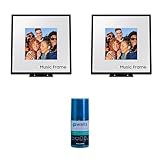
- Customizable Design: Audio when it’s on. Always your style. Included mat holds photos 10" high x 8" wide, viewable area is 8" x 8" | Dolby Atmos: Experience audio that fills the room. Enhance your favorite songs and movies with rich, deep sound
- Q-Symphony: Q-Symphony using the Music Frame is available only when connected with a 2024 Samsung TV, or 2024 Samsung TV and 2024 Samsung Soundbar | Wide Range Speaker Technology: Its patented wide-range speaker technology surrounds you with balanced audio no matter where you are in the room
- Cleans without Dripping: The non ammonia and alcohol free screen cleaning solution doesn't damage display screens | Removes Dust, Dirt, Fingerprints: 6.8oz 200ml spray liquid cleaner for TV's, monitor, tablets, phones, and glasses
- This Bundle Includes: Samsung HW-LS60D 2.0 Channel Photo Frame Speaker Pair with Dolby Atmos (2024) | Walts HDTV Screen Cleaner Kit
What to try if SmartThings cannot find a Samsung speaker
Samsung’s registration troubleshooting applies to soundbars, Wi-Fi speakers, and Music Frames. Try these steps in order:
Free tools Windows power users keep installed
One-click scans. No signup required.
- Make sure Bluetooth is enabled on the phone while registering the sound device.
- Unplug the speaker or soundbar, wait 30 seconds, then reconnect its power.
- Remove an old Bluetooth pairing from the phone: choose Unpair on Android or Forget This Device on iOS.
- Try registering the device again in SmartThings or Samsung Sound.
These steps come from Samsung’s registration troubleshooting guide. App compatibility can vary by product and change over time: the guide currently lists Samsung Sound support for 2026 products and the HW-LS60D Music Frame, with older 2023–2025 soundbar models planned for future updates. Check Samsung’s current app guidance for your device.
Rank #3
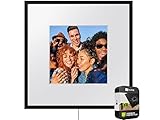
- IN THE BOX: Samsung Photo Music Frame Smart Speaker Dolby ATMOS with Q-Symphony 2024 - Wall Mount Kit - Power Cable - Power Adapter - Stand - Art Panel Holders
When to reset a Music Frame
Try the Bluetooth and registration fixes before resetting. A factory reset clears the Music Frame’s settings. If it still will not connect, turn it on and press both volume buttons for at least five seconds. Samsung says the LEDs blink cyan three times and then red three times during this reset. See the Samsung connection guide for the reset instruction.
Independent reader supportYour contribution helps us test, update, and keep practical guides available for everyone.When your speaker’s controls or menus do not match
The five-second Mic On/Off pairing control, TV menu paths, and volume-button reset above are documented for the Music Frame. Samsung speaker models do not necessarily share the same controls, supported connection types, or app setup. Check the manual and support page for your exact model before following a Music Frame-specific step.
Quick Recap
Rank #4
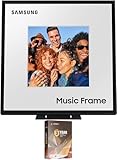
- Customizable Design: Audio when it’s on. Always your style. Included mat holds photos 10" high x 8" wide, viewable area is 8" x 8" | Dolby Atmos: Experience audio that fills the room. Enhance your favorite songs and movies with rich, deep sound
- Q-Symphony: Q-Symphony using the Music Frame is available only when connected with a 2024 Samsung TV, or 2024 Samsung TV and 2024 Samsung Soundbar | Wide Range Speaker Technology: Its patented wide-range speaker technology surrounds you with balanced audio no matter where you are in the room
- Cleans without Dripping: The non ammonia and alcohol free screen cleaning solution doesn't damage display screens | Removes Dust, Dirt, Fingerprints: 6.8oz 200ml spray liquid cleaner for TV's, monitor, tablets, phones, and glasses
- This Bundle Includes: Samsung HW-LS60D 2.0 Channel Photo Frame Speaker with Dolby Atmos (2024) | 2 Year Amber Protection in Addition to the Included Full 1 Year Manufacturer Warranty. Intended for Residential Use Only | Amber Protection HDTV Screen Cleaner Kit
Product prices and availability are accurate as of the date/time indicated and are subject to change. Any price and availability information displayed on Amazon at the time of purchase will apply.
What’s actually slowing this PC down?
Pick the symptom - the matching free tool is one click away.

