
What’s actually slowing this PC down?
Pick the symptom - the matching free tool is one click away.
iTechGuides is reader-supported. When you buy through links on our site, we may earn an affiliate commission. As an Amazon Associate I earn from qualifying purchases. Learn more
You can replace a WH-1000XM6 ear pad without prying tools: switch the headphones off, unplug USB, pull the pad straight away from the earcup, and press the correct replacement back until all five claws click. Sony says the left and right pads are different and must not be swapped.
For cleaning, Sony’s WH-1000XM6 care guidance calls for 99% water-based wipes for sweat or moisture, followed by thorough drying at room temperature. Do not rinse the headset or use thinner, benzene, or alcohol.
What you need to know before touching the pads
The WH-1000XM6 earpads are designed to come off and go back on, but Sony says removal should be done only when necessary. A careless twist, solvent, or wet cleaning method can damage the pad, its mounting claws, the microphone mesh, or internal metal parts.
Outdated Drivers Are Slowing You Down
One free scan finds every outdated or missing driver and matches the right update for your exact hardware.Free scan · exact hardware matchPC Slower Than It Used to Be?
A free scan shows the junk files, broken settings and background clutter dragging Windows down - then fixes them in one click.Free scan · Windows 10 & 11- Power: Turn the headphones off.
- Connection: Disconnect the USB cable.
- Work area: Keep the headset away from iron sand and metal dust. Sony warns that the headphone magnet can attract those particles.
- Replacement: Have a pad specifically identified for WH-1000XM6 and confirm which side it fits.
- Cleaning liquid: Use Sony’s specified 99% water-based wipes for sweat or moisture. Do not substitute solvent-based cleaners.
These precautions come from Sony USA Support’s WH-1000XM6 care guidance, listed as last modified June 23, 2025. The instructions are US-market guidance; product availability and service options can vary by region.
#1 Best Overall

- Premium Protein Leather:Crafted with premium soft protein leather, these ear pads perfectly replicate the look and feel of the original pads—offering exceptional comfort and long-lasting durability
- Supple Memory Foam Comfort:High-density memory foam gently molds to your ears, delivering cloud-like cushioning that eliminates pressure points while maintaining perfect shape for extended, comfortable listening
- Enhanced Sound Performance: Worn ear pads degrade sound, but our Sony WH-1000XM6 replacements restore original audio quality. Precision-designed to maintain Sony 's acoustic profile, they recreate the perfect seal for superior noise isolation and balanced sound – brand new again
- Designed for Sony WH-1000XM6 Headphones: Aurivor presents premium replacement earpads, meticulously crafted for perfect compatibility with Sony XM6 headphones. Not suitable for other Sony models
- Confidence in Purchase: We stand by our product with a 2-Year warranty and a money-back guarantee. If you need any assistance, our professional customer service team is always happy to help ensure your complete satisfaction
How to remove a WH-1000XM6 ear pad
- Shut down and isolate the headset. Turn the headphones off and unplug USB before cleaning or removing either pad.
- Position one earcup. Hold the earcup so the pad faces you and you can pull directly away from its surface. Keep the headband and opposite earcup supported rather than using them as a lever.
- Pull straight out. Remove the pad by pulling it perpendicular to the earcup surface. Sony’s instruction is a straight pull; do not describe or improvise a prying motion, twisting motion, or tool-assisted lift.
- Work patiently. If the pad does not release with a controlled straight pull, stop and reassess your direction instead of increasing force or bending the cushion. Damage to a claw or mount can make reassembly difficult.
- Set the removed pad aside cleanly. Keep it away from iron filings, metal dust, liquids, and dirty surfaces while you inspect the earcup.
Repeat the same process for the other side only if it also needs replacement or access for cleaning. Sony advises not to remove the pads unless necessary, so leave an undisturbed pad in place.
Clean the exposed earcup and microphone mesh
With a pad removed, you may see the microphone mesh in front of the microphones. Sony permits gentle cleaning of that mesh with a cotton swab.
- Use a clean cotton swab and touch the mesh lightly.
- Move gently across the surface rather than pressing into the openings.
- Do not push lint, skin oil, or other debris inward.
- Do not flood the mesh with a wipe or liquid.
The goal is to lift surface debris, not force contamination into the headset. If material has moved behind the mesh or the mesh appears damaged, stop cleaning and arrange an inspection rather than trying to disassemble the earcup.
Do these 3 things before closing this tab:
1Repair Windows errors before they cause bigger problems2Fix the driver behind crashes, sound loss and screen glitches3Clear out junk files and repair common Windows errorsRank #2
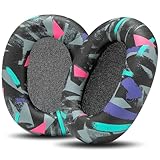
- Perfect Compatibility With Sony WH-1000XM6: WC PadZ XM6 earpads are custom-designed exclusively to be compatible with Sony WH-1000XM6 Headphones. These will not fit any previous generation models like the XM5, XM4, or XM3.
- Premium PU Leather Exterior: Crafted from luxuriously soft PU leather, these replacement pads provide a smooth, durable surface that resists cracking, peeling, and sweat damage over time.
- Dense Memory Foam Interior: The interior is filled with high-density memory foam, offering plush cushioning and reliable shape retention for all-day comfort.
- Sound Isolation Boost: Replacing worn-out earpads helps restore your headphones’ noise isolation. WC PadZ XM6 creates a snug, sealed fit that preserves your audio quality and immersion.
- Quick, Tool-Free Installation: Each pair includes everything you need for a fast installation—no tools required. Just snap them in place and enjoy your upgraded comfort.
How to install a replacement pad
- Confirm the side. Match the left pad to the left earcup and the right pad to the right earcup. Sony explicitly states that the pads are not interchangeable.
- Align the mounting features. Hold the replacement against its matching earcup and line up its claws with the corresponding openings. Do not rotate a left pad onto the right side to make it fit.
- Press evenly. Apply firm, controlled pressure around the pad so the mounting points engage. Avoid squeezing the cushion or forcing one edge while the opposite edge is raised.
- Listen for all five clicks. Sony specifies five claws. Each must seat; the installation is not complete if one corner remains loose or lifted.
- Check the perimeter. Run a fingertip around the outside edge without pulling the cushion. A properly seated pad should not wobble, gape, or spring away when touched lightly.
- Repeat only when required. Install the other side using the same side-specific process.
If you cannot achieve five clicks with the correct pad, remove pressure, verify that you have the WH-1000XM6 version and the correct side, and inspect for debris or a damaged claw. Do not compensate by using adhesive, a screwdriver, or another unapproved fastener.
Cleaning the headphones after use
Sweat and moisture are more than cosmetic issues. Sony warns that retained moisture can rust metal parts and can cause the earpads to deteriorate or develop mold. Cleaning should therefore remove moisture without saturating the headset.
- Turn the headphones off and disconnect USB before wiping.
- Use a 99% water-based wipe to remove sweat or moisture from the accessible exterior and pad surfaces.
- Use light passes instead of scrubbing. Pay attention to areas where moisture collects, while keeping liquid out of openings and the microphone mesh.
- Allow the headphones to dry thoroughly at room temperature before storing, charging, or wearing them again.
Sony’s instruction is to wipe and dry. It does not authorize rinsing the headset, immersing the pads, or treating the headphones as waterproof. Do not use thinner, benzene, or alcohol; these solvents can damage surfaces and pad materials.
Rank #3

- Next-Level Cooling with FreeZe V2 Fabric: WC FreeZe V2 XM6 earpads combine our new FreeZe V2 cooling fabric, dual-layer cooling gel, and breathable hybrid materials to help reduce heat buildup and keep your headphones comfortable for long listening, work, and travel sessions.
- Perfect Compatibility: Compatible With Sony WH-1000XM6 headphones ONLY. These replacement earpads are not compatible with WH-1000XM5, WH-1000XM4, WH-1000XM3, or any other headphone models.
- Upgraded Comfort Without the Bulk: Soft memory foam creates a plush, secure seal while giving your ears more comfortable space than worn-out stock pads. Refresh your XM6 headphones with cushions built for daily use, flights, commuting, and focused listening.
- Restores Seal, Isolation & Sound: Flattened earpads can hurt comfort, noise isolation, and audio performance. WC FreeZe V2 XM6 pads help restore a proper seal so your noise cancelling and music can perform the way they should.
- Easy Snap-In Replacement: Designed around the WH-1000XM6 earpad mounting style, these pads install by aligning the replacement cushion and snapping it securely into place. Refresh your headphones in minutes without glue or special tools.
A practical cleaning routine that avoids damage
After a sweaty session
Once the headset is off and disconnected, wipe away visible moisture with the specified water-based wipe. Leave the headset open in a dry room until it is thoroughly dry at room temperature. Do not seal damp pads in a case, and do not accelerate drying with an unapproved liquid or an aggressive cleaning chemical.
When the pads feel damp later
Treat delayed dampness as a moisture problem, not as evidence that more liquid cleaner is needed. Wipe the moisture, then give the headset time to dry completely. If an odor, visible deterioration, or suspected mold remains, stop using the affected pad and seek a replacement or service assessment.
When dust is visible near microphones
Keep the pad installed unless removal is necessary. If access is required, follow the straight-pull removal method, then use only a gentle cotton swab on the microphone mesh. Never push debris through the mesh.
Rank #4

- Compatibility: Made exclusively for WH-1000XM6 Wireless Headphones. Verify your model before purchasing.
- Easy Installation: Install effortlessly with our clear guide.
- Revitalize Your Headphones: Transform them with a fresh, standout look and turn your headphones into brand-new ones.
- Built to Last: Crafted with high-density memory foam and soft protein leather for ultimate comfort and lasting durability.
- Committed to Innovation: We create professional-grade headphone accessories and are dedicated to ensuring a satisfying experience.
Choosing replacement WH-1000XM6 pads
Sony’s repair guidance says replacement accessories may be available through its Parts & Accessories channel, but the materials consulted do not establish a current WH-1000XM6-specific part number, stock status, or a particular third-party listing. Treat a listing as unverified until it clearly identifies the XM6 model.
| What to verify | Why it matters | What Sony’s published guidance establishes |
|---|---|---|
| Model compatibility | A pad made for another headset may not align with the five-claw mount. | WH-1000XM6 compatibility must be stated by the seller; an exact part number is not stated. |
| Left/right configuration | The two sides cannot be swapped during installation. | Sony says left and right pads are not interchangeable. |
| Seller and manufacturer | Clear provenance helps you resolve a defective or misidentified pad. | Not stated for any individual listing. |
| Material and fit claims | Different materials can change comfort, seal, and moisture behavior. | Not stated for replacement products in Sony’s care article. |
| Return terms | A return option matters if the claws do not align or the side is wrong. | Not stated for any individual listing. |
| Official Sony status | An official accessory may have clearer model identification and support. | Sony says replacement accessories may be purchased through Parts & Accessories, but current XM6 stock is not confirmed. |
Before ordering, read the compatibility text rather than relying on a photograph or a generic phrase such as “fits Sony headphones.” Check whether the package contains one side or a pair, and verify that the listing distinguishes left from right. Keep the packaging and receipt until both pads have been installed and checked.
Troubleshooting removal and installation
The pad will not come off
- Confirm the headphones are off and USB is unplugged.
- Reposition your hands so the pull is perpendicular to the earcup, not upward at an angle.
- Use a controlled, even pull instead of twisting the cushion.
- Stop if the mount or cushion begins to deform. Continued force can turn a replaceable-pad job into an earcup repair.
One edge will not click
- Remove the pad and verify that it belongs on that side.
- Inspect the mounting area for lint or debris, keeping particles out of the microphone openings.
- Align all claws before pressing; do not lock one side while the opposite side is visibly misaligned.
- Press firmly and evenly until all five claws click.
The replacement seems loose
A loose perimeter usually means that one or more claws did not seat, the pad is for a different model, or the wrong side was selected. Do not glue it in place. Remove it, verify WH-1000XM6 compatibility and side, and reinstall. If the correct pad still will not lock, arrange service.
Best Value

- Compatible with Sony WH-1000XM6 Wireless Headphones ( Not compatible with WH-1000XM4 / WH-1000XM5 and Sony other Series Headset)
- Longer Use & Superior Comfort: Professional-grade Cooling Gel is designed for long-term, crack-free use, providing ear comfort to the point of forgetting the headphones are even on, specifically designed for extended listening sessions.
- Pressure Relief Design: Relieves uncomfortable pressure from strong clamping headphones during long listening sessions, ensuring maximum comfort throughout the day.
- Enhanced Sound Isolation: The ear-conforming fit features firmer memory foam cushioning which isolates sound from your environment while enhancing every beat that comes through your headphones.
- High-Density Memory Foam Construction: Premium quality memory foam provides superior cushioning and maintains its shape over extended use, ensuring consistent comfort and acoustic performance.
The headset got wetter than intended
Disconnect USB, wipe away surface moisture with the specified 99% water-based wipe, and let the headset dry thoroughly at room temperature. Do not rinse it, apply alcohol or another solvent, or reconnect power while moisture remains. Persistent malfunction after drying warrants an authorized evaluation.
The microphone sounds blocked after cleaning
Do not insert anything through the mesh. Sony’s method is a gentle cotton swab on the surface without pushing debris inward. If the problem remains, stop cleaning and seek service rather than removing internal parts.
When to use an authorized servicer
Sony’s repair guidance recommends taking a device with physical or cosmetic damage to an authorized servicer for evaluation. Use that route when an earcup, mount, claw, mesh, or cable area is damaged; when a pad cannot be removed without force; or when the headset remains faulty after it has dried.
Recommended Free Tools
A servicer can also help when you cannot identify a genuine or correctly fitting replacement. Sony’s repair information says replacement accessories may be purchased through Parts & Accessories, but availability changes and the consulted guidance does not confirm a specific XM6 pad listing.
Official guidance and its limits
The care instructions summarized here come from Sony USA Support’s WH-1000XM6 article, last modified June 23, 2025. Sony’s separate repair-options guidance was listed as last modified November 1, 2024. Together they establish the removal direction, five-claw refit, side matching, moisture-cleaning method, solvent warnings, and service path.
They do not establish a pad replacement schedule, a guaranteed pad lifespan, a universal cleaning frequency, a current price, or current stock for an XM6-specific replacement. Make those decisions from the pad’s condition, your usage, and the availability information shown by Sony or an authorized seller at the time you buy.
Quick Recap
Product prices and availability are accurate as of the date/time indicated and are subject to change. Any price and availability information displayed on Amazon at the time of purchase will apply.

