
Do these 3 things before closing this tab:
1Clear out junk files and repair common Windows errors2Scan for outdated or missing drivers - takes under a minute3Repair Windows errors before they cause bigger problemsiTechGuides is reader-supported. When you buy through links on our site, we may earn an affiliate commission. As an Amazon Associate I earn from qualifying purchases. Learn more
To reduce unwanted screen use, first notice when you reach for a device automatically, then try one small boundary that protects a part of your day—such as meals or the time before bed. There is no universal adult daily screen-time limit established by the public-health guidance cited here. The goal is to make technology use more intentional, not to treat every screen activity as harmful.
What does tech overstimulation mean?
People often use “tech overstimulation” to describe feeling distracted, keyed up, or pulled between alerts, apps, and online content. It is a useful description of an experience, not a diagnosis. Screen use also varies by purpose, content, timing, age, and personal circumstances, so a single daily total cannot tell the whole story.
The evidence does not support a simple claim that screen time alone causes poor mental health for everyone. The World Health Organization’s Europe office describes mixed associations between digital technology and young people’s mental health and wellbeing, including activities that may have both positive and negative effects. It also notes that the relationship can be bidirectional: distress may affect technology use as well as potentially be affected by it. A UK government summary published January 20, 2026, likewise highlights limits in high-quality causal evidence about children’s mental health and digital technologies, including smartphones and social media. WHO Europe’s policy brief and the UK government summary concern young people; they are not adult screen-time prescriptions.
How can I reduce screen time? Try these eight steps
1. Notice your pattern before setting a limit
For a few days, check your device’s screen-time or app-use summary and notice when you use it. Ask whether a session had a clear purpose or began automatically, and what was happening just before you picked up the device. Treat this as a personal self-audit, not a medical measure or a score to judge yourself by.
#1 Best Overall

- [Time Management] - The 60 minute countdown timer shows time passing in a clear, visible way. A quick glance is enough to understand how much time is left, helping kids and adults stay focused and efficient during study, cooking, workouts, or tasks
- [Easy to Use] - Just turn the knob to set the countdown, and the green disk will shrink as time passes. No screens, no setup—perfect for kids, seniors, and simple tools like a classroom timer, kitchen timer, or small egg timer
- [Silent Mode & No Ticking] - Operates silently without ticking sounds, making it ideal for classrooms and libraries. The optional alarm rings clearly at the end of the countdown, ensuring you never miss a reminder
- [Special Needs] - The intuitive visual dial is easy for all ages to understand, including children with autism, ADHD, or other learning differences. Perfect as a classroom timer, office timer, or study timer for kids and teachers
- [Product Details] - Lightweight, small, and durable ABS construction designed for everyday use at home, school, or office. Powered by 2 AAA batteries (not included). Compact enough for a desk, kitchen, or backpack, so you can take it anywhere
2. Make one small, specific rule
Choose a boundary tied to a situation rather than a vague goal such as “use my phone less.” For example, leave phones off the table during meals or set a brief screen-free period before bed. The U.S. Department of Health and Human Services (HHS) recommends household expectations and regularly scheduled screen-free times, including meals and bedtime, in its screen-use advisory and toolkit. These recommendations are youth-focused; adults can use the same situations as prompts for personal boundaries without treating them as clinical rules.
3. Experiment with fewer interruption triggers
If alerts repeatedly pull you back to a device, try silencing nonessential notifications. You could also move a high-pull app off your home screen or sign out of one service that you tend to open automatically. These are practical experiments, not tactics established by the cited sources as treatment. Change one thing at a time so you can tell whether it makes your routine feel easier.
Rank #2

- HIGH QUALITY: Four colors are a group, including blue, pink, white, and green. ABS plastic shell, not easy to break and long use time; LCD large screen display, the numbers are clearer ;Plastic buttons, not easy to get dirty, have a strong touch. Safe and non-toxic PC.
- SCOPE OF APPLICATION: The small timer is powerful. It is used to set lunch break time, study, beauty, sports, meeting, cooking time, etc. It can remind you on time, so you have no worries.
- DESIGN: There is a stand behind the timer, which can be placed on any flat place at will; with adsorption magnet, it can be attached to the refrigerator at home, on iron-containing objects; the big bell mouth, the sound is clearer; the hidden hanging hole is convenient for storage.
- SPECIFICATION AND USE: When the timer display is not clear or the sound is weakened, replace the AAA battery. Slide open the battery door, take out the battery, distinguish the positive and negative poles of the battery and put it in, then push the battery door back to its original flavor.
- GURANTEE FOR YOU:We are dedicated to provide premium productsof you,If you are not completely satisfied with your purchase or the product is damaged in transit, broken, please contact Amazon customer service in a timely manner to solve your problem. Don't wait longer, enjoy your ideal product immediately!
4. Protect the transition to sleep
Try a screen-free stretch before bedtime and avoid sleeping next to devices, as HHS recommends in its youth-focused toolkit. If you need an alarm, an analog alarm clock may make it easier to leave your phone outside the bedroom; it is an optional convenience, not an official recommendation or a cure for sleep problems. Choose a wind-down activity you can realistically repeat, such as reading a paper book or listening to music without browsing.
5. Replace the habit with something ready to do
Removing a screen leaves a gap; deciding in advance how to fill it can make a boundary more workable. Pick an offline activity that fits the moment—a short walk, a few pages of a book, a household task, music, or a conversation. HHS suggests redirecting attention toward healthy activities and doing chores, homework, music, or sports before screen use. For young children, WHO points to caregiver reading, storytelling, singing, and puzzles as alternatives to sedentary screen time.
Rank #3
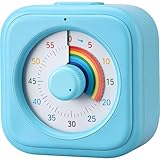
- [Time Management]: The 60-minute countdown timer shows time passing in a clear and colorful way. The rainbow dial makes it fun and easy to see how much time remains at a glance, helping kids and adults stay focused and efficient during study, cooking, workouts, or daily tasks
- [Easy to Use]: Just turn the knob to set the countdown, and the rainbow disk will gradually disappear as time passes—simple and intuitive, like watching an hourglass. No screens, no setup—perfect for kids, teachers, seniors, or anyone who prefers visual, hands-on tools
- [Silent Mode & No Ticking]: Operates silently without ticking sounds, ideal for classrooms, libraries, or study spaces. The optional alarm rings clearly when time is up, ensuring you never miss a reminder while maintaining a quiet environment
- [Special Needs Friendly]: The colorful dial helps children with autism, ADHD, or sensory sensitivities visualize time, reduce anxiety, and manage transitions smoothly. Perfect as a visual timer for kids, classroom timer, or office desk timer
- [Product Details]: Lightweight, compact, and durable blue ABS housing with a vivid rainbow dial, designed for everyday use at home, school, or office. Powered by 2 AAA batteries (not included). Easy to carry in a backpack, and sturdy enough for daily learning routines
6. Set family expectations together
If you are a parent or caregiver, make screen boundaries a shared routine rather than only a punishment imposed after conflict. HHS groups its family strategies as the “5 Ds”: Discuss, Do, Delay, Divert, and Disconnect. Talk with children about what they watch, who they interact with, and how online experiences make them feel; model the habits you want them to learn; and use age-appropriate limits. The toolkit is directed at protecting children and adolescents, so adapt its suggestions to the child’s age and circumstances.
7. Use age-specific guidance for children, not adult targets
WHO’s guidance for children under five sets limits that should not be generalized to adults or older children. It says sedentary screen time is not recommended for infants or one-year-olds. For two-year-olds, it recommends no more than one hour a day; for children aged three to four, no more than one hour a day. Less is better in both age groups. See WHO’s under-five movement guidance for the context of these recommendations.
Rank #4

- TIME MANAGEMENT — The 60-minute learning clock assists with organization and concentration among tasks. The desk timer is ideal for kids and adults to improve time management and productivity while completing activities
- SPECIAL NEEDS — The countdown analog timer can be understood intuitively by all ages and abilities, incluiding those with autism, ADHD or other learning disabilities. The visual timer provides a calm transition for every activity and ease workload during stressful situations
- EASY TO USE — The homework timer features 4 different removable silicone covers (not included) that encourage a creative and energetic environment for all ages and abilities. Each available color can be assigned to a different learning timer for a designated activity, such as gym timer, homework timer, kitchen timer, study timer or work timer
- OPTIONAL AUDIBLE ALERT — The timer for kids provides an optional alert feature for sound-sensitive environments to avoid distractions and interrumptions while doing your activity. This option is ideal for activities such as doing projects, reading, studying or taking tests
- PRODUCT DETAILS — The school desk timer requires 1 AA battery (not included). You can choose from more available colors — cotton ball white, lake day blue, dreamsicle orange, pale shale, Fern Green, and Peony Pink (not included)
For perspective, an HHS announcement on May 20, 2026, reported that adolescents in the United States average seven to nine hours of entertainment screen use a day and that most adolescents report using devices right before bed. That estimate is specifically about U.S. adolescents’ entertainment use—not adults, all screen activities, or an individual reader’s recommended limit. It appears in HHS’s May 2026 announcement.
Free tools Windows power users keep installed
One-click scans. No signup required.
8. Review the change after a week
After trying a boundary for a week, ask whether it made sleep, attention, meals, or time for offline priorities feel better. Keep what works and revise what is unrealistic; a smaller rule you can maintain may be more useful than an ambitious target you abandon. HHS says interventions show promise, but the sources cited here do not establish a best protocol for adults reducing their own screen use.
Best Value

- TIME MANAGEMENT — The 60-minute learning clock helps to stay on task, and assist with organization and concentration during study time. The dry-erase activity card helps to keep track of a task list and daily reminders
- SPECIAL NEEDS — The visual design of the desk timer helps to ease transitions between activities and encourages independence and productivity for all abilities, including those with autism, ADHD, or other special needs
- EASY TO USE — The timer for kids provides no loud ticking for concentration and a dry-erase activity card to write down tasks and placed on top of the slot as a reminder
- OPTIONAL AUDIBLE ALERT — The homework timer provides an optional alarm feature for sound-sensitive environments; ideal for activities such as doing homework, reading, studying, cooking and working out
- PRODUCT DETAILS — The 12. inches x 1.65 inches x 12 inches visual timer requires 2 AA batteries (not included). The size of the countdown timer is ideal for medium and large groups. The magnetic clock timer can be used as a wall mount or stand with foldable feet on a kids' desk
When to get extra support
If distress, compulsive-feeling use, sleep disruption, or problems with everyday responsibilities persist, consider discussing them with a qualified health professional. That does not mean screen use is necessarily the cause; it is a way to get help understanding what is affecting your wellbeing and what support may fit your circumstances.
Quick Recap
Product prices and availability are accurate as of the date/time indicated and are subject to change. Any price and availability information displayed on Amazon at the time of purchase will apply.

