
What’s actually slowing this PC down?
Pick the symptom - the matching free tool is one click away.
iTechGuides is reader-supported. When you buy through links on our site, we may earn an affiliate commission. As an Amazon Associate I earn from qualifying purchases. Learn more
There is no established rule that 50 concurrent Playwright sessions will trigger a CAPTCHA. A burst of that size may strain a particular machine and create traffic a target service challenges, but the outcome depends on the workload, infrastructure, site policies, identity, and authorization. Use a bounded worker pool, pace work per target, close each task’s browser context, and stop for review when a CAPTCHA or rate-limit response appears; throttling is operational control, not a guarantee of access.
Why 50 sessions can become a problem
The figure 50 is a scenario, not a validated threshold. The available title-matched article describes a possible failure loop: CPU contention and per-context memory use make browser tasks less stable; a burst toward one domain may draw a challenge or rate limit; immediate retries then repeat together while old sessions remain active. That explanation is an operational hypothesis, not a benchmark proving that any one factor causes a CAPTCHA.


Separate two kinds of failure. Local saturation can cause slow navigation, timeouts, crashes, and stuck work. A CAPTCHA or explicit rate limit is a response from the target service. Slowing the local worker pool can reduce pressure and make traffic less bursty, but it cannot make a site accept activity that its rules prohibit or guarantee that a challenge will not appear.
Build a bounded queue instead of launching every task
Put work in a queue and let a fixed-size worker pool claim tasks only when a slot is available. Set the initial active-worker count conservatively for your own machine and workload; there is no universal number established for Playwright agents. Keep overflow pending rather than starting browsers that cannot be serviced promptly.
#1 Best Overall

- 【1】*** MUST see the 3rd pictures in listing that highlights the correct PCI slots to work ***. Using this kit wrongly on motherboard other PCIe port is not the reason of "Doesn't Work". Please make sure the motherboard has PCI slot before placing the order. The Large Desktop PC motherboard diagnostic card is NOT a PCIe card but a Standard PCI card. If the PC has PCIe express slots only, please see my other listing with the "V8 PCIe Diagnostic Kit" instead. ***DO NOT push the Wrong pins with excess force to avoid issue. MUST MAKE SURE PSU 4 / 6 / 8 pin power connector pins match and fit to the tester exact same 4, 6, 8 pins CORRECTLY although the PSU tester is fault tolerant and preventive.
- 【2】This starter kit comes with 1 large PCI test board and 1 small laptop test board for the old desktop PCs and old laptops diagnosis respectively. The large test board comes with【BIOS SPEAKER】to get the desktop PC motherboard Bios beep codes. The 【motherboard power switch cable】is nice to quick check the sticky or damaged PC motherboard power switch button and cable causing no power ON issue. The【the Anti Static Wrist Strap】is a plus to help discharge static during the PC repairs. The 【ATX PSU tester】in this kit is either Blue or Black Color with EXACT same features to quick test the 20/24 pins PC ATX PSUs.
- 【3】Nice starter kit for old computers no Power On / Auto Power OFF / no POST / no Display / no Boot ...etc. diagnosis. No need to swap Known Good Parts in the computer repairs. Save time and money!! All parts are packed well and stored neatly in a nice 【Portable Carrying Storage Case】. A overall great starter kit to add to our tool boxes! Great for computer class learning and old PCs quick troubleshooting needs as well.
- 【4】Please see the listing for the instruction PDFs. *****【On the listing page】, scroll down to after the "Product Information" table the "Product guides and documents" section, BOTH the pictorial "User Guide (PDF)" and the "User Manual (PDF)" are needed. *****. ***** Besides, please DO NOT discard the ITEM PACKING Included Paper Manual Note Printout since that also contains the complete Instruction folder info!!! *****
- 【5】Online Easy Guide and Pictorial Manuals to guide step by step with complete list of codes description. Downloadable manuals to stay updated. Welcome to conact if any question or need helps. Quality Genuine Computer Hardware Diagnostic Test Starter Kit with Free Lifetime Customer Service Supports from 29 years professional computer hardware work experienced seller.
- Enqueue work. Record the target, task identity, and any relevant authorization or rate limits so the scheduler can apply the correct policy.
- Acquire a slot before launching. Bound active browser tasks, not merely the number of tasks submitted to the queue.
- Apply per-target pacing. Use a separate concurrency or pacing key for each domain, so work queued for one host does not become a concentrated burst. Respect the site’s documented limits and permitted workflow.
- Scope shared resources. Serialize operations that contend for the same account or shared data with a lock; unrelated tasks need not be serialized solely because they use Playwright.
- Clean up and release. Close the task’s BrowserContext and release its slot in a
finallyblock, including after errors or cancellation. - Classify failures before retrying. Cap retries and use increasing delays only when retries are permitted. Treat CAPTCHA and rate-limit responses as pause, stop, or human-review conditions rather than immediate retry signals.
A conceptual worker lifecycle is: acquire slot, create context, perform authorized task, close context in finally, then release slot. The queue and retry policy are application-level design choices; Playwright does not prescribe a universally safe pool size.
Use Playwright’s built-in controls where they fit
Custom agents
Playwright documents BrowserContexts as independent browser sessions and recommends closing contexts when finished. A context is useful for isolating session state and managing its lifecycle, but isolation does not set a target site’s concurrency allowance. See the Playwright BrowserContext documentation.
Rank #2
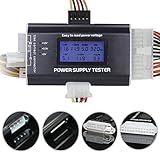
- 8-in-1 ATX power supply tester: Support testing 20-pin IDE/24-pin IDE/HDD/floppy disk 4-pin/PCI-e 6-pin/4-pin/8-pin/SATA connector.
- Aluminum alloy shell: light and easy to carry, high strength, good thermal conductivity and corrosion resistance.
- 1.8" LCD screen: The output voltage is displayed on the 1.8" LCD screen, which is easy to read (1.8" LCD screen is powered by the 20-pin/24-pin connector). Note: Is there a scratch on the product screen? Because the screen is easy to scratch, we put a protective film on it, if you think it is not beautiful, you can tear it off by yourself.
- Buzzer alarm: When your power supply PG number fails, the power tester will emit a buzzer alarm, which is easy to know.
- When testing with HDD/floppy disk 4-pin/PCI-e 6-pin/4-pin/8-pin/SATA connector, the indicator on the left shows the output voltage (+12V + 3.3V + 5V).
Playwright Test
For tests run through Playwright Test, use its workers setting to bound test-runner concurrency. The documentation describes workers as OS processes, isolated BrowserContexts for tests, and named locks for resources that must not be used concurrently. These are test-runner mechanisms; a custom agent generally needs its own scheduler. The linked documentation is under the /next/ path and may change, so check it against the version installed in your project: Playwright Test parallelism documentation.
Tell resource saturation from a site challenge
Record enough detail to distinguish a browser that cannot keep up from a target that has declined or challenged a request. Track active workers, queue depth and age, context lifetime, CPU and memory, task latency, retries, completion rate, HTTP status or explicit rate-limit signals, and CAPTCHA incidence. Correlate these signals by target and time.
Rank #3

- PCI and ISA 4 digit PCI analyzer:standard PCI and ISA interface, easy access to desktop PC.
- Standard PCI and ISA interfaces for easy access to desktop PCS.4 digit display,the first 2 digits indicate the current error code,and the last 2 digits indicate the previous error code.
- After power on self test,the card will quickly display the error code,the provided error code table allows you to easily understand the error details.
- Compatible with all mainstream motherboards.Support code search function.
- Support motherboard bus speed test.
- Likely local pressure: rising task latency or timeouts alongside high CPU or memory use, crashes, or many long-lived contexts.
- Likely target-side intervention: a CAPTCHA page or an explicit rate-limit response from the site, especially when local resource measures are stable.
- Possible combined failure: local slowdowns cause overlapping or delayed work while retries concentrate requests toward the same target.
Change concurrency in small, controlled increments against targets you are authorized to automate. Compare completion, latency, resource use, errors, and target responses; label the resulting setting as local to that workload and environment. The available sources establish no optimal worker count, queue depth, or CAPTCHA probability at 50 sessions.
Independent reader supportYour contribution helps us test, update, and keep practical guides available for everyone.What hosted-browser limits do—and do not—mean
Provider quotas govern the provider account, not whether an external site accepts traffic. Cloudflare’s Browser Run changelog records that on 2026-04-15 the default concurrent-browser limit for Workers Paid accounts increased from 30 to 120 per account. This dated plan limit is not a recommended agent setting or a CAPTCHA threshold; confirm current terms before relying on it. The changelog also describes a human-in-the-loop option for handing a live browser session to a person when automation reaches a CAPTCHA or another task requiring human input: Cloudflare Browser Run changelog.
Rank #4
Cloudflare also documents guardrails that can restrict browser HTTP/HTTPS requests to allowed hostnames, including for Playwright sessions. Such controls can constrain session scope; they do not bypass a CAPTCHA or authorize otherwise disallowed traffic. See Cloudflare Browser Run guardrails.
Free tools Windows power users keep installed
One-click scans. No signup required.
Quick Recap
Best Value
Product prices and availability are accurate as of the date/time indicated and are subject to change. Any price and availability information displayed on Amazon at the time of purchase will apply.

