
Quick wins for a faster PC:
Scan for outdated or missing drivers - takes under a minuteDriver Scan →Clear out junk files and repair common Windows errorsFree Scan →Fix the driver behind crashes, sound loss and screen glitchesFind Drivers →iTechGuides is reader-supported. When you buy through links on our site, we may earn an affiliate commission. As an Amazon Associate I earn from qualifying purchases. Learn more
To connect a phone to a Denon, put the specific Denon model into its Bluetooth input or pairing mode, then select its name in the phone’s Bluetooth settings. The button sequence and supported Bluetooth functions vary by model, so use the instructions for your exact unit rather than assuming one Denon procedure applies to all products.
Before pairing, identify your Denon model
Find the model number on the unit or in its documentation, then consult that model’s Denon owner’s manual. Denon receivers and soundbars do not all use the same pairing controls or display prompts. Bluetooth can also serve different purposes: some models receive music from a phone, while others separately support listening through Bluetooth headphones. Check the manual to confirm that your model supports the function you want.
Connect a phone to Denon Bluetooth
- Select Bluetooth on the Denon. The AVR-S570BT switches to its Bluetooth input when you press Bluetooth. On the DHT-S218 soundbar, turn it on and select the Bluetooth input. The AVR-X510BT enters pairing mode automatically the first time Bluetooth is selected.
- Enter pairing mode if needed. For the AVR-X510BT, hold Bluetooth for about three seconds or choose Pairing Mode from its options menu when pairing another device. For the DHT-S218, hold its Bluetooth control for three seconds to pair an additional device; its status LED blinks blue while it is in pairing mode. Follow the instructions for your own model if it differs.
- Open Bluetooth settings on your phone. Turn on Bluetooth and look for the Denon name in the available-device list. Select it. For the AVR-S570BT, Denon recommends pairing with the source about 1 meter (3.3 feet) from the unit while the pairing screen is displayed.
- Confirm pairing if prompted. If the phone and Denon display matching numbers, confirm that they match. The AVR-X510BT manual says to enter
0000if the source device asks for a password; this is a model-specific instruction, not a universal Denon PIN. - Play audio from the phone. Start a track or other audio in an app on the source device. The Denon should play it while its Bluetooth input is selected.
On the AVR-S570BT, a device that has paired successfully does not need to be paired again; selecting Bluetooth later reconnects the last paired device. The AVR-X2700H manual describes reconnecting by selecting the Denon in the source device’s Bluetooth list. To switch Bluetooth sources on that model, disconnect the currently connected device first.
Standard Bluetooth and LE Audio on the DHT-S218
The DHT-S218 offers standard Bluetooth and a separate LE Audio entry. These instructions apply to this soundbar, not to Denon products generally.
#1 Best Overall

- POWERFUL AUDIO IN COMPACT SIZE – Featuring advanced acoustic hardware, tuned DSP, and full-range drivers, the Denon Home 150 NV Bluetooth Wireless Speaker delivers immersive, room-filling audio with minimal distortion - all from a compact design
- ENGINEERED TO DELIVER DETAILS - This wireless bluetooth speaker system features a 1" Tweeter and a 3.5" Woofer for accurate audio output, powered by two efficient Class D amplifiers so every note bursts with life; plug in and witness the Denon sound
- SMART SPEAKER WITH MULTI-ROOM STREAMING - With built-in HEOS, play same song in every room or different song in each connected room. With additional Denon Home wireless speakers, sound bars, or AVRs, easily play music from favorite streaming services
- ONLINE & OFFLINE MUSIC PLAYBACK - Stream on a bluetooth home speaker from Spotify, TIDAL, Pandora, and more, play music from phone/laptop via Wi-Fi, AirPlay 2, or Bluetooth. Stream libraries via the USB port. Supports MP3, WAV, AAC, WMA, and more
- SEAMLESS INTEGRATION FOR ENHANCED IMMERSION - Pair two Denon Home 150 NV surround sound speakers to get a room-filling stereo; for a complete 5.1 cinematic immersion, connect them to the Denon Home Soundbar 550 and Subwoofer as rear surrounds
- For standard Bluetooth, select
Denon DHT-S218in the source device’s Bluetooth list. - For LE Audio, select
LE-Denon DHT-S218if the source supports it. Denon’s DHT-S218 manual says iPhone does not support Bluetooth LE Audio; it specifies Android 13 or later for an Android smartphone using LE Audio. - A new Bluetooth device cannot be paired while an LE Audio connection is active on the DHT-S218. Disconnect LE Audio before pairing another device. If the source cannot connect to LE Audio, Denon recommends trying the standard
Denon DHT-S218entry.
Fix common Denon Bluetooth connection problems
The Denon does not appear in the phone’s device list
- Check that the Denon is in pairing mode, not merely powered on or set to another input.
- Keep the phone close to the unit while pairing.
- Check whether another source is already connected. The DHT-S218 supports only one connected Bluetooth device at a time.
- For model-specific controls or prompts, follow the owner’s manual for your Denon.
The phone says it is paired, but there is no sound
- Make sure the Denon’s Bluetooth input is selected.
- Start playback on the phone, then check volume and mute on both the phone and the Denon.
- If the DHT-S218 is connected to another Bluetooth device, disconnect that device before trying the phone.
The connection drops or audio stutters
For the DHT-S218, Denon recommends bringing the devices closer and reducing obstacles or nearby sources of interference. If the connection remains unreliable, restart the source device, clear its old pairing information for the soundbar, and pair again. These are DHT-S218 manual instructions; owners of other models should use their model’s troubleshooting guidance.
Quick Recap
Rank #4

- POWERFUL AUDIO IN COMPACT SIZE – Featuring advanced acoustic hardware, tuned DSP, and full-range drivers, the Denon Home 150 NV Bluetooth Wireless Speaker delivers immersive, room-filling audio with minimal distortion - all from a compact design
- ENGINEERED TO DELIVER DETAILS - This wireless bluetooth speaker system features a 1" Tweeter and a 3.5" Woofer for accurate audio output, powered by two efficient Class D amplifiers so every note bursts with life; plug in and witness the Denon sound
- SMART SPEAKER WITH MULTI-ROOM STREAMING - With built-in HEOS, play same song in every room or different song in each connected room. With additional Denon Home wireless speakers, sound bars, or AVRs, easily play music from favorite streaming services
- ONLINE & OFFLINE MUSIC PLAYBACK - Stream on a bluetooth home speaker from Spotify, TIDAL, Pandora, and more, play music from phone/laptop via Wi-Fi, AirPlay 2, or Bluetooth. Stream libraries via the USB port. Supports MP3, WAV, AAC, WMA, and more
- SEAMLESS INTEGRATION FOR ENHANCED IMMERSION - Pair two Denon Home 150 NV surround sound speakers to get a room-filling stereo; for a complete 5.1 cinematic immersion, connect them to the Denon Home Soundbar 550 and Subwoofer as rear surrounds
Rank #3
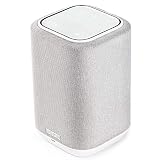
- POWERFUL AUDIO IN COMPACT SIZE – Featuring advanced acoustic hardware, tuned DSP, and full-range drivers, the Denon Home 150 Bluetooth Wireless Speaker delivers immersive, room-filling audio with minimal distortion - all from a compact design
- ENGINEERED TO DELIVER DETAILS - This wireless bluetooth speaker system features a 1" Tweeter and a 3.5" Woofer for accurate audio output, powered by two efficient Class D amplifiers so every note bursts with life; plug in and witness the Denon sound
- SMART SPEAKER WITH MULTI-ROOM STREAMING - With built-in HEOS, play same song in every room or different song in each connected room. With additional Denon Home wireless speakers, sound bars, or AVRs, easily play music from favorite streaming services
- ONLINE & OFFLINE MUSIC PLAYBACK - Stream on a bluetooth home speaker from Spotify, TIDAL, Pandora, and more, play music from phone/laptop via Wi-Fi, AirPlay 2, or Bluetooth. Stream libraries via the USB port. Supports MP3, WAV, AAC, WMA, and more
- SEAMLESS INTEGRATION FOR ENHANCED IMMERSION - Pair two Denon Home 150 surround sound speakers to get a room-filling stereo; for a complete 5.1 cinematic immersion, connect them to the Denon Home Soundbar 550 and Subwoofer as rear surrounds
Rank #2

- Extraordinary Sound For Any Space: Denon Home 200 premium wireless speakers for home deliver stereo room-filling sound and immersive Dolby Atmos Music for everyday listening with spacious, lifelike audio in living rooms, bedrooms, and kitchens.
- App-Based Streaming & Control via HEOS: Whether you're cueing up your morning playlist or setting the mood for dinner, this home speaker lets you stream, adjust volume, select rooms, sync multiple wireless speakers, and manage playlists from the HEOS app.
- High-Resolution Audio with Layered, Powerful Detail: These wireless speakers feature custom-engineered tweeters and a dedicated 4" woofer, each powered by its own amplifier, delivering crisp highs, natural mids, and rich bass for room-filling sound.
- Stream Music Your Way: Supports streaming services like TIDAL, Qobuz, Amazon Music HD, and more; stream via Wi-Fi, Bluetooth, or AirPlay 2; access personal collections via aux input or USB. Supports formats from DSD and FLAC to ALAC, WAV, WMA, and MP3.
- Designed to Elevate Your Space: Music lovers and home entertainers: This sleek smart speaker blends refined design with legendary sound for daily listening. Expand into a complete surround sound system for movie night with the Denon Home Sound Bar 550.
Product prices and availability are accurate as of the date/time indicated and are subject to change. Any price and availability information displayed on Amazon at the time of purchase will apply.

