
PC Slower Than It Used to Be?
A free scan shows the junk files, broken settings and background clutter dragging Windows down - then fixes them in one click.Free scan · Windows 10 & 11Outdated Drivers Are Slowing You Down
One free scan finds every outdated or missing driver and matches the right update for your exact hardware.Free scan · exact hardware matchiTechGuides is reader-supported. When you buy through links on our site, we may earn an affiliate commission. As an Amazon Associate I earn from qualifying purchases. Learn more
Lubing can reduce scratchiness, spring ping and stabilizer rattle, but the correct method depends on the switch type and the exact surface you are treating. For many linear switches, a very thin coat of Krytox GPL 205 Grade 0 (205g0) on the appropriate moving parts is a common approach. Springs are handled separately, often with GPL 105 oil, while stabilizer wires require a wire-compatible grease rather than the same product used on switch stems. Tactile switches need extra restraint: keep lubricant away from the tactile leaf and the stem’s front legs so the bump is not flattened.
This guide covers planning, disassembly, switch and spring lubrication, stabilizer service, reassembly and troubleshooting. Work slowly, use less lubricant than you think you need, and never force a switch or stabilizer that is not designed to come apart.
What you need before opening anything
A controlled setup matters more than having a large collection of products. Gather the tools below and confirm that your switches can be removed and opened.
- Compatible switch opener: MX-style and Kailh-style switches use different opening approaches. Match the opener to the switch family instead of pressing a generic tool into the housing.
- Fine detail brush: A small size 0 or 00 brush lets you spread a film rather than a blob. Keep one brush dedicated to each lubricant.
- Precision tweezers: Use them to lift springs, stems, leaves and small stabilizer parts without bending them.
- Lubing tray or separate containers: Keep top housings, bottom housings, stems and springs separated by switch type and orientation.
- Stem holder or lubing station (optional): A holder makes batch work faster and keeps the stem legs visible while you brush them.
- Lubricants selected for the target: 205g0 is commonly used on linear switch parts; GPL 105 oil is used for bag-lubing springs; a wire-specific grease such as Molykote EM-50L in a manufacturer’s stabilizer set is intended for stabilizer wire and the wire-contact area.
- Clean work surface and lighting: Lubricant contamination is difficult to see in poor light, especially on dark housings.
Disconnect the keyboard before removing switches. Photograph the board, switch orientation and stabilizer layout before disassembly; those references prevent reversed parts during reassembly.
#1 Best Overall
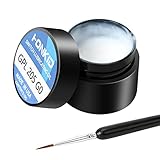
- KEY SWITCH LUBE-Precision instruments lube grease.205GPL G0 grease can be used on satellite and balance bar.Nonvolatile nonflammable and stable synthetic grease
- CONVENIENT:The design of the new packaging is convenient for every use and ensures that the lube oil is not contaminated
- SELECTED LUBE BRUSHES: After many experiments, choose a lubricating brush with a smaller brush head to better lubricate your switches
- WEIGHT:0.35oz. Apply only a very thin layer of grease. This 10 gram jar should last for about 300-400 switches if applied correctly
- ACKAGE INCLUDED: 1 pcs 205G0 lubricating grease , 1 lubricating brush
Identify the switch and the part you are servicing
Linear switches
Linear switches move straight down without a tactile event. Their stems, rails and springs are the usual targets for reducing friction and noise. A thin application of 205g0 is a commonly documented choice for these switch parts, provided the switch manufacturer does not specify a different lubricant.
Tactile switches
Tactile switches rely on a leaf and stem geometry to create the bump. Lubricant placed on the wrong contact surfaces can make that bump weaker or inconsistent. Builders who use 205g0 on tactile switches avoid the tactile leaf and the stem’s front legs. Treat the rails and other non-tactile sliding surfaces sparingly, and leave the contact surfaces that generate the bump dry.
Clicky switches
Click mechanisms add another set of contact surfaces. Because the click behavior can be altered by grease, do not assume a linear-switch recipe applies. Identify the click mechanism and follow the switch maker’s compatibility guidance; if you cannot identify the safe surfaces, limit service to the stabilizers or use a switch-specific guide.
Removable versus soldered switches
Some keyboards let you pull switches from sockets, while others require soldering work before a switch can be removed. Do not pry a soldered switch out of the plate or twist a socketed switch at an angle. If the switches are not designed for user removal, stop and use the appropriate desoldering equipment or a qualified technician.
Choose lubricant by component
| Product or tool | Where it fits | Important limitation |
|---|---|---|
| Krytox GPL 205 Grade 0 (205g0) | Common option for linear switch parts and selected stabilizer applications | Not universal; tactile users avoid the leaf and stem front legs, and excess can make a switch feel sluggish |
| Krytox GPL 105 oil | Bag-lubing switch springs | Use as a spring-specific method; it is an oil, not a substitute for controlled stem grease |
| Molykote EM-50L supplied for stabilizer service | Stabilizer wire and the wire-contact area when specified by the manufacturer | Wooting’s product guidance says not to apply it to switch or stabilizer stems |
| Fine brush, tweezers and compatible opener | Application and disassembly | Control depends on matching the opener to the switch family and keeping the brush lightly loaded |
| Lubing station or stem holder | Organization during batch work | Optional; it improves handling but does not replace correct lubricant placement |
“More” is not “better” with switch lubricant. The goal is a continuous, thin film on a sliding surface. Pools of grease can slow return, trap debris and migrate to a tactile contact.
How to lube mechanical keyboard switches
1. Plan the batch
- Confirm the switch type and whether the board permits safe removal.
- Count the switches and prepare containers for top housings, bottom housings, stems and springs.
- Decide whether you are servicing every switch or testing a small sample first. A sample lets you check feel and sound before committing to a full batch.
- Label parts if the keyboard mixes switch models or spring weights. Do not combine components that look similar but have different dimensions.
2. Remove the switches without damaging the board
- Unplug the keyboard and remove keycaps with a keycap puller.
- Use a switch puller on the plate and grasp the switch at its intended tabs. Pull vertically while releasing the top and bottom clips.
- For a soldered board, do not continue unless you are equipped to desolder. A switch that resists removal is a signal to reassess, not to apply more force.
- Place removed switches in a tray with the LED opening and pin orientation facing the same direction.
3. Open one switch and learn its parts
Place the switch in the opener that matches its housing. A compatible opener releases the clips evenly; an incompatible one can deform the housing or launch the spring. Lift the top housing, then remove the stem and spring with tweezers. Keep the stem orientation visible. The stem’s legs, rails and underside are not interchangeable surfaces, especially on tactile designs.
Rank #2

- GPL 205G0- It can lubricate about 300 mechanical key switches
- PURPOSE- It suitable for lubricating mechanical keyboard switches, stabilizers, springs and other parts
- EFFECT-It can enhance the flexibility of the keyboard and improve your typing feel
- PACKAGE INCLUDES- A bottle of GPL 205g0, 2 pcs lubrication pen
- WARM TIPS- This products only includes a 205g0 switch lube and 2 pcs lubricating pens. These switch ,springs and switch opener in the picture are only for display and are not included in the product. If the product is missing or damaged, we wii send you replacement
4. Load the brush correctly
Stir or work a small amount of 205g0 onto the brush, then wipe one side against the container edge. The bristles should look coated, not overloaded. If you can see a thick ridge of grease, remove some before touching the switch.
5. Lubricate the bottom housing
Hold the bottom housing so its rails are easy to see. Brush a thin film along each rail where the stem slides. Use light, even strokes and avoid filling the central cavity. On a tactile switch, stay away from the leaf and the stem-contact geometry that produces the bump. Do not paint lubricant over electrical contacts.
6. Lubricate the stem
Place the stem in a holder or grip it with tweezers. For a linear stem, apply a light coat to the side rails and other sliding faces, then inspect the legs for excess. For a tactile stem, keep the front legs and any surface that strikes the tactile leaf free of 205g0. If grease bridges the legs, wipe it off with a clean section of brush before assembly.
7. Decide how to handle the spring
You can leave springs dry, apply a controlled amount individually, or bag-lube a batch. The cited spring method uses GPL 105 oil: place springs in a sealable bag with a small amount of oil, close the bag and massage it so the springs receive a light coating. Remove the springs and let excess oil drain before putting them back. Do not substitute a heavy grease bath for this oil-based method.
8. Reassemble the switch
- Seat the spring on the bottom housing’s center post.
- Place the stem over the spring in its original orientation. Confirm that the stem legs align with the leaf or guide features.
- Lower the top housing evenly and press until every clip is engaged.
- Press the stem repeatedly by hand. It should return fully without sticking, scraping or remaining depressed.
- Set aside any switch that feels different from the others; troubleshoot it before installing the batch.
9. Test before installing all switches
Install a small group or test switches on a spare plate. Listen for scratch, spring ping and inconsistent return, and compare tactile force with an untouched switch. Lubrication changes feel and sound, but the available guidance is practical rather than a controlled performance test, so treat the result as a tuning choice rather than a guaranteed improvement.
How to lube stabilizers
Stabilizers use a wire, housings and moving stems to keep long keys level. Rattle can come from the wire, the wire-contact area, loose housings, or an installation problem. Service each component separately instead of spreading one product over every surface.
Rank #3

- GPL 205G0-This gpl 205g0 switch lube can be used to lubricate keyboard switches and stabilizers, which can effectively enhance your keyboard flexibility and allow you to enjoy a comfortable typing experience
- GPL 105-It can lubricate the spring of the mechanical keyboard,improve the flexibility of the switch, and bring you a nice percussion sound
- Purpose-This is the lubricating grease used for the switches and springs of mechanical keyboards to improve the flexibility of the switches and improve your typing feel. This will be a necessary product for you to build a keyboard
- Package Includes-1 bottle of 205g0, 1 bottle of 105, 2 lube pens
- Warm Tips-If the product is missing or damaged, don't worry, customer service will send you a new one
1. Remove the keycap and inspect the stabilizer
Take off the space bar, shift, enter or backspace key carefully. Check whether the stabilizer is plate-mounted, PCB-mounted or integrated into the plate. Photograph wire orientation and clip positions. Look for bent wire ends, cracked inserts and housings that are not fully seated.
2. Separate wire treatment from stem treatment
The wire and the stabilizer stems are different targets. Wooting’s product guidance assigns Molykote EM-50L to the stabilizer wire and the wire area and says not to apply it to switch or stabilizer stems. Follow the instructions for the grease you own rather than assuming a switch-stem lubricant is suitable everywhere.
3. Apply wire grease sparingly
Put a small amount of the wire-specific grease on the contact points where the wire enters or moves against the stabilizer housing. Work the wire through its full travel to distribute the film. Wipe away visible squeeze-out before reinstalling the keycap; excess grease attracts dust and can migrate onto the key switch.
Free tools Windows power users keep installed
One-click scans. No signup required.
4. Check the housings and inserts
Make sure each stabilizer housing is fully clipped or screwed down and that the wire ends are seated at equal depth. A loose housing can sound like a lubrication problem. If a wire is bent, correct the mechanical alignment first; grease will not compensate for an uneven wire.
5. Reinstall and balance the key
- Attach the wire to both stabilizer housings in the photographed orientation.
- Press each side of the bare stabilizer. Both sides should move together and return without a click or pop.
- Install the keycap, pressing directly over the stems.
- Test the center and both ends. A key that binds on one side usually needs alignment or reseating, not more lubricant.
Common mistakes and how to correct them
Using 205g0 on every switch
205g0 is commonly associated with linear switches, not a universal answer. On tactile switches, grease on the leaf or stem front legs can reduce the intended bump. Remove the switch, clean the affected contact carefully and relube only the permitted sliding surfaces.
Applying a thick coat
A visibly wet or clumpy switch often returns slowly or feels mushy. Open it, remove the excess with a clean brush or lint-free swab and test again. Add only a trace if a dry rail still produces scratch.
Rank #4

- 【GPL-205-GD0】A blend of 105 and 205 grease in an 8:2 factory ratio. Features a perfluorinated base oil with a density of 2.06 g/ml (2-3 times denser than standard grease), viscosity of 522 cSt at 20°C and 160 cSt at 40°C, ensuring stable performance across diverse environments
- 【Suitable】Professionally formulated for mechanical keyboard switches and stabilizers
- 【Product Effect】Reduces friction on switch stems, rails, springs, and stabilizer surfaces. Delivers a smoother texture and more consistent lubrication than 205G0, effectively eliminating noise
- 【Using Upgrade】Upgraded lubrication experience with pre-filled syringes. Includes two interchangeable nozzle tips (varying sizes) for precise application, saving time and enhancing usability
- 【Packaging】GPL 205 GD0-10ML (sufficient for ~300 switches) with two replacement nozzles
Lubing electrical contacts
Do not brush grease onto metal contact leaves or pins. Contamination can interfere with reliable actuation. If lubricant reaches a contact, remove it before reassembly and verify the switch registers consistently.
Do these 3 things before closing this tab:
1Scan for outdated or missing drivers - takes under a minute2Clear out junk files and repair common Windows errors3Fix the driver behind crashes, sound loss and screen glitchesMixing springs and stems in one container
Mixed parts make it easy to build a switch with the wrong spring or stem orientation. Use separate labeled containers and keep one model together from opening through testing.
Forcing an incompatible opener
If clips do not release with moderate, even pressure, stop. Confirm whether the housing is MX-style, Kailh-style or another design and obtain the matching opener. A damaged clip can leave the switch loose or impossible to close.
Adding grease to fix a bent stabilizer
Rattle and ticking can result from a bent wire, loose housing or uneven seating. Inspect and correct those causes before changing lubricant quantity.
Quality-control checklist after lubing
- Every switch closes fully and returns at the same speed as its neighbors.
- Linear switches have no obvious scratch at the start, middle or end of travel.
- Tactile switches retain a distinct bump and do not feel unusually damped.
- Springs do not produce a new metallic ping or inconsistent return.
- Long keys move evenly when pressed at either end.
- No grease is visible on electrical contacts, keycap stems or the plate.
- Stabilizer wires are seated symmetrically and do not tick against the housing.
When not to lube yourself
Pause the project if the keyboard uses soldered switches and you lack desoldering tools, if a switch housing is cracked, if a tactile or click mechanism is unfamiliar, or if a stabilizer has damaged clips or a badly bent wire. Replacement parts or experienced service can be safer than forcing a repair. Lubrication is a tuning operation, not a way to correct incompatible parts or physical damage.
Recommended Free Tools
Quick Recap
Product prices and availability are accurate as of the date/time indicated and are subject to change. Any price and availability information displayed on Amazon at the time of purchase will apply.

