
Recommended Free Tools
iTechGuides is reader-supported. When you buy through links on our site, we may earn an affiliate commission. As an Amazon Associate I earn from qualifying purchases. Learn more
You can manage a WordPress site on public Wi-Fi more safely if the site uses correctly configured HTTPS, your account has a unique password and two-step authentication, and the device is one you trust. Check the address bar before signing in. A VPN alone cannot fix an insecure site, stolen credentials, or outdated software.
Is public Wi-Fi safe for logging in to WordPress?
An unencrypted connection is not trusted for sending passwords. WordPress’s hardening guide uses an internet cafe sending passwords over an unencrypted wireless or wired connection as an example. HTTPS can protect the connection between your browser and the site, but only when TLS is configured correctly and the browser reaches the expected site over HTTPS.
Before entering credentials, confirm the address begins with https:// and the domain is the one you intended to visit. Do not bypass a browser certificate warning or proceed if the page redirects to an unexpected address. The WordPress handbook says HTTPS is strongly recommended to help protect WordPress logins and site visitors; it does not make an unsafe device or compromised site safe.
The Tool Desk
Outbyte PC Repair FREERepair Windows errors before they cause bigger problemsFix Now →Outbyte Driver Updater FREEScan for outdated or missing drivers - takes under a minuteDriver Scan →Secure the connection to the site
Use HTTPS for login and administration
Your server must have a valid TLS certificate and HTTPS configured before you can enforce HTTPS in WordPress. WordPress documents the FORCE_SSL_ADMIN setting in wp-config.php to require HTTPS for logins and administration. Follow the WordPress HTTPS guidance for the relevant server setup.
#1 Best Overall

- POWERFUL SECURITY KEY: The Security Key C NFC is the essential physical passkey for protecting your digital life from phishing attacks. It ensures only you can access your accounts.
- WORKS WITH 1000+ ACCOUNTS: Compatible with Google, Microsoft, and Apple. A single Security Key C NFC secures 100 of your favorite accounts, including email, password managers, and more.
- FAST & CONVENIENT LOGIN: Plug in your Security Key C NFC via USB-C and tap it, or tap it against your phone (NFC) to authenticate. No batteries, no internet connection, and no extra fees required.
- TRUSTED PASSKEY TECHNOLOGY: Uses the latest passkey standards (FIDO2/WebAuthn & FIDO U2F) but does not support One-Time Passwords. For complex needs, check out the YubiKey 5 Series.
- BUILT TO LAST: Made from tough, waterproof, and crush-resistant materials. Manufactured in Sweden and programmed in the USA with the highest security standards.
For a site behind a reverse proxy, use the handbook’s proxy-specific instructions rather than copying a generic configuration blindly. A mismatch between the proxy and WordPress about whether the request is secure can cause redirect loops or leave HTTPS enforcement misconfigured.
Consider an extra password gate only if you can configure it safely
The WordPress hardening guide describes server-side password protection around /wp-admin/ as an additional layer. It is an optional administrator or hosting configuration, not a required step for every site. Incorrect rules can block WordPress features, including admin-ajax.php; test the site’s administrative functions after any change.
Rank #2
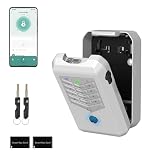
- Five Unlock Methods for Ultimate Flexibility - Choose from app remote control, Bluetooth proximity, digital keypad entry, fingerprint recognition, or backup physical key — five ways to open. Whether you're at home or away, you'll always have a convenient and secure way to access your keys or share entry with others.
- Built to Withstand Outdoor Conditions - Constructed with a rugged, weather-resistant housing and a sturdy mounting bracket, this key lock box is designed to endure sun, rain, snow, and temperature fluctuations. Install it confidently at your front door, gate, or any exterior location without worrying about damage or corrosion.
- Remote Management via Smart App - Control everything from the Tuya Smart app on your phone — add or remove users, generate time-limited access codes, and monitor activity in real time. The app also stores a complete operation log, so you can see exactly who unlocked the box, when, and which method they used.
- Perfect for Families, Realtors & Rental Hosts - Eliminate the hassle of physical key exchanges. Homeowners can grant family members easy access, real estate agents can manage multiple property showings remotely, and short-term rental operators can provide guests with secure, time-sensitive entry codes that expire automatically after their stay.
- Quick Installation with Voice Guidance - Mount the lock box on walls, doors, or railings using the included hardware — no professional tools or expertise required. The built-in voice prompts walk you through the initial setup and daily operations, making it simple for anyone to get started in just minutes.
Protect the WordPress account
Use a strong password that is unique to the WordPress account. Add two-step authentication (2FA) through the authentication method supported by your site. WordPress.org’s two-factor authentication guide covers security keys, time-based one-time password (TOTP) authenticator codes, and printing recovery codes. Hardware-key sign-in is not built into every self-hosted WordPress installation by default; compatibility depends on the site’s login configuration.
| Method | What it adds | Recovery and practical trade-off |
|---|---|---|
| Security key | A physical second-factor option; phishing resistance depends on a supported login flow. | Requires a compatible authentication setup. Keep a spare key or another recovery method so losing the key does not lock you out. |
| TOTP authenticator code | A changing code generated in an authenticator app. | Requires access to the enrolled device or saved recovery codes. Keep recovery codes somewhere secure and separate from the device. |
Neither method replaces HTTPS: two-step authentication helps protect the account, while HTTPS protects the connection in transit. A security key also cannot help if the site’s login flow does not support it.
Rank #3
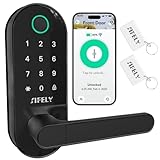
- 【Built-in WiFi – No Gateway Needed】Control the lock remotely from anywhere using the app without needing a separate WiFi gateway. Ideal for homeowners and rental property managers.
- 【Fast Fingerprint Biometric Unlock】Advanced biometric sensor recognizes your fingerprint in 0.3 seconds for secure and convenient access. Great for families, rentals, and offices.
- 【Strong Deadbolt Security】Heavy-duty deadbolt design provides reliable physical protection for front doors and apartments. Built for long-term home security and daily use.
- 【Smart App & Voice Assistant Control】Create codes, view access logs, and manage users with the app. Works with Amazon Alexa & Google Assistant for hands-free voice control.
- 【Multiple Unlock Methods for Any Situation】Unlock with fingerprint, passcode, app, FOB, or mechanical key. Auto-lock and low-battery alerts ensure safety and easy operation every day.
Keep the site maintained and recoverable
The WordPress security handbook calls keeping WordPress, plugins, and themes updated the most important general security practice. Choose extensions that are actively maintained, and make a backup before updates or other significant changes. WordPress documentation explains plugin and theme auto-updates; review how updates are handled for your site rather than assuming every component is current.
A backup is for recovery if an update or other incident damages the site. It does not prevent password interception, secure a login connection, or replace HTTPS. Know where the backup is stored and how to restore it before you need it.
Rank #4

- 【Effortless Integration】IC Cards seamlessly integrate with TTlock, Smart Life or Tuya smart locks, ensuring convenient access and management for keyless entry.
- 【Durability & Ease】Operating at 13.56MHz, Miuedo lock fobs ensure both premium durability and user-friendly setup, capable of enduring over 100k uses and preserving data for a decade.
- 【Sleek & Portable】Miuedo RFID keys are compact and lightweight, measuring just 50mm x 30mm x 4.1mm and weighing 6g, carrying with a rope.
Reduce risk on a device you do not control
Prefer your own updated device over a shared or public computer. If you must use a device you do not control, avoid saving the password in its browser, sign out when finished, and close the session. These are prudent general precautions; they are not a WordPress-specific public-computer checklist.
What’s actually slowing this PC down?
Pick the symptom - the matching free tool is one click away.
Do not treat a VPN as a substitute for the controls above. It does not update WordPress, repair a misconfigured certificate, add two-step authentication, or guarantee that the site you reach is the intended one. Network allowlisting can also be brittle for travelers because their network address changes; it is not a general solution for public Wi-Fi access.
Quick Recap
Best Value

- POWERFUL SECURITY KEY: The Security Key NFC is the essential physical passkey for protecting your digital life from phishing attacks. It ensures only you can access your accounts.
- WORKS WITH 1000+ ACCOUNTS: Compatible with Google, Microsoft, and Apple. A single Security Key NFC secures 100 of your favorite accounts, including email, password managers, and more.
- FAST & CONVENIENT LOGIN: Plug in your Security Key NFC via USB-A and tap it, or tap it against your phone (NFC) to authenticate. No batteries, no internet connection, and no extra fees required.
- TRUSTED PASSKEY TECHNOLOGY: Uses the latest passkey standards (FIDO2/WebAuthn & FIDO U2F) but does not support One-Time Passwords. For complex needs, check out the YubiKey 5 Series.
- BUILT TO LAST: Made from tough, waterproof, and crush-resistant materials. Manufactured in Sweden and programmed in the USA with the highest security standards.
Before you sign in away from home
- Open the expected site over HTTPS and verify its domain in the address bar.
- Use a unique password and an enabled second factor that the site supports.
- Use a device you control when possible; do not save credentials on shared machines.
- Keep WordPress core, plugins, and themes current, and make sure you can restore a recent backup.
Product prices and availability are accurate as of the date/time indicated and are subject to change. Any price and availability information displayed on Amazon at the time of purchase will apply.

