
PC Slower Than It Used to Be?
A free scan shows the junk files, broken settings and background clutter dragging Windows down - then fixes them in one click.Free scan · Windows 10 & 11Outdated Drivers Are Slowing You Down
One free scan finds every outdated or missing driver and matches the right update for your exact hardware.Free scan · exact hardware matchiTechGuides is reader-supported. When you buy through links on our site, we may earn an affiliate commission. As an Amazon Associate I earn from qualifying purchases. Learn more
Start by checking your exact Pixel model and its current security update level. Google’s support period varies by model: Pixel 8 and later receive seven years of OS and security updates, while several earlier models have a five-year period. Google says Pixel 5a and earlier listed models no longer receive Android-version or security updates. Once your phone has passed its support period, safer settings and habits can reduce exposure, but they cannot replace missing Android or firmware fixes. If you need current vendor maintenance and no actively maintained alternative operating system is confirmed for your exact model, moving to a supported phone is the clearest option.
First, find out whether your Pixel is actually out of support
“Pixel” is not enough information to determine whether a phone still receives security updates. Google’s policy is model-specific, and the support period begins when that model first became available in the US Google Store. Check the model name and policy rather than estimating an end date from the phone’s age or Android version.
On the phone, open Settings > About phone > Android version to see the Android version and Android security update level. To check for an update that may still be available, open Settings > System > Software updates and follow the on-screen instructions. Labels can vary by Android version. Google’s Pixel update policy explains how to check a device’s update status and lists support by model.
Use the model name shown in Settings, not just the phone’s marketing generation or the Android version it runs. Two phones that look similar or launched around the same time can have different terms. If you are checking for someone else, ask them to confirm the model in Settings rather than relying on a case, purchase receipt, or an approximate age. The policy page’s model-specific entry is the reference point for whether that device is still within its stated period.
#1 Best Overall

- 6.7" LTPO OLED 489PPI, 1344x2992px, 120Hz, HDR10+, Bluetooth 5.3, 5050mAh Battery, Android 14
| Pixel group | Google’s stated update period | What that means |
|---|---|---|
| Pixel 8 and later | Seven years of OS and security updates | The period starts when each device first became available in the US Google Store; check the individual model’s availability date and status. |
| Pixel 6a, Pixel 6 and 6 Pro, Pixel 7, 7 Pro and 7a, and Pixel Fold | Five years | Use the model-specific policy details to determine the applicable support end date. |
| Pixel 5a and earlier listed models | Updates have ended | Google says these listed models no longer receive Android-version or security updates. |
The seven- and five-year terms above are Google’s current policy figures, as listed on its support page accessed October 13, 2026. They are support periods, not a promise that every phone will receive an update on a particular day. If your model is still within its stated term, install available updates promptly before treating it as unsupported.
Finding an older security update level does not, by itself, tell you the official end date. Compare the model to Google’s policy, then check for an update and follow the policy page’s status information. If an update is offered, installing it closes the gap addressed by that update; it does not change the model’s overall support term. Conversely, do not assume support has ended just because a new update has not appeared on the same day it did for another device.
What changes when security updates stop?
Your phone may continue to turn on, run apps, make calls and connect to the internet after updates end. That does not mean it is still receiving current device security maintenance. Android and firmware updates can address vulnerabilities in system components that ordinary app updates or changes to your habits cannot repair on the phone.
The practical consequence is a growing gap between the software on the device and the fixes its manufacturer provides for supported models. The gap is not proof that the phone has been compromised, and the available evidence does not justify assigning a specific probability or deadline to a compromise. It does mean you should make decisions based on what the phone is used for and whether you can tolerate a device without current vendor patches.
Think about what the phone can reach, not only whether it still performs everyday tasks. A handset used for browsing, messaging, account recovery, work access, or financial services can expose different kinds of information and access. This is not a reason to assume an unsupported Pixel is already unsafe in every situation; it is a reason to decide whether its role and the data on it are acceptable without ongoing vendor fixes. A phone used as a spare is still an internet-connected device if it can sign in to accounts or access personal data.
Android’s Open Source Project describes the security goal of Verified Boot this way: “Verified Boot strives to ensure all executed code comes from a trusted source (usually device OEMs), rather than from an attacker or corruption.” The explanation of Verified Boot also covers integrity checks and rollback protection. Those protections are part of the device’s software trust chain; they do not turn an unsupported phone into a currently patched one.
Rank #2

- 6.1" OLED 428PPI, 1080x2400px, 120Hz, HDR10+, Bluetooth 5.3, 4492mAh Battery, Android 14
- 128GB 8GB RAM, Octa-core, Google Tensor G3 (4nm), Nona-core (1x3.0 GHz Cortex-X3 & 4x2.45 GHz Cortex-A715 & 4x2.15 GHz Cortex-A510), Immortalis-G715s MC10 GPU
- Rear Camera: 64MP, f/1.9 (wide) + 13MP, f/2.2 (ultrawide), Front Camera: 13MP, f/2.2
- 3G: HSDPA 800/850/900/1700(AWS)/1900/2100, 4G LTE: 1/2/3/4/5/7/8/12/13/14/17/20/25/26/28/29/30/38/41/48/66/71, 5G: 1/2/3/5/7/8/12/20/25/26/28/29/30/38/41/48/66/70/71/77/78 SA/NSA/Sub6 - Nano-SIM and eSIM
- Unlocked for freedom to choose your carrier. Compatible with both GSM & CDMA networks. The phone is unlocked to work with all GSM Carriers & CDMA Carriers Including AT&T, T-Mobile, Verizon, Sprint., Etc.
Reduce exposure if you need to keep using the phone
These steps are risk reduction, not a substitute for security updates. Prioritize the basics, then reconsider how much sensitive activity belongs on the device.
Free tools Windows power users keep installed
One-click scans. No signup required.
- Install any update that is still offered. Check the software update screen periodically, and install an available update rather than postponing it. A final update does not extend the manufacturer’s support period.
- Use a strong screen lock. Set a PIN or password that is difficult to guess, and configure the screen to lock automatically after a short period. Avoid leaving the phone accessible when unattended.
- Remove apps you no longer use. Fewer installed apps means fewer apps that can access data or services on the phone. Review permissions for the apps you keep and revoke access they do not need.
- Be selective about what you install and open. Avoid apps from unfamiliar sources and links or files you did not expect. Do not treat a security app as a replacement for missing Android or firmware fixes.
- Limit sensitive use according to your risk. If the phone no longer receives security updates, consider whether it should continue to hold or access sensitive work, financial, or personal information. Reducing that use lowers exposure; it does not fix the underlying software.
- Keep a separate, current backup. Make sure the information you cannot afford to lose is backed up somewhere you can access if the phone fails or needs to be replaced. A backup helps with recovery and continuity, not device security.
Turn those basics into a short routine: check the security update level and available updates, review the apps and permissions you still need, and confirm that your backup is current and accessible. If you discover you still rely on the phone for an important account, plan how you would move that access before retiring or resetting it. A backup is useful only if you can reach it independently of the phone you may need to replace.
App updates and device updates are different things. An app may continue to receive updates through its own distribution channel, but that does not establish that Android, the firmware, or other device components are receiving fixes. Likewise, the official material cited here does not establish that a third-party antivirus app can provide equivalent coverage to manufacturer security updates.
In particular, adding a security app does not change the phone’s support status or make missing vendor patches appear. Treat such software as a separate app, not as a substitute for Android and firmware maintenance. The same distinction applies to a factory reset: it can remove personal data and apps, but it does not extend the update period or install fixes that Google no longer provides for the model.
Should you install a different Android system?
Possibly, but only if a maintained operating system is specifically supported for your exact Pixel and you are prepared for the installation and security trade-offs. A generic Android system image (GSI) is not a general-purpose security patch for an unsupported phone: Android Developers describes GSIs as tools for app testing and validation. The GSI documentation is aimed at that developer use case.
A third-party system is also not automatically equivalent to manufacturer support. Before considering one, establish that it is actively maintained for your exact model, that its security updates are recent, that its installation and bootloader instructions are current, and that the apps you rely on will work. The evidence available here does not establish a current, authoritative support matrix for every Pixel model, so do not assume your phone is covered.
Rank #3
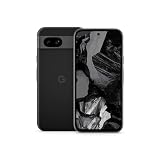
- Meet Google Pixel 8a, the Google AI phone; with the incredible Pixel Camera and top-rated security features to help protect your data[1]
- Unlocked Android 5G phone gives you the flexibility to change carriers and choose your own data plan[2]; it works with Google Fi, Verizon, T-Mobile, AT&T, and other major carriers
- The Pixel Camera gives you amazing photo and video quality; Google AI helps you create perfect group shots with Best Take and fix blurry images with Photo Unblur[3]
- The 6.1-inch Pixel 8a Actua display is even brighter and more vibrant; it’s fast and responsive for smoother scrolling, video streaming, and switching between apps on your phone[4]
- Google AI helps with everyday tasks; search anything right from the app you’re in, just by drawing a circle around an image, text, or video[5]; get a summary of emails and brainstorm ideas with Gemini[6]; and avoid spammers with Call Assist[7]
Do not choose an alternative just because its name includes Android, because it installs successfully on a related model, or because it is described as secure in general. Support has to apply to your precise device, and maintenance has to be current enough to meet your needs. Check when the project last issued security maintenance for that model, what its published installation instructions require, and whether there is a documented recovery path if installation fails. If you cannot verify those facts, treat the option as unconfirmed rather than as a security upgrade.
Understand the bootloader and data consequences
Android’s device-state documentation explains that an unlocked device permits software not signed by the built-in root of trust to boot. Changing device state wipes user data. Read the Android device-state documentation before proceeding, and make a backup you have verified you can restore.
Unlocking changes the device’s verified-boot state, which affects the security model. Re-locking is not a generic final step: follow only instructions explicitly provided for the operating system and device you have selected. Do not assume that a custom installation preserves the original trust chain or that an unlocked bootloader has no security implications.
The Tool Desk
Outbyte PC Repair FREERepair Windows errors before they cause bigger problemsFix Now →Outbyte Driver Updater FREEScan for outdated or missing drivers - takes under a minuteDriver Scan →For a daily-use phone, include more than the act of flashing in your decision. You need time to read the device-specific instructions, a separate place to keep a usable backup, and a way to restore the phone if it will not boot or an essential app stops working. Changing software can also mean changing how the phone verifies what it boots. If you are not comfortable understanding and accepting those consequences, staying on the old system or choosing a supported replacement is more straightforward than experimenting with the primary device.
Why a GSI is a risky shortcut
Android’s Android 17 GSI release notes warn that using a GSI can erase all device data, void the warranty, make parts of the device unusable, and cause apps not to function normally. Flashing an incompatible image can also leave the phone unable to boot. These are meaningful risks for a primary phone, especially if you depend on it for authentication, payments, work, or emergency access.
Only proceed when you have verified the exact device and image compatibility, understand the installation and recovery steps, have a restorable backup, and accept possible app and device-function limitations. If you cannot confirm those conditions, a GSI is not a sound security plan. A carefully maintained third-party operating system may be an option for some specific devices, but it must be evaluated on its own support and bootloader terms.
Rank #4

- Google Pixel 8a designed with a 6.1-inch Actua OLED display, delivering improved brightness, enhanced outdoor visibility, and smoother color rendering in a compact and lightweight form factor.
Before installing anything, check that the instructions name the exact model and explain the required device state; a guide for another Pixel is not proof of compatibility. Confirm that you can tolerate losing all user data, including data not covered by your backup, and that the phone can be recovered if it fails to boot. Finally, test whether essential apps—including those needed for your accounts, work, or payments—are supported in the intended setup. If any answer is unknown, do not use a GSI as a shortcut to regain security updates.
What’s actually slowing this PC down?
Pick the symptom - the matching free tool is one click away.
Choose between keeping it, changing its software, or replacing it
The right choice depends on what the phone does and what you can verify. Use this decision path rather than assuming every older Pixel needs the same response.
- If Google still supports your exact model: install available updates and continue checking the model’s policy entry. Do not treat a delayed update as proof that the support period has ended.
- If updates have ended and you can reduce the phone’s role: apply the exposure-reduction steps above, avoid relying on it for sensitive activity where current device patches are required, and plan a replacement.
- If you are considering an alternate OS: verify active maintenance and exact-model support, current installation instructions, bootloader implications, data-loss risks, and compatibility with essential apps. If any of those are unclear, do not treat the alternative as a supported substitute.
- If current vendor updates are a requirement: choose a currently supported phone. Verify its support term and starting point before buying, rather than assuming that a newer model will receive updates for a particular number of years.
| Option | What to verify | Main trade-off |
|---|---|---|
| Keep the Pixel on its existing software | Whether Google still offers updates; which sensitive activities the phone will handle; whether backups and account access are in place. | Risk-reduction habits do not provide missing OS or firmware fixes. |
| Install an alternative operating system | Exact-model support, recent maintenance, installation and recovery instructions, bootloader state, data loss, and essential-app compatibility. | More technical work and potential data, bootability, warranty, and app-function consequences. |
| Replace it with a supported phone | Official update term, when that term starts, model availability, price, and suitability for your needs. | Up-front replacement cost, in exchange for a current vendor-support path. |
This comparison is deliberately conditional. Keeping the phone may suit someone who can limit its role and accepts the support gap; it is not a way to regain patches. An alternative OS makes sense only when its maintenance and device-specific support are verifiable and its installation costs are acceptable. Replacing the device is the clearest path when current vendor security updates are a requirement. No single option is right for every owner, but the criteria should be clear before you commit time or money.
Google’s specifications list the Pixel 8a with seven years of OS, security and Pixel Drop updates, and Google includes it in the Pixel 8-and-later support group. That makes it one example of a supported Pixel replacement, not a universal recommendation. Check the Pixel phone hardware specifications and the update policy for the exact model, including its availability and support dates in your market.
Do not compare phones on the word “newer” alone. Confirm the support period for the exact model and how the starting date is defined, then consider its price, availability where you live, and whether it meets your needs. The cited Google pages establish the Pixel 8a’s seven-year update term, but they do not establish a current price or guarantee that it is the right choice for every buyer. Verify those details at the time you shop.
Before you retire or repurpose the Pixel
When you move away from the unsupported phone, plan the transition so you do not lose access to important information or accounts.
Best Value

- Meet Google Pixel 8a, the Google AI phone; with the incredible Pixel Camera and top-rated security features to help protect your data[1]
- Unlocked Android 5G smartphone gives you the flexibility to change carriers and choose your own data plan[2]; it works with Google Fi, Verizon, T-Mobile, AT&T, and other major carriers
- The Pixel Camera gives you amazing photo and video quality; Google AI helps you create perfect group shots with Best Take and fix blurry images with Photo Unblur[3]
- The 6.1-inch Pixel 8a Actua display is even brighter and more vibrant; it’s fast and responsive for smoother scrolling, video streaming, and switching between apps on your phone[4]
- Google AI helps with everyday tasks; search anything right from the app you’re in, just by drawing a circle around an image, text, or video[5]; get a summary of emails and brainstorm ideas with Gemini[6]; and avoid spammers with Call Assist[7]
- Confirm that photos, files, contacts and other information you need are backed up and accessible.
- Move account access and authentication methods to the replacement device before erasing the old one.
- Sign out of accounts and remove personal data using the phone’s reset process before giving it away, recycling it or selling it.
- If you keep the old phone as a secondary device, do not assume that a reset or restricted use restores security updates. Keep its role limited to what you are willing to do on an unsupported device.
Do not erase the old device until you have checked that the replacement can access your accounts and that the information you need is available elsewhere. A transition can be inconvenient if the old phone is still being used for account recovery or authentication, so move those dependencies first. A reset is a privacy step when you transfer or retire the handset; it is not a security update.
A supported replacement is the straightforward route when you require current manufacturer security maintenance and cannot verify a suitable maintained alternative for the exact Pixel. Until then, reduce what the phone can expose, keep any available updates installed, and make the support status—not the fact that the phone still works—the basis for your decision.
Frequently Asked Questions
How do I know whether my Pixel has stopped receiving updates?
Check the exact model in Settings, then compare it with Google’s Pixel update policy. The support period depends on the model and begins when it first became available in the US Google Store. You can view the Android security update level under Settings > About phone > Android version and check for available updates under Settings > System > Software updates. Google says Pixel 5a and earlier listed models no longer receive Android-version or security updates.
Quick wins for a faster PC:
Fix the driver behind crashes, sound loss and screen glitchesFind Drivers →Repair Windows errors before they cause bigger problemsFix Now →Can a factory reset make an unsupported Pixel secure again?
No. A reset can remove personal data and apps, but it does not extend Google’s support period or install missing Android and firmware fixes.
Will antivirus or app updates replace Google security updates?
No. Apps may receive updates through their own distribution channel, but that does not establish that Android, firmware, or other device components are patched. The official material cited here does not establish that a third-party antivirus app provides equivalent coverage to manufacturer security updates.
Is a generic system image (GSI) a good way to update an old Pixel?
Not as a general-purpose security fix. Android Developers describes GSIs as tools for app testing and validation. Android’s GSI documentation and Android 17 release notes warn of data loss, warranty consequences, device-function problems, app incompatibility, and the risk of an incompatible image leaving a phone unable to boot.
Does unlocking the bootloader affect security or erase data?
Yes. Android’s device-state documentation says an unlocked device permits software not signed by the built-in root of trust to boot, and changing device state wipes user data. Unlocking changes the verified-boot state, so read the device- and operating-system-specific instructions and make a restorable backup before proceeding.
Should I replace my unsupported Pixel now?
If you require current vendor security maintenance and cannot verify an actively maintained alternative operating system for your exact model, a supported replacement is the straightforward option. If you keep the old phone, reduce sensitive use and understand that those precautions do not restore missing patches. Check the new model’s official support term and starting point before buying.
The Bottom Line
Check the exact model, install anything Google still offers, and treat habits as risk reduction—not a substitute for patches. A custom system is worth considering only when recent support for your precise Pixel, safe installation and recovery instructions, and essential-app compatibility are all verified. If you need current vendor updates and cannot verify those conditions, move to a currently supported phone.
Quick Recap
Product prices and availability are accurate as of the date/time indicated and are subject to change. Any price and availability information displayed on Amazon at the time of purchase will apply.

