
Do these 3 things before closing this tab:
1Repair Windows errors before they cause bigger problems2Fix the driver behind crashes, sound loss and screen glitches3Clear out junk files and repair common Windows errorsiTechGuides is reader-supported. When you buy through links on our site, we may earn an affiliate commission. As an Amazon Associate I earn from qualifying purchases. Learn more
The safest way to improve cooling efficiency in an operating data center is to work in stages: measure the facility and IT load, stop air bypass and hot-air recirculation, tune temperature, humidity and controls, recommission chilled-water equipment, and only then evaluate economizers or major cooling-technology changes. The right retrofit depends on climate, rack density, existing equipment, reliability requirements, energy prices and water availability; no single measure or savings percentage applies to every site.
What “cooling efficiency” means in an existing data center
Cooling efficiency is not determined by the chiller alone. IT load, rack power density, fan speeds, room airflow, control sequences, outdoor conditions, chilled-water temperatures, condenser-water conditions and tower operation all affect the energy required to reject heat. A retrofit that lowers chiller power but causes fans, pumps or cooling towers to run harder may not improve total facility performance.
Start with two facility-level indicators, while remembering that neither identifies the faulty component by itself:
| Metric | Calculation | What it tells you | Important limitation |
|---|---|---|---|
| Power Usage Effectiveness (PUE) | Total facility energy ÷ IT equipment energy | How much energy the whole facility uses for each unit of IT energy. | PUE includes cooling, power distribution, lighting and other facility loads; it is not a cooling-only score. |
| Water Usage Effectiveness (WUE) | Annual site water use in liters ÷ IT energy in kWh | How much on-site water is associated with each kilowatt-hour consumed by IT. | Interpretation depends on tower cycles, makeup-water quality, climate and the site’s water accounting boundary. |
The U.S. Department of Energy’s Federal Energy Management Program (FEMP) gives PUE 2.0 as average-efficiency context and 1.0 as the theoretical minimum on its cooling-water guidance page; these figures are not a diagnosis of your facility or a universal target. The same page defines the PUE and WUE calculations and discusses cooling-water opportunities (DOE FEMP cooling-water efficiency guidance).
#1 Best Overall

- Adjustable temperature control helps ensure optimal performance for rackmount such as network, server, music, and AV cabinets
- Noise controlled fans makes the cooling system useful for a quiet office or business space
- Compact design mounts to any 19" inch cabinet and takes up only 1 unit of space
- Simple and easy to use LCD display allows user to control temperature
- Air pumped through to the top exhaust system of the fan
Stage 1: Establish a measured baseline before changing settings
Use a representative operating period that includes the normal IT-load range and, if practical, different outdoor conditions. Capture simultaneous readings so that a change in IT load is not mistaken for a cooling improvement.
Measure facility and IT energy
- Record total facility energy and IT equipment energy at the same interval and meter boundary.
- Trend each chiller, computer-room air-conditioning (CRAC) or computer-room air-handler (CRAH), pump, fan and cooling tower where submeters or building-management-system points are available.
- Log IT load by room, electrical bus or rack group. Note planned maintenance, unusually low occupancy and high-density deployments.
- Calculate PUE for the baseline period and calculate WUE when the site uses significant water for cooling.
Measure the thermal and hydraulic system
- Trend chilled-water supply and return temperatures, flow, differential pressure, valve positions and pump speeds.
- Record condenser-water supply and return temperatures, tower-fan speed, approach temperature, blowdown and makeup water where applicable.
- Capture CRAC/CRAH supply-air temperature, return-air temperature, fan speed, valve position and operating mode.
- Measure temperature and humidity at rack inlets, not just at a room thermostat. The 2024 FEMP guide discusses monitoring supply temperature and humidity at each CRAC or CRAH as part of integrated control (2024 FEMP Best Practices Guide for Energy-Efficient Data Center Design).
Document conditions that affect the result
- Map rack orientation, supply openings, return paths, cable penetrations, unused rack positions and containment sections.
- List IT equipment inlet limits, alarm thresholds, humidity requirements and any vendor restrictions on operating temperature.
- Record redundancy mode, equipment unavailable for maintenance, control overrides, alarms and manual setpoints.
- Document local weather, outdoor-air quality and water constraints before considering an economizer.
Keep the baseline data and the post-change data on the same meter boundaries. A lower chiller reading is not proof of savings if the comparison period has a lower IT load or milder weather.
Stage 2: Fix airflow bypass and hot-air mixing first
Airflow work is usually the least disruptive place to begin because it uses the existing cooling plant more effectively. Arrange racks so that cool supply air reaches equipment intakes and hot exhaust air returns to the cooling units without crossing the intake path.
Correct rack and supply-air paths
- Map the current supply and return pattern with rack-inlet measurements and, where permitted, smoke or tracer visualization.
- Maintain distinct cool intake and hot exhaust paths. Reorient racks or adjust supply openings when the current arrangement sends exhaust toward another rack’s intake.
- Close open cable penetrations, unused floor openings and other bypass routes that let supply air return to the cooling unit without passing through IT equipment.
- Install blanking panels in unused rack spaces where they fit the rack and do not obstruct required equipment ventilation.
- Use aisle roofs, doors, curtains or other containment barriers when the room design, fire protection and maintenance access allow them.
- Recheck every rack inlet after the physical changes and set alarms for conditions outside the approved operating envelope.
FEMP says that rack arrangement, sealing bypass openings and suitable barriers or containment can permit higher chilled-water temperatures and reduced airflow. Its cooling-water guidance reports a potential 20% reduction in chiller energy for the described air-management practices. That is a published potential, not a guaranteed result for an individual facility (DOE FEMP cooling-water efficiency guidance).
Blanking panels are a concrete accessory for closing rack bypass openings, but they do not replace an airflow survey. A panel in the wrong location can block an intended exhaust path or interfere with equipment ventilation, so verify the effect with inlet and return measurements.
Rank #2

- [Adjustable] Adjustable temperature control helps ensure optimal performance for your rackmount such as network, server, music, and AV cabinets
- [Quiet and powerful] Equipped with three powerful 4” (120mm) noise control ball bearing fans capable of pumping 225 CFM of air, preventing overheating of expensive equipment
- [Optimal Airflow] This three fan cooling system will provide excellent cooling with its high-performance fans, which keep the hot air stream away from your setup with its top exhaust cool air system.
- [Compact Design] Device is standardized to mount to any 19" server rack or cabinet while taking only a single unit (1U) of space and has a wide variety of applications.
- [Programmable] Equipped with a programmable thermostat sensor controller for better temperature monitoring that will trigger fans based on your parameter configuration.
Stage 3: Tune temperature, humidity and room-unit controls
Unnecessarily cold setpoints and narrow humidity bands make the plant remove heat or moisture that the IT equipment does not require. Confirm the allowable inlet conditions for every equipment class and follow the site’s reliability policy before widening a setpoint.
Review temperature setpoints
- Compare CRAC/CRAH supply and room setpoints with measured rack-inlet conditions and equipment limits.
- Raise a setpoint incrementally only when the warmest rack in the affected area remains within its approved limit under the highest expected load.
- Use supply-air reset or coordinated room-unit control when the control system can maintain the required inlet condition without units fighting one another.
- Remove manual overrides that force a colder unit to run continuously after the original condition has passed.
Review humidity control
- Check whether humidifiers and dehumidification coils can operate at the same time or repeatedly reverse direction.
- Widen an unnecessarily narrow humidity band only after checking IT requirements, electrostatic-discharge policy and local seasonal conditions.
- Use rack-inlet sensors and correctly located room sensors; a single thermostat can hide a hot or dry corner.
- In tower-cooled plants, include humidity and outdoor conditions in the water-use review because tighter moisture control can increase both chiller demand and tower water use.
Commission the control sequence
Change one control variable at a time, allow the system to reach a stable operating state, and check rack-inlet readings, alarms, fan power, valve positions and redundancy status. The FEMP cooling-water guidance specifically warns that setpoints that are unnecessarily low or humidity bands that are unnecessarily narrow can increase energy and, in tower-cooled facilities, water use (DOE FEMP cooling-water efficiency guidance).
Stage 4: Recommission chilled-water distribution and the plant
After airflow and room controls are stable, examine whether chilled-water flow and pressure follow actual load. These changes require engineering review, controls testing and a commissioning plan; they are not universal settings to copy into every plant.
Distribution-side opportunities
| Review item | What to look for | Possible action |
|---|---|---|
| Flow arrangement | Constant flow or pump speed that remains high when valves are nearly closed. | Evaluate variable-flow operation and whether the existing primary/secondary arrangement can be optimized. |
| Valves and bypasses | Three-way valves, open bypasses or differential pressure that sends water around the load. | Use two-way valves where compatible and eliminate unnecessary bypass flow. |
| Pressure setpoint | Differential pressure higher than the most remote coil requires. | Reset pressure to the point needed to satisfy the critical valve, with a controlled minimum for stability. |
| Coil and sensor performance | Stuck valves, inaccurate flow sensors, fouled coils or poorly located pressure sensors. | Repair, calibrate and recommission before changing the sequence. |
The 2024 FEMP guide lists conversion to variable flow, reducing an unnecessarily high supply-pressure setpoint, using two-way valves and differential-pressure reset as measures to consider at existing facilities (2024 FEMP Best Practices Guide for Energy-Efficient Data Center Design).
Optimize chiller and condenser operation
- Compare each chiller’s part-load efficiency with the actual staging sequence; avoid running more machines than the load and redundancy policy requires.
- Review chilled-water supply temperature. The FEMP guide identifies 55°F or higher as a medium-temperature chilled-water condition that can improve chiller efficiency and create more water-side economizer hours, but equipment and system limits must be checked first.
- Evaluate condenser-water reset, tower-fan control, approach temperature, tower cycles of concentration and water-treatment limits together. An energy change that increases blowdown or makeup water may worsen WUE.
- Verify that the new sequence preserves required redundancy, minimum flow, freeze protection and recovery after a control or equipment failure.
Do not raise chilled-water temperature merely because a guide cites 55°F. The allowable value depends on coil selection, control valve authority, room airflow, IT inlet requirements and the plant’s ability to remove heat at design conditions.
Rank #3

- DISCOVER THE MOST RELIABLE NETWORK RACK FAN COOLING SYSTEM: When it comes to your professional equipments performance and protection, you should not compromise. Making sure that your rack panels dont overheat is essential to their durability and efficiency. Thats why this ultimate rackmount triple cooling fan panel by Griffin is going to make your life easier!
- HEAVY-DUTY CABINET COOLING FAN STEEL CONSTRUCTION: Designed with maximum performance in mind, the Griffin premium cooling rack mounted fan system features a superior-quality, steel construction that can assure its durability and efficiency. Ideal for professional use, our stunning rackmount triple cooling server rack fans are made to protect your precious audio equipment from any possible damage due to high temperatures.
- 3 ULTRA-QUIET SERVER CABINET FAN FANS: Why settle for noisy, low-quality ventilation systems, when the most efficient and convenient alternative is available? The Griffin exclusive rackmount cooling system features three (3) ultra-quiet fans with independent fan guards, sleeve bearings, and five (5) blades each. Rest assured that even at full speed, the fans are virtually silent, protecting your system without disrupting your performance.
- RACK MOUNT FANS DESIGNED TO PERFORM ON YOUR SERVER RACK RAILS: Our durable and sturdy rackmount triple cooling fan panel is the prime choice when it comes to professional cooling systems. Perfect for concerts, live performances, studio recordings, DJ sets, and production, our cooling panel is not only reliable but also extremely stylish and sleek, due to the black powdered coat finish.
- 1-YEAR WARRANTY – All products we sell from laptop stands, recording studio equipment, disc jockey accessories and dj stands, to stage equipment and stage lighting packages, and everything in between comes with our exclusive, 30-day money back return policy and a premium 1-year warranty! All you have to do is contact us within 30 days to request a return, or within 365 days from purchase to request a warranty replacement.
Stage 5: Screen economizers against the site’s climate and configuration
An economizer displaces compressor or chiller operation with favorable outdoor conditions. Its value is the number of hours and the amount of load it can serve safely, not the name of the technology. Evaluate contamination, moisture, filtration, controls, building pressure, water use and maintenance before selecting a design.
Recommended Free Tools
| Option | How it works | Existing-facility questions | Typical constraint |
|---|---|---|---|
| Air-side economizer | Uses filtered outdoor air, directly or through dampers and mixing sections, when outdoor conditions can cool the space. | Are humidity, particulates and corrosive contaminants acceptable? Is filtration capacity adequate? Can controls provide humidity lockout, pressure control and reliable changeover? | Large supply and exhaust ductwork can make retrofit difficult in an existing data center. |
| Water-side economizer | Uses a cooling tower and heat exchanger, or related condenser-water path, to cool the chilled-water loop without full mechanical compression when conditions permit. | Is there suitable tower and heat-exchanger capacity? Can the plant operate at the required chilled-water temperature? What are water quality, treatment and control requirements? | Benefits depend on wet-bulb hours, tower performance, water availability and the existing piping arrangement. |
Air-side screening
- Use local weather data to estimate temperature and moisture hours, then apply conservative lockouts for humidity and contamination.
- Assess smoke, dust, salt, industrial pollutants and corrosive gases; specify filtration and a replacement strategy.
- Check duct routing, roof penetrations, structural loading, fire and smoke controls, building pressure and the effect on return-air paths.
- Model fan energy as well as compressor energy. A large duct system or high filter pressure drop can consume part of the expected benefit.
FEMP notes that air-side economizers can be difficult to add to existing data centers because they require large duct installations. Do not assume that a favorable outdoor temperature alone makes the retrofit practical (2024 FEMP Best Practices Guide for Energy-Efficient Data Center Design).
Water-side screening
- Confirm that the tower, heat exchanger, pumps, valves and controls can deliver useful cooling at the required supply temperature.
- Include tower fan power, pump power, treatment chemicals, blowdown and makeup water in the comparison.
- Use local hourly wet-bulb data rather than an annual average. The FEMP guide presents wet-bulb temperatures below 55°F for 3,000 or more hours per year as a climate condition where water-side economizing is usually best suited; it is not a universal qualification test.
- Define the transition and lockout sequences so the plant does not rapidly switch between mechanical and economizer modes.
Some existing chilled-water plants will accommodate a water-side economizer more readily than an air-side system, but the piping, heat-exchanger approach temperature, tower condition and water strategy determine the actual result.
Stage 6: Consider liquid cooling only when rack density justifies it
Liquid cooling can be relevant when high-density racks exceed what the air system can support efficiently. It is not a default upgrade for every existing data center. Assess the IT equipment’s compatibility, coolant distribution units, heat-rejection path, leak detection, maintenance procedures, water strategy and the residual air load from storage, networking and lower-density racks.
A mixed facility may need both liquid and air systems. The air system still has to control room conditions and remove heat that is not captured by the liquid loop. The 2024 FEMP guide covers air- and liquid-cooled systems without establishing liquid cooling as the right choice for every existing site (2024 FEMP Best Practices Guide for Energy-Efficient Data Center Design).
Crashes, No Sound, or Screen Glitches?
Random freezes, missing sound and display glitches usually trace back to one bad driver. Find and replace yours safely.Free scan · under a minutePC Slower Than It Used to Be?
A free scan shows the junk files, broken settings and background clutter dragging Windows down - then fixes them in one click.Free scan · Windows 10 & 11Rank #4
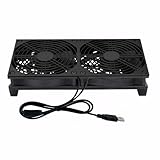
- Stay cool with double the power - our 2 in 1 USB fan features 2 fans connected to one USB cable, providing optimal airflow and whisper-quiet noise levels.
- Versatile design for any space - our square-shaped fan can be laid flat or stand upright on any surface, making it ideal for use with receivers, AV cabinets, PS4 consoles, and more.
- Say goodbye to sweaty nights - use our fan to promote indoor air circulation and cool down your bedroom with ease. Just plug it into a wall charger and enjoy.
- Shock Absorbing Feet - four feet using environmentally friendly rubber, after testing, the softness of the feet that can smoothly grab the desktop, not too hard and desktop resonance .
- Quality assurance you can trust - we stand behind our fans with a one-year warranty. If you experience any quality problems, contact us for a hassle-free replacement within one year.
DOE’s 2024 article on the updated guide identifies NREL researchers David Sickinger and Otto Van Geet as contributors. Van Geet said, “Across the board—from the compute side to the facility side—data center technologies have changed dramatically since 2011,” and Sickinger said, “We just needed to modernize it, especially with the increasing rack compute densities, which was one of the big triggers for the update” (DOE article on technology changes and data-center efficiency principles). Those changes make a density and compatibility assessment important, not a reason to convert an entire existing facility without evidence.
Independent reader supportYour contribution helps us test, update, and keep practical guides available for everyone.Compare retrofit choices on the measures that affect your site
| Retrofit category | Best initial question | Energy considerations | Water considerations | Risk and complexity |
|---|---|---|---|---|
| Airflow sealing, blanking and containment | Are bypass openings, rack orientation or recirculation causing uneven inlet conditions? | Can reduce unnecessary room airflow and enable warmer chilled water when measured conditions permit. | Usually little direct water effect; lower heat-rejection load may reduce tower demand. | Low to moderate, but must respect fire protection, access and equipment ventilation. |
| Setpoint and controls tuning | Are units overcooling, fighting one another or maintaining an unnecessarily narrow humidity band? | Can reduce compressor, reheat, humidification, fan or pump energy. | May reduce or increase tower and humidification water depending on the sequence. | Moderate; requires reliable sensors, alarms, trend logs and commissioning. |
| Chilled-water and pump optimization | Does flow or pressure remain high when the load is low? | Variable flow, pressure reset and appropriate staging can reduce pump and chiller power. | Indirect effect; condenser and tower operation must be included. | Moderate to high; minimum-flow, redundancy and failure-mode testing are essential. |
| Air-side economizer | Can the building accept filtered outdoor air and the required ductwork? | Can displace mechanical cooling during suitable outdoor hours but adds fan and filter pressure-drop energy. | Potentially low tower-water use, but humidification or filtration strategy may add other loads. | High in many existing facilities because of ducts, contaminants, pressure and controls. |
| Water-side economizer | Do climate and the existing tower/heat-exchanger arrangement provide enough useful hours? | Can displace compressor operation during suitable wet-bulb conditions. | May increase or decrease water use depending on tower hours, cycles, treatment and load. | Moderate to high; requires hydraulic, controls and water-treatment review. |
| Liquid cooling | Are rack densities and IT hardware compatible with a liquid heat-rejection design? | Can reduce air movement for captured heat, but adds pumps, CDUs and heat-rejection equipment. | Depends on the coolant loop and heat-rejection method; do not assume it is water-saving. | High; affects IT hardware, maintenance, leak response and residual room cooling. |
For each option, calculate expected energy and water effects from the measured baseline, identify capital and maintenance requirements, and state the operating hours or load range in which the option works. A claimed percentage without those conditions is not a project forecast.
Implement changes with commissioning and measurement
- Write the operating envelope. Record approved rack-inlet temperature and humidity limits, alarm thresholds, redundancy requirements, minimum flows and recovery expectations.
- Prioritize reversible work. Begin with airflow corrections, sensor calibration and control-sequence cleanup before cutting ducts, repiping or replacing plant equipment.
- Change one functional group at a time. Separate airflow, room controls, pump controls and chiller sequencing so that the effect of each change can be identified.
- Test failure modes. Verify loss of a pump, chiller, sensor, network connection or control signal; confirm that standby equipment starts and that inlet conditions remain within the approved envelope.
- Trend after stabilization. Compare facility energy, IT energy, cooling-unit power, chilled-water temperatures and flow, rack-inlet conditions, alarms and water use against the baseline at comparable IT load and weather.
- Lock in the sequence. Remove temporary overrides, document setpoints and alarm limits, train operators and schedule periodic recommissioning after major IT or mechanical changes.
Use rack-inlet alarms and trend data as the operational guardrail. Room-average temperature can look acceptable while a high-density row or poorly supplied rack is outside its limit.
Troubleshoot common symptoms before buying capacity
| Symptom | Likely checks | Corrective direction |
|---|---|---|
| Some racks are hot while the room average is normal | Rack orientation, blocked tiles, cable openings, missing blanking panels, containment gaps and sensor placement. | Repair the airflow path and verify each affected inlet before lowering the entire room setpoint. |
| Chillers run cold while valves are nearly closed | Supply-temperature setpoint, bypass flow, three-way valves, differential-pressure setpoint and sensor calibration. | Recommission the sequence; evaluate warmer water, two-way valves, variable flow and pressure reset only after hydraulic limits are known. |
| Pumps or fans stay at high speed at low load | Variable-frequency-drive command, control mode, minimum-speed setting and differential-pressure sensor location. | Reset speed or pressure to actual demand while preserving minimum flow and redundancy. |
| Humidity alarms alternate between high and low | Sensor location, narrow deadband, simultaneous humidification/dehumidification and outdoor-air lockouts. | Correct sensing and sequencing, then review the approved humidity band with IT and operations staff. |
| Economizer saves compressor energy but raises total energy or water | Fan and pump power, filter pressure drop, tower cycles, blowdown, treatment and changeover logic. | Compare total facility energy and WUE, not compressor power alone; adjust or lock out the mode when it is not beneficial. |
| New high-density racks trigger repeated alarms | Rack-level heat load, liquid or air-cooling compatibility, supply capacity and residual room load. | Rebalance the row or add a density-appropriate cooling design rather than lowering every room setpoint. |
Why there is no universal retrofit recipe
Climate, IT operating limits, rack density, existing piping and ductwork, redundancy architecture, maintenance skills, energy prices and water constraints change the answer. An air-side economizer may be impractical where ductwork and contaminants are limiting; a water-side economizer may be attractive where cool wet-bulb hours and tower capacity are available; neither is automatically better. Similarly, liquid cooling may solve a high-density problem while leaving most of the facility’s air load untouched.
Free tools Windows power users keep installed
One-click scans. No signup required.
The 2024 FEMP guide states: “No design guide can offer ‘the most energy-efficient’ data center design, but these guidelines can provide efficiency benefits for a wide variety of data center scenarios.” The statement appears in FEMP’s Best Practices Guide for Energy-Efficient Data Center Design (FEMP guide overview). For an existing facility, that principle means using measured conditions and commissioning evidence to select the next intervention, rather than promising a fixed saving or a wholesale conversion.
Quick Recap
Product prices and availability are accurate as of the date/time indicated and are subject to change. Any price and availability information displayed on Amazon at the time of purchase will apply.

