
iTechGuides is reader-supported. When you buy through links on our site, we may earn an affiliate commission. As an Amazon Associate I earn from qualifying purchases. Learn more
You can move some iCloud-synced data to a Samsung Galaxy with Smart Switch, but you cannot restore a complete iPhone backup onto it. Smart Switch imports supported categories—such as contacts, photos, calendars, notes, and files—rather than copying iPhone apps, settings, passwords, or all app data. Keep your iPhone and iCloud data intact until you have checked the transfer on your Galaxy.
What Smart Switch can—and cannot—move
Samsung’s iCloud import is a selective transfer, not an iPhone-style device restore. The categories offered depend on the Smart Switch route, device, software version, and region. Samsung lists contacts, calendar or schedule entries, reminders, notes, photos or images, videos, and documents or files across its support guidance. Check the category list shown on your Galaxy before starting; it is the best indication of what that particular transfer supports. Samsung’s US guide and Malaysia’s guide to the updated Smart Switch flow describe route-specific coverage.
- Samsung says Apple passwords and Keychain data do not transfer through Smart Switch, according to its Ireland instructions.
- Samsung’s US guidance says note font and formatting, tables, and similar presentation details are not supported. Review important notes after import.
- The support pages do not establish identical results for every iCloud Photos setup, optimized original, shared album, or media format. Verify the resulting library rather than assuming every item will appear as it did on the iPhone.
Before you start the iCloud import
- Make sure the data you want is available and synced to your Apple Account in iCloud. Samsung’s instructions describe importing data stored in the account.
- Have your Apple Account sign-in details ready, along with access to a trusted device or phone number for the verification code.
- Open the current Smart Switch app on the Galaxy. Exact menu wording and placement can vary by model, region, and software version, so follow the prompts displayed on your phone.
- Keep the iPhone available. Do not erase it, trade it in, or disconnect it from your account until you have checked the imported content.
Import iCloud data on your Galaxy
- On the Galaxy, open Smart Switch.
- Choose Receive data, then select iPhone/iPad as the source.
- Choose the iCloud import option. The precise label may differ in your version of Smart Switch.
- Sign in with your Apple Account and complete the requested verification step.
- Review the available content categories, select what you want to import, and start the transfer.
- When Smart Switch finishes, open the relevant Galaxy apps and folders to check the results.
Samsung documents this iCloud workflow in its Smart Switch instructions. If an expected category is missing or sign-in fails, consult current Samsung guidance for your device and Apple’s guidance for your account configuration. The support instructions do not establish that every account security configuration or recovery situation is supported; do not disable account protections based on generic transfer advice.
Free tools Windows power users keep installed
One-click scans. No signup required.
When to use a direct iPhone transfer instead
If you still have the iPhone and want to transfer directly from it, Samsung documents wired Smart Switch transfer as a separate option. Connect the phones using a compatible cable or an adapter if their ports require one, then follow Smart Switch’s prompts for a device-to-device transfer. This route does not require iCloud import or Apple Account sign-in for the iCloud workflow. Samsung describes the wired option in its iOS-to-Samsung transfer guidance.
#1 Best Overall
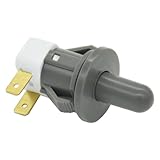
- Replaces Part Numbers: 2705488, AP5306252, PS4138763, EAP4138763. It can be used on most Samsung cecilware refrigerator door lights
- Why Need This: The ice maker will know the door is closed so it can dispense ice when the outside button is pressed, that's the switch which can reduce energy and save electricity
- Easy To Install: It only takes a few minutes to install, the important thing is you need to disconnect the power first, and find your switch's location, remove the cover with a screwdriver, then remove the old one and replace it with the new one, simple to use
- Worth Buying: Usually all samsung fridges use the same one so this is a great replacement part fits perfectly save your time and money
- Compatible model: RF263BEAESR/AA-03 RS25H5000SR/AA-00 RF28HDEDBSR/AA-04 RF23HCEDTSR/AA-01 RF26J7500SR/AA-02 etc. if you are not sure whether the model is suitable, please use the "Crtl+F" shortcut to search for the model you need, or contact us to help you check
Samsung also documents an updated wireless QR flow with specific software requirements: iOS 26.6, Android 17, and One UI 9.0 or later. Those requirements apply to that updated QR flow, not necessarily to every Smart Switch transfer path. Check Samsung’s updated-flow instructions and the options on your devices before choosing it.
| Route | Source iPhone needed? | What it depends on | Cable or software requirements |
|---|---|---|---|
| iCloud import on Galaxy | No physical iPhone is required for the documented import, but Apple Account access and the data being available in iCloud are needed. | The categories Smart Switch offers for the device and software version. | No cable is required; sign-in verification is part of the documented workflow. Samsung Ireland |
| Wired Smart Switch | Yes; the transfer is directly from the iPhone. | The direct-transfer options available in Smart Switch. | A suitable cable or adapter may be needed for the devices’ ports. Samsung Gulf |
| Updated wireless QR flow | Yes; this is a direct-device wireless flow. | The options available in the updated Smart Switch flow. | Samsung specifies iOS 26.6, Android 17, and One UI 9.0 or later for this flow. Samsung Malaysia |
Check the Galaxy before retiring the iPhone
Use the apps and folders where the transferred data should appear, and check more than one example in each important category. In particular, compare contact entries, calendar events, notes, document folders, and representative photos and videos against what you expect from iCloud. If something important is missing, keep the iPhone and its data available while you investigate another transfer route or Samsung’s current support instructions.
Quick Recap
Best Value

- Replacement power button on/off switch volume button flex cable for Samsung Galaxy A03s SM-A037U smartphone only. (NOT fit A037F)
- Brand new. Repair replacement parts. Professional technician is recommended for installation
- Compatible with: Samsung Galaxy A03s SM-A037U/A037U1/S134DL only. US Version phone. (NOT for A037F)
- Part Version Number: 96516_4_11. Please verify the version number on your existing cable to be sure to get the matching one
- Contents: flex cable x 1
Rank #4

- REDESIGNED TO DO MORE: The redesigned Galaxy SmartTag2 is made so you can keep calm and keep track; Its design makes it easy for you to tag and carry your belongings
- EASY TO USE: It's IP67-rated water- and dust-resistant, activates your compatible IoT devices and stays powered for up to 500 days or even up to 40% more on Non-Power Saving Mode
- RELAX, YOU'VE GOT IT TAGGED: Simply register a new Galaxy SmartTag2 and get started right away with SmartThings Find; With its intuitive tracking experience, you now have a way to keep track of things you love right in the palm of your hand
- SEARCH NEAR WHEN IT'S NOT FAR: Lose something. Switch on Search Nearby and get guided instructions to your item's location via Compass View; If you still don't see it, just ring your Galaxy SmartTag2 to have it send out an audible signal
- Type of battery needed: replaceable CR2032 1 ea Lithium battery (not included)
Rank #3

- REDESIGNED TO DO MORE: The redesigned Galaxy SmartTag2 is made so you can keep calm and keep track¹; Its design makes it easy for you to tag and carry your belongings
- EASY TO USE: It's IP67-rated water- and dust-resistant², activates your compatible IoT devices³ and stays powered for up to 500 days⁴ or even up to 40% more on Power Saving Mode⁵
- RELAX, YOU'VE GOT IT TAGGED: Simply register a new Galaxy SmartTag2 and get started right away with SmartThings Find; With its intuitive tracking experience, you now have a way to keep track of things you love right in the palm of your hand¹
- SEARCH NEAR WHEN IT'S NOT FAR: Lose something? Switch on Search Nearby⁶ and get instructions to your item's location via Compass View⁷; If you still don't see it, just ring your Galaxy SmartTag2 to have it send out an audible signal
- TAGGED & TRENDY: Cover your Galaxy SmartTag2 with a colorful Silicone Case for protection and a smooth touch – or a Rugged Case with a non-slip pattern on the side and additional bumper on the bottom⁸; Both have a carabiner ring attachment
Rank #2

- 【Compatibility Design】 : The DOGAIN A16U stylus pen for touchscreen offers enhanced compatibility with Android tablets(Samsung Galaxy Tab A9+/A9/A11+/A11/Lenovo/Huawei/XiaoMi/ViVo) and Phones (iPhone 6-17/Android PhoneSamsung Galaxy A17/A16/A14/A10e/A04e/S22/S20 FE etc) and Switch. (Note: Not compatible with any model of Laptop, Microsoft system device, Apple iPad, and Amazon Kindle, Please check your device model before placing an order)
- 【Easy to Use & LED Power Display】 : Simply double-tap the top button to turn this touch screen pen on or off—No Bluetooth pairing needed, so it’s ready to use instantly. Whether you’re using it as an iphone stylus or with other devices, the side-mounted 4-LED indicator lets you check battery status at a glance, so you’re never caught off guard. If you forget to power it off, the pen automatically enters sleep mode after 5 minutes of inactivity, helping extend battery life for when you need it most
- 【Magnetic Design】 : This stylus pen for samsung tablet A9+/A11+ is equipped with two magnets. You can attach the stylus to the side of your tablet device for convenient storage and use. Tablet devices also need to have built-in magnets; otherwise, the stylus cannot be magnetized either
- 【High Precision & Durable Tips】: The digital pen tip is crafted from high-quality POM material for smoother signal transmission, delivering precise, stable, and long-lasting writing performance. The polished surface helps prevent scratches on the tablet screen. The android stylus pen comes with 4 additional replaceable tips to meet the needs of frequent users
- 【What will you get?】: You can get 1*DOGAIN A16U Universal Stylus, 4*POM Replaceable pen tips, 1* Type-c charging cable, and 1* English manual. Our tablet stylus pen offers a 12-month service. If there is any problem with the product, you can contact us and our team will reply to you within 24 hours
Product prices and availability are accurate as of the date/time indicated and are subject to change. Any price and availability information displayed on Amazon at the time of purchase will apply.
Quick wins for a faster PC:
Clear out junk files and repair common Windows errorsFree Scan →Scan for outdated or missing drivers - takes under a minuteDriver Scan →Repair Windows errors before they cause bigger problemsFix Now →
