
Outdated Drivers Are Slowing You Down
One free scan finds every outdated or missing driver and matches the right update for your exact hardware.Free scan · exact hardware matchWindows Errors? Fix Them Before They Spread
Repair common Windows errors and clear accumulated junk for a smoother, more stable PC - no reinstall needed.Free scan · no reinstalliTechGuides is reader-supported. When you buy through links on our site, we may earn an affiliate commission. As an Amazon Associate I earn from qualifying purchases. Learn more
Open your device’s date-and-time settings and check that both the date and time are correct. Chrome can show “Your clock is behind,” “Your clock is ahead,” or NET::ERR_CERT_DATE_INVALID when your computer or mobile device’s clock is inaccurate.
Check your device’s date and time
- Open the date-and-time settings on the computer or mobile device where Chrome shows the warning.
- Compare the displayed date and time with the current date and time, and correct either value if it is wrong.
- Return to Chrome and try the page again.
Google recommends checking the device clock first. Its guidance does not provide a single menu path for every operating system, so use your device’s own date-and-time settings. Google Chrome Help identifies an inaccurate date or time as a possible cause of these specific warnings.
If the clock is already correct
If the date and time are correct but Chrome still shows the warning, the cited guidance does not establish the cause or give a further device-specific fix. To narrow down what to try next, identify your device and note the exact error message. Also check whether the warning appears on one website or across multiple sites.
Not every Chrome certificate warning is a clock problem
This fix applies to the named clock warnings and NET::ERR_CERT_DATE_INVALID when an inaccurate device clock is involved. Chrome has other certificate and privacy errors with different troubleshooting steps, so do not assume correcting the clock will resolve every warning.
Quick Recap
Best Value

- 【 Large Display Screen 】The small dashboard clock has a large LCD screen. You can clearly look at the date and time in form of large digitals at a glance while driving, which provids you with a safer driving environment.
- 【 High-quality material 】The small clock is made of PVC material, not easy to deform, or damage. You could use it for a long time.
- 【Multiple uses】Each car clock comes with a piece of sturdy adhesive sticker. You could peel off and place on the dashboard or windshield of the car. At the same time, the clock also has a foldable bracket on the back. You could unfold it and insert it into the airvent.
- 【Save space】The size of the digital clock is small, does not take up space, and can be carried around, which is very suitable for outdoor travel.
- 【Stopwatch function】The car clock has the additional function of a stopwatch. It can be used it in races that requires a stopwatch.
Rank #4

- High-quality CMOS BIOS RTC Battery: This CR2032 battery is specifically designed for laptops and has high-quality performance and reliability, so you can say goodbye to laptop time and date setting issues!
- Compatibility: This battery is universal and compatible with most laptop brands and models, which means you only need to buy one battery to use on multiple laptops. Compatible with Dell Latitude E4310 E5400 E5410 E5510 E6400 E6410 E6500 E6510 E6400 Atg.
- Longevity: This battery has a long lifespan and can keep your laptop's time and date setting for up to 8 years, which means you don't need to replace the battery frequently and can save a lot of time and money.
- Convenient and easy to use: Replacing the battery is very simple and can be completed in just a few steps without any special professional skills or tools, which means you can easily complete the battery replacement task on your own.
- Battery packaging: Each battery is protected by PVC heat shrink tubing, these batteries cannot be charged, otherwise the battery and product will be damaged.
Rank #3

- High-quality Cmos Battery: This CR2016 battery is specifically designed for laptops and has high-quality performance and reliability, so you can say goodbye to laptop time and date setting issues!
- Compatibility: This battery is universal and compatible with most laptop brands and models, which means you only need to buy one battery to use on multiple laptops. Rtc Bios Cmos battery compatible with Ibm Lenovo ThinkPad X1 Carbon 2-nd,X1 Carbon 3rd,X1 Carbon 4th,X1 Carbon 5th,X1 Carbon 6th.Cmos battery for Lenovo P40 Yoga,Thinkpad S3 Yoga 14.
- Longevity: This battery has a long lifespan and can keep your laptop's time and date setting for up to 8 years, which means you don't need to replace the battery frequently and can save a lot of time and money.
- Convenient and easy to use: Replacing the battery is very simple and can be completed in just a few steps without any special professional skills or tools, which means you can easily complete the battery replacement task on your own.
- Battery packaging: Each battery product is individually packaged, these batteries cannot be charged, otherwise they will damage the battery and product.
Rank #2

- High-quality CMOS Battery: This ML1220 battery is specifically designed for laptops and has high-quality performance and reliability, so you can say goodbye to laptop time and date setting issues!
- Compatibility: This battery is universal and compatible with most laptop brands and models, which means you only need to buy one battery to use on multiple laptops. Can replace the BIOS CMOS battery of these devices:DELL XPS 13 9343,9350,9360,9370,9380,9365;DELL XPS 15 9550,9560,9570;DELL Precision 5510,DELL Precision 5520,7350, 5530, 5540;Dell Latitude 7440 9410,Dell Latitude 5285 2-in-1.
- Longevity: This battery has a long lifespan and can keep your laptop's time and date setting for up to 8 years, which means you don't need to replace the battery frequently and can save a lot of time and money.
- Convenient and easy to use: Replacing the battery is very simple and can be completed in just a few steps without any special professional skills or tools, which means you can easily complete the battery replacement task on your own.
- Note: The ML1220 battery of this product is a rechargeable battery, not a CR1220 disposable battery (voltage above 3V). When the ML1220 battery is not fully charged, the voltage is about 2.75V. The fully charged voltage is 3V. Please confirm whether your device uses ML1220 battery or CR1220 battery. if you have any questions about the choice of the battery or the battery connector, please tell me, I will answer you as soon as possible.
#1 Best Overall
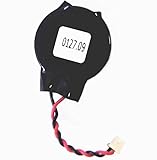
- Standard 2-Pin 2-Wire Connector
- Wire length is 2.5"/6.4cm
- Brand new at 3.3v
- Compatible with Dell Latitude D610 D620 D630 D810 D830 E6430 E6520 E6530
Product prices and availability are accurate as of the date/time indicated and are subject to change. Any price and availability information displayed on Amazon at the time of purchase will apply.
Independent reader supportYour contribution helps us test, update, and keep practical guides available for everyone.
