
iTechGuides is reader-supported. When you buy through links on our site, we may earn an affiliate commission. As an Amazon Associate I earn from qualifying purchases. Learn more
Fix boomy bass and harsh treble in this order: reset the controls, improve speaker and subwoofer placement, reduce room reflections, then make small equalizer changes. Corners, walls, vibrating furniture and untreated room modes usually cause the problem; large bass or treble boosts rarely solve it.
Start with the cause, not the tone controls
A speaker can sound boomy when low frequencies are reinforced by a nearby wall, corner, floor or cabinet. It can sound harsh when high frequencies are overemphasized, reflected repeatedly from hard surfaces, or made more prominent by a tilted speaker or excessive toe-in. The same system may sound balanced in one seat and unpleasant in another because the room, not just the speaker, determines what reaches your ears.
HARMAN Professional’s Chris Hansen summarizes the low-frequency problem this way: “In the low frequencies, the room is in control; your bass performance correlates directly to placement of your speakers.” Small rooms develop room modes—standing-wave peaks and dips—that create one-note bass in some locations and weak bass a few feet away. Treat a dramatic change as you walk around the room as evidence of a room-mode problem rather than a defective driver.
Reset the system before changing anything
Begin with a repeatable baseline so every adjustment has a known effect.
#1 Best Overall

- Wide Compatibility: The PERLESMITH speaker stands feature an adjustable width of 4.5" to 9", making it compatible with most small bookshelf and satellite speakers up to 11 lbs. These speaker stands are compatible with Bose, Harman Kardon, Polk, JBL, Sony, and more. Please note: it is not suitable for round or irregularly shaped speakers.
- Customizable Height for Optimal Sound: These floor speaker stands feature an adjustable height range from 33.3" to 45", positioning your speakers at the perfect level for the best acoustics, whether you're enjoying music or movies. The twist-lock design ensures quick and easy height adjustment without the need for tools.
- Two Cable Management Options: The speaker stands pair feature a 1.18" H x 0.59" W cable hole for routing wires through the hollow poles for a clean look. Please confirm the size before purchase. If the cable holes are too small for connectors or cables to pass through, the floor speaker stands include hook & loop straps to secure cables along the outside of the poles.
- Enhanced Stability: Made from solid steel with a wide base and 20% deeper threaded hole connections, this surround sound speaker stand delivers a rock-solid foundation to keep your speaker secure and balanced. It also includes non-slip foot pads, ensuring safe and stable placement on any floor type.
- Effortless Assembly & Reliable Support: Each pair of speaker stands comes with standard mounting hardware for hassle-free setup. Our US-based customer support team is always online to assist with pre-sale and after-sale support. If you have any questions, feel free to contact us, and we’ll respond within 24 hours.
- Set the amplifier or receiver’s bass, treble, presence and loudness controls to 0 dB or their neutral position.
- Set the subwoofer level to its marked reference or middle position, and disable any “extra bass,” dynamic-bass or virtualizer mode.
- Use a familiar recording with a steady kick drum, acoustic bass, speech and cymbals. Avoid judging with a heavily mastered track only.
- Check that left and right channels are wired with the same polarity. A reversed speaker can create weak, uneven bass that tempts you to add excessive low end.
- Listen at a moderate level. A system that is clean at moderate volume but hard or distorted when loud may be reaching its amplifier or driver limits rather than needing EQ.
Change one variable at a time and note the result from your normal seated position. Returning to this baseline prevents a chain of compensating boosts and cuts.
Move the main speakers away from boundaries
Break the corner boost
Room boundaries reinforce low frequencies. A speaker in a corner receives support from two walls and usually the floor, producing more bass than the same speaker in open space. Move each speaker forward and sideways out of the corner, then listen again before touching the equalizer. Bose’s room guidance likewise recommends moving a bass-heavy speaker away from the corner and rear wall; use the amplifier’s low-cut filter if one is available and the excess remains.
Leave useful rear-wall clearance
As a practical starting point, leave about 12–18 inches behind a speaker when the room allows. The 12–18-inch recommendation is cited for a Bose Lifestyle Ultra Speaker setup, so treat it as a starting range rather than a universal acoustic law. Increase the distance if bass is still thick; reduce it only after checking that the sound does not become thin and the speaker remains stable.
Escape cabinets and tight shelving
Do not place a speaker inside a confined cabinet or flush against a shelf’s back panel. The enclosure can reflect upper bass, while the shelf itself can vibrate. Roku’s placement guidance also calls for keeping speakers away from walls and confined cabinets. If a cabinet is unavoidable, pull the speaker to the front edge, leave air around the enclosure and use isolation pads that do not make it unstable.
Raise the tweeters and stabilize the enclosure
Set bookshelf speakers on stable stands so the tweeters are close to seated ear height. Philips recommends a proper rack and warns that metal racks can vibrate and add harshness; floor placement can add vibration noise. Use stands with a load rating above the speaker’s weight, a broad stable base and effective isolation between the speaker and stand. Tighten fasteners, keep the speaker level and prevent the stand from rocking.
For floor-standing speakers, check that spikes, feet or pads are adjusted evenly and that the cabinet does not contact a resonant shelf or wall. A heavy, rigid support is useful only if it does not transmit a new buzz into the floor or furniture.
Rank #2
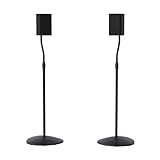
- Height Adjustable: Customize your sound thanks to 10 inches of height adjustment. Now you can mount your speakers directly at ear level, just twist the collar and adjust from 28 to 38 inches. No tools required!
- Premium Design: Built from heavy-gauge steel, these speaker stands will help deliver top quality sound while keeping your speakers safe. The wide base helps prevent against bumps or falls, and included felt pads minimize vibration.
- Universal Speaker Stand: Engineered to securely hold small satellite and bookshelf speakers up to 3.5 lbs, these stands offer three versatile mounting options: L-shaped brackets, a top plate, and a keyhole adapter, ensuring maximum compatibility with your speakers.
- DIY Installation: Easy as 1, 2, 3. This speaker stands pair come with everything you need to take your speakers to new heights, including hardware, base pads and different mounting brackets for your unique setup.
- SANUS Difference: The SANUS adjustable height speaker stand comes with a 5-year warranty, and top-notch Minnesota based customer service. Our experts are ready to chat 7 days a week if you have questions or run into a snag.
Set the listening geometry
Form a symmetrical triangle
Place the left and right speakers the same distance from the main seat and from the front wall. Aim for a listening triangle in which the distance between the speakers is similar to the distance from each speaker to your ears. Symmetry makes the center image stable and prevents one boundary from making one channel boomier.
Recommended Free Tools
Adjust toe-in gradually
Start with the speakers aimed straight ahead. Play a clear vocal and rotate both speakers inward by small, equal increments. Stop when the voice locks to the center without becoming piercing. Excessive toe-in sends more on-axis treble directly at you and can make the upper midrange seem harsh; too little toe-in can weaken the center image and encourage an unnecessary treble boost.
Check the seat before blaming the speaker
Avoid placing the listening position exactly against a rear wall or at the exact midpoint between two parallel walls. Those locations often coincide with strong room-mode pressure. Move the chair forward or backward by a foot and listen for a smoother low end. If the best sound changes substantially across a small area, placement or room treatment will produce a larger improvement than a new tone-control setting.
Reduce reflections that make treble sound hard
Hard, bare surfaces reflect high frequencies. Early reflections from a glass table, bare floor, side wall or large television can combine with direct sound and make consonants, strings and cymbals seem sharp. Bose recommends using rugs, upholstered furniture and bookshelves to break up reflections without making the room acoustically dead.
- Place a rug between the speakers and the listening seat when the floor is wood, tile or concrete.
- Use curtains or fabric blinds on large windows, especially at the first-reflection points beside the speakers.
- Add an upholstered chair or sofa rather than relying only on thin decorative foam.
- Use irregular bookshelves to scatter reflections; a completely empty hard shelf can act like a reflective panel.
- Keep large glass, stone or glossy tables out of the direct path between tweeter and listener.
Do not cover every surface with thick absorption. An overly dead room can remove ambience and make a small treble cut seem necessary. Treat the strongest reflection points first, then reassess.
The Tool Desk
Outbyte PC Repair FREERepair Windows errors before they cause bigger problemsFix Now →Outbyte Driver Updater FREEScan for outdated or missing drivers - takes under a minuteDriver Scan →Use small, targeted EQ changes
Equalization is the final step after placement and reflection control. ADAM Audio’s room-EQ examples use small boundary and desk-loading cuts of about 2–4 dB. Its example treble control range is +1.5, 0 and −1.5 dB, illustrating why a modest cut is preferable to a large correction. Exact control names and ranges vary by receiver and active speaker.
Rank #3
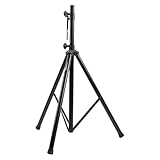
- Tripod speaker stand for easy speaker setup; ideal for use on stage, in a studio, or at home
- 99.2-pound maximum weight capacity; adjustable height (4.1 to 6.6 feet); sturdy, expandable, long tripod legs provide stability in any environment
- Constructed with a durable steel tube for reliable strength; upper shaft measures 1.4 inches (35mm) in diameter; If the inner diameter of speaker bottom hole is 38mm, then need to purchase an additional 35mm to 38mm adapter
- Safety pin ensures secure speaker placement; black finish for easy coordinating with other equipment
- Backed by an Amazon Basics 1-year limited warranty
| What you hear | First adjustment | Conservative EQ starting point | What to avoid |
|---|---|---|---|
| One-note or swollen bass near a wall | Move the speaker forward and out of the corner; remove cabinet contact. | Low-cut filter if available, or bass −2 dB; reassess before another change. | Adding treble to make excess bass seem less obvious. |
| Bass buildup from a desk or console | Raise the speaker, pull it to the front edge, and isolate it. | Boundary/desk correction around −2 to −4 dB where the speaker provides it. | A large bass cut that makes the system thin elsewhere. |
| Vocals and cymbals sound sharp | Reduce toe-in and treat the first-reflection surfaces. | Presence or treble −1.5 dB, then listen for several tracks. | Deep treble cuts that remove detail instead of glare. |
| Low end is weak everywhere | Check polarity, distance from boundaries and the listening seat. | Do not boost until wiring and placement are verified. | Large boosts that consume amplifier headroom. |
Use a low-cut filter when the main speakers are being asked to reproduce bass they cannot handle cleanly, or when a subwoofer will take over below the chosen crossover. A cut reduces the room-driven peak; a boost cannot fill a cancellation caused by a room mode and may only increase distortion.
Integrate a subwoofer without muddy bass
Find the subwoofer position with a crawl
Bose’s subwoofer-crawl method reverses the usual process:
- Place the subwoofer temporarily at the main listening position, at roughly ear or chest height if practical and safely supported.
- Play familiar bass-heavy music or a smooth bass sweep at a moderate level.
- Walk slowly around the room perimeter, listening for locations where bass is even, tight and similar in level across several notes.
- Put the subwoofer in one of those locations, then return to the listening seat and verify the result.
Do not choose the loudest location automatically. A spot that produces one huge note and little else is probably exciting a room mode. A smoother location usually gives more usable bass after level and crossover are adjusted.
Choose a sensible crossover
Audient identifies 80 Hz as a common crossover starting point, or approximately 15 Hz above the main speakers’ low-frequency cutoff. If your main speakers are specified to reach 65 Hz, a starting point near 80 Hz follows that rule; the specification is not a guarantee of flat output in your room. A crossover set too high can make bass sound boomy or reveal the subwoofer’s location because upper-bass content becomes directional.
Start at 80 Hz when you do not have a reliable measurement, then move in small steps. Lower the setting if the subwoofer sounds localized or overlaps strongly with the mains. Raise it slightly if there is a hole around the handoff and the main speakers roll off early. Use the receiver’s bass-management mode consistently; do not also engage a second, conflicting crossover on the subwoofer unless the system documentation requires it.
Match level, polarity and phase
Set the subwoofer level low enough that bass supports the mains rather than calling attention to itself. Toggle polarity or phase at the listening seat and keep the setting that produces stronger, smoother bass around the crossover region. If the subwoofer has a continuously variable phase control, adjust it while playing a tone or repeating bass line near the crossover, then recheck with music. A phase setting that is loudest at one seat may not be smooth throughout the room, so favor evenness over maximum output.
Rank #4

- 【Optimal Home Theater Audio Experience】 Home Theater Essential - Whether you’re chilling on the couch or dancing in your socks, easily twist the collar to change bookshelf speaker stands from 28" to 38" to let sound follow your ear. Let's enjoy more immersive, room-filling vibe with fewer reflections!
- 【Universal Speaker Brands Friendly】 Equipped with three key mounts - Top plates(with pads), L-shaped brackets, and Dual brackets, think of the surround sound speaker stand as a universal remote for most satellite speakers and small bookshelf speakers from Klipsch, Polk, JBL, Sony, Vizio, Edifier, and more. Versatile mounting options for theater setup.
- 【Rock Solid Stability】 As a trinity of sturdy metal pole, weighted base, and anti-slip pads, the rear speaker stands make speakers stay put-even when your playlist gets rowdy; Pads protect carpet or tile flooring. Each stand supports up to 11lbs—ideal for small home audio systems.
- 【Cable Wire Management】 Say goodbye to spaghetti wires. The speaker stands for surround sound, keep wires tucked away with larger built-in cable channel. Plus, ten velcro straps make you quickly fix and change the wire.
- 【Quick Setup in Minutes】 The speaker stands pair comes with all the necessary hardware and step-by-step instructions. Grab a screwdriver—no extra tools or hassle required, and you’re done in minutes.
Recognize a room-mode problem
Walk from the front wall to the rear wall while playing a sustained bass note. If the note swells, disappears and swells again over short distances, the room is creating peaks and nulls. Moving the speakers and seat changes which modes you excite; moving the subwoofer can make the response more uniform. A tone control cannot correct every location simultaneously because a cut at one peak may make another seat too quiet.
Quick wins for a faster PC:
Clear out junk files and repair common Windows errorsFree Scan →Scan for outdated or missing drivers - takes under a minuteDriver Scan →When placement is constrained, consider measured room correction. Anthem ARC, for example, measures the room response and applies filters and equalization when the response remains uneven. Systems differ in microphone requirements, filter limits and compatibility, so verify that the correction system supports your receiver, amplifier or active speakers. Measurement-based correction is most useful after basic placement, polarity and crossover settings are correct.
Choose physical upgrades by the problem they solve
| Upgrade category | Compare these specifications | Best use | Limit |
|---|---|---|---|
| Speaker stands | Height, load rating, footprint, stability and vibration isolation. | Raises tweeters to ear level and removes speakers from resonant furniture. | Cannot eliminate a room mode by itself. |
| Isolation pads or feet | Weight capacity, material, angle adjustment and compatibility with the floor. | Reduces cabinet-to-furniture vibration and rattles. | Does not replace wall clearance or correct tonal balance. |
| Acoustic panels | Placement, thickness, absorption range and coverage area. | Controls strong side-wall or ceiling reflections that make treble hard. | Thin decorative panels may absorb little bass. |
| Bass traps | Thickness, corner placement, low-frequency range and room coverage. | Reduces persistent low-frequency buildup when placement alone is insufficient. | Requires space and usually several strategically placed units. |
| Room-correction system | Measurement method, microphone position, filter control and device compatibility. | Refines the response after speakers and subwoofer are positioned. | Cannot restore bass at a deep null or fix rattling hardware. |
| Subwoofer | Crossover range, phase/polarity adjustment, level control and placement flexibility. | Extends low bass while allowing the main speakers to operate within their strengths. | A poorly placed or overly loud subwoofer makes boom worse. |
Troubleshoot by symptom
“Bass is boomy only in my chair”
Move the chair and subwoofer before changing EQ. Test a seat several inches forward or backward, then perform the crawl. If the change is dramatic, use multiple subwoofers or bass treatment only if your room and equipment support them; otherwise choose the smoothest practical position and apply a modest cut.
“Bass is boomy from both speakers, but not from headphones”
Headphones bypass the room, so inspect wall and floor boundaries, furniture vibration and the subwoofer crossover. Disable the subwoofer temporarily. If the boom remains, adjust main-speaker placement; if it disappears, lower the subwoofer level or crossover and check phase.
“Treble became harsh after moving the speakers”
Moving a speaker away from a wall can reduce bass reinforcement, making an unchanged treble level seem more prominent. Recheck toe-in and add a small −1.5 dB treble or presence adjustment only after treating the nearest hard reflections. Do not compensate with a large bass boost.
Do these 3 things before closing this tab:
1Clear out junk files and repair common Windows errors2Fix the driver behind crashes, sound loss and screen glitches3Repair Windows errors before they cause bigger problems“The system sounds harsh only when loud”
Lower the volume and check whether the harshness disappears. Persistent loud-only glare can indicate amplifier clipping, a damaged tweeter, a rattling grille or a loose stand. Inspect cables, grille fit and furniture contact; if distortion remains with neutral controls and moderate placement, have the speaker or amplifier serviced.
Best Value

- HEAVY-DUTY CONSTRUCTION: All-steel build supports up to 100 lbs per stand, ideal for speakers or lights in any setup.
- ADJUSTABLE HEIGHT: Customize your setup with a height range up to 71 inches for optimal sound or lighting coverage.
- EXPANDABLE TRIPOD LEGS: 0-32 inch base spread ensures maximum stability on a variety of surfaces.
- CONVENIENT CARRY BAG INCLUDED: Carry and store your stands with ease using the included durable transport bag.
- UNIVERSAL COMPATIBILITY: Works with virtually any speaker with standard 35mm mounting socket
“The subwoofer sounds like it is beside me”
Lower the crossover, reduce the level and move the subwoofer using the crawl. A crossover above the useful low-frequency range of the mains can expose directional upper bass. Confirm that a receiver’s crossover and the subwoofer’s own low-pass filter are not both set high.
“One side has more bass than the other”
Swap left and right speaker cables at the amplifier. If the imbalance follows the speaker, inspect that speaker and its placement. If it stays on the same amplifier channel, check the electronics and cable. Also verify that one speaker is not closer to a corner, window or large cabinet.
A repeatable fine-tuning sequence
- Reset all tone, loudness, subwoofer and virtual-surround settings to neutral.
- Move the main speakers out of corners and tight cabinets, leaving roughly 12–18 inches behind them where practical.
- Raise them so tweeters are near seated ear height; stabilize and isolate the stands or furniture.
- Center the listening seat between the speakers, then adjust toe-in gradually with a vocal recording.
- Add a rug, curtains, upholstery or bookshelves at the strongest hard-surface reflection points.
- Apply a low-cut filter or a small bass reduction if boom remains; avoid large boosts elsewhere.
- For a subwoofer, perform the crawl, begin near 80 Hz, then adjust level, crossover and polarity in small steps.
- If bass changes sharply around the room, treat it as a room-mode issue and consider measured correction or bass traps.
- Save the settings only after checking several recordings at your normal listening level.
This sequence keeps mechanical, acoustic and electronic corrections in the right order. It also makes it clear whether a change solved the cause or merely masked a symptom.
Frequently Asked Questions
Can moving speakers really change bass more than changing the amplifier?
Yes. Wall, corner and floor boundaries can reinforce or cancel low frequencies, so a small placement change may alter bass far more than a different amplifier tone setting.
Should I use acoustic foam to fix harsh treble?
Only if its thickness and placement match the reflection problem. A rug, curtains, upholstery or bookshelves may address early reflections more effectively than thin foam, while excessive absorption can make the room unnaturally dead.
Is 80 Hz always the correct subwoofer crossover?
No. It is a common starting point. Audient also suggests roughly 15 Hz above the main speakers’ low-frequency cutoff; adjust lower or higher according to localization, overlap and the measured or audible handoff.
Why did a bass boost fail to fix missing bass?
A room-mode cancellation is a positional null. Boosting that frequency may increase amplifier strain without restoring sound at the seat; moving the speaker, subwoofer or listening position is the effective first response.
What’s actually slowing this PC down?
Pick the symptom - the matching free tool is one click away.
Quick Recap
Product prices and availability are accurate as of the date/time indicated and are subject to change. Any price and availability information displayed on Amazon at the time of purchase will apply.

