
Free tools Windows power users keep installed
One-click scans. No signup required.
iTechGuides is reader-supported. When you buy through links on our site, we may earn an affiliate commission. As an Amazon Associate I earn from qualifying purchases. Learn more
A demo can fail on a clean checkout even when the submitted commit is correct because the successful run depended on something outside the committed source: installed dependencies, generated assets, a particular runtime, environment variables, or an external service. Recreate the exact commit in a new directory, follow the repository’s own setup instructions, and use the first error to identify what is missing.
What a clean checkout tests
An existing working directory may contain dependencies, generated files, or configuration that Git does not include in the submitted commit. A fresh checkout removes that local state. The rehearsal therefore tests both the committed repository and whether another person can follow its setup instructions.
Start with the project’s README and dependency manifest. Setup varies by language and project; manifests may include files such as package.json, requirements.txt, or Gemfile. Follow the project’s documented workflow rather than borrowing commands from another ecosystem. GitHub’s guide to setting up a repository points readers to the README and project files for setup information.
Recommended Free Tools
Rehearse the submitted commit from scratch
-
Clone the repository into a new directory and check out the exact submitted commit. Record its commit identifier so you know which source was tested.
#1 Best Overall
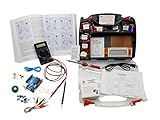 Make: Electronics 3rd Edition Ultimate Electronics Kit 1 and 2 Bundle
- ProTechTrader's Make: Electronics 3rd Edition Kits 1 and 2 form an electronics component pack for Charles Platt's book. The bundle combines Deluxe Kit 1 and Economy Kit 2 parts.
- Build the book's circuits with resistors, capacitors, fuses, diodes, a breadboard, microcontroller, ICs, and transistors. The 500-item bundle keeps the core parts together for project work.
- Additional contents include an IC assortment, 7-segment display, cylindrical magnets, voltage regulator, piezo crystal earphone, and Arduino Uno compatible controller with USB cable.
- Kit 1 and Kit 2 include a storage organizer, bench tools, soldering iron, 9V adapter, and components for AC and battery-powered work. Package size is 12 x 13 x 3 inches.
- The companion book is sold separately. Choose this component bundle when you have Make: Electronics 3rd Edition and need parts for its experiments. Check edition and kit numbers before assembly.
-
Read the README and identify the required runtime, dependency manager, manifest, lockfile, and startup command. The repository’s own instructions should determine the commands you run.
-
Install dependencies as documented. If installation fails, save the first error before changing versions or files; otherwise, you may lose evidence of what the submitted setup actually requires.
Rank #2
 OSOYOO ESP8266 NodeMCU IOT Starter kit with ESP-12E Development Board Open Source Serial Module
- This kit comes with NodeMCU micro controller board which is based on ESP8266, an enconimcal and powerful chip which supports wifi and IDE .
- This kit is developed specially for those want to learn and play IoT ( Internet of things). In order to connect Things to Internet, for this kit, we uses a very popular and simple IOT protocol - MQTT which has many free open-source coding resources and mobile APP to help beginners to get started in an easy and economical way. Once you master MQTT, you can also buit a smarter home or something else .
- The kit includes free on-line 17 sample lessons with detailed circuit graph, step-by-step tutorial, fully-tested sample codes and video which can save lots of your time and speed up your learning progress .
- The kit is nicely packed in plastic box. This IOT programming learning starter kit includes more than 22 kinds of different electronic components items .
- The kit can not only help students make many fancy projects in science fair, hackathon and homeworks, but also prepare the necessary knowledge base for their future career path in an interesting way.
-
Run the documented build step if startup or the error message indicates that generated assets are needed. A build may create files that are absent from a fresh checkout.
Recommended: Update Every Outdated Driver on Your PC in One Scan - Free →Recommended: PC Feels Slow? A Free Scan Shows What's Dragging Windows Down →Recommended: Crashes or Glitches? A Free Driver Scan Usually Finds the Culprit →Special offer. See more information about Outbyte and uninstall instructions. Please review EULA and Privacy policy. -
Check whether the application needs configuration or services that were available on your development machine, such as environment variables, a database, system libraries, or a service account.
Rank #3
 Make Electronics 3rd Edition Kit 1 Deluxe Electronic Component Kit
- Learn electronics with ProTechTrader's Deluxe Kit 1 for Make: Electronics, 3rd Edition. Its 200-piece electronics kit matches early Sections 1-3 by Charles Platt.
- Build breadboard circuits with specified passive parts and semiconductors, then move projects to perforated board. A double-sided organizer keeps labeled parts sorted.
- Measure and assemble projects with the PDM631 multimeter and 30W soldering iron. Exact solder, heat-shrink tubing, wire, and test leads support the lesson work.
- Power the supported experiments with the supplied 9V battery, connector, or AC/DC adapter. This electronics tool kit sets up a new beginner bench in one package.
- Choose Deluxe for home study or a supervised class when your new bench needs tools, project power, and the parts used in Sections 1-3. Book sold separately. This product is not a toy and is designed for use by teens and adults ages 13 and up
-
Record the command you ran, the expected result, the observed result, and the first step that failed. After making a repair, repeat the rehearsal from another clean copy.
Match the first error to the likely missing piece
A dependency or module cannot be found
Check that you installed dependencies using the project’s documented package manager and lockfile. GitHub’s troubleshooting guidance gives npm install as a remedy for a Cannot find module error when starting a local server. If that does not resolve that particular problem, the guide suggests removing node_modules and reinstalling. These are remedies for that scenario, not commands to apply to every project. See GitHub’s troubleshooting guidance.
Rank #4

- Learn electronics with ProTechTrader's Make: Electronics 3rd Edition Kit 1 Economy pack. Nearly 200 selected parts match Sections 1-3 by Charles Platt.
- Build hands-on circuit projects on solderless breadboards, then move selected work to perforated board. The electrical components match the early lessons and diagrams.
- Test switching, sound, and control circuits with an electronics kit that includes passive parts and semiconductors. An 8-ohm speaker and 9V relay support key experiments.
- Four wire colors separate circuit paths, and alligator-clip leads handle temporary connections. ProTechTrader sorts components in labeled bags for fast cleanup.
- Choose the Economy component pack for Sections 1-3 at home, in supervised STEM, homeschool, or club use if you own bench tools and project power. Book sold separately. This product is not a toy and is designed for use by teens and adults ages 13 and up
Static assets or generated files are missing
Determine whether the repository expects a build step before the demo starts. GitHub documents npm run build as a fix for a particular local rendering test that fails because of static assets while passing in CI. That example does not establish that every project should run this command; use it only if the project’s tooling and error point to that build step. The same GitHub guide describes the static-asset case.
The program starts but cannot connect or configure itself
Check the project’s instructions for required environment-variable names and external services. Document variable names and safe example values, but do not publish secret values. If the demo needs a database, system library, or service account, a clean checkout alone will not supply it; the setup instructions must explain how to provide it.
Best Value

- Cover Experiments 7-14 with this ProTechTrader electronics kit pack for Charles Platt's Make: Electronics, Third Edition.
- Work with the included resistors and LEDs while following the corresponding experiments in your companion book.
- Prepare with a 9V battery and begin without assembling the component pack first.
- Check the compact 2 x 1 x 3 inch package, 0.1-pound weight, and confirmed metal material before use.
- Match ProTechTrader Mini Kit 2 to Experiments 7-14 by Charles Platt. Book sold separately. This product is not a toy and is designed for use by teens and adults ages 13 and up
The same dependencies behave differently
Compare the runtime and dependency-manager versions used for the working run with those available in the clean environment. Record the operating system, runtime and dependency-manager versions, and commit identifier. A project may also use an isolated environment or locked dependency configuration; Hatch’s documentation describes those practices, but Hatch is not required or suitable for every repository. Read Hatch’s environment documentation.
Independent reader supportYour contribution helps us test, update, and keep practical guides available for everyone.Make setup reproducible for the next person
Update the README or other project setup documentation with the steps that actually worked from a fresh checkout. Include the runtime and dependency-manager requirements, install and build commands, startup command, and required configuration or services. Keep secrets out of the repository and documentation; specify how to supply them safely instead.
Do not silently change dependencies until the demo happens to start and then describe the altered setup as though it were the original. Preserve the first failure, make one targeted repair at a time, and verify the final instructions from a new checkout. That distinguishes a real fix from a working directory that still depends on hidden local state.
Quick Recap
Product prices and availability are accurate as of the date/time indicated and are subject to change. Any price and availability information displayed on Amazon at the time of purchase will apply.

