
iTechGuides is reader-supported. When you buy through links on our site, we may earn an affiliate commission. As an Amazon Associate I earn from qualifying purchases. Learn more
You can find and follow a near-Earth asteroid online without owning a telescope. NASA and JPL tools let you look up a known object, filter the catalog, see which known objects are in a selected patch of sky, check what may be observable from a location, calculate a time-specific position, and interpret impact-monitoring results. Those are different jobs, so the fastest route is to choose the tool that matches your question.
Use CNEOS NEO Lookup when you have a designation, NEO DB Query to search the catalog by orbital or physical criteria, Sky Search to identify known objects in a field at a chosen time and location, What’s Observable to plan a night, SBDB to inspect the orbit, and Horizons to generate predicted positions. Scout handles unconfirmed candidates; Sentry monitors confirmed near-Earth objects for possible impacts over roughly the next century.
Which NASA tool should you use?
Start with the task, not with the name of a website. The tools overlap in subject matter but not in purpose.
The Tool Desk
Outbyte PC Repair FREEClear out junk files and repair common Windows errorsFree Scan →Outbyte Driver Updater FREEScan for outdated or missing drivers - takes under a minuteDriver Scan →| What you want to do | Use | What it returns | Limitation to remember |
|---|---|---|---|
| Look up an asteroid you already know | CNEOS NEO Lookup or SBDB Lookup | Known orbital and physical parameters and related object information | The record is the best available orbit and data, not certainty about every future position. |
| Search for objects matching criteria | NEO DB Query or SBDB Query | A filtered population of cataloged bodies | Results change with your constraints and with the database’s contents. |
| Identify objects in a particular image or field | Sky Search (also called Small-Body Identification in the service family) | Known objects expected in a specified sky region, time, and location | It matches against known bodies; it is not a discovery survey. |
| Plan an observing night | What’s Observable (Small-Body Observability) | Objects meeting the service’s observability criteria for a site and date | “Observable” does not guarantee an easy visual detection. |
| Calculate where an object will be | Horizons | An ephemeris: predicted positions for selected times and circumstances | Predictions inherit the orbit solution and its uncertainty. |
| Check a newly reported, unconfirmed candidate | Scout | A short-term, preliminary assessment of candidates on the Minor Planet Center’s NEO Confirmation Page | A candidate can be an observing artifact, and Scout ratings are not rigorous probabilities. |
| Check possible future impacts of a confirmed object | Sentry | Long-term impact-monitoring results, generally over the next 100 years | A listing represents possible paths allowed by current observations, not an expected collision. |
A useful distinction is identification versus observation. Sky Search can tell you which cataloged bodies should be in a field. It cannot discover an object that is absent from the catalog, and a listing in What’s Observable does not mean a consumer telescope will show it.
#1 Best Overall

- Funny astronomy humor design for stargazers, amateur astronomers, astronomy club, space nerds, backyard astronomers and more.
- Lightweight, Classic fit, Double-needle sleeve and bottom hem
What counts as a near-Earth asteroid?
NASA/JPL Asteroid Watch defines a near-Earth object (NEO) as an asteroid or comet whose orbit brings it within 120 million miles (195 million kilometers) of the Sun. A near-Earth asteroid (NEA) is the asteroid subset of that broader group.
“Potentially hazardous asteroid” (PHA) is a narrower classification. NASA/JPL describes PHAs as asteroids larger than about 460 feet (140 meters) across whose orbits come within 4.6 million miles (7.5 million kilometers) of Earth’s orbit. The classification describes size and orbital geometry; it does not say that an impact is predicted.
Find a known asteroid by designation
If an observatory, news report, observing list, or previous search gives you a designation, use CNEOS NEO Lookup first. SBDB Lookup is a useful companion when you need the underlying small-body record.
- Open CNEOS NEO Lookup. Enter the object’s designation in the search field. Use the official designation rather than an informal nickname; provisional and numbered designations can be formatted differently.
- Review the identity. Confirm that the returned object is the one you intended. Look for its designation, object type, and links or references to its orbit and physical information.
- Read the orbit section. Treat the listed elements and uncertainty information as a solution derived from observations, not as a guarantee. A short observational history generally leaves more room for the predicted path to change.
- Move to Horizons for a date and place. Lookup pages describe the object; Horizons propagates the orbit to produce positions at times you specify.
- Use Sentry only for the risk question. A lookup record alone does not indicate whether an object is on an impact-monitoring list.
SBDB stores the orbit and physical parameters that support these services. If two pages show slightly different presentation or precision, use the service designed for your question rather than treating formatting differences as a disagreement in the science.
Search the catalog by size, orbit, or other criteria
When you do not have a designation, use NEO DB Query or SBDB Query. These tools let you define a population instead of opening objects one at a time.
Rank #2

- 【Excellent Optics】Astronomical telescope features 80mm aperture 600mm(f/6.7) focal length-The big aperture can capture more light; high transmission multi-fully coated optical lens can improve light transmittance, reduce the reflection of light. It will bring you more bright and clear images.
- 【Portable & Stable】Our refractor telescope has a backbag, an adjustable aluminum tripod and an upgraded phone adapter. All accessories can be packed into the bag, which is convenient for you to carry and storage for traveling. The tripod is stable and the height can adjust from 17.7" to 52", which is suitable for adults and kids. With the phone adapter, you can take amazing photos through your phone.
- 【Easy to Operate】 This telescope is easy to assemble even for astronomy beginners and kids. You can set up easily with the detail installation manual and video. No tools are required. It’s a great astronomy gift telescope for adults, astronomy enthusiasts, beginners and kids 8-12.
- 【Optimum Magnification】Our telescope for kids and adults is equipped with two replaceable excellent-quality eyepiecesa (20mm and 9mm) for 30X and 66X magnification. A moon filter transmits only 13 percent of the incoming light and improving contrast. Also with 5x24 finderscope, you can locate objects easily. A great option for astronomy lovers to explore the moon, Saturn and Jupiter.
- 【Satisfaction Service】We provide 3 years satisfaction service. If you have any questions about the product and service, please feel free to contact us to get 24-hour technical support from our expert team. Whether observing moon or viewing planets, our telescope can meet your all needs. It’s a great telescope for adults & 8-12 kids & astronomy beginners.
- Choose the database query page. Decide whether you need the NEO-focused list or the broader small-body database.
- Set only constraints you understand. Depending on the query, filters can include orbital and physical properties. A very narrow combination can return few or no results even when many objects satisfy a looser version of the question.
- Run the query and inspect the result columns. Record the designation before opening an individual object. The result is a database selection, not a statement that every matching body is currently observable.
- Open promising records in SBDB or CNEOS. Check the orbit quality, observation context, and any uncertainty information before drawing conclusions.
- Generate an ephemeris in Horizons. A population search tells you which objects match your criteria; Horizons tells you where one selected object is expected to appear at a particular time.
Query results depend on the selected constraints and on what is in the database at the time of the search. Save the query settings with your notes if you need to reproduce the result later.
Identify known asteroids in a sky field with Sky Search
Sky Search is the right choice when you have a photograph, a telescope field, or a planned pointing and want to know which known objects should be there.
Free tools Windows power users keep installed
One-click scans. No signup required.
- Specify the observing circumstances. Enter the date and time, observing location, and the sky region or field of view. Use the same time standard and coordinates that describe the image or planned observation.
- Set the field size accurately. A field that is too large can produce a long, distracting list; one that is too small can omit a nearby object.
- Run the identification. The service compares the requested field and time with cataloged small bodies.
- Compare returned positions with the image. A match is an identification candidate, not proof that an unmeasured dot is an asteroid. Check the time, pointing, and image scale before accepting it.
- Follow the object in Horizons. Request positions over the image’s exposure interval or over future times to see how the predicted location changes.
Sky Search is not a substitute for a discovery pipeline. An uncataloged moving point may require separate observations and submission through the professional observation system before it can receive a reliable orbit.
See which asteroids may be observable tonight
Use What’s Observable when your starting point is a location and a night rather than an object name.
- Enter the observing site. Provide the location or observing-site information requested by the page.
- Select the date and night. Be precise about the local date, especially when observing after midnight.
- Review the returned list. Treat it as a list that meets the service’s criteria for that site and date, not as a ranked promise of easy targets.
- Check each candidate in Horizons. Generate time-specific positions for the hours you can observe and note how quickly the object’s position changes.
- Assess practical detectability. Consider apparent brightness, altitude, twilight, moonlight, sky transparency, tracking accuracy, camera or telescope capability, and the length of your observing window.
NASA/JPL’s observability pages do not guarantee that a particular consumer telescope will show a listed asteroid. “Observable” is a tool criterion; successful visual or photographic detection depends on the target, site, date, sky, and equipment.
Rank #3

- 【First Telescope for Clear, Crisp Views】Start exploring the Moon and nature with confidence. Designed for kids, adults and astronomy beginners, this 70mm aperture refractor telescope features fully multi-coated optical glass that gathers more light, enhances contrast and reduces glare. Whether in your backyard, at a campsite, or on an outdoor adventure, it provides you with a clear and bright field of vision
- 【15X–150X Versatile Zoom for Moon & Nature】Featuring a 300mm focal length, two interchangeable eyepieces (20mm & 6mm), a 1.5X erecting eyepiece and a 3X Barlow lens, this telescope offers 15X–150X magnification to suit different viewing needs. Enjoy a wide field of view for locating targets at lower magnification, then zoom in to explore lunar craters and Saturn's rings in greater detail
- 【Tool-Free Setup & Stable Tracking】Spend less time assembling and enjoy precise viewing. No tools are required, making it easy for kids and adults beginners to set up. The sturdy tripod provides stable support for smoother observation and helps reduce shaking. Combined with the 5×24 finder scope (note: an inverted image in the finder scope is normal), it allows you to quickly locate targets when observing the planets, wildlife, or distant buildings
- 【Capture & Share with Phone Adapter】Share your favorite moments instantly with the included phone adapter and wireless remote, making it effortless for beginners to capture clear, stable photos of distant scenery through their phone. It is also a perfect telescope for kids to explore the natural world and helps them easily identify plants, animals and celestial objects
- 【Beginner's Gift & Lifetime Maintenance】It comes in an exquisite gift box for easy carrying and storage, making it a great astronomy gift for birthdays, Christmas and other special occasions. We also offer lifetime maintenance and professional customer support—please message us via Amazon Messages for any product-related questions
Track an asteroid’s path with SBDB and Horizons
Online tracking usually means following a published orbit and requesting updated predicted positions. The workflow below separates the relatively stable orbit record from the time-specific ephemeris.
1. Inspect the orbit in SBDB
Open the object’s SBDB record and note the designation, orbit solution, physical information when available, and uncertainty indicators. CNEOS orbit solutions are based on the available astrometric observations and a modeled calculation; they are refined as new measurements arrive.
2. Choose the observer and time span in Horizons
Set the observing location, start and end times, and step interval. A site on Earth and a spacecraft location are different observing circumstances, so select the one that matches your use. For a short exposure, request sufficiently fine time steps; for a multi-night plan, use an interval that makes the motion easy to see.
3. Read the ephemeris as a prediction
Horizons produces an ephemeris, meaning predicted positions for the circumstances you entered. Use the output to plan where to point and when to look, then carry the orbit uncertainty into your expectations. A future position is not a direct observation and can shift when additional astrometry improves the solution.
4. Recheck before an observing session
For fast-moving or recently observed objects, generate a fresh ephemeris close to the session. Preserve the input location, times, and settings in your notes so another observer can reproduce the result.
Quick wins for a faster PC:
Clear out junk files and repair common Windows errorsFree Scan →Fix the driver behind crashes, sound loss and screen glitchesFind Drivers →Rank #4

- Professional Astronomical Refractor Telescope: If you are interested in astronomy or like to explore the night sky, the MEEZAA astronomical telescope is for you. A telescope for adults astronomy beginners to explore nature and the universe
- 90mm Large Aperture: The astronomy telescope has an 800mm(f/8.88) focal length and 90mm aperture. The 90mm aperture captures more light pictures, fully multi-coated optical glass lenses with high transmission coating improve image brightness and clarity
- Optimum Magnification (32X-240X): Our telescope for adults high powered is equipped with two eyepieces(10 mm and 25 mm) and a 3X Barlow lens. The 3X Barlow lens triples the magnification of each eyepiece, allowing us to observe unprecedented lunar details
- Convenient Accessories: Includes an adjustable stainless steel tripod (28 to 46 inches) for flexible viewing. All accessories fit neatly into the carry bag. Use the phone adapter to capture photos and videos, sharing moments for backyard astronomy, camping nights, and outdoor star parties
- Quick Setup, Big Discoveries: With a detailed paper manual, 90% of users assemble in 10 minutes. MEEZAA telescopes are trusted by thousands for learning astronomy, exploring nature, and creating unforgettable moments under the stars
How observations become a trackable orbit
The online records are the end of a measurement pipeline.
- Survey telescopes image wide areas. Wide-field surveys repeatedly photograph large portions of the sky and report positions of moving sources.
- The Minor Planet Center receives the astrometry. The MPC is the public archive for small-body position measurements.
- Follow-up observations extend the arc. Additional positions on later times and nights help distinguish a real moving body from an artifact and reduce the range of possible orbits.
- CNEOS computes an orbit solution. CNEOS describes using complete astrometric observation sets, data weighting and debiasing, perturbation models, and numerical methods.
- SBDB archives the solution and uncertainties. The resulting orbital parameters and uncertainty information support lookups, ephemerides, close-approach calculations, and risk analysis.
In this context, “tracking” can mean two different things. A reader tracking online is following the published orbit and Horizons predictions. An observer tracking operationally is collecting repeated astrometric measurements that can be submitted through the accepted observing process and used to refine the orbit.
Scout and Sentry: two very different risk tools
| Characteristic | Scout | Sentry |
|---|---|---|
| Object status | Unconfirmed candidates on the Minor Planet Center NEO Confirmation Page | Confirmed near-Earth objects |
| Time horizon | Short-term, preliminary assessment | Potential impacts over roughly the next 100 years |
| Purpose | Flag candidates that deserve attention and follow-up | Continuously search the current catalog for possible future Earth impacts |
| Certainty | Some detections may be artifacts; ratings are not rigorous probability assessments, especially for short arcs | Impact entries represent possible paths allowed by current orbital uncertainty |
| What happens after confirmation | The candidate leaves the confirmation page | Long-term monitoring can continue through Sentry |
How to read a Scout entry
Scout is designed for an object that has not yet been confirmed. Its provisional designation is unofficial, and the available observation arc may be very short. A high-interest indicator means that follow-up could be valuable; it is not a measured probability that the object will hit Earth. Because artifacts can enter the candidate stream, do not treat a Scout entry as a confirmed asteroid.
How to read a Sentry entry
Sentry scans confirmed NEOs for possible future impact paths. An entry can appear because the observations still allow a range of orbits and some members of that range intersect Earth. As more observations constrain the orbit, the object can be removed from the risk page. The correct interpretation is conditional: an impact path is mathematically allowed by present uncertainties, not that a collision is expected.
What NASA’s current risk statement means
NASA/JPL Asteroid Watch stated on the page retrieved for this guide that “There is currently no known significant threat of impact for the next hundred years or more.” The word currently matters: impact-monitoring results are updated as observations improve or alter an orbit. Check the live Asteroid Watch and CNEOS pages when making a time-sensitive claim.
Best Value
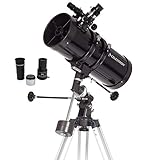
- PERFECT ENTRY-LEVEL TELESCOPE: The Celestron PowerSeeker 127EQ is an easy-to-use and powerful telescope. This 127mm Newtonian Reflector offers enough light gathering ability to see planets, the Moon's craters, distant stars, the Orion Nebula, and more.
- MANUAL GERMAN EQUATORIAL MOUNT: With its slow-motion altitude rod, the German Equatorial mount allows you to navigate the sky with ease. Find celestial objects quickly and follow them smoothly & accurately as they appear to drift across the night sky.
- COMPACT AND PORTABLE: The ideal telescope for adults and kids to use together, the PowerSeeker is compact, lightweight, and portable. Take it to your favorite campsite, a dark sky observing site, or simply the backyard.
- MULTIPLE ACCESSORIES: The Celestron PowerSeeker 127EQ Telescope comes with 2 quality eyepieces (20mm and 4mm) plus a 3x Barlow lens to triple the power of each. You'll also receive a FREE download of one of the top-rated astronomy software programs.
- UNBEATABLE WARRANTY & SUPPORT: Buy with confidence from Celestron, a leading telescope brand in California since 1960. Your purchase includes a 2-Year US Warranty and unlimited support from our team of US-based experts.
NASA’s NEO Observations Program page, published February 12, 2019, describes a congressionally directed objective to find, track, and characterize at least 90 percent of the predicted NEO population 140 meters and larger. That is a stated program objective, not evidence that the target has been achieved.
Do you need a telescope?
No. Searching the catalogs, reading an orbit, generating an ephemeris, and viewing Scout or Sentry results are online activities. A telescope becomes relevant only if you want to attempt an actual visual or photographic observation.
Detection depends on more than aperture. The object’s apparent brightness, its position above the horizon, twilight and moonlight, transparency and light pollution, the telescope or camera, tracking quality, and exposure strategy all matter. NASA’s public tool descriptions do not promise that a particular consumer instrument will detect a particular asteroid.
Windows Errors? Fix Them Before They Spread
Repair common Windows errors and clear accumulated junk for a smoother, more stable PC - no reinstall needed.Free scan · no reinstallCrashes, No Sound, or Screen Glitches?
Random freezes, missing sound and display glitches usually trace back to one bad driver. Find and replace yours safely.Free scan · under a minuteAmateur observers can contribute to the worldwide astrometric stream, but a casual sighting is not automatically a reportable measurement. Use the observing and reporting standards associated with the Minor Planet Center and the relevant follow-up program before submitting data.
Use the NASA/JPL API when you need repeatable queries
The JPL SSD/CNEOS API catalog exposes machine-readable services for Horizons, close approaches, object identification, observability, SBDB, Scout, and Sentry. It is useful for scripts, dashboards, and repeatable research workflows that can handle JSON responses.
For a first search, the human-facing CNEOS pages are easier. Move to the API when you need to run the same query regularly, archive results, combine asteroid data with your own observing log, or feed an ephemeris into another program. Record query parameters, retrieval time, and returned uncertainty information because the underlying catalog changes.
Common mistakes and how to correct them
- Using the wrong tool for the question: use Lookup for a known designation, DB Query for a population, What’s Observable for a site and date, Sky Search for a field, and Horizons for positions.
- Confusing “observable” with “visible to the unaided eye”: inspect brightness, geometry, sky conditions, and equipment before planning a detection.
- Calling Sky Search a discovery service: it identifies known cataloged objects; it does not certify an unknown moving point.
- Treating a Sentry listing as a prediction: read it as a set of possible paths under uncertainty. The listing can disappear after additional observations.
- Treating Scout’s indicator as a probability: candidates are unconfirmed, ratings are preliminary, and artifacts are possible.
- Ignoring time and location settings: regenerate the Horizons ephemeris with the correct site, date, time standard, and interval.
- Assuming an orbit never changes: new astrometry can refine the solution and move predicted positions, especially when the original observation arc is short.
- Reporting a casual sighting as astrometry: follow the Minor Planet Center’s accepted measurement and submission practices.
- Reading a catalog query as a current observing list: a body can satisfy orbital or physical filters while being below your practical detection threshold or below your horizon.
A practical end-to-end workflow
For most readers, the following sequence avoids tool-switching confusion:
What’s actually slowing this PC down?
Pick the symptom - the matching free tool is one click away.
- Start with the object status. If you have a designation, use CNEOS NEO Lookup. If you have only a description such as size or orbit, begin with NEO DB Query.
- Confirm the record in SBDB. Note the orbit solution and uncertainty information before planning a position.
- Choose the observing question. Use What’s Observable for a site and date, or Sky Search for a defined field and time.
- Generate the position in Horizons. Enter the exact observer location and time range you will use.
- Decide whether observation is realistic. Account for brightness, altitude, sky conditions, equipment, and motion.
- For an unconfirmed candidate, consult Scout. Treat the result as preliminary and seek follow-up rather than announcing an impact risk.
- For a confirmed-object impact question, consult Sentry. Interpret any entry conditionally and check again later because the result can change.
- Keep a reproducible record. Save the designation, query or ephemeris settings, observing location, times, and retrieval date.
Bottom line
NASA’s tools form a chain rather than a single asteroid tracker: CNEOS and SBDB identify and describe objects, database queries find populations, What’s Observable and Sky Search address observing circumstances, Horizons predicts positions, and Scout and Sentry handle different levels of uncertainty and risk. You can do all of the online tracking without a telescope. If you observe or submit measurements, remember that the quality of the orbit—and the reliability of every future prediction—depends on repeated, properly reported astrometric observations.
Quick Recap
Product prices and availability are accurate as of the date/time indicated and are subject to change. Any price and availability information displayed on Amazon at the time of purchase will apply.

