
What’s actually slowing this PC down?
Pick the symptom - the matching free tool is one click away.
iTechGuides is reader-supported. When you buy through links on our site, we may earn an affiliate commission. As an Amazon Associate I earn from qualifying purchases. Learn more
To find Fortnite skins, open the live Item Shop, inspect an outfit’s details, and verify its price and included items before buying. You can also earn outfits through Battle Pass progression or a qualifying quest offer. After an outfit is in your account, open Locker from the lobby, select the outfit, and click back to equip it. Epic’s official support describes the process as: “Access your Locker from the lobby.” Epic Games Support
“Unique” does not automatically mean rare, exclusive, or permanently unavailable. It may mean an outfit with an alternate style, a cosmetic currently listed in the shop, or a distinctive combination you create with other Locker items. Shop rotations, prices, eligibility, and regional availability change, so treat the live in-game listing as the authority for any specific offer.
What “unique Fortnite skin” can mean
Fortnite generally calls character appearances outfits; players commonly call them skins. The word unique is ambiguous, so decide which outcome you want before searching:
The Tool Desk
Outbyte Driver Updater FREEFix the driver behind crashes, sound loss and screen glitchesFind Drivers →Outbyte PC Repair FREEClear out junk files and repair common Windows errorsFree Scan →- A different style of an outfit: some outfits include selectable styles or variants. The number of available styles can differ between items and passes.
- A currently listed cosmetic: an outfit may feel unique simply because it is in the live Item Shop rotation when you look.
- Your own combination: an outfit paired with a particular back bling, pickaxe, glider, contrail, wrap, emote, and lobby background can create a look that is personal even when the individual items are widely owned.
- A limited or exclusive item: this requires item-specific, current evidence. An old release date or a player’s claim is not proof that a skin can never return.
The official pages used for this guide do not provide a complete rarity history or a definitive ranking of every Fortnite outfit. Do not assume that a shop absence, a past Battle Pass appearance, or an unusual style guarantees scarcity.
#1 Best Overall

- GILDED TROOPER: Board the Battle Bus and drop in with Fortnite Legendary Skull Trooper (Gilded)!
- FORTNITE: 6-inch action figure is inspired by the video game Fortnite
- ARTICULATED: Feature 28 points of articulation to win any Battle Royale
- ACCESSORIES: Comes equipped with Back Bling and Harvesting Tools
- BONUS CODE: Code for virtual item included: Mecha-jolly
Where to find Fortnite skins today
Start with the live Item Shop
The Fortnite Item Shop is the official storefront for outfits, bundles, and other cosmetic offers. Open it in Fortnite to see the current lineup, then select an outfit to inspect its preview, styles, bundle contents, and displayed V-Bucks price. The web shop can help you understand the current categories, but the in-game listing is the practical place to check what your account can purchase and how it appears on your platform.
Shop inventory is a live snapshot. A named outfit, price, bundle, or end time can change after publication, and offers can differ by account, platform, time, or region. If an outfit is not visible, that does not establish that it is permanently retired; it may simply not be offered in the current rotation. Conversely, seeing an outfit today is not a promise that it will remain available tomorrow.
Inspect an offer before spending V-Bucks
- Open the Item Shop from Fortnite’s main navigation.
- Select the outfit or bundle you are considering.
- Use the preview controls to view the model from different angles and check any listed alternate styles.
- Read the offer panel for the V-Bucks price, included cosmetics, and whether the purchase is an individual outfit or a bundle.
- Check the purchase confirmation carefully, especially when a bundle contains items you already own.
Epic’s Item Shop documentation explains the shop’s role as the place where cosmetic offers are presented; the official documentation is useful for terminology, while the live offer controls the details that matter for your account.
Recommended Free Tools
Ways to obtain an outfit
Your best route depends on whether the outfit is listed now, whether you already have pass access, and how much play time you want to invest. There is no universal value ranking because content, prices, eligibility, and availability change.
| Route | Availability | Cost or requirement | Effort | What to verify |
|---|---|---|---|---|
| Item Shop purchase | Only while the offer is live | Displayed V-Bucks price; bundles may include several items | Low after purchase | Current price, styles, contents, and platform/account eligibility |
| Battle Pass progression | Rewards tied to the active pass and its progression rules | Current pass access; the October 2026 page lists 800 V-Bucks | Earn XP, reach required levels, and claim rewards | Pass end date, reward prerequisites, and style unlock conditions |
| Quest offer or quest pack | Only when the particular offer is available | Offer price plus completion of its listed quests | Complete the required quests | Live terms, expiration, and exactly which rewards quests grant |
| Personal Locker combination | Uses items already owned | No new purchase required | Choose and save compatible cosmetics | Which styles and cosmetic slots the outfit supports |
Buying a skin from the Item Shop
Understand individual offers and bundles
An individual outfit offer normally shows one outfit and its price in V-Bucks. A bundle can combine an outfit with items such as a back bling, pickaxe, glider, wrap, or loading screen. The offer panel—not a third-party list—determines what is included at the moment you buy. Read every line before confirming because two offers with similar artwork can contain different items.
Some shop pages also present paid quest packs. These are not the same as a standard outfit purchase: you obtain the offer under its stated terms and then complete its quests for the listed rewards. Because the terms can change, open the live offer and record its completion requirements before deciding.
Check your V-Bucks and confirmation screen
V-Bucks prices shown in the shop are the relevant price for the current offer. Keep enough balance for the exact purchase, and review the final confirmation dialog for the total, the account receiving the item, and any bundle contents. If a price or inclusion is not shown, treat it as “not stated” rather than estimating from another outfit.
Quick wins for a faster PC:
Scan for outdated or missing drivers - takes under a minuteDriver Scan →Clear out junk files and repair common Windows errorsFree Scan →When a desired outfit is absent
Do not rely on a countdown, social-media prediction, or old screenshot as proof of a return date. Check the shop again when the rotation changes and use Fortnite’s own listing to confirm whether the outfit is offered. The official shop pages do not establish a complete schedule for every past outfit.
Using the Battle Pass to earn outfits
How progression works
The current Fortnite Battle Pass page says players unlock rewards by earning XP across Fortnite experiences. Depending on the reward, you may need to reach a particular level, claim earlier rewards, or complete quests. Open the pass interface in Fortnite to see the exact path for the outfit you want instead of assuming that XP alone instantly grants every item.
At the time covered by this guide, the active Battle Pass page lists a price of 800 V-Bucks and an end date of November 1, 2026, Eastern Time. Both figures are time-sensitive. Confirm the live pass page before buying or repeating those details for a later season.
Plan for styles and prerequisites
A pass outfit may have additional styles, but the number of alternate styles can vary. Look for style-specific level, claim, or quest requirements in the pass interface. If a reward appears locked, open its detail panel to identify the prerequisite rather than repeatedly earning XP without knowing what is missing.
Crashes, No Sound, or Screen Glitches?
Random freezes, missing sound and display glitches usually trace back to one bad driver. Find and replace yours safely.Free scan · under a minuteWindows Errors? Fix Them Before They Spread
Repair common Windows errors and clear accumulated junk for a smoother, more stable PC - no reinstall needed.Free scan · no reinstallWhat happens after a pass expires
The current pass language says Battle Pass items may become available in the Fortnite Shop at least 18 months after that pass expires. This is a possibility, not a guarantee that a named outfit will return, and it does not promise that every alternate style will be offered. Treat any specific future return as unconfirmed unless Fortnite lists it in a live offer.
Quest-based outfits and rewards
When a shop listing identifies a quest pack, open the offer details before purchasing. Confirm the price, the reward list, the number and type of quests, and any stated expiration. After obtaining the pack, use Fortnite’s quests interface to track progress and complete each requirement. A quest reward can require gameplay effort even though the pack itself was purchased; buying it does not necessarily grant every reward immediately.
If a quest is not counting, read its exact wording for mode, action, or location restrictions. Return to the offer or quest detail screen to verify that the correct pack is active on the account. Avoid assuming that a similarly named challenge belongs to the outfit you want.
How to equip a skin in Fortnite
Once the outfit is owned or earned, use this official menu flow. Button names can vary by platform or future interface updates, but the destination remains the Locker.
- Launch Fortnite. Sign in to the account that owns the outfit.
- Access your Locker from the lobby. Locker is available from the top menu bar of the matchmaking lobby. Epic’s Locker documentation describes it as the inventory for appearance and gameplay customizations.
- Select the outfit slot. Choose the outfit or cosmetic you want to use, then open your owned items.
- Choose the outfit. Select the character appearance and confirm the selection if your platform displays a confirmation control.
- Click back. Epic’s support sequence ends by clicking back, which applies the selected item and returns you to the Locker view.
You do not need a special physical controller, figure, card, guide, or other hardware to find or equip a skin. The supported process is an in-game menu action.
Rank #2
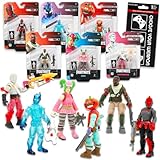
- Fortnite Action Figures Legendary Series Set for Kids - Bundle of 6 Figurines of Red Knight, Zero, and More, Plus Stickers | Fortnite Figures for Boys, Girls, Styles May Vary.
- This Fortnite set includes 6 figurines from the popular video game, Fortnite. Charactes can include Red Knight, Zero, Tomatohead, Love Ranger, and more.
- These Fortnite Legendary Series figures will be great for boys and girls! Perfect for fans and collectors, watch as you assemble your squad with these memorable characters.
- Great for play & display, imaginative storytelling, showcasing, and more. This action figure set is great as party favors, party supplies, goodie bag fillers, loot bag stuffers, and more. Each action figure is 2.5 inches tall.
- Officially licensed Fortnite action figure pack for boys and girls, ages 8 and up. Set also includes a Choose Your Weapon decal sticker.
Use a Changing Booth when available
Epic’s Locker documentation also identifies the in-game Changing Booth as another access point. If you are already in an experience and see a Changing Booth, interact with it to open the relevant customization interface. The lobby Locker is the more consistent route for preparing a loadout before matchmaking.
Independent reader supportYour contribution helps us test, update, and keep practical guides available for everyone.Make an owned outfit look distinctive
Change selectable styles
Some outfits expose a style selector in their Locker details. Select the outfit, look for a style or edit option, and review the available variants. A style is only available when your account has unlocked it; an icon or locked requirement indicates that you cannot apply it yet. Because style counts vary, do not infer that one outfit has the same options as another.
Build a coordinated cosmetic set
After choosing the outfit, review the other Locker slots one at a time:
Do these 3 things before closing this tab:
1Clear out junk files and repair common Windows errors2Fix the driver behind crashes, sound loss and screen glitches3Repair Windows errors before they cause bigger problems- Back bling: choose a silhouette and color that do not obscure the outfit’s main details.
- Pickaxe: match its visual theme or deliberately contrast it for a recognizable combination.
- Glider and contrail: use the preview to check that colors and effects fit your intended look.
- Wraps: apply a consistent finish to weapons and vehicles where supported.
- Emotes and lobby items: select items that reinforce the character concept without changing the outfit itself.
This approach creates a personal combination without claiming that any component is rare or exclusive. Save or favorite the combination if your current Locker interface provides those controls, and test it in the preview before entering a match.
Availability, region, and account checks
Fortnite offers can vary by time, account, platform, and region. If a friend can see an outfit that you cannot, compare the exact offer name, shop section, account, and date before concluding that your account is blocked. Restarting the game can refresh a stale shop display, but it cannot force an offer that is not currently listed.
- Verify that you are signed into the intended Epic account and platform profile.
- Check that the displayed V-Bucks balance and offer currency match your account’s region.
- Open the offer’s detail page to see whether it is a bundle, a quest pack, or an individual outfit.
- For pass rewards, open the reward track and identify the missing level, claim, or quest prerequisite.
- For a supposedly returning item, rely on a current Fortnite listing rather than a rumor or historical database.
Troubleshoot an outfit that will not equip
The outfit is not in Locker
Confirm that the purchase or reward was completed on the same account you are using. For a Battle Pass item, check the pass track for an unclaimed reward; reaching a level may not automatically complete a separate claim step. For a quest reward, verify that every required quest is marked complete.
The style option is locked
Open the outfit’s detail panel and read the requirement shown beside the locked style. It may require a pass level, a claim, or a quest. You cannot select a style that has not been unlocked, even if the base outfit is already owned.
The shop offer disappeared
A shop offer can leave the rotation while you are deciding. Check the live Item Shop after its next update; there is no supported method to purchase an offer that is not currently presented to your account. Do not treat the disappearance as proof of permanent exclusivity.
The Locker menu looks different
Epic can change navigation labels and button prompts between platforms and interface updates. Follow the function rather than an exact button icon: open the lobby’s Locker, select the outfit slot, choose an owned outfit, and back out to apply it. If the item still does not appear, return to the account and reward checks above.
A practical decision guide
Choose the Item Shop when immediacy matters
If the outfit is visible now and you want it without progression, compare its displayed price and contents with your V-Bucks balance. This is the fastest route, but it depends entirely on the current rotation and does not establish future availability.
Choose the Battle Pass when you will play and complete progression
A pass can make sense when the desired outfit is on the active reward track and you expect to earn enough XP and complete its prerequisites before the end date. Check the current price, track, and deadline first; do not buy based on an old season’s information.
Free tools Windows power users keep installed
One-click scans. No signup required.
Choose a quest offer when its tasks fit your play
A quest pack may suit you when its rewards are clearly listed and the required tasks are realistic for your available time. Calculate the effort from the live quest descriptions, not from another pack’s requirements.
Use your existing Locker for a no-purchase “unique” look
If your goal is simply to stand out, start with outfits and accessories you already own. Try alternate styles, contrasting color themes, and a complete set across cosmetic slots before spending V-Bucks. This produces a distinctive appearance without making an unsupported claim about rarity.
What the official information does—and does not—establish
Official Fortnite pages establish where current offers appear, how Battle Pass progression and possible post-pass shop availability are described, and how to equip an owned item. They do not provide a complete catalog of every historical outfit, a universal rarity scale, or a guaranteed return date for a particular past Battle Pass skin. Keep those boundaries in mind when evaluating community lists and “rare skin” claims.
For the most reliable answer to “How do I get a specific Fortnite outfit?”, identify the exact outfit name, search the live Item Shop and active Battle Pass, and read the item’s own detail panel. Then use Locker to apply it after ownership is recorded.
Quick Recap
Product prices and availability are accurate as of the date/time indicated and are subject to change. Any price and availability information displayed on Amazon at the time of purchase will apply.

