
Do these 3 things before closing this tab:
1Scan for outdated or missing drivers - takes under a minute2Repair Windows errors before they cause bigger problems3Fix the driver behind crashes, sound loss and screen glitchesiTechGuides is reader-supported. When you buy through links on our site, we may earn an affiliate commission. As an Amazon Associate I earn from qualifying purchases. Learn more
To convert a qualifying physical game, insert its Xbox One or Xbox Series X disc into a disc-capable Xbox One or Xbox Series X console and launch the game. Xbox says that action can claim a digital entitlement for supported discs. Eligibility is game-specific, the entitlement remains conditional on your continued possession of the qualifying disc, and an Xbox Series S cannot perform the process because it has no disc drive.
What “disc to digital” means on Xbox
Microsoft’s current rules describe a limited digital license that can be claimed from certain physical Xbox game discs. The disc is still the qualifying item: it is not converted into an unrestricted digital purchase that can be separated from the disc. Microsoft can require the disc to be revalidated and can suspend or revoke access if you no longer possess it. The license also cannot be transferred separately from the disc. Read the full policy in Microsoft’s Usage rules for Digital Goods.
Xbox announced the feature on August 26, 2026. Jason Ronald, Xbox’s vice president for Next Generation, said that players can claim a digital entitlement by inserting a supported disc into an Xbox One or Xbox Series X console and launching the game. Xbox said it was starting with “thousands of titles” and would continue adding more; that wording is a broad description, not a published, exhaustive count of eligible discs.
The practical result is that a qualifying disc may unlock digital-style benefits for that game, but only within the limits of the game’s support and Microsoft’s rules. It does not turn every old Xbox disc into a digital license, and it does not make a Series S compatible with physical media.
#1 Best Overall

- FASTEST, MOST POWERFUL XBOX — Experience next-generation performance with 12 teraflops of processing power, delivering smoother gameplay, richer worlds, and faster responsiveness than any previous XBOX.
- TRUE 4K GAMING UP TO 120 FPS — Enjoy breathtaking visuals with true 4K resolution, HDR, and frame rates up to 120 FPS, plus hardware-accelerated ray tracing for a heightened level of realism.
- 1TB CUSTOM SSD AND XBOX VELOCITY ARCHITECTURE — Reduce load times dramatically with the custom 1TB NVMe SSD and XBOX Velocity Architecture, enabling lightning-fast performance and seamless world streaming.
- QUICK RESUME — Seamlessly switch between multiple games and resume exactly where you left off. No more waiting through title screens and loading bars.
- FOUR GENERATIONS OF GAMES — Play thousands of games from XBOX Series X|S, XBOX One, XBOX 360, and Original XBOX, with many titles enhanced for better visuals and performance on XBOX Series X.
Eligibility: check all three parts before you start
The claim works only when the game disc, the console and Microsoft’s current eligibility decision all line up.
| Requirement | What the current guidance says | What it means for you |
|---|---|---|
| Disc generation | The policy category covers supported Xbox One and Xbox Series X game discs. Original Xbox and Xbox 360 discs are not included in this disc-to-digital category. | A disc from an earlier generation should not be assumed to qualify merely because the console can play it through backward compatibility. |
| Console | The Xbox announcement identifies Xbox One and Xbox Series X consoles for the claim process. | You need access to one of those consoles with a working optical drive. |
| Xbox Series S | Series S has no physical-disc playback capability, as documented in Xbox’s backward-compatibility guidance. | You cannot insert a disc or start a disc-based claim on Series S. |
| Game-specific eligibility | Microsoft says not all discs qualify. Eligibility can vary for technical, licensing, publishing or other reasons, and Microsoft may add or remove qualifying discs. | There is no safe universal list-based assumption. The claim flow shown for your particular disc is the decisive check. |
| Continued possession | The limited license remains conditioned on possession of the qualifying disc. | Keep the disc. Selling, giving away or otherwise losing it can affect continued access. |
Xbox’s statement that “most XBOX One and XBOX Series X disc-based games support this new feature” is not a guarantee for a particular title. The word “most” is not a percentage, and the announcement does not publish an exhaustive disc-by-disc register. Treat each game as a separate eligibility decision.
What you need before claiming a license
A supported physical edition
Have the actual Xbox One or Xbox Series X game disc available. A listing, product key, case, download code or a different platform’s disc is not the physical item described by this process. If a game has multiple editions, do not assume that one edition’s eligibility applies to every other disc; let the console’s claim flow determine whether that specific disc qualifies.
The Tool Desk
Outbyte PC Repair FREEClear out junk files and repair common Windows errorsFree Scan →Outbyte Driver Updater FREEScan for outdated or missing drivers - takes under a minuteDriver Scan →A disc-capable console
Use an Xbox One model with a functioning disc drive or an Xbox Series X. A Series S cannot substitute for either system because it has no drive. If your only console is a Series S, the practical hardware choice is to use a compatible disc-capable Xbox One or Series X; buying another console is optional, not a requirement for people who already have access to one.
The disc itself, kept after the claim
Do not treat the physical copy as disposable after the digital entitlement appears. Microsoft’s policy makes possession an ongoing condition and permits revalidation. Store the disc where you can retrieve it if the console later asks to verify it.
Rank #2

- What's in the box: Xbox Series X console, 1 Xbox Wireless Controller - Carbon Black, Ultra High Speed HDMI cable, Power cord.
- Equipped with AMD's Zen 2 and RDNA 2 architectures, DirectX ray tracing delivers true-to-life lighting, shadows and accurate reflections to create dynamic, living worlds.
- Memory: 16GB GDDR6 w/320 bit-wide bus; Memory Bandwidth: 10 GB @ 560 GB/s, 6 GB @ 336 GB/s; Internal Storage: 1TB Custom NVME SSD
- Gaming Resolution: True 4K; Performance Target: Up to 120 FPS; High Dynamic Range: Up to 8K HDR; Optical Drive: 4K UHD Blu-Ray; HDMI Features: Auto Low Latency Mode, HDMI Variable Refresh Rate, AMD FreeSync.
- Bundled with HDMI_Cable
Realistic expectations about the interface
The official announcement explains the action—insert the supported disc and launch the game—but does not provide a current, menu-by-menu walkthrough or promise particular button labels. Menus can change. Follow the prompt the console displays for that disc instead of relying on an old screenshot or an assumed “convert” option.
How to claim the digital entitlement
- Choose the right console. Start on an Xbox One or Xbox Series X with a working disc drive. Do not begin on Series S; it cannot read the disc.
- Insert the game disc. Use the Xbox One or Xbox Series X disc for the title you want to claim. If the console does not recognize the disc at all, resolve that physical-recognition problem before judging eligibility.
- Launch the game from the console. Xbox identifies launching the game after insertion as the action that starts the claim process. The announcement does not specify a universal sequence of menu names, so select the game using the prompt and controls shown on your system.
- Read the on-screen claim information. If that disc is supported, the console should present the relevant entitlement flow or confirmation. Check the title and edition shown before accepting anything; eligibility is tied to the specific qualifying disc.
- Complete only the prompts the console provides. Do not infer that a missing prompt can be replaced by a manual download, a code from another edition or a different disc. Microsoft’s published description does not specify an alternative manual-claim route.
- Leave the disc in your possession. Once the entitlement is claimed, retain the qualifying disc. The license is limited and remains dependent on possession under Microsoft’s rules.
If the console offers no claim message, that absence is not proof of a temporary glitch or proof that every copy of the game is excluded. It means you should check the disc, console and current title eligibility rather than assume the entitlement was created.
Quick wins for a faster PC:
Clear out junk files and repair common Windows errorsFree Scan →Scan for outdated or missing drivers - takes under a minuteDriver Scan →Repair Windows errors before they cause bigger problemsFix Now →What the digital license does—and does not—promise
Possible Play Anywhere access
Xbox says benefits may include Xbox Play Anywhere where the relevant game supports it. That is conditional: converting a disc does not make a non-Play Anywhere title eligible. If the game itself is not part of the Play Anywhere program, the disc claim cannot create that feature.
Possible cloud gaming access
Xbox also identifies Xbox Cloud Gaming as a possible benefit where supported. Cloud availability depends on the particular game and service support. A successful disc claim is therefore not a blanket promise of streaming access on every device.
No automatic guarantee for every PC, handheld or cloud device
The announcement’s language is “where supported.” Do not read the feature as a universal cross-device license. Confirm that the specific title supports the platform or service you intend to use, and distinguish that support question from the separate question of whether your disc qualifies for the claim.
Rank #3

- BEST VALUE IN GAMING — Experience next-gen speed and performance in the smallest XBOX ever. The XBOX Series S delivers powerful all-digital gameplay in a sleek, compact design.
- UP TO 120 FPS GAMEPLAY — Enjoy smooth, responsive gaming with frame rates up to 120 FPS, powered by XBOX Velocity Architecture, a custom NVMe SSD, and DirectX Raytracing for a heightened level of realism.
- 1TB CUSTOM SSD AND XBOX VELOCITY ARCHITECTURE — Reduce load times dramatically with the custom 1TB NVMe SSD and XBOX Velocity Architecture, enabling lightning-fast performance and seamless world streaming.
- QUICK RESUME — Seamlessly switch between multiple games and resume exactly where you left off. No more waiting through title screens and loading bars.
- FOUR GENERATIONS OF DIGITAL GAMES — Play thousands of digital games from XBOX Series X|S, XBOX One, XBOX 360, and Original XBOX with backward compatibility. Many titles are enhanced for better visuals and performance. Smart Delivery ensures you always get the best version for your console.
The physical condition remains important
The digital presentation does not erase the disc condition. Microsoft states that it may revalidate possession and may suspend or revoke access if you no longer possess the qualifying disc. The entitlement is not a separately transferable digital product.
Recommended Free Tools
Series S owners: why the process stops at the first step
Xbox Series S is a digital-only console. Xbox’s backward-compatibility page documents that it has no physical-disc playback capability, so there is no way to perform the required insertion step on that hardware.
A Series S owner who wants to use a qualifying disc must access a disc-capable Xbox One or Series X. The claim is performed on that supported console; the fact that the resulting benefit may work on another supported device does not give Series S the ability to read the original disc. Do not buy or borrow a disc expecting Series S alone to convert it.
How to diagnose a failed or missing claim
The disc is not recognized
- Confirm that you inserted an Xbox One or Xbox Series X game disc, not an original Xbox or Xbox 360 disc covered by a different compatibility arrangement.
- Try the same disc in a supported Xbox One or Series X with a working optical drive if one is available. A Series S cannot be used as a test because it cannot read physical media.
- Check the disc for visible damage and make sure it is seated correctly. A recognition failure is a physical or console-read issue, not evidence about the title’s digital eligibility.
The game launches but no entitlement prompt appears
- Do not assume that every disc qualifies. Microsoft expressly allows eligibility to vary and to change.
- Check that the console is an Xbox One or Series X and that the disc is the edition you intended to claim.
- Follow the exact prompt, if any, shown by the console. The official announcement does not document a universal button sequence that can be substituted when no prompt appears.
The title works but Play Anywhere or cloud access is absent
- Separate the disc claim from service support. Xbox describes Play Anywhere and Cloud Gaming benefits as available only where the individual game supports them.
- Do not treat the absence of a cross-device feature as proof that the physical claim failed; the game may simply lack that service support.
You no longer have the disc
Microsoft’s rules make continued possession a condition of the limited license. If you sold, gave away or lost the qualifying disc, access may be revalidated, suspended or revoked. The policy does not support treating the digital entitlement as something that can be kept independently after transferring the disc.
You are relying on an old eligibility assumption
Eligibility is not permanently fixed. Microsoft may add or remove qualifying discs for technical, licensing, publishing or other reasons. Re-run the claim flow on a supported console and rely on the current result for your specific disc rather than on a forum post, a retailer description or a remembered list.
Rank #4
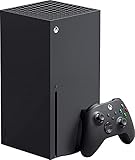
- Introducing the Xbox Series X: Providing a true 4K gaming experience, thanks to the 12 teraflops of processing power. Equipped with AMD's Zen 2 and RDNA 2 architectures, hardware-accelerated DirectX raytracing delivers realistic lighting, shadows, and reflections to create dynamic, living worlds.
- Make the most of every gaming minute with Quick Resume, lightning-fast load times, and gameplay of up to 120 FPS which are all powered by Xbox Velocity Architecture. Minimize load times and increase frame rates with a custom-built 1TB SSD, which enables larger, more robust games to operate at their full capacity. Bring your game experience with the rich, dynamic sound environments at a high quality.
- CPU: 8X Cores @ 3.8 GHz (3.66 GHz w/SMT) Custom Zen 2 CPU; GPU: 12 TFLOPS, 52 CUs @1.825 GHz Custom RDNA 2 GPU; SOC Die Size: 360.45 mm. Memory: 16GB GDDR6 128 bit-wide bus; Memory Bandwidth: 10 GB @ 560 GB/s, 6 GB @ 336 GB/s..; Internal Storage: 1TB Custom NVME SSD
- Play thousands of games from four generations, compatible with Xbox Series X and with backward compatibility Play with friends and family near and far—sitting together on the sofa or around the world, the fastest, most reliable gaming network
- Dimension 8.5x11.57x14.88 inches, Weight: 13.1 lbs. In the product box, it includes Xbox Series X 1TB console, 1 Wireless Controller, High Speed HDMI cable, Power cord.
Important limits and ownership decisions
Do not sell the disc on the assumption that the license stays with you
The entitlement cannot be transferred separately from the qualifying disc. Because possession is an ongoing condition, disposing of the disc can jeopardize access even if the game remains installed or visible in your library.
Do not promise a particular game to another player
“Most” and “thousands of titles” describe Xbox’s rollout, not a guarantee for a named game. A friend’s successful claim does not establish that your edition qualifies. The console’s claim flow for your disc is the useful confirmation.
Do not confuse backward compatibility with this license category
An original Xbox or Xbox 360 game can have separate backward-compatibility support, but Microsoft’s current disc-to-digital rules described here cover supported Xbox One and Xbox Series X discs. Compatibility and eligibility are related questions, not interchangeable terms.
Do not assume a digital entitlement is an unconditional purchase
Microsoft characterizes this as a limited license tied to the qualifying physical copy. Its rules reserve revalidation and possible suspension or revocation when the possession condition is no longer met. Keep the physical copy and account for that limitation when deciding whether to part with it.
A practical decision checklist
- Hardware: Do you have an Xbox One or Xbox Series X with a disc drive? If you have only Series S, the disc step cannot be performed.
- Disc: Is it an Xbox One or Xbox Series X disc, and is it the exact edition you intend to claim?
- Claim attempt: Have you inserted the disc and launched the game on the supported console?
- Eligibility: Did the console’s current flow confirm an entitlement for that disc? If not, do not infer eligibility from “most” or “thousands.”
- Long-term access: Will you retain possession of the qualifying disc? Microsoft’s policy makes that an ongoing condition.
- Extra benefits: Does the specific title support Play Anywhere or Xbox Cloud Gaming? Those features are conditional, not automatic.
What is established and what remains title-specific
The established process is narrow: use a supported Xbox One or Xbox Series X game disc, insert it into the matching disc-capable console, and launch the game to claim a digital entitlement when Microsoft recognizes that disc as eligible. The Series S cannot perform the insertion step. The entitlement remains tied to continued possession of the qualifying disc.
Several details remain title-specific or subject to change. Microsoft does not publish a complete, permanent list in the material describing the feature, does not give a precise current eligible-disc total, and does not provide a universal menu-by-menu walkthrough. Technical, licensing and publishing decisions can add or remove qualifying discs. Play Anywhere and cloud gaming support likewise depends on the individual game.
For that reason, the safest procedure is deliberately simple: use the correct disc-capable console, insert the exact disc, launch the game, read the current prompt, and keep the disc afterward. That approach follows Xbox’s published process without promising a benefit that the particular game or edition may not support.
Quick Recap
Product prices and availability are accurate as of the date/time indicated and are subject to change. Any price and availability information displayed on Amazon at the time of purchase will apply.
Free tools Windows power users keep installed
One-click scans. No signup required.

