
iTechGuides is reader-supported. When you buy through links on our site, we may earn an affiliate commission. As an Amazon Associate I earn from qualifying purchases. Learn more
The practical answer: use the supported LILYGO T-Lora Pager if you want a working pager-shaped Meshtastic node quickly. Converting a legacy pager shell is a custom electronics project, not a firmware installation. You must add a Meshtastic-capable microcontroller and LoRa transceiver, provide a correctly matched antenna and safe power system, and reverse-engineer the old display and keyboard if you want to keep them.
A reused shell can be worthwhile for a particular form factor or aesthetic, but the T-Lora Pager integrates the radio, processor, display, keyboard, GPS, battery monitoring and enclosure around a supported firmware target. That integration eliminates most of the failure-prone work in a retrofit.
What a Meshtastic node does
Meshtastic is an open-source, community-driven platform for sending messages over LoRa radios without cellular service or internet infrastructure. Nodes can rebroadcast packets, creating a mesh in which other nodes relay traffic. A phone can connect to a node over Bluetooth, Wi-Fi or USB, depending on the hardware. Text messaging, encrypted channels and optional GPS data are available features.
Windows Errors? Fix Them Before They Spread
Repair common Windows errors and clear accumulated junk for a smoother, more stable PC - no reinstall needed.Free scan · no reinstallCrashes, No Sound, or Screen Glitches?
Random freezes, missing sound and display glitches usually trace back to one bad driver. Find and replace yours safely.Free scan · under a minuteMeshtastic’s published documentation describes a 331 km record feature. Treat that as a project record, not as a range promise for a pager conversion. Actual distance depends on antenna performance, frequency, terrain, elevation, transmit settings, interference and the number and placement of relay nodes.
#1 Best Overall

- LoRa chip:SX1262
- Github : github.com/Xinyuan-LilyGO/LilyGoLib
- WIKI : wiki.lilygo.cc/get_started/en/LoRa_GPS/T-LoraPager/T-LoraPager.html
- Board Function: RTC, Battery Charger, Battery Gauge GPlO Expand, Audio Power Amplifier, TF Card, Keyboarod
- If you have any questions or suggestions about the product, please feel free to contact us. We will answer your question as soon as possible.
Choose your conversion route
| Route | What you get | Work required | Best reason to choose it |
|---|---|---|---|
| LILYGO T-Lora Pager | A complete supported handheld node in a pager form factor | Attach the antenna, flash the matching firmware and configure it | Fastest path to a reliable keyboard-equipped node |
| Legacy pager shell | Your original enclosure and possibly its controls | Install a new MCU and LoRa radio; design power and RF; decode the display and keypad if retained | Preserving a specific shell, industrial design or personal project |
An old pager’s original electronics do not become Meshtastic-capable when you install an app or change software. Traditional pagers generally lack the supported LoRa transceiver and firmware environment required by Meshtastic. The retrofit therefore replaces or bypasses the original electronics.
The supported pager option: LILYGO T-Lora Pager
The LILYGO T-Lora Pager is a compact handheld device designed for Meshtastic. Its main processor is an ESP32-S3, paired with a Semtech LR1121 LoRa transceiver. Hardware variants are listed for 915 MHz, 868 MHz and 433 MHz operation, so the variant must match your region and the rules that apply where you operate.
| Component | Published specification | Why it matters |
|---|---|---|
| Microcontroller | ESP32-S3 | Runs the Meshtastic firmware and handles the user interface and connectivity |
| LoRa radio | Semtech LR1121 | Provides the long-range radio link used by the mesh |
| Frequency variants | 915 MHz, 868 MHz and 433 MHz | Choose the hardware band appropriate to your operating region |
| Display | 2.33-inch color display, 222 × 480 pixels | Shows node status, messages and settings |
| Keyboard | Full QWERTY keyboard | Allows standalone text entry instead of relying on a phone |
| Antenna | Foldable external antenna | Provides an integrated, positionable RF radiator |
| Navigation and sensors | u-blox GPS, IMU, NFC/RFID | Supports location and motion-related features and short-range identification functions |
| Power and audio | Power monitoring and audio circuitry | Enables battery-state information and audible device functions |
| Connector | USB-C | Used for data, firmware flashing and recovery |
Firmware filenames use the pattern firmware-tlora-pager-X.X.X.xxxxxxx.bin. The exact version and filename shown by the current Meshtastic release process should be used; do not substitute a visually similar T-Deck, generic ESP32 or another board image.
The Tool Desk
Outbyte Driver Updater FREEScan for outdated or missing drivers - takes under a minuteDriver Scan →Outbyte PC Repair FREERepair Windows errors before they cause bigger problemsFix Now →What a legacy-pager build requires
1. Document the original hardware before disassembly
Identify the exact pager model and photograph it from every side before opening it. Label the battery, display, keypad, speaker, charging contacts, antenna and any flex cables. Record connector orientation and wire colors, but do not assume the colors indicate standard functions.
Pager displays and keypads often use undocumented buses, unusual voltage levels or proprietary timing. There is no universal pager wiring standard in the official Meshtastic documentation. If you want to reuse the original LCD or keyboard, plan to discover its pinout and protocol with electrical measurements and controlled experiments rather than by relying on a generic wiring diagram.
Rank #2

- LoRa Communication Chip: Equipped with SX1262 LoRa chip for long-range wireless communication at 915MHz frequency
- Github : github.com/Xinyuan-LilyGO/LilyGoLib
- WIKI : wiki.lilygo.cc/get_started/en/LoRa_GPS/T-LoraPager/T-LoraPager.html
- Board Function: RTC, Battery Charger, Battery Gauge GPlO Expand, Audio Power Amplifier, TF Card, Keyboarod
- If you have any questions or suggestions about the product, please feel free to contact us. We will answer your question as soon as possible.
2. Select a supported Meshtastic core
The replacement electronics need both a compatible microcontroller and a LoRa transceiver. Official device information includes community and partner choices such as the RAK11310, which combines an RP2040 with an SX1262, and a Raspberry Pi Pico paired with a Waveshare LoRa Module. The supported-device overview favors newer Semtech SX126x or LR11xx radios for performance and compatibility.
Choose a board for which Meshtastic provides a current target and firmware build. A board that merely contains an ESP32, RP2040 or another microcontroller is not automatically suitable; the radio, pin mapping, firmware target, power requirements and regional band all have to line up.
Quick wins for a faster PC:
Clear out junk files and repair common Windows errorsFree Scan →Fix the driver behind crashes, sound loss and screen glitchesFind Drivers →3. Build a proper RF path
Use the frequency variant and antenna intended for your selected radio board. The antenna connector, coax routing and ground arrangement are part of the RF design. Do not reuse a legacy pager antenna unless its electrical characteristics are known to be suitable for the selected LoRa band and the board’s connector.
Keep the antenna away from metal shielding, batteries, large ground obstructions and other electronics as the enclosure is designed. A foldable or external antenna should remain clear when the device is operated, not only when it is on a workbench.
4. Design power and charging safely
A pager battery or charging circuit is not automatically compatible with a modern development board. Keep the board’s regulated supply, battery protection and charging arrangement within the board maker’s specifications. Confirm battery chemistry, connector polarity, charge voltage, current limits and protection before connecting anything.
Rank #3

- LoRa chip:SX1262
- Github : github.com/Xinyuan-LilyGO/LilyGoLib
- WIKI : wiki.lilygo.cc/get_started/en/LoRa_GPS/T-LoraPager/T-LoraPager.html
- Board Function: RTC, Battery Charger, Battery Gauge GPlO Expand, Audio Power Amplifier, TF Card, Keyboarod
- If you have any questions or suggestions about the product, please feel free to contact us. We will answer your question as soon as possible.
During initial tests, use a known-good supply and leave the original charger disconnected until you understand its circuitry. Check for heat, unexpected current draw and brownouts while the radio transmits. A compact enclosure leaves little room for a regulator or battery that runs hot.
Recommended Free Tools
5. Decide whether the first version will be headless
The most reliable first prototype is a headless node: mount the supported board, antenna and safe power system in the shell, then control it from the Meshtastic phone client. This lets you validate radio operation, firmware and battery behavior before attempting to decode a proprietary screen or keyboard.
Retaining the old controls is a separate embedded-development task. You may need to identify signal levels, scan buses, determine key-matrix timing, write a display driver and adapt the firmware interface. Meshtastic does not provide a universal legacy-pager driver that can be enabled with a setting.
6. Delay final enclosure assembly
Keep USB access available for flashing and recovery. Test the radio with the antenna installed, verify that the enclosure does not detune or shield it, and check thermal behavior before closing the case. Leave enough clearance that the battery, board and flex cables cannot be crushed when the housing is screwed together.
How to flash the LILYGO T-Lora Pager
Flashing is straightforward when the exact target and frequency variant are used. Follow this sequence:
What’s actually slowing this PC down?
Pick the symptom - the matching free tool is one click away.
Rank #4

- 【LORA】LR1121 LORA chip supports dual-band operation at 830-945 MHz and 2.4 GHz.
- 【Github】github.com/Xinyuan-LilyGO/LilyGoLib
- 【WIKI】 wiki.lilygo.cc/get_started/en/LoRa_GPS/T-LoraPager/T-LoraPager.html
- 【Board Function】 RTC, Battery Charger, Battery Gauge GPlO Expand, Audio Power Amplifier, TF Card, Keyboarod
- If you have any questions or suggestions about the product, please feel free to contact us. We will answer your question as soon as possible.
- Identify the hardware. Confirm that the device is the LILYGO T-Lora Pager and determine whether it is the 915 MHz, 868 MHz or 433 MHz version.
- Attach the antenna. Install the supplied or correctly matched antenna before applying power. Meshtastic’s getting-started guidance warns: “Never power on the radio without attaching an antenna as doing so could damage the radio chip.”
- Prepare a data connection. Use a USB-C cable that carries data, not a charge-only cable. If your operating system requires a serial driver for the board, install that driver before starting the flash process.
- Select the exact firmware target. Choose the T-Lora Pager target and its current firmware image, whose filename follows
firmware-tlora-pager-X.X.X.xxxxxxx.bin. Do not choose T-Deck firmware or a generic ESP32 image because the enclosure looks similar or the processor family is related. - Flash the device. Put the pager into the connection or boot mode required by the current Meshtastic flashing procedure, select the detected serial device and write the matching image. Keep the USB connection stable until the process reports completion.
- Reconnect after reboot. Allow the pager to restart, then connect with the Meshtastic client over the connection method supported by the device. If it does not appear, try another data cable or USB port and check whether the serial driver created a port.
For a custom shell build, the sequence is the same in principle but the firmware target changes to the exact supported board you installed. Never flash an image simply because its connector or microcontroller looks similar.
Configure the node after flashing
Set the regional radio configuration
Select the region and frequency plan that correspond to the hardware variant and your local regulations. A 915 MHz, 868 MHz or 433 MHz radio is not interchangeable merely by changing a menu label; the antenna and RF circuitry must also be appropriate for that band.
Choose the node role
Set the role based on how you will use the pager. A handheld device carried by a person generally has different power and routing needs from a permanently mounted relay. Choose a role that reflects whether the node should prioritize battery life, direct messaging or rebroadcasting traffic.
Configure channel and security settings
Create or select the channel used by the other nodes you intend to reach, and set the channel’s security parameters consistently across those nodes. Encryption is available, but every participant must use matching channel settings or messages will not decode.
Pair a phone only when useful
The pager can operate as a standalone handheld because it has its own display and QWERTY keyboard. Pairing it with the Meshtastic client is useful for setup, contact management, diagnostics and features that are more convenient on a larger screen. Depending on the hardware and configuration, the client connection can use Bluetooth, Wi-Fi or USB.
Best Value
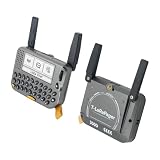
- 【LORA】LR1121 LORA chip supports dual-band operation at 830-945 MHz and 2.4 GHz.
- 【Github】github.com/Xinyuan-LilyGO/LilyGoLib
- 【WIKI】 wiki.lilygo.cc/get_started/en/LoRa_GPS/T-LoraPager/T-LoraPager.html
- 【Board Function】 RTC, Battery Charger, Battery Gauge GPlO Expand, Audio Power Amplifier, TF Card, Keyboarod
- If you have any questions or suggestions about the product, please feel free to contact us. We will answer your question as soon as possible.
Verify GPS and sensors deliberately
If your project needs location data, allow the u-blox GPS time to acquire a fix in an open area and verify that coordinates update. The IMU, NFC/RFID and power-monitoring functions are additional hardware features; their presence does not mean every application or firmware release exposes identical controls.
Independent reader supportYour contribution helps us test, update, and keep practical guides available for everyone.Using a Motorola T900 or another old pager case
A Motorola T900 case, or any other legacy enclosure, is a mechanical starting point rather than a ready-made Meshtastic platform. Measure the internal volume, mounting points, keyboard opening, display window, battery compartment and antenna exit. Then compare those dimensions with the board, connector and battery you intend to install.
The original case may have metalized shielding, a narrow antenna channel or a charger designed for a different battery chemistry. Preserve the shell only after confirming that the replacement RF path and power system can be installed safely. If the keyboard and LCD cannot be decoded economically, leave them disconnected and use the phone client or a separate small display for the prototype.
Purpose-built pager versus shell conversion
| Decision factor | LILYGO T-Lora Pager | Legacy shell conversion |
|---|---|---|
| Time to first working node | Short: flash the matching target and configure it | Long and unpredictable: mechanical, electrical and firmware work precede normal use |
| Display and keyboard documentation | Designed as part of the supported product | Usually undocumented; protocols and pinouts must be discovered |
| RF and antenna integration | Integrated foldable antenna and LR1121 radio | Must be selected, matched and physically routed by the builder |
| Battery and charging | Power monitoring and a coordinated device design | Builder must validate battery, protection, charging and regulation |
| Power consumption | Depends on firmware settings and use; the platform is designed as a node | Depends on the replacement board, display, regulators and reused components |
| Repairability | Standard supported hardware is easier to replace | Highly dependent on the builder’s documentation and custom wiring |
| Firmware support | Dedicated T-Lora Pager target and firmware naming | Support follows the exact installed board, not the old pager model |
| Total cost | Purchase price of a complete supported device | Board, radio, antenna, battery or charger changes, wiring and fabrication; total cost is not stated in the available specifications |
The purpose-built pager wins on integration, documentation and support. A shell conversion wins only when preserving a particular physical design is more important than minimizing build time and risk.
Troubleshooting common failures
The pager is not detected over USB
- Replace the cable with a confirmed data-capable USB-C cable.
- Try another USB port and check whether the operating system creates a serial device.
- Install the serial driver required by the board if one is missing.
- Use the exact boot or connection procedure for the hardware; a normal reboot may not enter flashing mode.
The flash completes but the device behaves incorrectly
- Confirm that the image is for the T-Lora Pager, not T-Deck or a generic ESP32 target.
- Check that the firmware version and filename identify the intended target.
- Verify that the physical pager variant is 915 MHz, 868 MHz or 433 MHz as expected before configuring the region.
The radio has poor or no range
- Power down and inspect the antenna connection; never operate without an antenna attached.
- Check that the antenna is matched to the selected band and is not trapped against metal or the battery.
- Confirm that nearby nodes use compatible channel and regional settings.
- Test in a location with a clear line of sight before concluding that the hardware is defective.
The custom build resets or becomes hot
- Measure the supply during transmit and look for voltage sag or regulator overheating.
- Disconnect an inherited pager charger until its chemistry and output are verified.
- Check for crushed wires, reversed polarity or a battery-protection circuit that is not rated for the board’s load.
- Re-test with the board outside the shell to separate electrical faults from enclosure or thermal problems.
The original display or keyboard does nothing
That result is expected until the interface has been identified and supported in software. Check voltage levels, pinout, bus type and timing, then write or adapt a driver. There is no setting that automatically maps an undocumented pager LCD or keypad to Meshtastic.
Safety, legal and practical limits
Attach the antenna before every power-up, including bench tests. Use the frequency variant permitted in your operating region, and follow local requirements for transmit power, channels and duty cycle. Keep lithium batteries protected and charged only with circuitry designed for their chemistry. Do not assume that a legacy pager’s charger, antenna or shielding is safe to reuse.
No universal retrofit kit, wiring diagram or conversion success rate is established for legacy pagers. Each model can differ in mechanical dimensions, battery technology, display protocol, keyboard matrix and RF construction. Plan the project as a custom hardware design, document every wire and test the node before committing to permanent modifications.
Free tools Windows power users keep installed
One-click scans. No signup required.
Quick Recap
Recommended build sequence
- Decide whether you need a working pager quickly or specifically want to preserve an old shell.
- For the fast route, obtain the LILYGO T-Lora Pager in the correct regional frequency variant.
- For a shell project, select a supported SX126x- or LR11xx-based board and map the available space before buying batteries or fabricating mounts.
- Install and verify the antenna, then validate power and USB access on an open bench.
- Flash the exact Meshtastic target for the installed hardware.
- Configure region, node role, channel and security settings.
- Test messaging and, if needed, GPS and phone connectivity.
- Only after RF, power and thermal checks pass, close the enclosure and add custom display or keyboard drivers.
Product prices and availability are accurate as of the date/time indicated and are subject to change. Any price and availability information displayed on Amazon at the time of purchase will apply.

