
iTechGuides is reader-supported. When you buy through links on our site, we may earn an affiliate commission. As an Amazon Associate I earn from qualifying purchases. Learn more
Use the AT-LP60XBT’s supplied 3.5 mm-to-dual-RCA cable for a wired connection. Set the turntable to LINE when the receiving device uses AUX, LINE, or another ordinary audio input. Set it to PHONO only when the receiving stereo has a PHONO input. For wireless listening, put the speaker or headphones into Bluetooth pairing mode, then hold the turntable’s wireless function button for about two seconds.
The selector and receiving input must match: PHONO to PHONO and LINE to AUX/LINE. The turntable has a built-in phono equalizer/preamp, so powered speakers with a line input can be connected directly without a separate phono preamp.
Choose the connection before plugging anything in
Identify the input on the device that will receive the turntable’s audio. Your choice determines both the cable connection and the pre-amplifier selector position.
What’s actually slowing this PC down?
Pick the symptom - the matching free tool is one click away.
| Receiving equipment | Turntable connection | Selector position | What else is required |
|---|---|---|---|
| Powered speakers with AUX or LINE input | 3.5 mm output to the speakers’ red and white RCA inputs, using the supplied cable | LINE | The speakers must have their own volume control |
| Stereo receiver or amplifier with AUX, LINE, or another non-phono input | 3.5 mm output to the receiver’s matching line-level RCA inputs | LINE | Select that input on the receiver |
| Stereo receiver or amplifier with PHONO input | 3.5 mm output to the receiver’s PHONO inputs; use the system’s ground/earth connection as specified by its setup instructions | PHONO | Select PHONO on the receiver and start at low volume |
| Bluetooth speaker, headphones, or wireless stereo speakers | No audio cable | The PHONO/LINE position does not affect Bluetooth pairing | The receiving device must support Bluetooth audio reception |
| Passive speakers | Connect the turntable to an amplifier or receiver first | Match the selector to the amplifier’s input | The amplifier must be capable of driving the speakers |
Turn the receiving device’s volume down before making a wired connection. This avoids a loud burst if the wrong input or selector setting is initially selected.
#1 Best Overall

- Experience the high-fidelity audio of vinyl
- Fully automatic belt-drive turntable operation with two speeds: 33-1/3, 45 RPM
- Anti-resonance, die-cast aluminum platter
- Redesigned tonearm base and headshell for improved tracking and reduced resonance
- Integral Dual Magnet phono cartridge with replaceable diamond stylus (ATN3600LC)
What the AT-LP60XBT outputs and why the switch matters
The included detachable lead is a 3.5 mm (1/8-inch) male mini-plug to two male RCA plugs. The red RCA plug carries the right channel and the white plug carries the left channel. Plug the mini-plug into the turntable’s stereo output, then connect each RCA plug to the correspondingly marked input.
The rear selector controls the turntable’s phono equalizer/pre-amplifier. Audio-Technica’s manual describes the model this way: “This product has a built-in phono equalizer function.” In practice, that means the turntable can produce a line-level signal for AUX or LINE inputs when the switch is set to LINE. You do not need to add a separate phono stage for that connection.
PHONO and LINE are different signal levels. A PHONO input expects the low-level, equalization-dependent output from a cartridge; a LINE or AUX input expects an already equalized, higher-level signal. Connecting LINE output to PHONO can make the sound excessively loud and distorted. Connecting PHONO output to AUX or LINE can make it extremely quiet and lacking normal tonal balance.
Rank #2

- High-fidelity audio with Bluetooth wireless technology Connects wirelessly to speakers and other devices equipped with Bluetooth wireless technology or to wired audio systems and powered speakers via included dual RCA output cable Compatible with aptX codec Fully automatic operation with two speeds: 33-1/3 and 45 RPM Anti-resonance, die-cast aluminum platter Redesigned tonearm base and headshell for improved tracking and reduced resonance Integral Dual Moving Magnet phono cartridge with replaceable diamond stylus (ATN3600LC) AC adapter handles AC/DC conversion outside of the chassis, reducing noise in the signal chain
Connect to powered speakers with a cable
Powered, active, or self-amplified speakers contain their own amplifier. They can receive the turntable directly as long as one speaker or the speaker pair provides a suitable AUX, LINE, or RCA input.
- Switch the speakers off or reduce their volume. If the speakers have separate left and right controls, reduce both.
- Locate the speaker input. Use an input labelled AUX, LINE, Audio In, or a pair of RCA sockets intended for line-level equipment. Do not use a PHONO input for this setup.
- Connect the mini-plug. Insert the 3.5 mm end of the supplied cable fully into the AT-LP60XBT’s stereo output.
- Connect the RCA plugs. Insert red into the right-channel input and white into the left-channel input. If the speaker uses a single 3.5 mm AUX socket instead of RCA, the supplied dual-RCA lead is not the matching cable; use a cable whose ends match both devices.
- Set the turntable to LINE. Move the pre-amplifier selector to LINE before playing a record.
- Power the speakers and select the input. Choose AUX, LINE, or the corresponding input on the speaker controls.
- Start playback and raise volume gradually. Set a comfortable level on the powered speakers.
The speakers must provide their own volume adjustment. Audio-Technica’s manual notes that volume cannot be adjusted when the connected speakers or other equipment have no volume control. If your speakers offer only a fixed input with no level control, add a suitable preamp or use a receiver with a volume knob rather than connecting directly.
If the powered speakers have only a 3.5 mm AUX socket
Check the connector arrangement before buying a replacement lead. The turntable output is 3.5 mm, while the supplied cable terminates in separate red and white RCA plugs. A speaker with a single 3.5 mm stereo AUX input needs a stereo 3.5 mm-to-3.5 mm lead instead. A speaker with RCA inputs can use the supplied cable. Match the cable to the actual sockets; do not assume that every 3.5 mm jack accepts the same signal or wiring.
Rank #3

- Bundle Includes: Audio-Technica AT-LP60XBT Bluetooth Fully Automatic Stereo Turntable (Black) and 3-Inch Powered Studio Monitors Pair (Black)air
- Dual Magnet Cartridge: The Audio-Technica AT-LP60XBT has a Dual Magnet cartridge with a replaceable diamond stylus. The cartridge is integrated into the headshell for assured performance and ease of setup
- Sleek Design: This stereo turntable was designed to fit your digital lifestyle. It is combining the classic sound of vinyl with a sleek and stylish modern design. A newly designed arm base and headshell mean the unique style of the AT-LP60XBT is bringing vinyl into the 21st century
- Wireless Connectivity: With the AT-LP60XBT you can wirelessly connect with your favorite speakers, headphones, or other wireless devices. With its CSR BT chipset, the turntable is even able to connect to devices that support the aptX codec, which offers much-improved sound quality over the standard SBC codec
- Operates Like a Regular Turntable: The AT-LP60XBT can be operated just like a regular turntable with a traditional wired connection. Whether you go wired or wireless you'll get outstanding audio with the ease of automatic operation
Connect to a stereo receiver or amplifier
A stereo system may contain a receiver, integrated amplifier, or another component that either has a PHONO input or accepts ordinary line-level sources. The correct setup depends on that input, not on whether the system is marketed as a home-stereo package.
Recommended Free Tools
Using AUX, LINE, CD, or another line-level input
- Lower the receiver’s volume.
- Connect the supplied 3.5 mm-to-dual-RCA cable from the turntable’s stereo output to a pair of unused RCA inputs labelled AUX, LINE, CD, or another non-phono source input.
- Set the AT-LP60XBT selector to LINE.
- Turn on the receiver and choose the same input you used for the cable.
- Play a record and increase the receiver volume slowly.
Although a receiver may label several source inputs differently, AUX, CD, and similar inputs are normally line-level inputs. Use the receiver’s own documentation if an input has an unusual function or a special sensitivity setting.
Using a PHONO input
- Lower the receiver’s volume and switch the receiver off if its instructions require connections to be made with power removed.
- Connect the turntable’s left and right RCA plugs to the receiver’s PHONO inputs, observing white for left and red for right.
- Set the AT-LP60XBT selector to PHONO.
- Attach the ground or earth lead/terminal as specified for the particular stereo system. Use the designated terminal; do not connect a wire to an unrelated socket.
- Turn on the receiver, select PHONO, and begin playback at low volume.
Do not use PHONO mode with an AUX or LINE input, and do not feed LINE mode into a PHONO input. Those two mismatches account for many reports of either barely audible sound or loud, harsh distortion.
Rank #4

- High-fidelity audio with Bluetooth wireless technology
- Connects wirelessly to speakers and other devices equipped with Bluetooth wireless technology or to wired audio systems and powered speakers via included dual RCA output cable
- Compatible with aptX codec
- Fully automatic operation with two speeds 33-1/3 and 45 RPM
- Anti-resonance die-cast aluminum platter
Pair the AT-LP60XBT with a Bluetooth speaker or headphones
Bluetooth is useful when the speaker location makes a cable inconvenient. The receiving product must be able to receive Bluetooth audio; a device that only transmits Bluetooth cannot serve as the turntable’s speaker.
- Prepare the receiver. Put the Bluetooth speaker, headphones, or wireless stereo speaker into pairing mode using that device’s controls. Follow its own instructions because the button and indicator behavior vary by model.
- Move it close for setup. Keep the receiver within 1 m (3.3 ft) of the turntable while pairing.
- Power the turntable. Connect its AC adapter and make sure the turntable is powered.
- Start pairing from the turntable. Press and hold the wireless function button for about two seconds. The indicator flashes red and blue while it searches.
- Wait for confirmation. When pairing completes, the indicator lights blue. Audio-Technica’s manual states that the product remains in pairing mode for 30 seconds.
- Play a record. Leave the PHONO/LINE selector in either position; that selector is not used to route Bluetooth audio.
If pairing does not complete within the 30-second window, restart the sequence from the receiver’s pairing mode. The turntable stores pairing information for up to eight devices. After that limit, a new pairing overwrites the oldest stored connection record. If a previously paired device is nearby and reconnects first, switch that device’s Bluetooth off temporarily or remove its old pairing before trying again.
Do these 3 things before closing this tab:
1Repair Windows errors before they cause bigger problems2Fix the driver behind crashes, sound loss and screen glitches3Clear out junk files and repair common Windows errorsThe AT-LP60XBT product information for one regional market lists aptX Adaptive audio, aptX audio, and SBC. Codec availability can vary by market and by the receiving device, so the presence of a Bluetooth logo alone does not guarantee support for every codec or every Bluetooth role.
Best Value
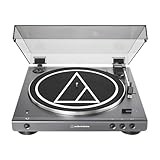
- High-fidelity audio with Bluetooth wireless technology Connects wirelessly to speakers and other devices equipped with Bluetooth wireless technology or to wired audio systems and powered speakers via included dual RCA output cable Compatible with aptX codec Fully automatic operation with two speeds: 33-1/3 and 45 RPM Anti-resonance, die-cast aluminum platter Redesigned tonearm base and headshell for improved tracking and reduced resonance Integral Dual Moving Magnet phono cartridge with replaceable diamond stylus (ATN3600LC) AC adapter handles AC/DC conversion outside of the chassis, reducing noise in the signal chain
How passive speakers fit into the setup
Passive speakers do not contain a power amplifier and cannot be driven directly by the AT-LP60XBT. Connect the turntable to a receiver or integrated amplifier, then connect the passive speakers to that amplifier’s speaker outputs.
- If the amplifier has a PHONO input, use PHONO on the turntable and connect to PHONO.
- If the amplifier has only AUX, LINE, CD, or another line-level input, use LINE on the turntable and connect there.
- Set the amplifier’s volume, balance, and speaker selection controls; the turntable does not power the passive speakers.
A powered speaker system is the direct-connect option. A passive pair requires the additional amplifier stage even if the turntable itself is powered from the wall.
Wired or Bluetooth: which approach fits?
| Consideration | Wired connection | Bluetooth connection |
|---|---|---|
| Equipment needed | Supplied cable and a compatible AUX, LINE, or PHONO input | A Bluetooth audio receiver such as a compatible speaker or headphones |
| Setup | Match the cable, input, and PHONO/LINE selector | Place the receiver in pairing mode and pair within 1 m during setup |
| Placement | Turntable and receiving equipment are linked by a cable | Receiver can be placed wirelessly after pairing, within its operating range |
| Known performance comparison | Provides a direct cable connection | Codec and wireless behavior depend on the receiving device |
The available documentation does not establish a universal sound-quality winner or provide a comparative latency test. Choose wired when direct stereo integration and predictable input behavior matter most; choose Bluetooth when avoiding a cable is the priority and the receiver supports Bluetooth audio.
Troubleshoot the most common problems
No sound or very low volume
- Confirm the receiver or powered speaker is switched on and set to the input used by the cable.
- Check the selector against the input: PHONO for PHONO, LINE for AUX or LINE.
- Raise the receiving device’s volume gradually. The turntable itself is not a substitute for a speaker or amplifier volume control.
- Remove and firmly reseat the 3.5 mm plug and both RCA plugs.
- Inspect the stylus. A damaged stylus or one that is not seated correctly can reduce or eliminate audible output even when the electronics are connected correctly.
A particularly common cause is leaving the turntable on PHONO while it is connected to an AUX or LINE input.
Sound is excessively loud, harsh, or distorted
- Check whether LINE is selected while the cable is plugged into a PHONO input. Change the input or selector so they match.
- Start with the receiver or speaker volume low and increase it only after the correct input is selected.
- Verify that the stylus is properly seated and not visibly damaged.
LINE output into PHONO is a documented common mismatch because the receiver’s phono stage applies additional gain and equalization to a signal that has already received them.
Only one channel works, or left and right are reversed
- Confirm that white is connected to the left input and red to the right input.
- Reseat each plug; a partially inserted RCA connector can interrupt one channel.
- If the problem follows one plug when you swap left and right at the receiving end, inspect the cable or the receiving input. If it stays with the same turntable channel, inspect the stylus and cartridge area.
Bluetooth will not pair
- Put the speaker or headphones into their actual pairing mode, not merely powered-on mode.
- Bring the receiver within 1 m (3.3 ft) of the turntable.
- Hold the turntable’s wireless function button for about two seconds and watch for the red-and-blue flashing indicator.
- Complete pairing before the 30-second pairing period ends.
- If the device was previously paired, remove its old record or temporarily disable Bluetooth on other nearby devices that might reconnect.
- Remember that eight stored pairing records is the documented limit; a new pairing replaces the oldest record after that limit.
Howling, rumble, or feedback-like noise
- Move the turntable away from the powered speakers or speaker cabinets.
- Place the turntable on a stable, level surface that is not vibrating.
- Lower the speaker volume while testing and avoid placing speakers on the same unstable furniture.
Acoustic vibration can feed back into the stylus even when the cable, input, and selector are correct.
Quick Recap
Connection checklist
- Powered speakers or AUX/LINE receiver: supplied cable, selector at LINE, receiving input set to AUX/LINE.
- PHONO receiver: cable connected to PHONO, selector at PHONO, ground/earth connection handled as the system instructions specify.
- Bluetooth receiver: receiver in pairing mode, within 1 m during setup, wireless button held for about two seconds.
- RCA channels: red to right, white to left.
- Passive speakers: amplifier or receiver required between the turntable and speakers.
- Volume: begin low and use the receiving equipment’s volume control.
Product prices and availability are accurate as of the date/time indicated and are subject to change. Any price and availability information displayed on Amazon at the time of purchase will apply.

