
iTechGuides is reader-supported. When you buy through links on our site, we may earn an affiliate commission. As an Amazon Associate I earn from qualifying purchases. Learn more
The correct turntable-to-speaker connection depends on two things: the signal your turntable can provide and the input your speaker system accepts. A turntable set to PHONO must feed a receiver’s PHONO input or an external phono preamp. A turntable set to LINE can feed powered speakers, an amplifier’s AUX/line input, or a Bluetooth transmitter. Passive speakers cannot work from a turntable or phono preamp alone; they also need an amplifier or receiver.
Before plugging in cables, check the turntable for a PHONO/LINE switch, built-in phono preamp, and Bluetooth transmitter. Then check the speakers or receiver for PHONO, RCA/AUX/line, Bluetooth receive capability, and speaker terminals. Matching those stages prevents the two most common faults: very quiet sound when a PHONO signal enters a line input, and loud or distorted sound when a LINE signal enters PHONO.
Identify the output and input before connecting anything
Turntables produce a very low-level cartridge signal that must be equalized and amplified by a phono stage. Some models include that stage and expose a switchable LINE output; others provide only PHONO output. Your speakers may include amplification, while passive speakers require a separate power amplifier. Use the following map to identify the path.
| Turntable output | Receiving input | What to do |
|---|---|---|
| PHONO | PHONO on a receiver or amplifier | Connect the RCA leads to PHONO and attach the ground wire to the receiver’s ground terminal when provided. |
| PHONO | AUX, CD, LINE or RCA input | Insert an external phono preamp between the turntable and the line input. The preamp performs the required equalization and gain. |
| LINE | Powered speaker RCA/line input | Connect directly with RCA cables, or use the cable/adapter specified by the speaker maker for a 3.5 mm input. |
| LINE | Receiver or integrated amplifier line input | Connect to AUX, CD, or another line-level input, not PHONO. |
| Bluetooth transmission | Bluetooth speaker or headphones in receive mode | Pair the devices according to both manuals. A Bluetooth transmitter still needs a suitable line-level source. |
Audio-Technica’s AT-LP70XBT manual and Sony’s turntable connection instructions both describe matching PHONO output to PHONO input and LINE output to a line-level input. The labels on another model may differ, so its manual takes precedence.
#1 Best Overall
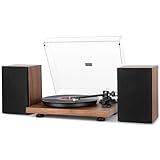
- Solid iron platter - precision-manufactured iron platter produces uniform inertial mass for perfect stability and rotation. Brings high-fidelity playback to the next level!
- Adjustable counterweight & anti-skating force - essential for any serious classic Turntable. Tonearm counterweight coupled with the advanced anti-skating system produces smooth stylus movement and tunes out skipping and distortion.
- Great connectivity - Built-in switchable phono line and pre-amplifier allow connection to the set of included speakers or to your own externally-powered speakers via the included dual RCA output cables.
- Vinyl Recording Via PC - Connect this turntable to your computer via USB and encode vinyl audio into MP3s for digitalized storage and playback on your computer, smartphone or tablet.
- Bluetooth streaming - play music from all your favorite devices (iPhones, Android smartphones, tablets, PCs, usb-mp3 players) through the turntable’s speakers with Bluetooth.
Choose the connection path that fits your equipment
Built-in preamp to powered speakers
Powered (active) speakers contain their own power amplifier. If your turntable has a built-in phono preamp, set its switch to LINE, then connect the left and right RCA outputs to the speaker’s RCA or line input. Use the supplied cable where it fits. If the speaker has only a 3.5 mm AUX socket, use a compatible RCA-to-3.5 mm cable or adapter and follow the speaker manufacturer’s wiring instructions. The powered-speaker connection guidance from Fluance covers this RCA and 3.5 mm possibility and cautions that the adapter must match the input.
For the AT-LP70XBT, Audio-Technica states that active speakers can be connected directly and that LINE is the appropriate setting when the destination has no PHONO input. Other built-in-preamp turntables work on the same signal principle, but confirm the switch names and output arrangement in the model’s manual.
Turntable to a receiver or amplifier with PHONO
A receiver or integrated amplifier with a genuine PHONO input already contains the phono stage. Connect the turntable’s RCA leads to the receiver’s PHONO jacks and connect the separate ground wire to the receiver’s ground terminal if one is supplied. On a switchable turntable, select PHONO or disable its built-in phono equalizer as the manual directs. The receiver then selects the source, amplifies it, and drives either passive speakers connected to its speaker terminals or another compatible output.
Quick wins for a faster PC:
Scan for outdated or missing drivers - takes under a minuteDriver Scan →Repair Windows errors before they cause bigger problemsFix Now →Fix the driver behind crashes, sound loss and screen glitchesFind Drivers →Do not send a preamplified LINE output into PHONO. The receiver will apply phono equalization and gain a second time, which can produce excessive level and distortion. Sony’s support page specifies PHONO output for a receiver PHONO input and LINE output when that input is unavailable: Sony’s connection procedure.
Rank #2
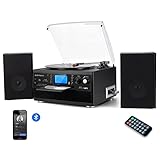
- 【CD Player and Recorder】Convenient CD changer for recording and playing with one press.Multimedia playback center is one of the best choices for home entertainment.
- 【Bluetooth Connection】Playing music from external wireless device, such as mobile phone, laptop and other bluetooth device.
- 【Twin Detachable Speakers】Clear and lound sound, no noise, simply playback and listen to your records.The volume can be adjusted according to your needs.
- 【Vinyl to MP3 Recording】Recording vinyl records directly to digital format in USB/SD card. Backup old vinyl in your PC or laptop.
- 【More Function】33 , 45, 78 RPM selectable (included 45-RPM adapter) playing, AUX in,LCD Screen backlight,With CD player and Cassette deck,And with AM/FM radio, you could listen the channel you like.
Turntable without a built-in preamp to powered speakers
Place an external phono preamp between the turntable and the powered speaker. Connect the turntable’s RCA leads to the preamp’s PHONO input, attach the turntable ground wire to the preamp ground terminal, and run the preamp’s line output to the speaker’s RCA/line input. The powered speaker supplies the amplification; the external box supplies only phono equalization and signal-level conversion.
Fluance documents this requirement for its Reference RT82, RT83, RT84 and RT85 models, which do not include an internal preamp. Those models need an external preamp unless they are connected directly to a receiver or amplifier with PHONO input. This is a model-specific example, not a specification for every turntable. See the Fluance Reference setup and FAQ for that series.
Turntable to passive speakers
Passive speakers have no power amplifier, so they cannot be driven by a turntable’s RCA output or by a phono preamp’s line output alone. Use a receiver or integrated amplifier between the source and the speaker terminals:
What’s actually slowing this PC down?
Pick the symptom - the matching free tool is one click away.
- With a receiver PHONO input, connect the turntable at PHONO, attach the ground wire, and connect the passive speakers to the receiver’s speaker terminals.
- Without a PHONO input, set the turntable to LINE if it has a built-in preamp, then connect to an AUX/line input; or place an external phono preamp before that line input.
- Use the receiver’s source selector and volume control to operate the system.
The Fluance Turntable Connection Guide illustrates both the preamp-plus-amplifier route and the receiver route. Its guidance distinguishes the preamp stage from the power-amplifier stage: one prepares the signal, while the other supplies power to passive speakers.
Rank #3

- 2*18 W Bookshelf Speakers: produce natural, well-balanced studio sound with massive bass, sounds with minimal distortion and decent tonal quality. Offer exquisite craftsmanship and aesthetics, match room decoration
- Iron Platter & Accurate Counterweight: Hefty platter is designed to reduce vibration and increase the clarity of the sound, better for stable rotation. The counterweight can independently adjust the tracking force of the needle accurately
- Moving Magnet Cartridge & Static-Balanced Tonearm: This cartridge produces moderate to high output levels, works into standard phono inputs on a stereo amplifier or receiver. Also features a robust aluminum tonearm and vibration-damping belt-drive system
- Bluetooth Streaming & Vinyl Recording via PC: the built-in receiver allows you to listen to music via smart phone, tablet or other compatible devices. It also supports USB to PC encoding, which converts vinyls into MP3 digital files via computer
- Built-in Preamp & Analog Phono-Line Output: Built-in switchable Phono-line and pre-amplifier allow to connect with the set of included speakers, or if you prefer to connect with your speakers or stereo system, take advantage of the turntable’s RCA jacks
Turntable with Bluetooth to a Bluetooth speaker
A Bluetooth connection requires a transmitter in the turntable and a Bluetooth receiver in the speaker. Put the speaker into pairing mode, start pairing on the turntable, and complete any confirmation steps shown in both manuals. On the AT-LP70XBT, Audio-Technica specifies the LINE setting for Bluetooth operation; consult the model’s instructions for status-light patterns and pairing controls.
Wireless convenience changes the signal path. Fluance explains that Bluetooth digitizes and compresses the audio and may reduce quality compared with a wired connection. That is a qualitative manufacturer statement, not a measured ranking of codecs or devices, so the audible result depends on the particular transmitter, receiver, codec, and listening environment. See Fluance’s Bluetooth guidance for its documented limitations.
Turntable without Bluetooth to a Bluetooth speaker
Add a third-party Bluetooth transmitter only after establishing a suitable line-level source. A turntable with a built-in preamp should be set to LINE and connected to the transmitter’s analog input. A turntable that outputs only PHONO must first connect to an external phono preamp; connect that preamp’s line output to the transmitter. Pair the transmitter with the speaker, following both devices’ manuals.
The transmitter is a wireless bridge, not a phono stage. Plugging a raw PHONO output into a transmitter that expects line level will still produce very quiet, improperly equalized audio. Fluance describes this preamp requirement and the possible compression trade-off in its Bluetooth support article.
Rank #4

- [Adjustable Counterweight] Adjustable counterweight and anti-skating weight can ensure smooth AT-3600L movement out of skipping to keep clarity on musical peaks and avoid distortion, sharing your favorite musics with family happily.
- [Solid Iron alloy platter] precision-manufactured Iron platter produces uniform inertial mass for perfect stability and rotation, Brings high-fidelity playback to the next level.It’s totally 1.5KG weight.
- [Superior Record Player with Speakers] The built-in switchable phono line allows connecting to included Hi-Fi speakers 36W High power or to your own externally speakers via the dual RCA output cables, ground wire also allow Connect the ground wire in your home with the ground wire of this product, which can reduce sound interference effectively, ensuring a clean, uninterrupted listening experience.
- [Bluetooth Record Player] This Bluetooth record player supports wireless playback from iPhones, Android smartphones, and tablets, letting you enjoy your favorite tracks effortlessly. But not from Bluetooth speakers.
- [Vinyl to MP3 Recording] Easily convert your vinyl collection to digital format with the USB connection. This record player allows you to back up your classic records directly to your Mac or PC in MP3 format. No matter where you are, you can enjoy your vinyl records.
Step-by-step setup checklist
- Turn everything off. Stop the platter, lower the volume, and switch off the turntable, speakers, receiver, and any preamp before making connections.
- Read the labels. Find PHONO/LINE, “built-in preamp,” or “phono equalizer” controls on the turntable. On the receiving side, identify PHONO, AUX, CD, LINE, RCA, 3.5 mm, Bluetooth, and speaker-terminal connections.
- Classify the speakers. Powered speakers have a power cord and an amplifier inside. Passive speakers have speaker terminals but no internal amplification and therefore need a receiver or amplifier.
- Select the signal path. Use direct LINE-to-powered-speaker wiring when possible; use PHONO-to-PHONO for a receiver with a phono stage; otherwise insert an external phono preamp before any line input or Bluetooth transmitter.
- Set the turntable switch before playback. Choose PHONO for a PHONO input. Choose LINE for AUX, CD, RCA/line, powered-speaker inputs, or a Bluetooth transmitter that expects line level. Do not guess if the manual uses a different label.
- Connect the left and right channels. Match the red/right plug to the red/right jack and the white or black/left plug to the corresponding left jack. Push each plug fully home without forcing it.
- Attach the ground wire where applicable. Secure the turntable ground lead to the PHONO, GND, or ground screw on the preamp or receiver. If a powered speaker has no ground terminal, follow its manual; the Fluance connection guide says grounding to a powered speaker may be unnecessary, but trying the available ground connection can help if hum remains.
- Power up in a safe order. Turn on the source components first, select the correct receiver input or Bluetooth source, then raise the speaker or receiver volume gradually.
- Test with a record at low volume. Confirm that both channels play, the stylus is tracking normally, and there is no hum or overload before increasing the level.
Grounding, hum and low-volume problems
A ground lead normally runs from the turntable chassis to the ground terminal on the phono preamp or receiver. The RT82–RT85 setup instructions warn that omitting this connection can introduce noise or hum. Keep the ground connection tight and route the turntable signal cables away from power bricks and mains cords where practical. The exact terminal location varies by model.
If hum persists with powered speakers, check whether the speaker provides a ground point and consult its manual. Fluance’s guide notes that a ground wire to a powered speaker may not be required, but it can be tried when hum continues. Do not remove a safety-earth connection from a mains-powered product; address signal grounding only as the equipment instructions describe.
Troubleshoot by symptom
| Symptom | Likely cause | Checks and fix |
|---|---|---|
| Very quiet, thin sound | PHONO output is feeding AUX/LINE without a phono stage. | Set the turntable to LINE if it has a built-in preamp, or add an external phono preamp before the line input. Sony identifies an incorrect PHONO/LINE or equalizer setting as a low-audio cause. |
| Loud, harsh or distorted sound | LINE output is feeding a PHONO input, causing double equalization and gain. | Move the cable to AUX/CD/LINE, or switch the turntable to PHONO only when the receiver’s PHONO input is the destination. |
| Persistent hum or buzz | Missing or loose ground lead, poor cable routing, or an unseated plug. | Reconnect the ground at the preamp or receiver, reseat both RCA plugs, separate audio and power cables, and follow the speaker manual if it offers a ground terminal. |
| Only one channel plays | Left/right RCA plug or jack is loose, damaged, or connected to the wrong input. | Power down, swap the left and right plugs one at a time to isolate the cable or input, and verify the source selector. |
| No sound from powered speakers | Wrong input selected, speaker power off, or turntable output not compatible with the input. | Confirm the speaker is powered, select its RCA/AUX input, verify LINE output or the external preamp, and check every cable connection. |
| Bluetooth will not pair | One device is not in receive/transmit mode, another device is already connected, or the turntable lacks a transmitter. | Clear old pairings, place both products in pairing mode, stay within the range specified by their manuals, and use a compatible external transmitter when necessary. A transmitter still requires line-level input. |
How to choose between wired and Bluetooth options
No single route is best for every room. Compare the actual equipment and your priority rather than buying every component listed in a generic setup.
| Priority or constraint | Usually suitable path | Trade-off or requirement |
|---|---|---|
| Fewest components with active speakers | Turntable’s built-in preamp set to LINE, direct RCA or approved 3.5 mm adapter | Works only when the turntable really provides LINE output and the speaker accepts that connector. |
| Existing receiver with PHONO | Turntable set to PHONO, RCA to PHONO, ground wire attached | Requires a receiver or amplifier with a functioning PHONO stage and speaker outputs. |
| Turntable has no built-in preamp | External phono preamp into powered speakers, amplifier, or Bluetooth transmitter | Adds a component and another set of cables; the preamp does not power passive speakers. |
| Passive speakers already owned | Receiver or integrated amplifier between source and speaker terminals | The receiver supplies power; a phono preamp alone is insufficient. |
| Wireless placement | Built-in Bluetooth transmitter to Bluetooth speaker, or external transmitter after a phono preamp | Both ends must support the required Bluetooth roles, and digitization/compression may reduce quality. |
| Maximum certainty and simplest troubleshooting | Correctly matched wired PHONO or LINE connection | Requires a physical cable run, but avoids pairing and wireless compatibility issues. |
The available sources do not establish a universal, measured sound-quality difference between wired and Bluetooth connections, nor do they rank particular preamps, speakers, cables, or codecs. Choose based on your inputs, component count, room layout, and tolerance for wireless compression.
Best Value

- 100W Hi-Fi Stereo Sound System: Equipped with dual bookshelf speakers (100w RMS Power, 400w Peak Power), the HiFire X delivers immersive, balanced sound. Each 5.3” woofer produces rich, punchy bass, while 1.5” silk dome tweeters deliver smooth, detailed highs—perfect for vinyl or wireless streaming.
- Powerful 105W Power System: Paired with a 21V/5000mA adapter, the HiFire X brings your vinyl collection to life with energy and precision. Enjoy deep dynamics, low distortion, and clean power delivery across all playback modes.
- True DSP Audiophile Preamp:Built-in DSP amplifier intelligently adapts EQ profiles to each audio input—phono, Bluetooth, or LINE-IN—ensuring optimized tone for every source. RCA LINE-OUT supports external amp/preamps for advanced customization.
- Retro VU Meter for Signal Dynamics: Experience audio visually with the real-time VU meter—watch the analog swing react to volume and signal strength. It’s a nostalgic callback to classic studio equipment from the '60s to '80s, adding character and function.
- CNC Machined Aluminum Control Panel: Engineered from a solid block of aluminum with brushed finishing, the front panel offers premium durability and control. Every knob and button offers smooth tactile feedback and lasting stability for true Hi-Fi precision.
What extra equipment might be necessary?
- External phono preamp: Needed when the turntable has only PHONO output and the destination has no PHONO input. It connects before a powered-speaker line input, amplifier line input, or Bluetooth transmitter.
- Receiver or integrated amplifier: Required to drive passive speakers. It may also provide the phono stage if it includes PHONO input.
- RCA or RCA-to-3.5 mm cable: Used only when the connectors on the turntable and speaker differ. Confirm whether the 3.5 mm socket is an analog line/AUX input and follow the speaker maker’s cable guidance.
- Bluetooth transmitter: Useful when the turntable has no Bluetooth transmitter but the speaker accepts Bluetooth. It does not replace a phono preamp for PHONO-only turntables.
You do not automatically need all four items. The turntable’s output and the receiving equipment’s inputs determine which, if any, are required.
Model-specific examples and limits
The AT-LP70XBT documentation is an example of a turntable that can feed active speakers directly when set to LINE and can use Bluetooth with the LINE setting. Its instructions are not a substitute for another model’s manual: controls, pairing procedures, and connector layouts can differ. Refer to the official AT-LP70XBT user manual for its exact table and operating steps.
Fluance’s RT82, RT83, RT84 and RT85 Reference models illustrate the opposite case: the documented setup requires an external phono preamp unless the receiver or amplifier itself has PHONO input. The Reference-series support page describes those models; do not generalize their lack of a built-in preamp to unrelated turntables.
Free tools Windows power users keep installed
One-click scans. No signup required.
For a general wiring diagram covering powered and passive speaker routes, grounding, and preamp placement, consult the Fluance Turntable Connection Guide. Use the equipment manuals for final connector names, switch positions, and Bluetooth pairing behavior.
Quick Recap
Product prices and availability are accurate as of the date/time indicated and are subject to change. Any price and availability information displayed on Amazon at the time of purchase will apply.

