
PC Slower Than It Used to Be?
A free scan shows the junk files, broken settings and background clutter dragging Windows down - then fixes them in one click.Free scan · Windows 10 & 11Crashes, No Sound, or Screen Glitches?
Random freezes, missing sound and display glitches usually trace back to one bad driver. Find and replace yours safely.Free scan · under a minuteiTechGuides is reader-supported. When you buy through links on our site, we may earn an affiliate commission. As an Amazon Associate I earn from qualifying purchases. Learn more
The safest way to clean earbuds is to follow the exact model’s care instructions, begin with gentle dry tools, and keep liquid out of speaker openings, microphones, charging ports, and electrical contacts unless the manufacturer gives a narrowly defined exception. Remove the earbuds from power, work with dry hands, avoid sharp or abrasive tools, and let every part dry completely before wearing or charging.
There is no universal earbud-cleaning recipe. Apple, Samsung, and Sony allow different tools and liquids for different models and components. The procedures below separate general precautions from model-specific instructions, with links to the manufacturers’ current support pages so you can verify your exact version before touching a mesh, sensor, or port.
Why the exact model matters
Earbuds that look similar can have different mesh materials, waterproofing limits, microphone layouts, adhesives, and charging contacts. A method that is explicitly approved for one model can damage another. Apple’s AirPods instructions, Samsung’s Galaxy Buds guidance, and Sony’s earbud-care pages do not all permit the same liquids or brushes.
Use the manufacturer’s page for the exact model and identify the part you are cleaning before you start:
#1 Best Overall

- This set of keyboard cleaning brushes is well made, comes in a variety of shapes and sizes for cleaning deep and hard-to-clean areas, enough to meet your daily needs.
- Made of PP handle and nylon bristles, it is durable, the bristles are not easy to fall off or break, and will not generate static electricity during use, preventing damage to your device.
- The computer brush kit is small in size and light in weight, making it easy to carry and use. This is a great tool kit for use at home or at work.
- Mini electronic cleaning brush is suitable for cleaning computer keyboards, home appliances, car interiors, vents, circuit boards, mobile phones, cameras, electronic devices, etc.
- Packaging: 5 different types of anti-static cleaning brushes.
- removable silicone or rubber ear tip;
- speaker or receiver mesh;
- microphone or pressure-relief vent;
- outer housing;
- wear sensor;
- charging contact; or
- charging-case port and interior.
Apple’s general AirPods page is at support.apple.com/en-au/102672. Samsung’s Galaxy Buds instructions are at samsung.com/us/support/answer/ANS10001320/, and its Buds4-specific procedure is at samsung.com/ca/support/mobile-devices/how-to-clean-your-galaxy-buds4-series/. Sony provides model-specific instructions for the WF-1000XM4 at sony.com/electronics/support/articles/00264304 and broader WF/WI care guidance at sony.co.uk/electronics/support/wireless-headphones-bluetooth-headphones/wh-ch720n/articles/00249895.
Prepare before touching the earbuds
Preparation prevents most accidental liquid and electrical damage. Set aside enough time for drying; do not clean immediately before a call, commute, or charging session.
- Disconnect power. Remove both earbuds from the charging case, stop playback, and disconnect Bluetooth if the model’s instructions recommend powering down.
- Use clean, dry hands. Oils and moisture on your fingers can transfer to the mesh or contacts.
- Work over a clean, well-lit surface. A plain cloth or tray keeps tiny ear tips from rolling away and makes loose debris visible.
- Read the exact instructions. Confirm the model name, generation, and the component you intend to clean. Do not assume instructions for a different generation apply.
- Inspect first. Look for visible wax, dust, corrosion, cracked housing, torn mesh, or liquid inside an opening. If a component is loose or damaged, stop rather than trying to force it back into place.
- Separate removable parts. Take off ear tips only as described by the manufacturer. Never twist or pull a tip so hard that its mounting ring or the nozzle is stressed.
Tools that are generally safer—and tools to avoid
Use only tools the model’s instructions permit. A soft-bristled electronics brush and a soft lint-free cloth are useful for many dry-cleaning tasks, but owning them does not authorize wet cleaning or scraping.
Quick wins for a faster PC:
Clear out junk files and repair common Windows errorsFree Scan →Scan for outdated or missing drivers - takes under a minuteDriver Scan →| Tool or material | Appropriate use | Main limitation |
|---|---|---|
| Soft, dry brush | Loosening surface dust and debris where the manufacturer allows brushing | Use light strokes; do not push bristles into a mesh, vent, or microphone opening |
| Soft lint-free cloth | Wiping the outer body, case, or accessible contacts when the instructions allow it | It should be dry unless the model explicitly permits a slightly damp cloth for that component |
| Cotton swab | Cleaning specified charging contacts or sensors in Samsung’s guidance | Keep fibers and moisture out of openings; never jam a swab into a port |
| Distilled water | Used to rinse a brush in Apple’s and Samsung’s narrowly defined micellar-water procedures | Not a general earbud cleaner and not a reason to wet another model |
| Specified micellar water | Only in the Apple AirPods 3, 4, and 5 mesh procedure and Samsung Buds4 procedure described below | Do not transfer this exception to other earbuds or electronics |
| Metal tools, pins, needles, toothpicks, wire brushes | Not recommended | They can puncture mesh, scratch coatings, deform contacts, or push debris deeper |
| Alcohol, soap, household spray, solvents, abrasives | Not a default cleaning choice | Use only if the exact manufacturer instructions explicitly approve the substance for that component |
Clean removable ear tips without forcing them
Ear tips collect skin oils and wax but are also easy to stretch or tear. Remove them only after checking the model instructions and noting how they attach.
Rank #2

- 10 Different Sizes for Versatile Cleaning: This keyboard cleaning brush set includes 10 different sizes, featuring 7 hard brushes and 3 soft bristle brushes, allowing you to clean various components in different locations with ease
- Effective Dust Removal: The brushes are designed to effectively remove debris from keyboard gaps and dust inside computers, ensuring optimal performance and preventing dust buildup that could damage your equipment, saving on costly repairs
- Anti-Static Protection: Made with high-quality nylon material, the anti-static brushes are safe for cleaning electronic components, including computer motherboards, without worrying about damaging sensitive parts. (Note: Yellow bristle brush is not anti-static.)
- Soft Bristles for Delicate Surfaces: The yellow and blue soft bristle brushes are perfect for cleaning delicate surfaces like computer monitors, car screens, and camera lenses, offering a gentle touch for sensitive areas
- Wide Range of Applications: Ideal for cleaning keyboards, computer fans, car vents, door/window tracks, razors, and more, this cleaning brush kit efficiently removes dust and debris from hard-to-reach areas in various environments
- Hold the earbud by its housing, not by the stem, microphone grille, or charging contact.
- Peel the tip away from the nozzle gradually. If it resists, stop and recheck the removal direction rather than pulling harder.
- Clean the detached tip only by the method approved for that model. If water is allowed, keep it on the removable tip—not on the earbud—and rinse away all residue.
- Dry the tip completely with a soft, lint-free cloth and allow trapped moisture to evaporate.
- Inspect the nozzle and tip for tears, stretched mounting rings, or debris that could fall into the receiver.
- Press the tip back on evenly until it is seated. A partially attached tip can come loose in the ear or alter the fit.
Samsung’s general Galaxy Buds instructions say to remove rubber tips carefully, use a cotton swab or dry brush for debris, and wipe the receiver mesh with a soft dry cloth. Samsung also warns against holding the earbuds upright while cleaning because loosened debris or liquid can fall inside, and it says not to use alcohol or soapy water. Follow those cautions only for the Galaxy Buds models covered by that page.
Clean speaker mesh and vents
Mesh is the highest-risk area because it protects the acoustic opening. The goal is to lift debris away, not to drive it through the grille. Keep the earbud angled so loosened material falls away from the opening, and use almost no pressure.
General dry-cleaning approach
- Hold the earbud with the mesh facing slightly downward or sideways, as the model instructions permit.
- Use a soft, dry brush or cloth on the surface only. Make short, gentle passes rather than scrubbing.
- Pause and inspect after each pass. If the mesh looks cleaner, stop; more brushing increases the chance of damage.
- Do not blow forcefully into the opening. Air pressure can move wax or dust farther inside.
- Do not insert a pin, needle, blade, metal pick, or stiff bristle into the grille.
Apple AirPods 3, AirPods 4, and AirPods 5: the limited micellar-water procedure
Apple publishes a specialized procedure for particular meshes on AirPods 3, AirPods 4, and AirPods 5. It calls for micellar water containing PEG-6 Caprylic/Capric Glycerides (or the Belkin AirPods Cleaning Kit), a soft-bristled children’s toothbrush, distilled water, two small cups, and paper towel. This is not a general instruction for every AirPods generation or for other earbuds.
Do these 3 things before closing this tab:
1Clear out junk files and repair common Windows errors2Scan for outdated or missing drivers - takes under a minute3Repair Windows errors before they cause bigger problems- Confirm that your model and the mesh you intend to clean are among those covered by Apple’s page.
- Apply the specified micellar water to the soft children’s toothbrush as directed; do not pour liquid onto the earbud.
- Brush the mesh in circles for about 15 seconds per pass, using light contact.
- Blot the area with paper towel, then repeat the micellar-water brushing and blotting sequence three times as Apple specifies.
- Rinse the toothbrush with distilled water, remove excess water, and repeat the brushing step with the rinsed brush.
- Blot the surface again and leave the earbuds undisturbed to dry for at least two hours.
Apple separately warns not to place AirPods under running water and not to use sharp objects or abrasive materials. Keep liquid away from charging ports even when following the approved mesh procedure.
Rank #3

- Soft bristles gently sweep away dust
- Slim silicone wiper grabs dirt from small, hard-to-reach places
- Ideal for keyboards, computer screens, cell phones, camera lenses and more
- Bristles retract for storage
- Silicone wiper is protected by cap when not in use
Samsung Galaxy Buds4: a separate micellar-water exception
Samsung Canada’s Buds4 and Buds4 Pro page describes a limited micellar-water method. Samsung explicitly limits it to Galaxy Buds4 and says not to use the method on other electronics unless their manufacturer specifies it.
- Use a soft brush and the specified micellar water, applying it to the brush rather than flooding the earbud.
- Gently brush each listed port for about 15 seconds.
- Wipe away moisture and repeat the brushing and wiping sequence three times.
- Rinse the brush with distilled water, remove excess moisture, and brush again as instructed.
- Wipe the earbuds dry and let them dry completely before use or charging.
Do not substitute this Buds4 procedure for Samsung’s general guidance on another Galaxy Buds generation. The product family name alone is not enough; the generation and component must match.
Sony earbuds: keep each instruction attached to its model
Sony’s WF-1000XM4 support page says not to wash the ear tips with water and not to use alcohol or chemicals on them. Treat that as a model-specific restriction.
The Tool Desk
Outbyte PC Repair FREERepair Windows errors before they cause bigger problemsFix Now →Outbyte Driver Updater FREEScan for outdated or missing drivers - takes under a minuteDriver Scan →Sony’s broader WF/WI care guidance describes a tightly wrung damp cloth for certain mesh-cleaning tasks and says to avoid pushing debris inward. It also mentions a clean brush or dust-cleaning gel for lodged vent debris. Those options belong to the models and components covered by Sony’s general page; they are not permission to wet every Sony earbud or tip. Check the exact product page before using a damp cloth or cleaning gel.
Rank #4
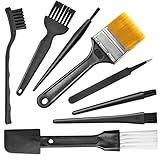
- Wide variety of brushes, different bristles hardness & sizes for different tasks all the time.
- The round handle brushes clean those finer detail, made for hard-to-reach places such as CPU fan, controller, camera, sewing machine
- The flat handle brush is used for cleaning PCB, circuit boards and electronic components. The crank brush is good for some heavy-duty scrubbing such as grout
- Note: The yellow bristles brush and scraper brush are not anti-static, the scraper brush can clean some extremely difficult stains, shaver head, and car air vent
- This computer cleaning kit gets rid of the dust bunnies and crumbs on your keyboard, goes well with an air blower or compressed air or power duster
Clean the outer housing
The housing can usually be wiped more safely than the mesh, but seams, microphones, sensors, and charging contacts still need protection.
- Use a dry, soft, lint-free cloth first to remove surface dust and oils.
- If the exact instructions permit moisture for the housing, dampen the cloth slightly rather than applying liquid to the earbud. The cloth should never drip.
- Wipe around the body while avoiding speaker openings, microphone holes, seams, buttons, and contacts.
- Immediately follow with a dry cloth and inspect for moisture trapped around a seam.
Apple’s AirPods guidance allows a cloth slightly dampened with fresh water after exposure to substances that could stain or damage the body. Apple then calls for a soft, dry, lint-free cloth and at least two hours of drying. It also says not to run AirPods under water or use sharp or abrasive materials. Do not extend that fresh-water allowance to the speaker mesh or charging port.
Clean charging contacts, sensors, and the case
Charging contacts and wear sensors
Charging contacts need a clean, dry connection, but they are not a place to experiment with liquids. Samsung’s Galaxy Buds guidance recommends a cotton swab for specified contacts and sensors. If sweat or another liquid reaches a contact, Samsung says to dry it thoroughly with a clean, soft cloth to help reduce corrosion risk.
- Remove the earbud from the case and inspect the contact and the surrounding recess.
- Use the dry tool named by the manufacturer, moving lightly over accessible residue.
- Do not scrape a contact with metal or push a swab into a narrow charging channel.
- If moisture is present, blot and leave the earbud out of the case until fully dry.
For Buds4, Samsung specifically says to wipe charging contacts carefully with a soft, dry cloth and remove all moisture after its prescribed cleaning procedure.
Best Value

- 🌀 PRECISION WAVED BRISTLE DESIGN — Unique waved bristles provide increased surface contact to lift dust, debris, flux residue, and thermal paste from hard-to-reach areas for more effective cleaning.
- 🪶 ULTRA-SOFT HIGH-DENSITY BRISTLES — Extra-fine, flexible bristles are designed for delicate electronic assemblies, helping clean around IC chips, connectors, and surface-mounted components while minimizing the risk of scratching or damaging sensitive parts when used properly.
- 💻 MADE FOR ELECTRONICS REPAIR — Ideal for PCBs, motherboards, smartphones, tablets, laptops, gaming consoles, keyboards, cooling fans, heatsinks, cameras, and other precision electronics.
- ✋ COMFORTABLE ERGONOMIC HANDLE — Lightweight, balanced handle provides excellent grip and precise control, making detailed cleaning easier during long repair sessions.
- 🛠️ PROFESSIONAL REPAIR TOOL — Perfect for repair shops, technicians, hobbyists, soldering stations, flux cleanup, thermal paste removal, preventive maintenance, and everyday electronics servicing.
Charging case
Keep the case disconnected from a charger while cleaning. A dry, soft brush can lift loose debris near the case port, and a soft, dry lint-free cloth can wipe the exterior and accessible interior surfaces. Apple says not to put anything into the charging ports. Follow that restriction rather than trying to excavate compacted lint with a pin.
- Empty the case and turn it so loose debris can fall out naturally.
- Brush the outside of the port and the case well only where the manufacturer permits brushing.
- Wipe the case with a dry lint-free cloth.
- If your model’s instructions permit a slightly damp cloth for the exterior, use it only on the outside and keep the lid, contacts, and ports dry.
- Leave the case open until it is fully dry before reconnecting power or replacing the earbuds.
Dry every part before wearing or charging
Moisture left in a mesh, sensor recess, contact, or case well can cause poor sound, unreliable charging, or corrosion. Drying time is model-specific.
- Apple’s AirPods procedure described above requires at least two hours of drying.
- Samsung’s Buds4 instructions require the earbuds to dry completely but do not set a universal number of hours.
- For other models, use the time and conditions in the exact manufacturer instructions rather than borrowing Apple’s two-hour figure.
Keep the earbuds and case in a clean, dry place with the openings unobstructed. Do not use a hair dryer, heater, radiator, or compressed air unless the manufacturer explicitly approves it; concentrated heat or pressure can deform parts or drive moisture and debris inward.
What to do when sound or charging is still wrong
Cleaning should stop once the visible contamination is gone. Continued probing can turn a minor blockage into damaged mesh or contacts.
| Symptom after cleaning | Safe next action | Stop and seek support when |
|---|---|---|
| Muffled audio | Confirm that the tip is seated, the mesh is unobstructed, and the earbud is completely dry. Test again only after the required drying period. | The sound remains muffled after gentle, model-approved cleaning |
| One side is quieter | Compare the two meshes visually and check the device’s balance and accessibility settings. | The difference persists or the mesh appears torn, dented, or detached |
| Earbud will not charge | Inspect the case well and contacts for visible debris, clean only with the approved dry tool, and verify that the earbud is seated. | Contacts are corroded, the case is wet, or charging still fails after everything is dry |
| Automatic pause or wear detection fails | Wipe the sensor area with the permitted dry cloth or swab and allow it to dry. | The sensor remains unreliable or the housing is cracked |
| Liquid entered an opening | Remove the earbud from power, leave it out of the case, and follow the manufacturer’s liquid-exposure guidance. | Do not charge, heat, shake forcefully, or insert tools; contact the manufacturer or an authorized service channel |
Samsung notes that dust, earwax, and other debris can make audio seem muffled or prevent earbuds from charging correctly. If approved cleaning does not resolve either problem, use the manufacturer’s troubleshooting or service route. Apple likewise recommends seeking service when cleaning does not fix the issue.
Common mistakes that cause damage
- Using alcohol by default: Alcohol is not a universal disinfectant for earbud materials. Sony’s WF-1000XM4 instructions specifically prohibit alcohol or chemicals on its tips, while other pages give different, component-specific rules.
- Applying soapy water: Samsung warns against alcohol and soapy water for the Galaxy Buds covered by its general guide because liquid or debris can fall inside.
- Scraping the grille: A pin or metal pick can puncture mesh and push wax toward the driver.
- Holding the earbud upright while brushing: Samsung warns that loosened material can fall inward; use the orientation specified for your model.
- Cleaning while charging: Power and moisture are a bad combination. Remove the earbuds from the case and disconnect chargers first.
- Reusing a damp tool: A cloth or brush that still holds moisture can transfer it to a port or contact.
- Assuming water resistance means washable: A water-resistance rating does not replace the cleaning instructions for a specific model, and it does not make running water or submerged cleaning safe.
- Continuing after the symptom remains: More force rarely fixes an internal blockage. Persistent faults need troubleshooting or service, not deeper probing.
A quick decision path
- Is the exact model instruction available? If not, find it before using any liquid or cleaning a mesh.
- Is the dirty part removable? Remove only a detachable tip; leave fixed mesh, sensors, and contacts in place.
- Does the instruction permit a liquid? If no, stay dry. If yes, use only the named liquid, tool, component, and technique.
- Can debris be lifted without pressure? Brush or wipe gently. If it will not move, stop instead of scraping.
- Is every part dry? If you cannot answer yes, do not wear the earbuds or place them in the case.
- Did the fault remain? Stop cleaning and use the manufacturer’s troubleshooting or service channel.
Key differences among the documented procedures
| Manufacturer and scope | Liquid policy in the documented guidance | Tools or technique | Drying requirement |
|---|---|---|---|
| Apple AirPods 3, 4, and 5, specified meshes | Specified micellar water and distilled-water brush rinse only | Soft children’s toothbrush; circular brushing for about 15 seconds per pass; three micellar-water cycles | At least two hours |
| Samsung Galaxy Buds, models covered by the general US page | Do not use alcohol or soapy water; dry cleaning is emphasized | Cotton swab, dry brush, and soft dry cloth; avoid holding earbuds upright | Thoroughly dry before use or charging |
| Samsung Galaxy Buds4 and Buds4 Pro | Micellar water is allowed only in the stated Buds4 procedure | Brush each listed port about 15 seconds, repeat three times, rinse brush with distilled water | Dry completely; no universal time stated |
| Sony WF-1000XM4 tips | Do not wash tips with water; do not use alcohol or chemicals | Follow the model page rather than a generic wet-cleaning method | Use the model’s instructions |
| Sony WF/WI general care guidance | A tightly wrung damp cloth may be allowed for specified mesh tasks | Clean brush or dust-cleaning gel may address lodged vent debris | Follow the exact model’s instructions |
When professional help is the safer option
Stop cleaning and contact the manufacturer or an authorized service provider if the earbud has liquid inside an opening, visible corrosion, a detached or punctured mesh, a cracked housing, a swollen battery, heat, a burning smell, or a charging fault that remains after approved dry cleaning. Do not open the housing or try to replace an internal battery at home. Service instructions and availability vary by region and model, so use the support channel for your exact product.
For routine buildup, the safest pattern is conservative: identify the part, use the least aggressive method the manufacturer permits, keep liquid narrowly controlled, and give the earbuds enough time to dry before power is restored.
Recommended Free Tools
Quick Recap
Product prices and availability are accurate as of the date/time indicated and are subject to change. Any price and availability information displayed on Amazon at the time of purchase will apply.

