
Recommended Free Tools
iTechGuides is reader-supported. When you buy through links on our site, we may earn an affiliate commission. As an Amazon Associate I earn from qualifying purchases. Learn more
The right laptop review tests are the ones that answer a specific buyer’s questions. Build a plan around the laptop’s intended use, then combine repeatable CPU, GPU, storage and battery measurements with practical work, display measurements, usability checks, and sustained thermal testing. A single benchmark score or battery number cannot represent every workload.
Before testing, write down the likely buyer, the decisions they must make, and the conditions under which every result will be produced. That approach makes comparisons fairer and gives readers evidence they can apply to their own work, travel, gaming, or creative projects.
1. Start with the buyer and the laptop’s purpose
A thin everyday notebook, a gaming machine, and a mobile workstation should not receive identical test plans. The hardware may share some benchmarks, but the important questions differ.
Free tools Windows power users keep installed
One-click scans. No signup required.
| Laptop type | Questions the review should answer | Tests to emphasize |
|---|---|---|
| Everyday or student laptop | Does it stay responsive in office, browser, video-call, and media tasks? Is it light enough to carry? How long does it last unplugged? | Web battery, video playback, office tasks, keyboard and touchpad, webcam and microphone, display readability, weight, ports and fan noise |
| Thin performance laptop | How much performance is available before heat, noise, or battery compromises become noticeable? | Short and sustained CPU tests, creator workloads, thermals, acoustics, display, battery and charger behavior |
| Gaming laptop | Can it maintain playable performance rather than only produce a high first-run score? Is the screen suitable for games? | GPU benchmarks, selected games, stress tests, sustained temperatures, fan noise, refresh rate, motion behavior and plugged-in battery behavior |
| Workstation or creator laptop | How quickly does it complete the buyer’s actual render, encode, compile, or data task? | CPU and GPU rendering, video transcoding, storage, memory capacity, sustained loads, color and brightness, ports and external-display support |
Translate the intended use into measurable questions. Examples include: “How long does it last during light reading at a controlled brightness?”, “Does performance fall after the chassis heats up?”, “Can the display be used in a bright room?”, and “Are the ports and wireless capabilities suitable for the buyer’s accessories?” This audience-first approach follows the categories used in established laptop methodologies from RTINGS, whose laptop methodology was updated February 26, 2025.
#1 Best Overall

- SPECIFICATIONS: Monitor calibration colorimeter with Easy 1 2 3 software workflow, USB C connection, compact body approx. 34mm tall x 37mm diameter, adjustable counterweight for screen placement, supports up to 2 displays, brightness target selection including Native or Photo with before and after check.
- EASY SETUP: Guided 1 2 3 workflow makes calibration fast and approachable, helping photographers and creators achieve more accurate color without complicated settings, so you can edit with confidence and trust what you see on screen.
- COLOR ACCURACY: Corrects common monitor color shifts to deliver truer tones and more reliable contrast, improving consistency across editing sessions and helping your images look closer to final output on other screens and devices.
- DUAL DISPLAY SUPPORT: Calibrates up to 2 monitors for matching color across a multi screen workspace, ideal for photo editing, video work, and creative setups where consistent viewing on both displays matters.
- BEFORE AFTER CHECK: Built in comparison view lets you instantly see the difference after calibration, making it easy to confirm improved accuracy and maintain consistent results by repeating the process on a regular schedule.
2. Build a balanced test matrix
A defensible plan normally covers seven areas: configuration, performance, battery, display, interface, thermals and acoustics, and connectivity. Not every test belongs in every review. Select enough tests to answer the buyer’s questions without creating a pile of unrelated scores.
- Configuration: Record the exact processor, graphics processor, memory, storage, panel, operating system, drivers and firmware.
- Performance: Use a small, repeatable synthetic set for comparison and at least one practical task that reflects the laptop’s purpose.
- Battery: Run clearly labeled light-use and media or heavy-use scenarios when relevant.
- Display: Measure brightness and color-related properties, then describe reflections, viewing angles and motion in use.
- Interface: Assess the keyboard, touchpad, speakers, webcam and microphone separately from instrument readings.
- Sustained behavior: Observe temperatures, fan noise and performance over an extended load rather than only during a short burst.
- Connectivity: Verify physical ports and advertised capabilities, and identify the wireless adapter and supported standard.
3. Choose complementary performance tests
CPU performance
Use a repeatable CPU benchmark to establish a comparable reference, then add a workload readers recognize. RTINGS lists Geekbench 5 and Cinebench R23 among the benchmarks in its published methodology. Those names are examples, not a permanent mandatory stack; benchmark versions and operating-system support change.
A practical task can reveal behavior that a short score hides. Laptop Mag describes pairing industry benchmarks such as Geekbench with in-house work including a spreadsheet macro and video transcoding. You can adapt that principle to the audience: recalculate a large spreadsheet, compile a defined project, export a fixed video timeline, or batch-process a known image set. Record the input files, application version, settings and completion time so another reviewer can reproduce the task.
GPU and gaming performance
Match the graphics test to the GPU class. For current hardware, UL’s reviewer guidance recommends its latest benchmarks, including Speed Way for heavy ray-traced gaming and Steel Nomad for heavy rasterized gaming. Do not treat scores from different benchmark versions as interchangeable.
Game tests should identify the title, resolution, quality preset, upscaling or frame-generation settings, driver version and whether the result is an average, percentile or built-in-run score. A lightweight productivity laptop may need no demanding game suite; a gaming model needs several representative titles and evidence of sustained performance.
Storage and memory
Use a cross-platform disk test or another repeatable storage workload, but explain what it measures. Sequential throughput does not equal application launch time, and a benchmark run can be affected by a nearly full drive, thermal limits or background updates. Report the tested drive capacity and interface, memory amount and channel configuration because laptop variants can differ.
Short-run versus sustained results
Run a short benchmark for peak responsiveness and a repeated or extended workload for behavior after heat builds. A high first score can coexist with a lower long-run result if power or temperature limits reduce clock speeds. Present the two results as different measurements rather than declaring one “the” performance figure.
What’s actually slowing this PC down?
Pick the symptom - the matching free tool is one click away.
4. Test battery life by defined scenario
Battery runtime is conditional, not a universal property. Web browsing approximates light productivity and reading; video playback represents media consumption; a simulated gaming load represents a heavy workload. RTINGS describes all three types and notes that the playback application or website can change the result.
| Scenario | What it represents | Details to disclose |
|---|---|---|
| Light web or productivity | Reading, browser tabs, documents and routine work | Browser, page set or script, Wi-Fi state, brightness, refresh rate, power mode and background controls |
| Video playback | Streaming or local media viewing | Video source, player or website, codec where relevant, audio level, network state and screen settings |
| Heavy graphics or simulated gaming | Demanding 3D or creator use away from an outlet | Workload, frame settings, performance mode, brightness, whether the charger is connected and stopping condition |
Control brightness by luminance rather than by the same slider percentage on every laptop. UL recommends calibrating standard backlit LCD devices to 200 cd/m² when brightness is not the test variable. That is a comparability recommendation, not a universal target for OLED or every other display technology. State the chosen luminance and any platform-specific exception.
Rank #2
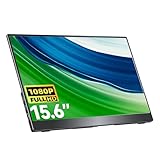
- Portable Monitor for Laptops: Cocopar laptop screen extender is the ideal portable monitor for Macbook, Surface Pro, Surface Laptop, Lenovo Laptop, HP Laptop, Dell Laptop, ASUS Laptop, etc. This second monitor for laptop supports Extend and Mirror Mode, bringing you efficiency for meetings, work from home, and presentations
- FHD Portable Monitor VESA Mountable: Featuring a 1080P resolution, 60HZ, 85% color gamut, 178° FULL viewing angle, HDR, and Low Blue Light Super Clear IPS A-grade screen, this Cocopar 15.6 inch portable screen for laptop measures only 6mm (0.24 inches) at the slimmest point and 700g (1.5 pounds) weight
- Plug and Play USB-C Monitor: Cocopar portable laptop monitor provides 2 Full-featured USB-C ports and a Full Size HDMI port, is compatible with most laptops, PC, PS4/5, and Xbox. Only One single USB-C Cable is required for both power supply and display and supports power pass-through reverse charging. NOTE: Your device should support thunderbolt 3.0/4.0 or USB 3.1 Type C DP ALT-MODE
- Adjustable Stand and VESA Mountable: Cocopar portable computer monitor setup with ease. The 90° adjustable integrated kickstand lets you personalize the position and angle. Plus, the 2 VESA holes enable stable mounting on compatible stands for efficient space utilization. Customize your workspace for enhanced productivity
- Your Go-To Screen Anywhere: Perfect for remote work, business trips, virtual meetings, gaming, and content creation. Cocopar delivers flexible dual-screen convenience wherever you are.
Keep the operating system, wireless state, power mode, charger state, background processes, screen refresh rate and application versions consistent. RTINGS documents controlled brightness, power settings and background-process controls in its methodology. When comparing two machines, use the same scenario and stop at the same endpoint. UL’s stated rule is: “The benchmark will run until the system goes into hibernation or shuts down.”
Report runtime with its conditions attached: for example, “7 hours 42 minutes in the web scenario at 200 cd/m², balanced mode, Wi-Fi enabled.” Do not present that figure as the expected runtime for gaming or video editing.
The Tool Desk
Outbyte Driver Updater FREEScan for outdated or missing drivers - takes under a minuteDriver Scan →Outbyte PC Repair FREEClear out junk files and repair common Windows errorsFree Scan →5. Measure the display for the environment where it will be used
A display section should combine instruments and observation. Depending on the panel and audience, measure:
- Peak and sustained brightness
- Contrast
- Color coverage and, when possible, accuracy
- Reflections and glare
- Viewing-angle behavior
- Flicker
- Refresh rate and variable-refresh support
- Motion behavior in games and scrolling
A display colorimeter is the appropriate category of equipment for objective brightness and color measurement. Describe the measurement mode, pattern, warm-up period and any automatic-brightness setting that was disabled. Then add a separate hands-on description of legibility in a bright room, text clarity, scaling and perceived motion.
RTINGS notes that its laptop motion assessment is limited and does not currently measure response time with its test across all supported operating systems. A review should disclose similar limits instead of implying a complete laboratory assessment from a single observation.
6. Evaluate keyboard, touchpad, audio and camera separately from measurements
Interface quality often determines whether a laptop is pleasant to use, yet much of it is subjective. Describe the basis for each judgment:
- Keyboard: Key travel, actuation force, layout, backlight uniformity, arrow-key size, function-row behavior and flex.
- Touchpad: Surface friction, click mechanism, gesture accuracy, palm rejection and usable area.
- Speakers: Voice clarity, maximum loudness, bass presence and distortion at high volume.
- Webcam: Resolution, exposure, color, noise, framing and behavior in low light.
- Microphone: Voice intelligibility, background-noise handling and whether processing can be disabled.
Keep these observations distinct from measured brightness, temperature or runtime. RTINGS explicitly separates subjective interface assessments from objective tests. Avoid turning a reviewer preference into a claimed measurement.
7. Test thermals and noise under sustained load
Record both idle and loaded behavior. Idle results show baseline fan behavior; sustained loads reveal hot spots, acoustic limits and performance changes after the system reaches equilibrium.
One documented RTINGS method runs Cinebench R23 and Unigine Heaven together for 20 minutes while recording keyboard-deck temperatures, then measures fan noise under load. This is a reproducible example, not a mandatory threshold or the only valid workload. Report where temperatures were taken, the ambient temperature, the duration, the power mode and whether the laptop was plugged in.
Rank #3

- 【15.6”Portable Monitor with stand】 15.6” Portable monitor with an adjustable high stand can better adjust the height and angle you need through the stand.Laptop screen extender perform multiple taskssimultaneously while using this computer monitor.And come with a protective case! Could also be used as a lower stand for monitor!
- 【Wide Compatibility】IPS portable monitor for laptop equipped with 2 USB Type-C ports and Mini-HDMI port,No need to download driver software. Experience the convenience of effortlessly connecting the monitor to your device.HONGO could connect to a gaming console,like XBOX,Switch, PS and most laptop, smartphone, PC.
- 【Ultra Slim】Portable screen extender equipped with 0.35" ultra-thin profile. Travel monitor for laptop ultra - thin and travel - ready design allows you to easily slip it into your backpack good for travel.Boost your productivity and gaming experience with a great choice for second screens
- 【Plug and Play】Portable external monitor with stand no need for any driver installation, No assembly required. you only need one USB-C cable to set the portable small monitor for its video signal and power to deliver a full HD resolution viewing. .
- 【Package Detail】Our products include:1x 1080P external monitor, 1x adjustable stand, 1x protective sleeve, 1x USB-C cable, 1x HDMI cable, 1x power adapter, and manual.
For graphics-focused systems, UL describes 3DMark stress tests as useful for assessing stability, cooling performance and thermal throttling. A stress result should include the test, loop or duration, pass criteria and performance variation. A laptop that maintains a lower but steady result may be more suitable than one that produces a higher opening score and then drops sharply.
8. Verify configuration and connectivity
Put the tested configuration near the results. Include CPU model, GPU model and memory limits; installed RAM; storage model and capacity; panel resolution, refresh rate and technology; operating-system edition; driver and firmware versions; and the power profile used.
Inspect every physical port and identify its location and function. Verify important advertised capabilities where practical, such as HDMI output support, USB data speed, charging input, display output and card-reader behavior. A port that exists physically may have reduced functionality on a particular configuration.
For wireless, distinguish identification from performance testing. Report the wireless adapter model and supported Wi-Fi standard. RTINGS reports those details but does not test wireless throughput in its laptop methodology. Do not imply that an adapter listing proves a particular speed in a reader’s home network.
9. Make the procedure reproducible
Reproducibility is a publishing requirement, not merely a laboratory preference. Use this pre-test checklist:
- Install the same benchmark version on every comparison system, or clearly separate results from different versions.
- Apply documented operating-system, firmware and graphics-driver updates.
- Set the same performance or power mode and record whether the charger is connected.
- Calibrate display brightness to a stated luminance when brightness is not the variable.
- Set the same screen resolution, refresh rate and graphics quality for comparable tests.
- Close or control background applications, updates, cloud synchronization and security scans.
- Record room temperature, test surface, network state and peripheral connections.
- Allow the laptop to reach a consistent starting condition before each run.
- Repeat runs when a score is an outlier and publish the rule used to select or average results.
- Keep the exact test files, scripts and application settings so a retest can use the same inputs.
When a deviation is necessary, state it next to the affected result. A different brightness, operating system, driver or benchmark version can invalidate a direct comparison even when the laptop models are otherwise similar.
10. Compare laptops on reader-relevant axes
When several laptops are in scope, organize the comparison around trade-offs rather than a single ranking.
| Comparison axis | Useful evidence | Readers who usually value it most |
|---|---|---|
| Short-run and sustained performance | Repeatable CPU/GPU scores, practical completion times and performance change over time | Creators, developers, gamers and power users |
| Battery by workload | Light-use, video and heavy-use runtimes with conditions | Travelers, students and mobile professionals |
| Screen behavior | Brightness, contrast, color, reflections, refresh rate and motion observations | Creators, gamers and anyone working in varied lighting |
| Temperature and acoustics | Idle and load temperatures, fan-noise readings and sustained performance | Gamers, creators and users in quiet rooms |
| Portability | Weight, thickness, charger size and battery capacity | Commuters and frequent travelers |
| Input and communication | Keyboard, touchpad, speakers, webcam and microphone observations | Students, office users and remote workers |
| Connectivity | Port inventory, display-output support, adapter model and Wi-Fi standard | Desk-based users and owners of external displays or fast storage |
The weighting is editorial. A travel-focused verdict may prioritize battery and weight, while a gaming verdict may prioritize sustained GPU performance, display behavior, thermals and acoustics. Explain the weighting instead of pretending every reader needs the same winner.
Independent reader supportYour contribution helps us test, update, and keep practical guides available for everyone.11. Example test plans by laptop class
Everyday productivity model
- Record the complete configuration and charger dimensions.
- Run a CPU benchmark, storage test and a fixed spreadsheet or document task.
- Measure web-browsing and video-playback battery life at a controlled brightness.
- Measure display brightness and contrast; inspect reflections and text clarity.
- Assess keyboard, touchpad, webcam, microphone and speakers.
- Run a moderate sustained CPU load and report fan behavior and keyboard-deck temperature.
- Verify ports, external-display support and wireless adapter details.
Gaming model
- Record GPU, driver, display refresh rate and power mode.
- Use current graphics benchmarks appropriate to the GPU, plus several games at stated settings.
- Run a graphics stress test or extended game loop to expose thermal throttling and performance variation.
- Measure plugged-in temperatures and noise, then separately report any meaningful unplugged limitation.
- Measure display brightness, contrast, refresh behavior and motion; note response-time limits if not instrumented.
- Check port placement for peripherals and confirm external-display outputs.
Creator or workstation model
- Use CPU and GPU benchmarks alongside a fixed render, encode, compile or batch-processing task.
- Test storage with a repeatable disk workload and record memory capacity.
- Measure sustained performance over a long enough interval for clocks and temperatures to stabilize.
- Use a colorimeter and report brightness, contrast, color coverage and accuracy with the measurement conditions.
- Check high-speed ports, display outputs, card-reader behavior and charger capacity.
- Run a light-use battery scenario, while making clear that rendering or encoding away from power may be much shorter.
12. Common mistakes and how to correct them
Publishing one battery number
Problem: A single runtime is treated as universal. Correction: Publish separate scenarios and attach brightness, software, wireless, power mode and configuration to each result.
Do these 3 things before closing this tab:
1Scan for outdated or missing drivers - takes under a minute2Repair Windows errors before they cause bigger problems3Fix the driver behind crashes, sound loss and screen glitchesRank #4

- Automated Color and Brightness Calibration
- Full-spectrum color sensor
- Single sensor calibrates multiple displays
- Improved accuracy and stability - The fourth-generation Spyders have double-shielded color filters for even closer match to CIE color standards and improved long term stability. Average accuracy is up 26% and consistency between Spyder units is 19% better.
- Fast Re-calibration Assistant - The ReCAL feature makes it quick and easy to recalibrate your display to compensate for changes over time.
Using identical slider percentages
Problem: “50% brightness” produces different luminance on different panels. Correction: Calibrate luminance, with 200 cd/m² as UL’s recommendation for standard backlit LCD comparisons when appropriate.
Relying only on synthetic scores
Problem: Readers cannot tell what the score means for their work. Correction: Pair comparable benchmarks with a fixed spreadsheet, transcode, render, compile or game task.
Testing only a short burst
Problem: Peak performance hides heat, noise and throttling. Correction: Repeat the workload or use a sustained stress test and publish duration and power conditions.
Mixing benchmark versions
Problem: Scores appear directly comparable when the software changed. Correction: Keep versions consistent or place different versions in separate result groups with an explicit warning.
Outdated Drivers Are Slowing You Down
One free scan finds every outdated or missing driver and matches the right update for your exact hardware.Free scan · exact hardware matchPC Slower Than It Used to Be?
A free scan shows the junk files, broken settings and background clutter dragging Windows down - then fixes them in one click.Free scan · Windows 10 & 11Confusing specifications with measured capability
Problem: A listed Wi-Fi standard is presented as tested throughput, or a physical HDMI port is assumed to support every advertised mode. Correction: Separate specification reporting from verification and measurement.
Presenting preference as laboratory fact
Problem: A reviewer’s keyboard or speaker preference is written like an instrument result. Correction: Explain the observation and its basis, while labeling it subjective.
13. Decide what to omit
More tests do not automatically make a review better. Omit a benchmark that does not answer a buyer question, cannot run on the operating system, or cannot be compared fairly with the rest of the table. RTINGS lists Geekbench 5, Cinebench R23, Blender, Basemark GPU, games and a cross-platform disk test in its methodology, but its page is a living document; named tests should not be assumed to remain current forever.
Do not claim that any test predicts every reader’s experience. Laptop Mag reports testing more than 150 models per year on its methodology page, but that figure is not an independently audited population statistic and its publication year is not stated. RTINGS says its laptop testing usually takes about five working days; that is its stated process, not a general timetable for every review team.
Quick wins for a faster PC:
Fix the driver behind crashes, sound loss and screen glitchesFind Drivers →Clear out junk files and repair common Windows errorsFree Scan →A concise review with controlled, relevant evidence is more useful than a long score list with unknown conditions. End the test plan by mapping each result to a buyer decision: performance, endurance, comfort, visibility, portability, connectivity or suitability for a named workload.
Quick Recap
Product prices and availability are accurate as of the date/time indicated and are subject to change. Any price and availability information displayed on Amazon at the time of purchase will apply.

